
Overview
This guide covers the Mobile SDK v2.0.0 production release and explains how app developers should synchronize their Consent Management Platform (CMP) with the Utiq Mobile SDK consent state.
It is intended for developers integrating Utiq alongside a CMP such as Didomi, OneTrust, or another consent solution that manages vendor and purpose choices.
Installation & Initialization
Install (Android, iOS) Utiq SDK within your app, with the API token provided by Utiq
Consent synchronization flow
-
if CMP consent does not exist for Utiq do not call any of the ID fetching SDK functions
-
if CMP consent exists for Utiq, call
fetchIDs(...)to get Utiq IDs -
if CMP consent exists for Utiq, and user revokes, then call
rejectConsent(...)and do not callfetchIDs(...)until Utiq consent is granted -
if
fetchIDs(...)returnsUserOptedOutFromUtiqException, switch off Utiq in the CMP -
if consent is revoked via the Manage Utiq page/screen, switch off Utiq in the CMP and call
rejectConsent(...)
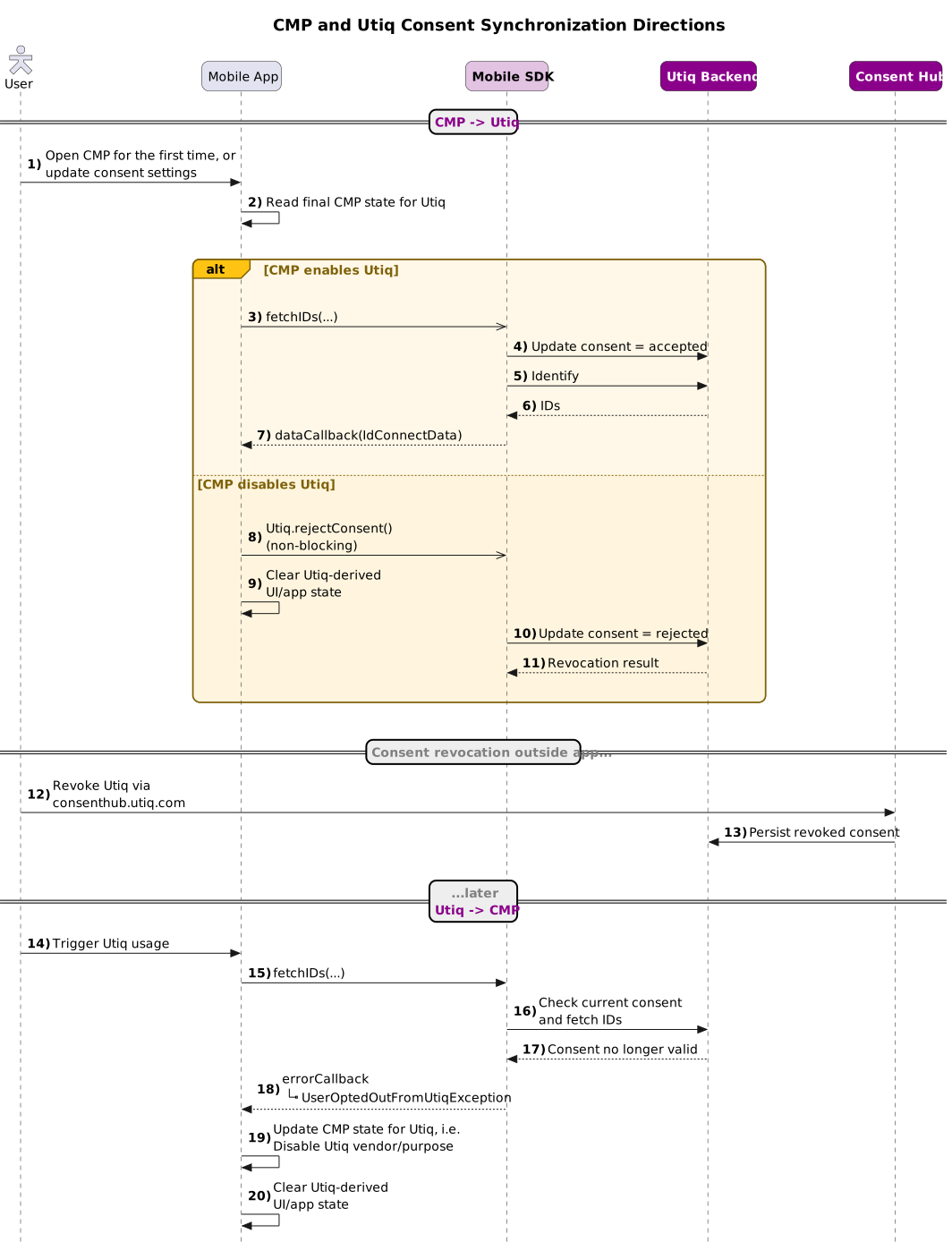
Recommended app behavior
When CMP consent does not exist for Utiq
If CMP consent does not exist for Utiq, do not call any of the ID fetching SDK functions
If the user rejected Utiq in the CMP, or revoked previously granted consent, then the app should:
-
call
rejectConsent(...) -
clear any app state that depends on previously fetched Utiq IDs
-
do not call
fetchIDs(...)until the user grants Utiq consent again
When CMP consent exists for Utiq
The app should:
-
call
fetchIDs(...)when Utiq IDs are needed -
use every
IdConnectDatarecord returned todataCallback(...). Each record contains attland any ofmtid,atid,attrid
When fetchIDs(...) reports Utiq opt-out
If errorCallback(...) receives UserOptedOutFromUtiqException, the app should:
-
switch off Utiq in the CMP (reject Utiq purpose and vendor)
-
clear any app state that depends on previously fetched Utiq IDs
This is the main path for synchronizing a consent change that happened outside the app, for example through consenthub.
Minimal examples
Disclaimer: The examples below are directional. The app owner is responsible for adapting and thoroughly testing the integration before production.
Android
// Utiq consent exists in the CMP
Utiq.fetchIDs(
    dataCallback = { ids ->
        renderIds(ids)
    },
    errorCallback = { error ->
        if (error is UserOptedOutFromUtiqException) {
            cmp.disableUtiq()
            clearUtiqUiState()
        }
    }
)

// Utiq consent exists, and user revokes
Utiq.rejectConsent(
    successCallback = {
        clearUtiqUiState()
    },
    errorCallback = { error ->
        showError(error.message)
    }
)
iOS
// Utiq consent exists in the CMP
Utiq.shared.fetchIDs(
  dataCallback: { ids in
        self.renderIds(ids)
    },
    errorCallback: { error in
        let nsError = error as NSError
        if nsError.code == UserOptedOutFromUtiqException().code {
            self.cmp.disableUtiq()
            self.clearUtiqUiState()
        }
    }
)

// Utiq consent exists, and user revokes
Utiq.shared.rejectConsent(
    successCallback: {
        self.clearUtiqUiState()
    },
    errorCallback: { error in
        self.showError(error.localizedDescription)
    }
)
Error handling
Only one fetchIDs(...) error should automatically update the CMP:
-
UserOptedOutFromUtiqException
Other errors are normally technical or eligibility errors and should not automatically switch off Utiq in the CMP.
App lifecycle note
The app may be resumed from memory or restarted from scratch when the user returns to it.
Because of this:
-
do not rely on in-memory state alone
-
always derive Utiq behavior from the current CMP consent state and current SDK state
Testing
The App SDK integration should be validated using the testing principles described here: Mobile SDK Testing Guide
Before you start, send the public IP address your test device connects from to onboard@utiq.com so that it can be whitelisted.
Disclaimer
This guidance describes how to keep SDK and CMP states technically aligned. It does not replace the developer's responsibility to configure their CMP, vendor disclosures, purposes, legal text, and jurisdiction-specific consent experience in accordance with their legal and compliance requirements.