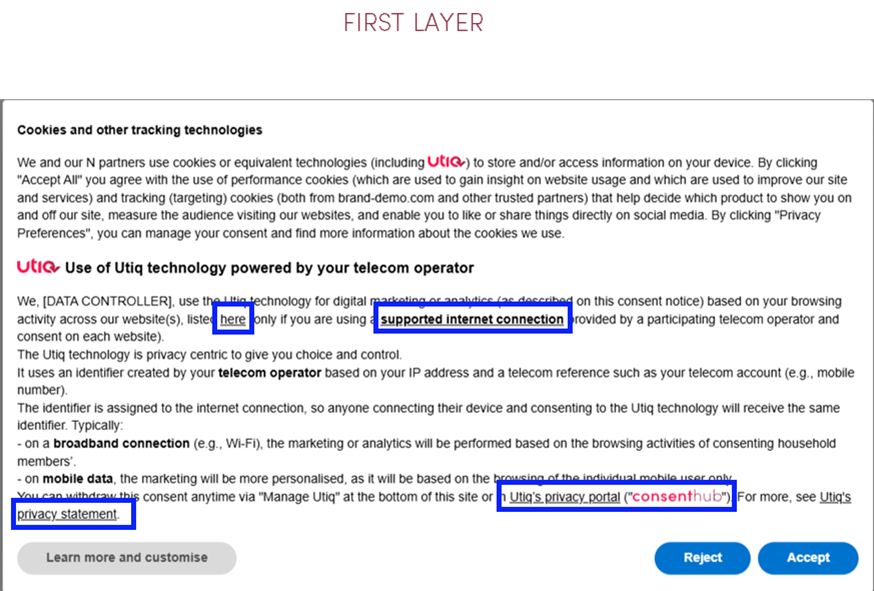
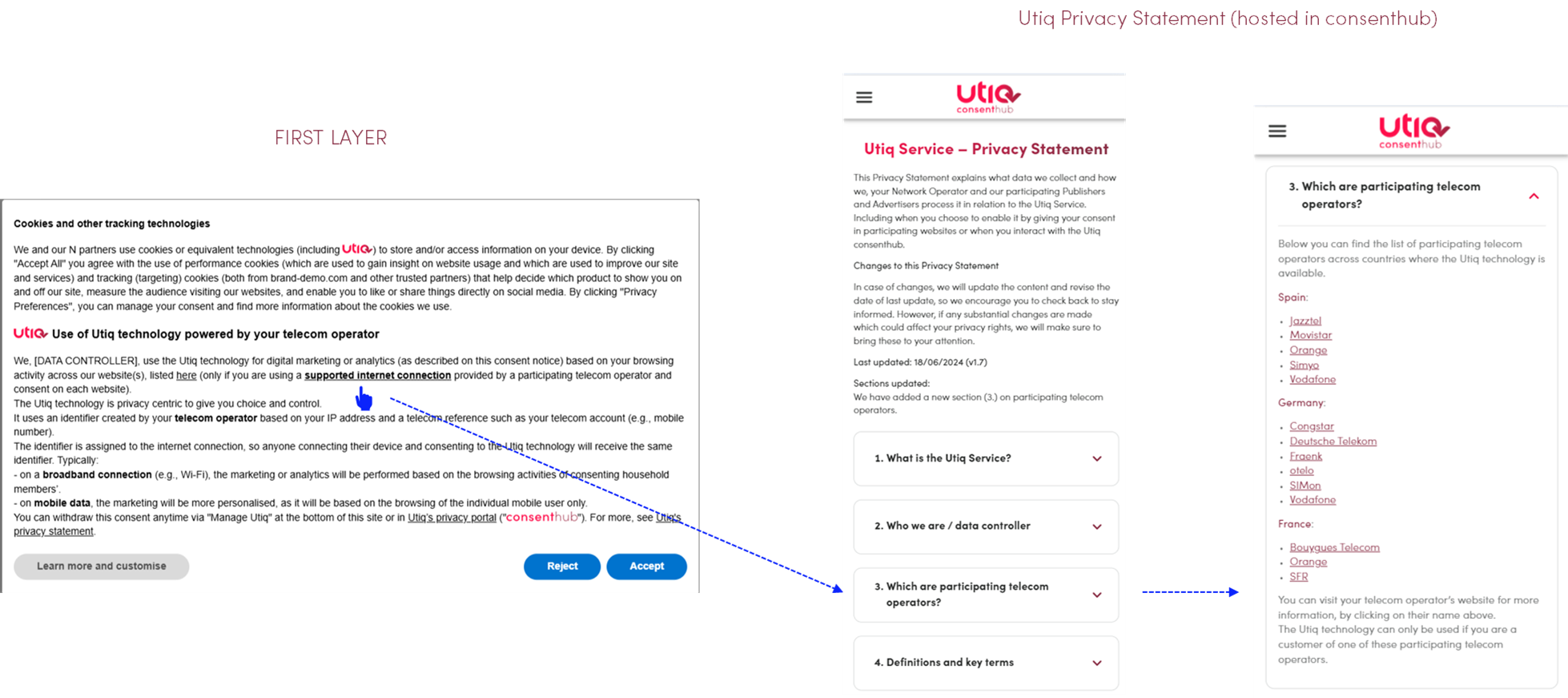
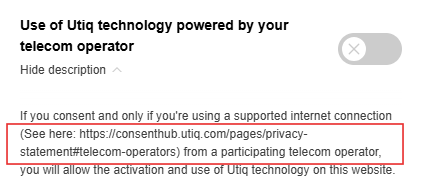
telecom operator / supported internet connection: the reference to participating telecom operators in scope within the Utiq consent text must be correctly hyperlinked and direct the user to the relevant section within Utiq’s Privacy Statement containing the list of all participating telecom operators per country → https://consenthub.utiq.com/pages/privacy-statement#telecom-operators
our other websites / listed here / across our property(ies) → https://consenthub.utiq.com/pages/digital-properties?domain=[INSERT DIGITAL PROPERTY] with already pre-filtered the digital property (e.g. website/app) the user is coming from (e.g. example.com - without www). This page lists the cross domain websites in scope (i.e., all digital properties that would make use of the same martechpass value), providing transparency also on Group of companies and Data Controllers
for advertising or analytics activities → this function will open the Advertiser/Publisher’s own privacy statement.
(for Consent or Pay Model only): You can reject Utiq now → a function to open the second layer of the CMP.
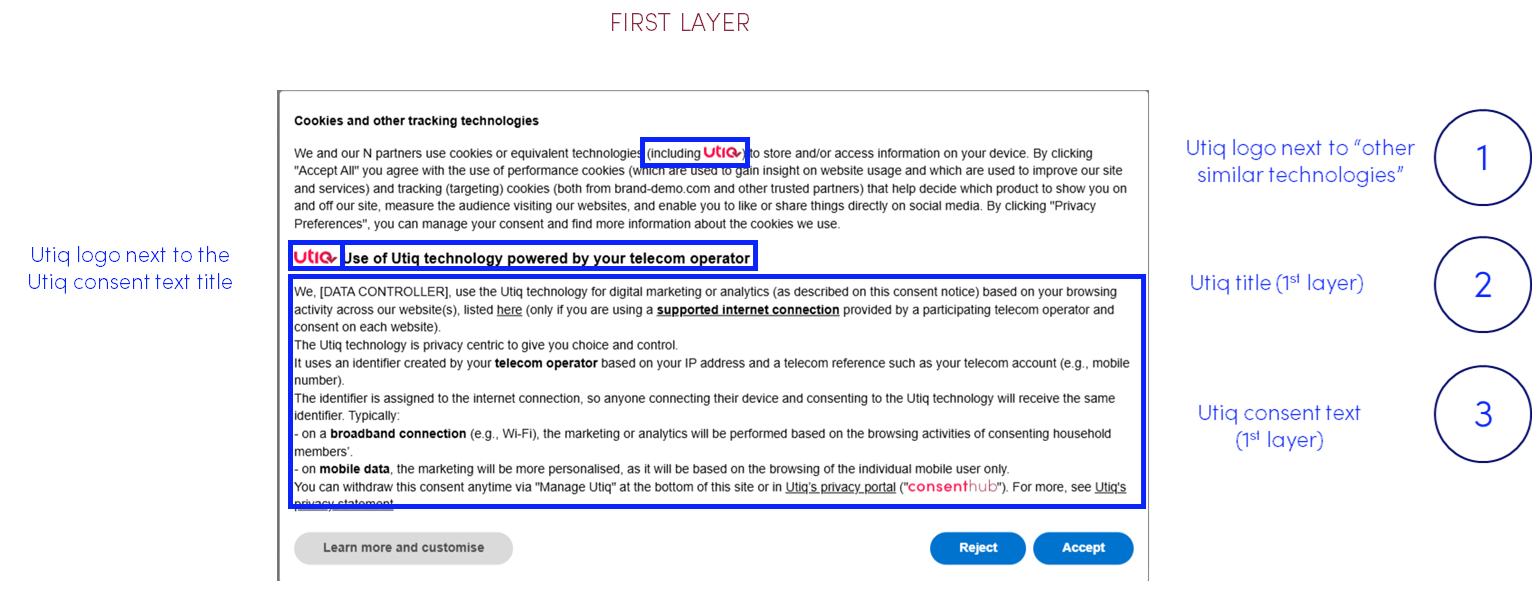
(1) Utiq logo next to "other similar technologies"
In case scrolling is required to view Utiq consent text, Utiq logo must be placed in a fully visible section of the CMP (logo must be clickable and, if clicked, to scroll automatically to the Utiq section).
The most logical place is expected to be next to the mention of use of similar tracking technologies.
Please add Utiq logo, using the following code - remember to optimize the style attribute:
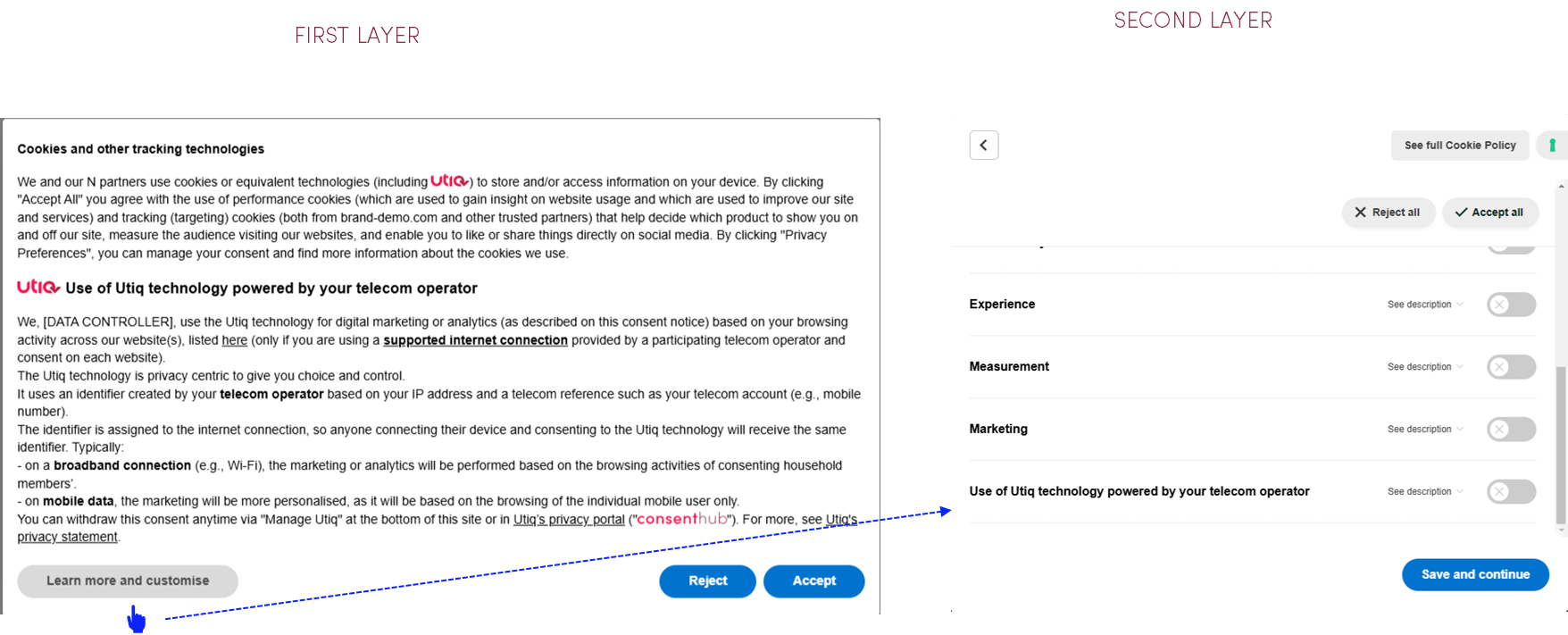
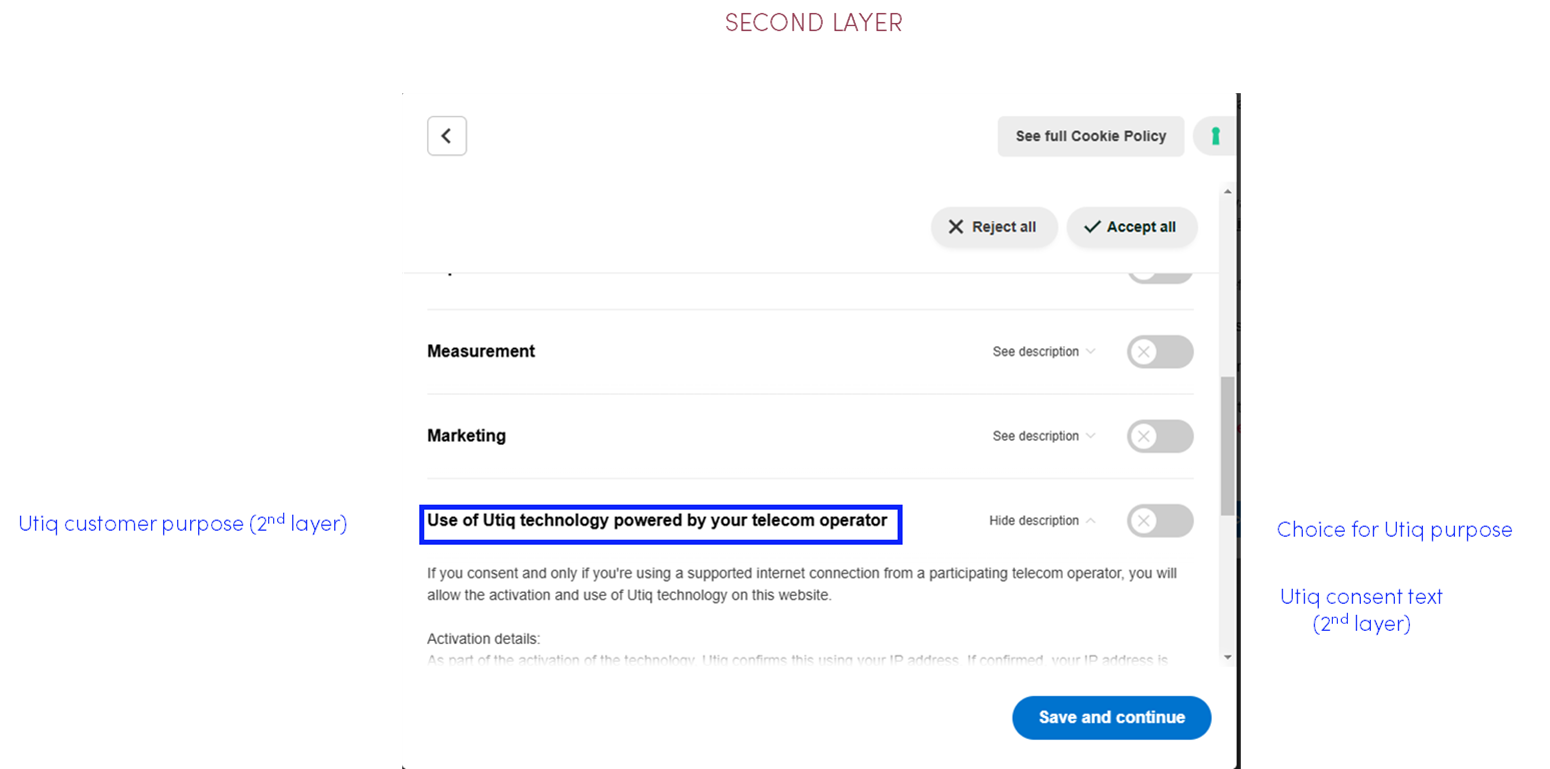
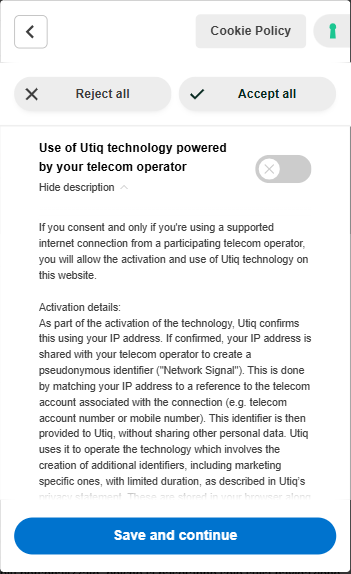
Utiq purpose displayed in the 2nd layer of the CMP
Utiq custom purpose
When you configure the Utiq custom purpose, please use the following text:
Text
Purpose name
Utiq purpose name for “Integrated Model” can be found here.
Purpose description
Utiq purpose description for “Integrated Model” (--> Second layer (Utiq custom purpose)) can be found here.
To add the Utiq related purpose you will need to add the following code to your pages - please make sure it’s executed before iubenda code.
EN
HTML
<script type="text/javascript">
  var _iub = _iub || [];
  _iub.csConfiguration = {
    siteId: <your_site_id>,
    cookiePolicyId: <your_cookie_policy_id>,
    lang: '<website-language>',
    storage: {useSiteId: true},
    logLevel: 'info',
    banner: {
      showPurposesToggles: false,
    },
    perPurposeConsent: true,
    additionalPurposes: [ // List of additional purposes
      {
        id: 'Utiq', // Id using to handle the scripts
        defaultLabel: 'Use of Utiq technology powered by your telecom operator', // Default label used to additional purpose when there is no translation
        defaultDescription: 'If you consent, you agree to the following processing:\n\n- Eligibility check: Utiq uses your IP address to check if you’re using a supported internet connection. If you are not, Utiq will not be activated.\n- Activation of Utiq technology: Your IP address is shared with your telecom operator to create a secure identifier ("Network Signal") for each supported connection you use (mobile and broadband), created now or later when you switch connections. To do this, your operator matches your IP address with internal data (e.g. mobile number), without disclosing it. Only this identifier is then provided to Utiq.\n- Creation of Utiq identifiers: Utiq uses the Network Signal to create additional Utiq identifiers, including marketing specific ones for each connection, stored in your browser with first party cookies and other device storage information.\n- Sharing and use of marketing identifiers: Utiq only shares with us the marketing identifiers for each connection that we can use to understand your browsing behaviour and connect visits across our property(ies) (only if you agree to the activation of the Utiq technology on each one separately). This helps us, for example, to personalise or customise content in our property(ies), to recognise you when you return, or to enable us or our selected partners to create audiences for advertising or analytics, as explained below. If the connection is shared (typically in the case of broadband), the same identifiers are assigned to each consenting person on that connection, linking their browsing behaviour.\n- Sharing of Utiq identifiers to advertising and analytics platforms: Certain Utiq identifiers will be transferred to these platforms that work with us and/or Utiq. We supplement these identifiers with data we hold about your browsing activity and profile, which is further processed in these platforms to show you personalised ads (our own or our partners’) or conduct analytics, according to the consents you have given us. This can involve display of ads, managing how frequently ads are shown or measuring the performance of the ads. The analytics activities can involve comparison analysis to produce aggregated reports or select audiences for activation. For more detailed information on how these activities are supported by Utiq see the dedicated section in Utiq’s privacy statement.\n\nThe Utiq technology is designed with privacy in mind: it uses minimal personal data, secure, temporary identifiers, and limits data sharing. Utiq also offers a privacy portal ("consenthub") to exercise your privacy rights.\n\nFor more details, visit Utiq’s privacy statement.', // Default description used to additional purpose when there is no translation
        value: false
      },
    ],
    i18n: {
      "<website-language>": {
        per_purpose: {
          purposes : { // Translation of purposes
            Utiq: { // Id of the additional purpose
              name: 'Use of Utiq technology powered by your telecom operator', // Name of the additional purpose
              description: 'If you consent, you agree to the following processing:\n\n- Eligibility check: Utiq uses your IP address to check if you’re using a supported internet connection. If you are not, Utiq will not be activated.\n- Activation of Utiq technology: Your IP address is shared with your telecom operator to create a secure identifier ("Network Signal") for each supported connection you use (mobile and broadband), created now or later when you switch connections. To do this, your operator matches your IP address with internal data (e.g. mobile number), without disclosing it. Only this identifier is then provided to Utiq.\n- Creation of Utiq identifiers: Utiq uses the Network Signal to create additional Utiq identifiers, including marketing specific ones for each connection, stored in your browser with first party cookies and other device storage information.\n- Sharing and use of marketing identifiers: Utiq only shares with us the marketing identifiers for each connection that we can use to understand your browsing behaviour and connect visits across our property(ies) (only if you agree to the activation of the Utiq technology on each one separately). This helps us, for example, to personalise or customise content in our property(ies), to recognise you when you return, or to enable us or our selected partners to create audiences for advertising or analytics, as explained below. If the connection is shared (typically in the case of broadband), the same identifiers are assigned to each consenting person on that connection, linking their browsing behaviour.\n- Sharing of Utiq identifiers to advertising and analytics platforms: Certain Utiq identifiers will be transferred to these platforms that work with us and/or Utiq. We supplement these identifiers with data we hold about your browsing activity and profile, which is further processed in these platforms to show you personalised ads (our own or our partners’) or conduct analytics, according to the consents you have given us. This can involve display of ads, managing how frequently ads are shown or measuring the performance of the ads. The analytics activities can involve comparison analysis to produce aggregated reports or select audiences for activation. For more detailed information on how these activities are supported by Utiq see the dedicated section in Utiq’s privacy statement.\n\nThe Utiq technology is designed with privacy in mind: it uses minimal personal data, secure, temporary identifiers, and limits data sharing. Utiq also offers a privacy portal ("consenthub") to exercise your privacy rights.\n\nFor more details, visit Utiq’s privacy statement.' // Description of the additional purpose
            }
          }
        }
      }
    }
  };
</script>
IT
HTML
<script type="text/javascript">
  var _iub = _iub || [];
  _iub.csConfiguration = {
    siteId: <your_site_id>,
    cookiePolicyId: <your_cookie_policy_id>,
    lang: '<website-language>',
    storage: {useSiteId: true},
    logLevel: 'info',
    banner: {
      showPurposesToggles: false,
    },
    perPurposeConsent: true,
    additionalPurposes: [ // List of additional purposes
      {
        id: 'Utiq', // Id using to handle the scripts
        defaultLabel: 'Use of Utiq technology powered by your telecom operator', // Default label used to additional purpose when there is no translation
        defaultDescription: 'Se dai il tuo consenso, accetti il seguente trattamento:\n\n- Verifica dell'idoneità all’attivazione: Utiq utilizza il tuo indirizzo IP per verificare se stai utilizzando una connessione internet supportata. Se non stai utilizzando una connessione supportata, Utiq non verrà attivata.\n- Attivazione della tecnologia Utiq: Il tuo indirizzo IP viene condiviso con il tuo operatore telefonico per creare un identificativo sicuro ("Network Signal") per ciascuna connessione supportata che usi (rete mobile e rete fissa), creati ora o in un secondo momento quando cambi la connessione. A tal fine, il tuo operatore associa il tuo indirizzo IP a dati interni (ad esempio, numero di cellulare), senza però condividerli. Solo questo identificativo viene quindi fornito a Utiq.\n- Creazione di identificativi Utiq: Utiq utilizza il Network Signal per creare ulteriori identificativi Utiq, inclusi quelli specifici per il marketing per ogni connessione, memorizzati nel tuo browser insieme a cookie di prima parte e altre informazioni nella memoria del dispositivo.\n- Condivisione e utilizzo degli identificativi di marketing: Utiq condivide con noi solo gli identificativi di marketing per ogni connessione che possiamo utilizzare per comprendere il tuo comportamento di navigazione e collegare le visite sulla/e nostra/e proprietà digitale/i (solo se dai il consenso all'attivazione della tecnologia Utiq su ciascuna di esse separatamente). Questo ci aiuta, ad esempio, a personalizzare i contenuti nella/e nostra/e proprietà, a riconoscerti quando torni o a consentire a noi o ai nostri partner selezionati di creare un pubblico per la pubblicità o per attività di analisi, come spiegato di seguito. Se la connessione è condivisa (tipicamente nel caso di connessioni di rete fissa), gli stessi identificativi vengono assegnati a ciascuna persona che ha dato il proprio consenso con quella connessione, collegando i loro comportamenti di navigazione.\n- Condivisione degli identificativi Utiq con piattaforme pubblicitarie e di analisi: Alcuni identificativi Utiq saranno trasferiti a queste piattaforme che collaborano con noi e/o con Utiq. Integriamo questi identificativi con i dati in nostro possesso relativi alla tua attività di navigazione e al tuo profilo, che vengono ulteriormente trattati in queste piattaforme per mostrarti annunci personalizzati (nostri o dei nostri partner) o per condurre attività di analisi, in base ai consensi che ci hai dato. Ciò può comportare la visualizzazione di annunci pubblicitari, la gestione della frequenza di visualizzazione degli annunci o la misurazione delle prestazioni degli annunci. Le attività di analisi possono riguardare analisi comparative per produrre reportistica aggregata o selezionare il pubblico da attivare. Per informazioni più dettagliate su come queste attività sono supportate da Utiq, consultare la sezione dedicata nell'informativa sulla privacy di Utiq.\n\nLa tecnologia Utiq è incentrata sulla privacy: utilizza una quantità minima di dati personali, identificativi temporanei sicuri e limita la condivisione dei dati. Utiq offre anche un portale privacy ("consenthub") per esercitare i tuoi diritti in materia di protezione dei dati.\n\nPer ulteriori dettagli, consultare l'informativa sulla privacy di Utiq.', // Default description used to additional purpose when there is no translation
        value: false
      },
    ],
    i18n: {
      "<website-language>": {
        per_purpose: {
          purposes : { // Translation of purposes
            Utiq: { // Id of the additional purpose
              name: 'Use of Utiq technology powered by your telecom operator', // Name of the additional purpose
              description: 'Se dai il tuo consenso, accetti il seguente trattamento:\n\n- Verifica dell'idoneità all’attivazione: Utiq utilizza il tuo indirizzo IP per verificare se stai utilizzando una connessione internet supportata. Se non stai utilizzando una connessione supportata, Utiq non verrà attivata.\n- Attivazione della tecnologia Utiq: Il tuo indirizzo IP viene condiviso con il tuo operatore telefonico per creare un identificativo sicuro ("Network Signal") per ciascuna connessione supportata che usi (rete mobile e rete fissa), creati ora o in un secondo momento quando cambi la connessione. A tal fine, il tuo operatore associa il tuo indirizzo IP a dati interni (ad esempio, numero di cellulare), senza però condividerli. Solo questo identificativo viene quindi fornito a Utiq.\n- Creazione di identificativi Utiq: Utiq utilizza il Network Signal per creare ulteriori identificativi Utiq, inclusi quelli specifici per il marketing per ogni connessione, memorizzati nel tuo browser insieme a cookie di prima parte e altre informazioni nella memoria del dispositivo.\n- Condivisione e utilizzo degli identificativi di marketing: Utiq condivide con noi solo gli identificativi di marketing per ogni connessione che possiamo utilizzare per comprendere il tuo comportamento di navigazione e collegare le visite sulla/e nostra/e proprietà digitale/i (solo se dai il consenso all'attivazione della tecnologia Utiq su ciascuna di esse separatamente). Questo ci aiuta, ad esempio, a personalizzare i contenuti nella/e nostra/e proprietà, a riconoscerti quando torni o a consentire a noi o ai nostri partner selezionati di creare un pubblico per la pubblicità o per attività di analisi, come spiegato di seguito. Se la connessione è condivisa (tipicamente nel caso di connessioni di rete fissa), gli stessi identificativi vengono assegnati a ciascuna persona che ha dato il proprio consenso con quella connessione, collegando i loro comportamenti di navigazione.\n- Condivisione degli identificativi Utiq con piattaforme pubblicitarie e di analisi: Alcuni identificativi Utiq saranno trasferiti a queste piattaforme che collaborano con noi e/o con Utiq. Integriamo questi identificativi con i dati in nostro possesso relativi alla tua attività di navigazione e al tuo profilo, che vengono ulteriormente trattati in queste piattaforme per mostrarti annunci personalizzati (nostri o dei nostri partner) o per condurre attività di analisi, in base ai consensi che ci hai dato. Ciò può comportare la visualizzazione di annunci pubblicitari, la gestione della frequenza di visualizzazione degli annunci o la misurazione delle prestazioni degli annunci. Le attività di analisi possono riguardare analisi comparative per produrre reportistica aggregata o selezionare il pubblico da attivare. Per informazioni più dettagliate su come queste attività sono supportate da Utiq, consultare la sezione dedicata nell'informativa sulla privacy di Utiq.\n\nLa tecnologia Utiq è incentrata sulla privacy: utilizza una quantità minima di dati personali, identificativi temporanei sicuri e limita la condivisione dei dati. Utiq offre anche un portale privacy ("consenthub") per esercitare i tuoi diritti in materia di protezione dei dati.\n\nPer ulteriori dettagli, consultare l'informativa sulla privacy di Utiq.' // Description of the additional purpose
            }
          }
        }
      }
    }
  };
</script>
Where:
<your_site_id> is given by iubenda
<your_cookie_policy_id> is given by iubenda
<website_language> is ISO format, e.g. en-GB, it-IT, etc.
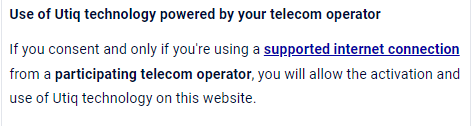
If you cannot technically add hyperlinks in the 2nd layer, please add the URL of the hyperlink as plain text in brackets.
Example:
If you cannot technically add this:
add this:
Consent Validity Timeframe
The consent validity timeframe (the time after which consent should be re-requested) for Utiq consents for the Integrated Model is aligned with your CMP consent validity timeframe and up to a possible 13 month maximum period.
Technical implementation
Technical steps
Please follow the steps as described here to integrate.
Correct configuration of accept and reject functions
The CMP must be configured to ensure that Utiq calls are only triggered if user accepts Utiq consent. This means if the user either clicks on:
"accept all" or
accept Utiq custom purpose
Utiq technology must be off by default.
No Utiq calls to enable the Utiq technology shall be triggered if a user clicks on reject option.
Only strictly necessary cookies can be dropped if user clicks on reject option i.e., consent status.
Utiq consent withdrawal mechanisms
3 ways to withdraw Utiq consents:
via the CMP: by re-opening the CMP and changing the preferences, the users can withdraw Utiq consent.
Utiq script ensures synchronization CMP-consenthub-Consent withdraw function hosted in Manage Utiq page.
Utiq SDK should be loaded on all site pages, to be able to ensure consent synchronisation of the user.
Function not to show main CMP in “Manage Utiq” page
To avoid prompting your CMP in the “Manage Utiq” page, please add the following configuration right before you iubenda tag.
HTML
<script>
// Hide the CMP popup in the "Manage Utiq" page
if(window.location.pathname === "<manage_utiq_page_path>") {
  document.head.innerHTML = document.head.innerHTML + '<style>div#iubenda-cs-banner { display: none !important; } </style>';
}
</script>
Where:
<manage_utiq_page_path> is the URL path of the “Manage Utiq” page, e.g. if the page is hosted at https://<domain>/pages/manage_utiq then the path would be /pages/manage_utiq