---
language: "en"
---
# Utiq Documentation

## Documentation

*

  ### [How Utiq Technology works](https://docs.utiq.com/docs/utiq-technology.md)

### [Utiq Privacy Requirements](https://docs.utiq.com/docs/partner-privacy-requirements.md)

### [Utiq Use Cases \& AdTech Partners](https://docs.utiq.com/docs/utiq-use-cases-via-adtech-partners.md)

### [Utiq Technical Documentation](https://docs.utiq.com/docs/utiq-technical-documentation.md)

---
language: "en"
---
# 1. Option A: Integrated consent model

## Pre-requisites

**Make sure you meet the minimum Utiq standards for using the Integrated model**

To use the "Integrated model", Advertisers and Publishers must meet Utiq's minimum standards listed below. If you cannot meet these requirements, you must use Utiq's "Separate consent pop-up model" ([see section 1B](https://docs.utiq.com/docs/1b-consent-experience-utiq-separate-pop-up-model-u.md).).

For any questions, please contact [++onboard@utiq.com++](mailto:onboard@utiq.com)

### Minimum Utiq standards for using the Integrated model - CMP required features

|                                                                          **Core Requirements**                                                                          |                                                                                                                        **Description**                                                                                                                        |                                                                                                                                                                                                                                                                                                                                                                                                                                               **Specification/Checklist**                                                                                                                                                                                                                                                                                                                                                                                                                                               |                                                                                  **Example**                                                                                  |
|-------------------------------------------------------------------------------------------------------------------------------------------------------------------------|---------------------------------------------------------------------------------------------------------------------------------------------------------------------------------------------------------------------------------------------------------------|-------------------------------------------------------------------------------------------------------------------------------------------------------------------------------------------------------------------------------------------------------------------------------------------------------------------------------------------------------------------------------------------------------------------------------------------------------------------------------------------------------------------------------------------------------------------------------------------------------------------------------------------------------------------------------------------------------------------------------------------------------------------------------------------------------------------------------------------------------------------------------------------------------------------------|-------------------------------------------------------------------------------------------------------------------------------------------------------------------------------|
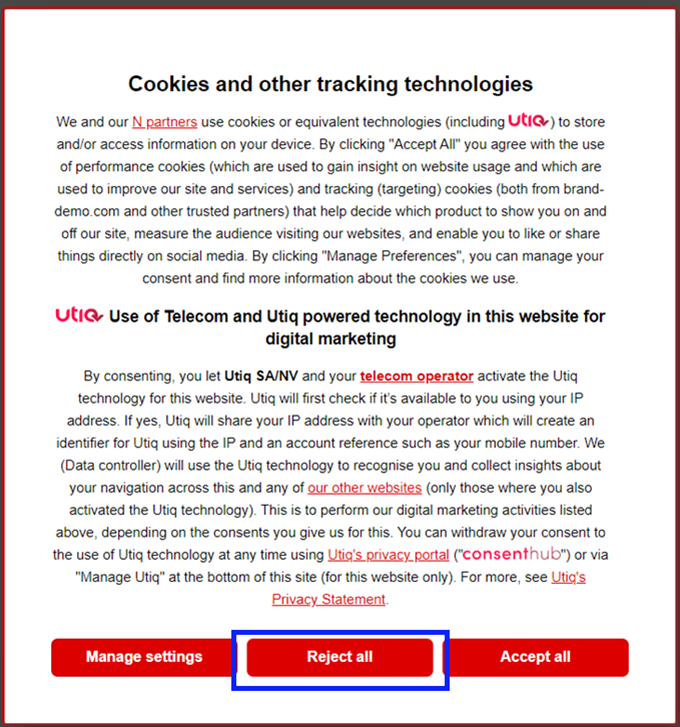
| Users must be provided with the possibility of accepting cookies and tracking technologies and to just as easily refuse them.                                           | Reject option presented as a reject button on first layer.                                                                                                                                                                                                    | The "Reject" option should be: 1. Located in the 1st layer and requiring only 1 click to action. 2. Presented as a button. 3. Equally visible to the accept option (factors to consider here are size, font and location for example). 4. Enabling user to reject with 1 click. 5. Not resulting in limitation to access the site/content if selected (i.e., must not result in redirection to subscription or pay wall). 6. Clear wording used (i.e., "reject all", "deny all", "continue without accepting" or an equivalent). 7. No reliance on (other) deceptive design patterns \[1\]. 8. In case scrolling is required to view Utiq consent text, the buttons are always displayed and are placed in a fully visible section of the CMP (i.e. the accept/reject buttons do not disappear with the scrolling down).                                                                                                | ![image-20240703-123848.png](https://docs.utiq.com/__attachments/a_3ffd337b4fd47740476e79267cd62f9570003cf955655f27b79d8d060fb15b0b/image-20240703-123848.png?cb=5c7a3eb50bd289a21089182707043812) |
| Users must be provided with the possibility of accepting cookies and tracking technologies and to just as easily refuse them.                                           | **FRENCH AND ITALIAN MARKETS ONLY** Reject option presented as a Cross ("X") enabling the closure of the CMP.                                                                                                                                                 | 1. Located in 1st layer and requiring only 1 click to action. 2. Its design makes the cross option to reject easily visible to the user (factors to consider here are if included within the frame/CMP, in colors distinguishable from the background, etc.). 3. An explanation of its function being provided next to it (e.g.,: "to continue without accepting: X"). 4. An explanation about the function should be provided within the text. 5. No reliance on (other) deceptive design patterns \[1\].                                                                                                                                                                                                                                                                                                                                                                                                              |                                                                                                                                                                               |
| Users must be provided with the possibility of accepting cookies and tracking technologies and to just as easily refuse them.                                           | **FRENCH AND ITALIAN MARKETS ONLY** Reject option presented as "continue without accepting".                                                                                                                                                                  | 1. Located in 1st layer and requiring only 1 click to action. 2. Design making this option to reject easily visible to the user, without reliance on other deceptive design patterns \[1\]; i.e.,: * as a standard, text should be displayed as part of the CMP box (this is commonly placed in the top corner) or in a location that provides enough visual support for the user to see it. * visible without scrolling required. * not using design features that may obscure its location (factors to consider here are whether the colour of the text contrasts sufficiently with the background of CMP, option should not be embedded within the text or a location in CMP that would clearly diminish its visibility to the user). 3. Clear wording used (i.e., "continue without accepting"), creating no ambiguity as to its function. 4. An explanation about the function should be provided within the text. |                                                                                                                                                                               |
| Correct configuration of accept and reject functions                                                                                                                    | The CMP must be configured to ensure that Utiq calls are only triggered if user consents to the activation of Utiq technology.                                                                                                                                | 1. Utiq technology must be off by default. 2. No Utiq calls to enable the Utiq technology shall be triggered if a user specifically rejects consent to the use of Utiq technology or makes an overall rejection of all non-essential cookies and other tracking technologies. 3. Only strictly necessary cookies (i.e., utiq_consent_status) can be dropped if user denies consent to non essential cookies and other tracking technologies.                                                                                                                                                                                                                                                                                                                                                                                                                                                                            |                                                                                                                                                                               |
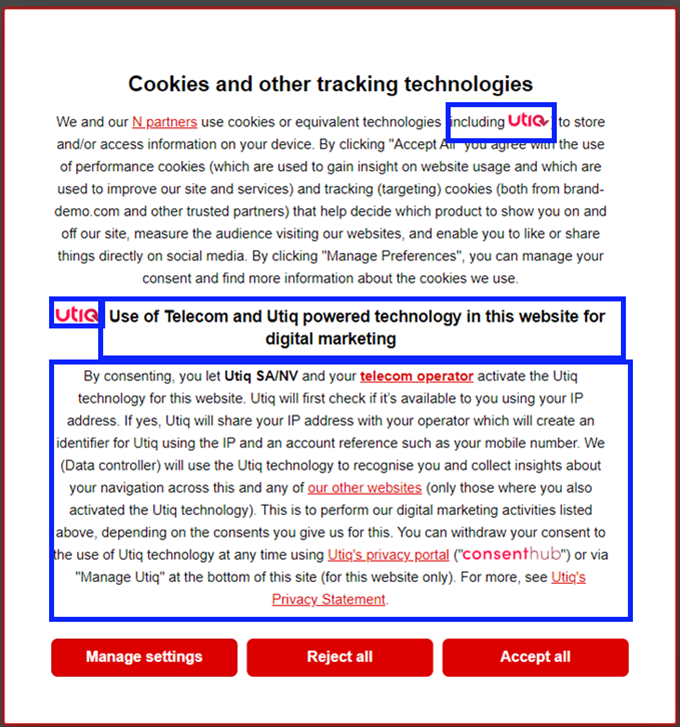
| Users must be provided with the Utiq consent text in 1st layer without modifications                                                                                    | It should be sufficiently clear that the use of Utiq technology is available on the website. User attention must be drawn to Utiq consent text on 1st layer.                                                                                                  | 1. Utiq consent text is shown in the same form as the domain's own consent text (same size, font, colour). 2. Utiq consent text is inserted in an appropriate location to ensure appropriate visibility and distinct from other consent wording. 3. Sub-title provided by Utiq is implemented without any variations. 4. Utiq logo is placed next to Utiq consent text sub-title. 5. In case scrolling is required to view Utiq consent text, Utiq logo is placed in a fully visible section of the CMP not requiring scrolling down (where possible, logo should be clickable and, if clicked, it directs automatically to the Utiq section). The most logical place is expected to be next to the mention of use of similar tracking technologies. 6. No reliance on deceptive design patterns \[1\] that could compromise the visibility of Utiq consent.                                                            | ![image-20240703-123915.png](https://docs.utiq.com/__attachments/a_c6b6459071b99893ba6940fde9ca9e55e1d71a142204da51fa3b1845d53af0f1/image-20240703-123915.png?cb=6e45b593f6987899d1b326e66e6c1ba4) |
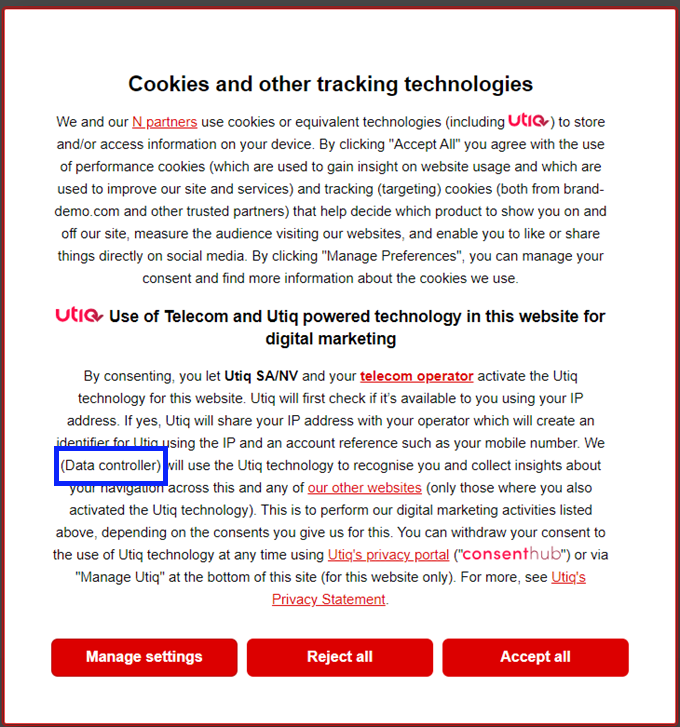
| Configurable elements within the Utiq Consent text must be populated with the Data Controller information                                                               | The Utiq consent text contains configurable elements: * Data Controller                                                                                                                                                                                       | Populate dedicated configurable elements with your details: * Data Controller's name                                                                                                                                                                                                                                                                                                                                                                                                                                                                                                                                                                                                                                                                                                                                                                                                                                    | ![image-20240703-123936.png](https://docs.utiq.com/__attachments/a_e1fa2fe523423b352aaab0ee0781b8f3999f95227e8cc40015b3c69b094c78f7/image-20240703-123936.png?cb=d5f837f45389d3514cb1748c403f7169) |
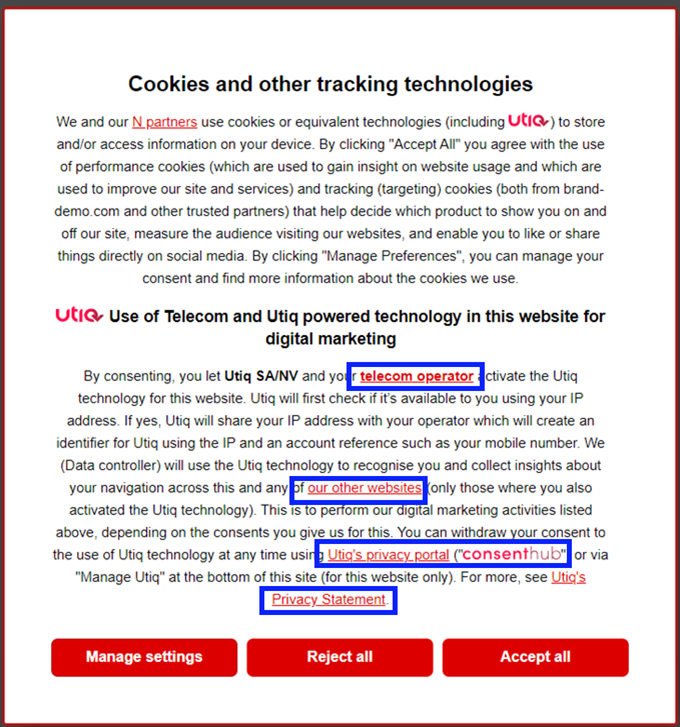
| Implement hyperlinks in clickable elements within Utiq consent text (1st layer and 2nd layer)                                                                           | The Utiq consent text contains clickable elements: * consenthub * Utiq's Privacy Statement * telecom operator * our other websites                                                                                                                            | Implement hyperlinks that open in a new page for clickable elements within Utiq consent text: * **consenthub:** <https://consenthub.utiq.com/> * **Utiq's Privacy Statement:** <https://consenthub.utiq.com/pages/privacy-statement> * **telecom operator:** <https://consenthub.utiq.com/pages/privacy-statement#telecom-operators> * **our other websites** (see "[2. Setup the dedicated "Manage Utiq" page linked via a footer hyperlink](https://docs.utiq.com/docs/2-setup-the-dedicated-manage-utiq-page-linked-via-.md)").                                                                                                                                                                                                                                                                                                                                                                                                           | ![image-20240703-124026.png](https://docs.utiq.com/__attachments/a_72573c0589133a205c1e3d0adbb795d5ef8f359dce601e64775e6445c603ff11/image-20240703-124026.png?cb=9349d9de08f539b3387ebc0796f3762d) |
| Main CMP title must be adequate                                                                                                                                         | As per core requirement.                                                                                                                                                                                                                                      | The main CMP title must not only reference or concern cookies. It must address other similar technologies.                                                                                                                                                                                                                                                                                                                                                                                                                                                                                                                                                                                                                                                                                                                                                                                                              | ![image-20240703-124054.png](https://docs.utiq.com/__attachments/a_1029d336e1052a3e533460ab026591aad8ab7089aaad7d29b4f987e172799418/image-20240703-124054.png?cb=04ad3bc92b6504ae91ec8d88f445b6be) |
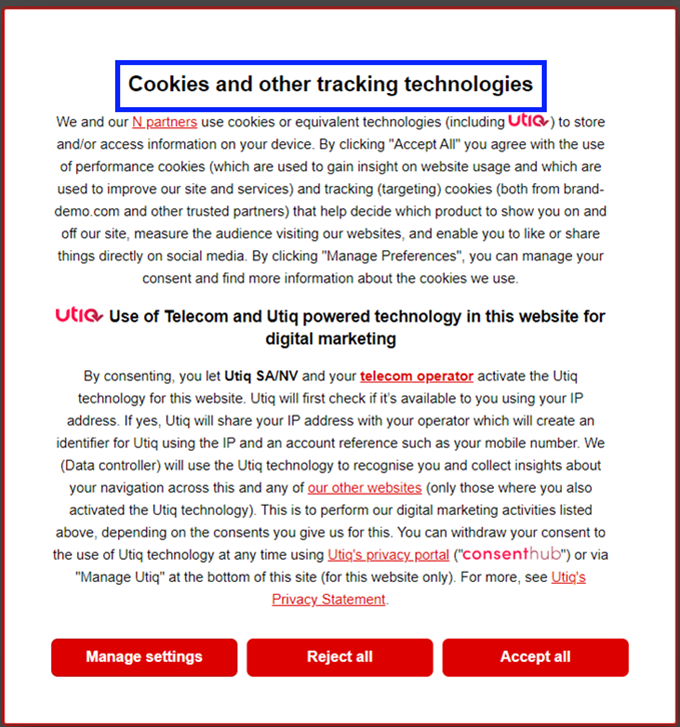
| Implementation of a section within "Manage Utiq" page listing the cross domain websites in scope (i.e., all websites that would make use of the same martechpass value) | As per core requirement.                                                                                                                                                                                                                                      | 1. The reference to other websites in scope within the Utiq consent text must be correctly hyperlinked and direct the user to the relevant section within the "Manage Utiq" page where there is the list of all such websites in scope (i.e., all websites that would make use of the same martechpass value). 2. In case of additional websites in scope, the list must be updated, before the additional website goes live.                                                                                                                                                                                                                                                                                                                                                                                                                                                                                           | ![image-20240703-124118.png](https://docs.utiq.com/__attachments/a_c4056630593389d2387656f9ed32a772a7f24242f739e39fc3d30cdc2a2b36dd/image-20240703-124118.png?cb=cfc44fb5c70502283478d5670d56dee4) |
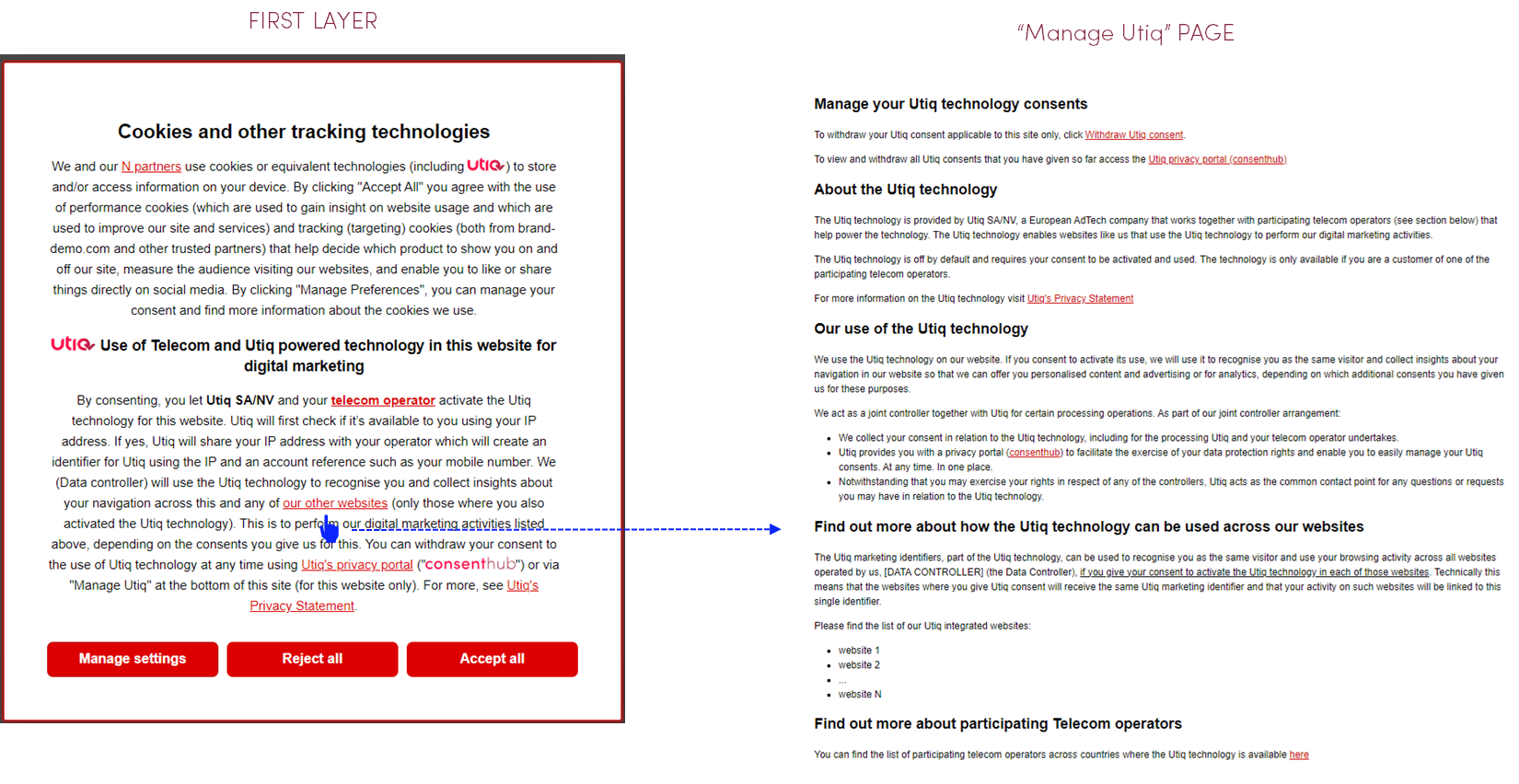
| Implementation of telecom operators hyperlink                                                                                                                           | As per core requirement.                                                                                                                                                                                                                                      | 1. The reference to participating telecom operators in scope within the Utiq consent text must be correctly hyperlinked and direct the user to the relevant section within the Utiq privacy statement which contains the list of all participating telecom operators per country. 2. In case of additional telecom operators in scope, the list within Utiq's privacy statement will be updated by Utiq, without unreasonable delay.                                                                                                                                                                                                                                                                                                                                                                                                                                                                                    | ![image-20240703-124134.png](https://docs.utiq.com/__attachments/a_350099a1fe93757b01a00354dda377e1cdd89f21813735b1f5f4bf5d02cc4791/image-20240703-124134.png?cb=c9d436a6ba411b871aec0477b89ba751) |
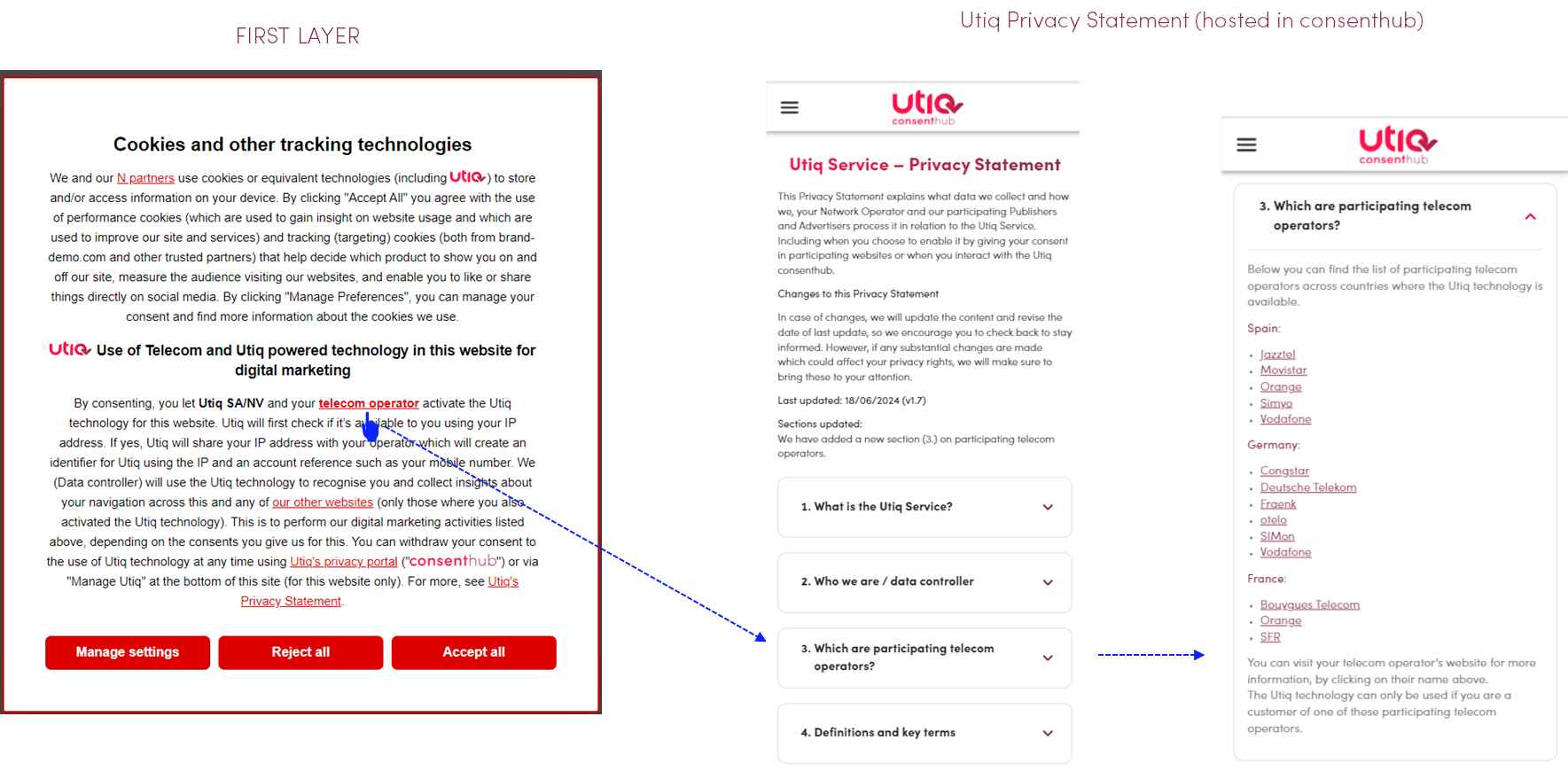
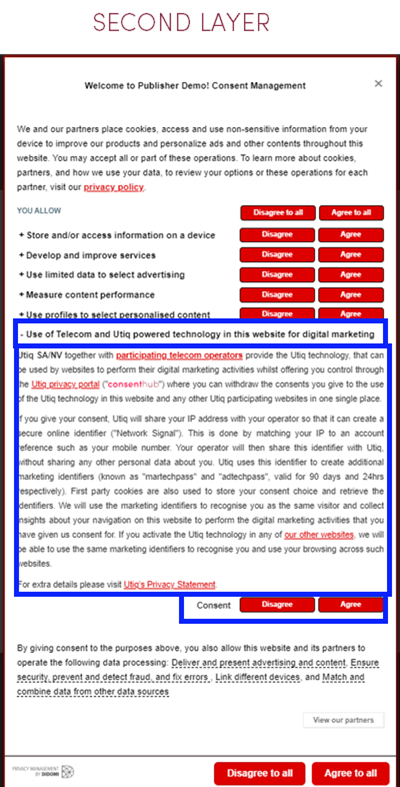
| Utiq technology purpose included in 2nd layer of CMP (as Utiq custom purpose)                                                                                           | It must be possible for users to view the purposes in a granular way. Specifically, users should be able to make granular choices for Utiq via distinct tick boxes.                                                                                           | 1. Utiq 2nd layer consent text must be added in an appropriate location (as Utiq custom purpose). 2. If possible, Utiq logo must be placed next to Utiq 2nd layer title. 3. Accept and reject options must be displayed in the 2nd layer and must be equally visible to each other (factors to consider here are size, font and location for example). 4. Specific accept and reject options must be placed next to Utiq consent (Utiq 2nd layer text) 5. No reliance on deceptive design patterns \[1\] that could compromise the visibility of Utiq consent.                                                                                                                                                                                                                                                                                                                                                          | ![image-20240703-124154.png](https://docs.utiq.com/__attachments/a_ad7575119290dd50c25547f4f08775f54cca47cf249ea344b19724c62c9006c3/image-20240703-124154.png?cb=0e650dd0c8bac7accd22f1514ba79da5) |
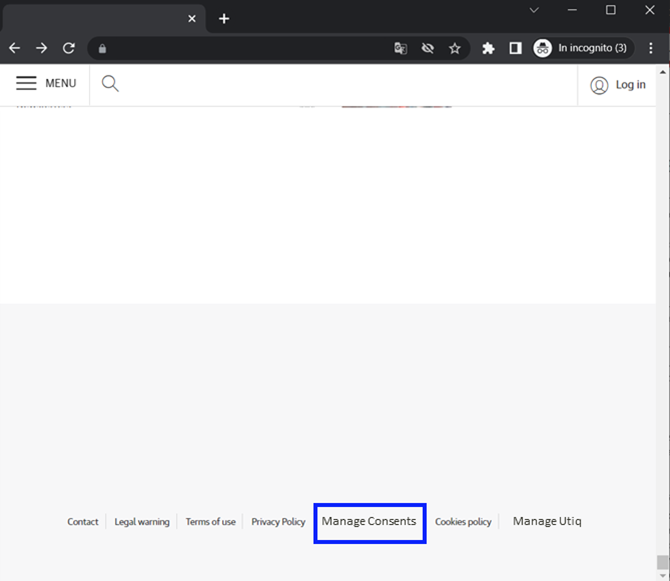
| The website's main CMP must be easy to locate and resurface to facilitate withdrawal of consent at any time                                                             | As per core requirement.                                                                                                                                                                                                                                      | 1. The option to resurface the website main CMP shall be located in an easily visible place for the user to find. Usually, this will be at the bottom of the page. 2. The option must be present in all the pages of the website (i.e. not only in the Homepage). 3. The name of the functionality (e.g., link or icon) should use clear wording to enable the user to make use of the functionality to manage their consents. 4. The wording used must not reference only cookies, but also other similar technologies (in case such wording is used). 5. No reliance on deceptive design patterns \[1\] (e.g., different size, font, colour or inappropriate location), accessible with 1 click, not hidden by other banners in the websites, colour of text contrasts sufficiently with the background)                                                                                                              | ![image-20240703-124510.png](https://docs.utiq.com/__attachments/a_d01debcd9174563106294673c92c49b755c2c03ecc77b76e6df1161e5db7ab87/image-20240703-124510.png?cb=f359ab840748f5ba4ee7f7eedeb62328) |
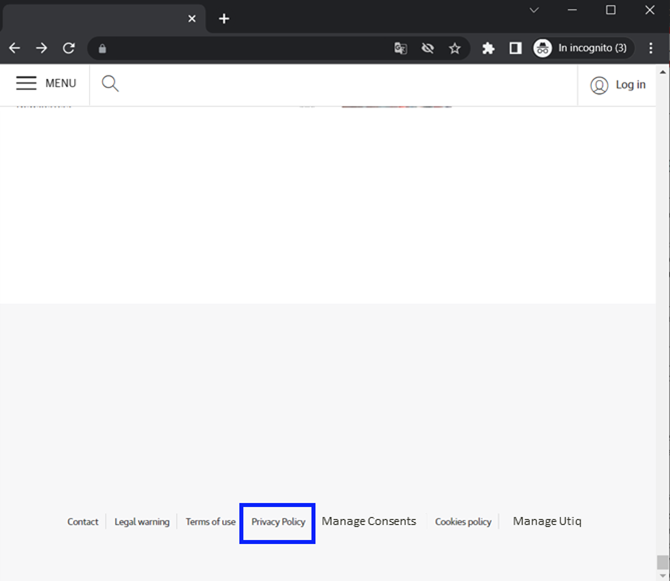
| The website should make its "Privacy policy/notice/statement" easily accessible at the bottom of all pages                                                              | As per core requirement.                                                                                                                                                                                                                                      | 1. The option to open the Privacy Statement shall be located in an easily visible place for the user to find. Usually, this will be at the bottom of the page. 2. The option to open the Privacy Statement must be present in all the pages of the website (i.e. not only in the Homepage). 3. No reliance on deceptive design patterns \[1\] (e.g., different size, font, colour or inappropriate location, accessible with 1 click, not hidden by other banners in the websites, colour of text contrasts sufficiently with the background).                                                                                                                                                                                                                                                                                                                                                                          | ![image-20240703-124454.png](https://docs.utiq.com/__attachments/a_a49c37957782bd78e2951e5111655c6d7432d6f6d197504b473470e0520346b9/image-20240703-124454.png?cb=ec31fcdda6bc2ea0850f4f9abde18279) |
| Consent validity times (the time after which consent should be re-requested)                                                                                            | The consent validity timeframe (the time after which consent should be re-requested) for Utiq consents for the Integrated Model is aligned with your CMP consent validity timeframe and up to a possible 13 month maximum period. martechpass TTL is 90 days. | Main CMP's consent validity timeframe is no longer than 13 months.                                                                                                                                                                                                                                                                                                                                                                                                                                                                                                                                                                                                                                                                                                                                                                                                                                                      |                                                                                                                                                                               |
| Evidence of consent                                                                                                                                                     | It should be technically possible for the Advertiser/Publisher to provide evidence of Utiq consents captured. It should be technically feasible for Utiq to monitor that each consent has effectively been provided.                                          | 1. Ensure that you are keeping track of the version of your Consent Notices that includes Utiq consent. 2. Ensure that the Evidence of Consents feature in your CMP console is correctly capturing the user's preferences for the Utiq consent.                                                                                                                                                                                                                                                                                                                                                                                                                                                                                                                                                                                                                                                                         |                                                                                                                                                                               |
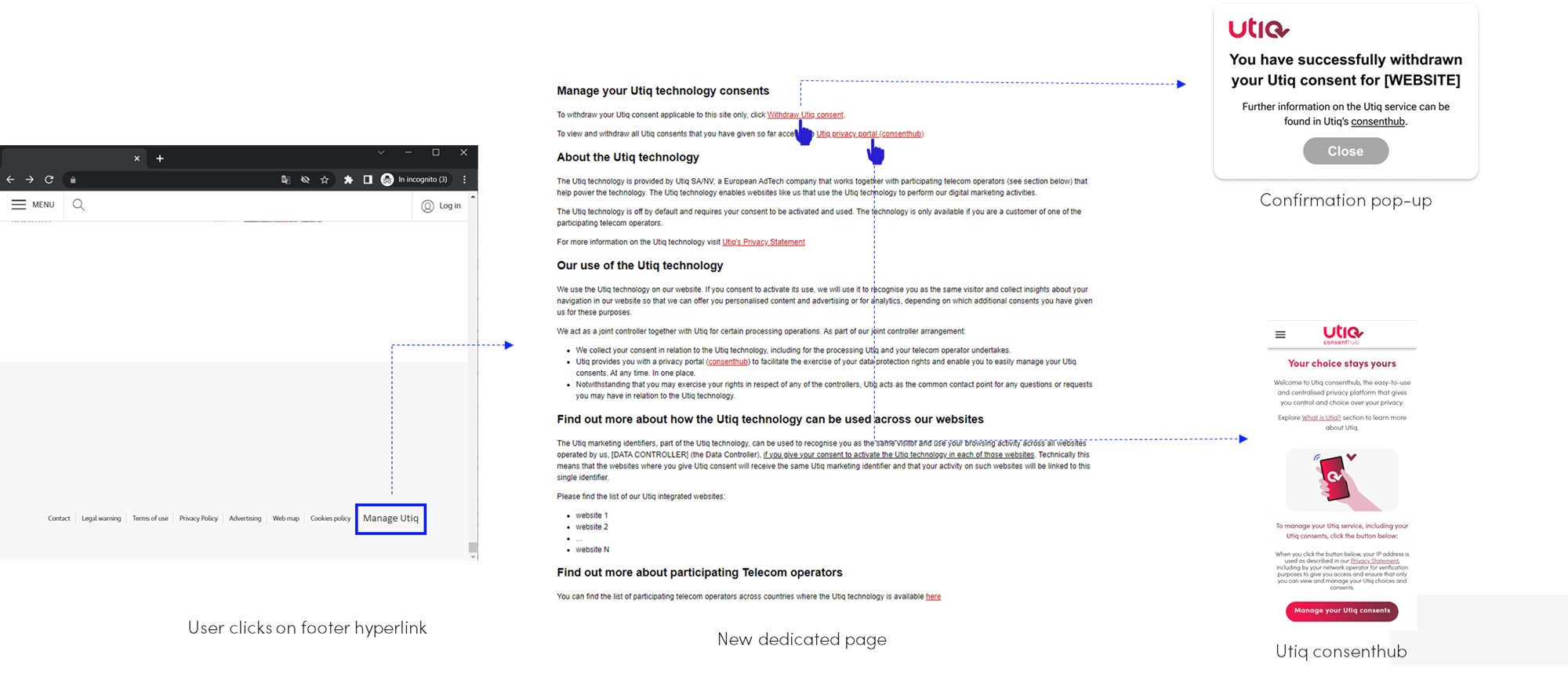
| Utiq consent withdrawal mechanisms                                                                                                                                      | As per core requirement.                                                                                                                                                                                                                                      | 1. The following 3 ways for users to withdraw Utiq consents should be in place: * CMP: by re-opening the CMP and changing the Utiq preferences, the users can withdraw Utiq consent. * Manage Utiq via the consent revocation dedicated functionality: users can revoke their Utiq consent directly through your site. The revocation will only apply to your site in this case. * consenthub. 2. The above should be implemented in accordance with Utiq technical requirements to ensure correct synchronisation with consenthub.                                                                                                                                                                                                                                                                                                                                                                                     | ![image-20240703-124228.png](https://docs.utiq.com/__attachments/a_f9e6fc7afee1fa9d77832e83938e814d364b0bb15a80f1e5b71f1c837555c6ce/image-20240703-124228.png?cb=0720060949db2b74c73488274aad2882) |
\[1\] Also known as "dark patterns", are considered as interfaces and user journeys implemented on platforms that attempt to influence users into making unintended, unwilling and potentially harmful decisions, often towards a decision that is against the users' best interests and in favour of the platforms interests, regarding the processing of their personal data (EDPB Guidelines 03/2022)

## Configuration in CMP console

Once added Utiq requirements in your CMP, you must ++**reprompt your consent notice/banner to all your users**++.

### Utiq's consent text for the Integrated model

The Utiq consent text has been carefully defined seeking to strike a balance between providing complete information on the processing and keeping the text brief and understandable for users as part of a layered approach to transparency. Specifically, the text addresses the purpose and scope of the processing, the nature of the personal data processed, retention periods, and the identity of controllers.

Utiq consent text to date (this may be subject to change) can be found at the following link:

[Utiq Transparency Texts (for Advertisers and Publishers)](https://docs.utiq.com/docs/utiq-transparency-texts-for-advertisers-and-publis.md)

### 1st layer
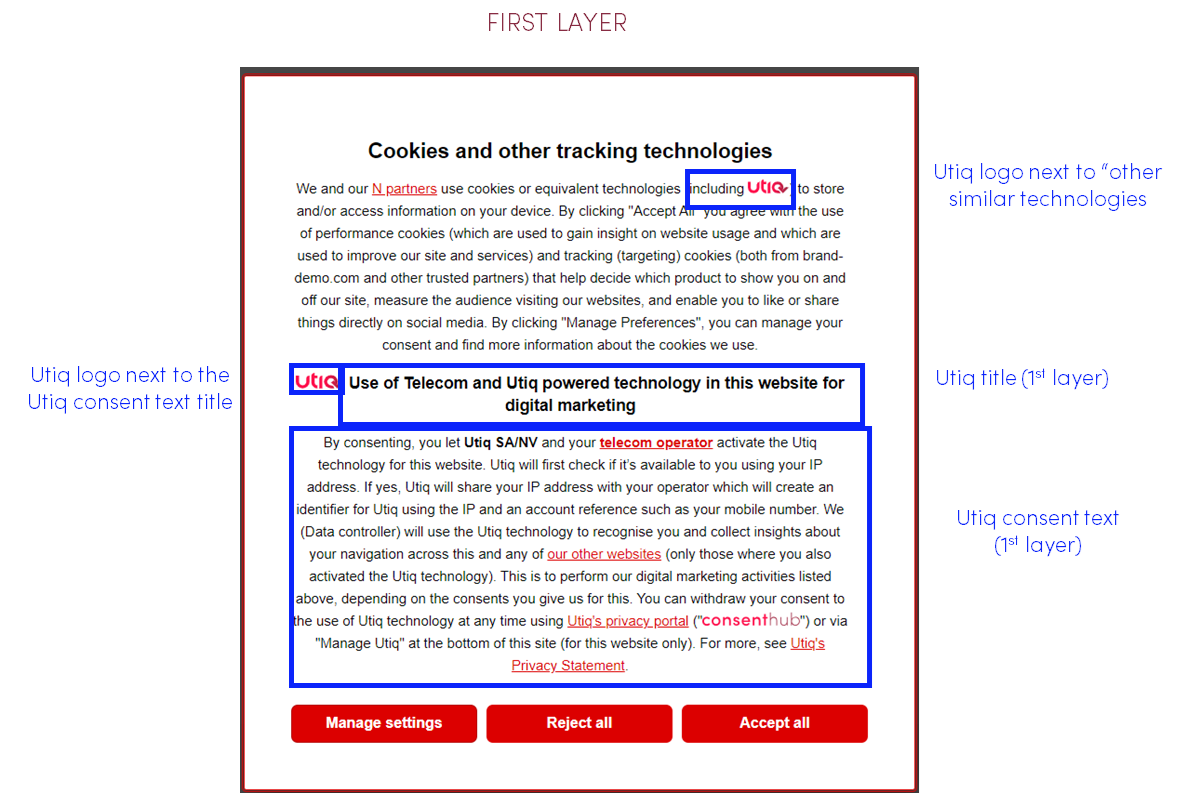
![image-20240703-124247.png](https://docs.utiq.com/__attachments/a_84e84da3973a96d6d6a5a021f9db8259c2c3376fb67acb333e52d9467bd88edf/image-20240703-124247.png?cb=444a0d8a1eef85561089efb4924285cb)

### Utiq purpose displayed in the 2^nd^ layer of the CMP

Utiq consent must be collected both for Utiq custom purpose and for Utiq custom vendor.
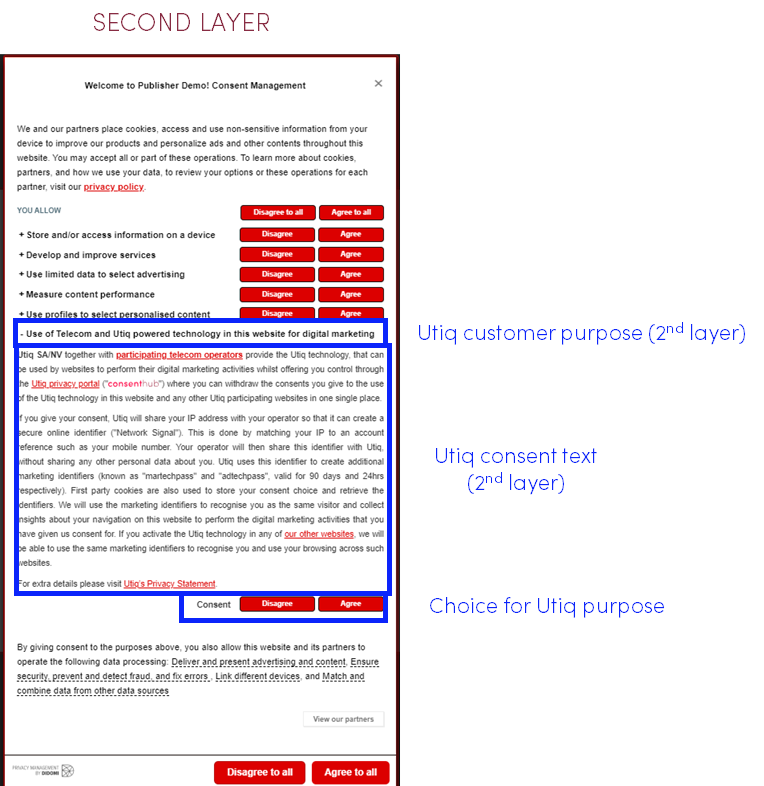
![image-20240703-124256.png](https://docs.utiq.com/__attachments/a_3a4f4ca5eb7556a8e0c0380de543a933799ca2ba932272accf43e49b1a98e131/image-20240703-124256.png?cb=1baf7a74117e37507dbe298c4a51a037)

### Utiq custom vendor

Utiq consent must be collected both for Utiq custom purpose and for Utiq custom vendor.  

|        **Field**         |                                                                                                                       **Value**                                                                                                                       |
|--------------------------|-------------------------------------------------------------------------------------------------------------------------------------------------------------------------------------------------------------------------------------------------------|
| Vendor name              | Utiq                                                                                                                                                                                                                                                  |
| Privacy Policy           | <https://consenthub.utiq.com/pages/privacy-statement>                                                                                                                                                                                                 |
| Purpose based on consent | \<select the "Use of Telecom and Utiq powered technology on this website for digital marketing"\> Utiq purpose description for "Integrated Model" can be found [here](https://docs.utiq.com/docs/utiq-transparency-texts-for-advertisers-and-publis). |

Note:

* If the website's CMP is **not** listing any other vendors (and only listing the purposes), the configuration of "Utiq as vendor" can we omitted.

* If the website's CMP is listing other vendors, Utiq must be configured also as a custom vendor

### Set up the functionalities in the Utiq Integrated Model text

#### Configurable elements

The Utiq consent text (1st layer) contains the following configurable element "Data Controller"

![image-20240703-124310.png](https://docs.utiq.com/__attachments/a_14867503a0285a0c2672e7ae369b485714291c2e0ff0c00e5c21059c13701295/image-20240703-124310.png?cb=2ac7d6b3ad752249bedf551881dfaeab)

You will need to populate the dedicated configurable elements with your details: Data Controller's name and legal form → the legal entity that owns the website as mentioned on the website's Privacy Policy page

#### Clickable elements

The Utiq consent text (1st layer and Utiq purpose displayed in the 2nd layer of the CMP) contains clickable elements:

* consenthub

* Utiq's Privacy Statement

* telecom operator / supported internet connection

* our other websites / listed here

![image-20240703-124326.png](https://docs.utiq.com/__attachments/a_a79e5ca2d30ad00cd81e7cd3a287f930a8d6f7be4365e3b5ad59dc76593875cc/image-20240703-124326.png?cb=e57ad33eedf6b94abdefcafc7e3552dc)

You will need to implement hyperlinks that open in a new page for clickable elements within Utiq consent text:

* **consenthub** : <https://consenthub.utiq.com/>

* **Utiq's Privacy Statement** : <https://consenthub.utiq.com/pages/privacy-statement>

* **telecom operator** / **supported internet connection** : the reference to participating telecom operators in scope within the Utiq consent text must be correctly hyperlinked and direct the user to the relevant section within Utiq's Privacy Statement containing the list of all participating telecom operators per country → <https://consenthub.utiq.com/pages/privacy-statement#telecom-operators>

![image-20240703-124334.png](https://docs.utiq.com/__attachments/a_6a51b3459cbb1cbedf3ab78dca1407c8003d1258e8166eca724fbdd6fc8f8868/image-20240703-124334.png?cb=c9d436a6ba411b871aec0477b89ba751)

* **our other websites** /**listed here** : the reference to other websites in scope within the Utiq consent text must be correctly hyperlinked and direct the user to the relevant section within the "Manage Utiq" page where there is the list of all such websites in scope (i.e., all websites that would make use of the same martechpass value) (see "[2. Setup the dedicated "Manage Utiq" page linked via a footer hyperlink](https://docs.utiq.com/docs/2-setup-the-dedicated-manage-utiq-page-linked-via-.md)").

![image-20240703-124344.png](https://docs.utiq.com/__attachments/a_da03c0863b3a514445bc601da99be8064c3895a36e28248b24dca61c8cd6a333/image-20240703-124344.png?cb=cfc44fb5c70502283478d5670d56dee4)

Utiq requires the implementation of 2 sections in the "Manage Utiq" page (see "[2. Setup the dedicated "Manage Utiq" page linked via a footer hyperlink](https://docs.utiq.com/docs/2-setup-the-dedicated-manage-utiq-page-linked-via-.md)") listing the cross domain websites in scope and participating telecom operators:

* The reference to ++"our other websites"++ /listed "++here++ " in scope within the Utiq consent text must be correctly hyperlinked and direct the user to a page listing all such websites in scope.

  Data Controller without the cross-domain feature enabled shall remove that part of the sentence completely. The sentence should be as reported in the below table.

  The relevant section in the "Manage Utiq" page can also be omitted.

  The sentence to be used in the Utiq consent text in case of Data Controller without the cross-domain feature enabled, can be found here: [Utiq Transparency Texts (for Advertisers and Publishers)](https://docs.utiq.com/docs/utiq-transparency-texts-for-advertisers-and-publis.md)

* The reference to ++"telecom operator"++ / "++supported internet connection++ " within the Utiq consent text must be correctly hyperlinked and direct the user to the relevant section in Utiq's Privacy Statement containing the list of all participating telecom operators per country → <https://consenthub.utiq.com/pages/privacy-statement#telecom-operators>

### Consent synchronization with CMP-consenthub-"Manage Utiq" withdraw function

* With the Utiq Integrated model, there are 3 ways for users to withdraw Utiq consents:

  * via the CMP: by re-opening the CMP and changing the Utiq preferences, the users can withdraw Utiq consent.

  * via the consent revocation dedicated functionality in the "Manage Utiq" page: users can revoke their Utiq consent directly through the site. The revocation will only apply to that site in this case.

  * via [consenthub](https://consenthub.utiq.com/)

Synchronization of the three options must be ensured.

* Utiq SDK should be loaded on all site pages, to be able to ensure consent synchronisation of the user.

### Consent Validity Timeframe

The consent validity timeframe (the time after which consent should be re-requested) for Utiq consents for the Integrated Model is aligned with your CMP consent validity timeframe and up to a possible 13 month maximum period.

### Correct configuration of accept and reject functions

* The CMP must be configured to ensure that Utiq calls are only triggered if user accepts Utiq consent. This means if the user either clicks on:

  * "accept all" or

  * accept Utiq custom purpose ("Use of Telecom and Utiq powered technology in this website for digital marketing") and Utiq customer vendor.

* Utiq technology must be off by default.

* No Utiq calls to enable the Utiq technology shall be triggered if a user clicks on reject option.

* Only strictly necessary cookies can be dropped if user clicks on reject option (i.e., utiq_consent_status).

### Evidence of consent

Ensure that:

* you are keeping track of the previous version of your Consent Notices that includes Utiq consent.

* the evidence of consent feature in your CMP console is correctly capturing the user's preferences for the Utiq consent.

## How to integrate it

You can find the documentation to integrate it at the [**Tag Integrations**](https://docs.utiq.com/docs/website-integration-utiq-integrated-model.md) section.

For any technical query on the implementation, please contact [++onboard@utiq.com++](mailto:onboard@utiq.com)

---
language: "en"
---
# 1. Option B: Separate consent pop-up model

One of the consent options Utiq supports is the integration of the Utiq separate out-of-the-box consent pop-up (a separate pop-up box surfaced after the domain's main CMP) to capture Utiq consent separately.

## Utiq's separate consent pop-up layout (mock-ups)

Mock-up of Utiq's separate consent pop-up layout:
EN  

![image-20240731-072338.png](https://docs.utiq.com/__attachments/a_0fccd16c40347d6f11852e3f878c3e8e889a105c1d5004459e03c8a7f09bd297/image-20240731-072338.png?cb=ec539ad8c5a363966c03e5c97e774a91)

DE  

![image-20240731-072359.png](https://docs.utiq.com/__attachments/a_f96e8b738b5120b3396ea9c03d80ac6f2cde61a702d85f24ef149e24130975d9/image-20240731-072359.png?cb=2cb0d99474117b2505564d449acc6b1a)

ES  

![image-20240731-072423.png](https://docs.utiq.com/__attachments/a_65da05b007bee7b71c11f0f36d54c0d970fbcd8430547665c1913046cdfc21bf/image-20240731-072423.png?cb=311f4d2547b398b179fbaacfb8cd7cb2)

FR  

![image-20240731-072441.png](https://docs.utiq.com/__attachments/a_e4f0c0b007d1c40f20386a1a1c97ef38ff000b24034ac2bc1505b64068119144/image-20240731-072441.png?cb=29056e6526e347c4cd8820dc41ed268e)

IT  

![image-20240731-072455.png](https://docs.utiq.com/__attachments/a_5b553d549f385403d7d66e7f1458790965b1e652cfbfa5c799ca2ceb038289ec/image-20240731-072455.png?cb=9c2d82e50601535351d54e7e140aade4)

## Utiq's out-of-the-box consent pop-up characteristics

We provide a \<\<Plug and Play\>\> implementation of the Utiq dedicated consent pop-up to make the integration process as smooth as possible for Advertisers and Publishers and ensure consent is validly obtained. Specifically, it:

* Fulfils all the privacy requirements to capture a valid consent and ensures their correct implementation.

* Provides an optimised UX/UI for mobile and is already tested on different devices and browsers.

* Ensures consent synchronisation between user's preferences expressed in Advertiser/Publishers' websites with Utiq's consenthub.

* Ensures it's shown only to users browsing via an eligible Telecom Operator involved in the provision of the Utiq technology.

* Already includes the Utiq consent text and design characteristics (including hyperlinks to Utiq's privacy statement and consenthub).

* Should be customised with the Advertiser/Publisher's brand identity (e.g., colour palette, font, etc.).

### Utiq's separate pop-up customisation

Utiq's separate pop-up should include the Advertiser/Publisher's website logo and colour palette.

The allowed customisations are the following:  

|         **Item**          |                                                              **Description**                                                               |                                                 **Example**                                                 |
|---------------------------|--------------------------------------------------------------------------------------------------------------------------------------------|-------------------------------------------------------------------------------------------------------------|
| Logo asset                | A file with your logo preferably in SVG format (we also accept PNG format). The logo filename should match your domain                     | For domain [www.example.com](https://www.example.com/) the file name of the logo should be: example-com.svg |
| Colour scheme             | Any specific colours (Color RBG or HEX value) to be used unless we can use your site's CSS. E.g.: change the default colour of the buttons | #054850 button colour, #000000 text colour                                                                  |
| Square or rounded buttons | Chose to have the buttons rounded or squared. We also support settings the roundness.                                                      |                                                                                                             |

## Ensure correct set-up of the consent capture journey

Example of the correct set-up:  
![image-20240703-130623.png](https://docs.utiq.com/__attachments/a_777657472119777f8402b994191e0a41505b55a63f90c45ac857ea7e9730055b/image-20240703-130623.png?cb=472af8d6393df3f27b07d4fcd989f5ff)

### When to show the Utiq separate consent pop-up

You must set up the Utiq out-of-the-box dedicated consent pop-up so that it is only surfaced/presented to users if they have accepted all processing purposes in the site's main CMP, i.e., user clicks on "accept all".

Utiq's separate pop-up should be shown either:

* immediately after the main CMP acceptance, or

* in the visitor's next session

### Consent validity timeframe

The consent validity timeframe for Utiq consents for the Utiq Separate pop-up Model is 180 days.

### Consent synchronisation with consenthub-"Manage Utiq" withdraw function

* With the Utiq Separate pop-up model, there are 2 ways for users to withdraw Utiq consents:

  * via the consent revocation dedicated functionality in the "Manage Utiq" page: users can revoke their Utiq consent directly through the site. The revocation will only apply to that site in this case.

  * via [consenthub](https://consenthub.utiq.com/)

Synchronization of the 2 options must be ensured.

* Utiq SDK should be loaded on all site pages, to be able to ensure consent synchronisation of the user.

## Utiq's Consent Text for Separate pop-up model

The Utiq consent text has been carefully defined seeking to strike a balance between providing complete information on the processing and keeping the text brief and understandable for users as part of a layered approach to transparency. Specifically, the text addresses the purpose and scope of the processing, the nature of the personal data processed, retention periods, and the identity of controllers.

Utiq consent text to date (this may be subject to change) can be found at the following link:

[Utiq Transparency Texts (for Advertisers and Publishers)](https://docs.utiq.com/docs/utiq-transparency-texts-for-advertisers-and-publis.md)

### Set up the functionalities in the Utiq separate pop-up model text

#### Configurable elements

Utiq consent text contains configurable element "Data Controller".

![image-20240703-130654.png](https://docs.utiq.com/__attachments/a_1ac79ada551ed3d5b9dfa274af5d64541f9693cadccc5c46b843c379009b9935/image-20240703-130654.png?cb=28a47fb53553d512f6f2bb6ae0d2bdb6)

You will need to populate dedicated configurable elements with your details: Data Controller's name and legal form → the legal entity that owns the website as mentioned on the website's Privacy Policy page

#### Clickable elements

The Utiq consent text (1st layer and 2nd layer) contains clickable elements:

* consenthub

* Utiq's privacy statement

* (as further described ++here++ ) / (as described ++here++)

* telecom operator / supported internet connection

* our other websites / listed here

![image-20240703-130705.png](https://docs.utiq.com/__attachments/a_6c6ef709a309855836ff78b6c95e48a64134dcf445131cd8eb555d9f0a3ce741/image-20240703-130705.png?cb=e13a88d6093e1387c262e4442824481f)

You will need to implement hyperlinks that open as a new page for clickable elements within Utiq consent text:

* **consenthub** : <https://consenthub.utiq.com/>

* **Utiq's privacy statement** : <https://consenthub.utiq.com/pages/privacy-statement>

* **(as further described** ++**here**++ **) / (as described** ++**here**++ **)**: this function will open the Brand/Publisher's own privacy statement.

* **telecom operator** / **supported internet connection** : the reference to participating telecom operators in scope within the Utiq consent text must be correctly hyperlinked and direct the user to the relevant section within Utiq's Privacy Statement containing the list of all participating telecom operators per country → <https://consenthub.utiq.com/pages/privacy-statement#telecom-operators>

![image-20240703-130725.png](https://docs.utiq.com/__attachments/a_6e6e12099ec3aac1701b63b49ef7b5c86607be20d63fd594f35e72226eece370/image-20240703-130725.png?cb=ced59bd929f3377a97e8fd9648766abc)

* **our other websites** /**listed here** : the reference to other websites in scope within the Utiq consent text must be correctly hyperlinked and direct the user to the relevant section within the "Manage Utiq" page where there is the list all such websites in scope (i.e., all websites that would make use of the same martechpass value) (see "[2. Setup the dedicated "Manage Utiq" page linked via a footer hyperlink](https://docs.utiq.com/docs/2-setup-the-dedicated-manage-utiq-page-linked-via-.md)").

![image-20240703-130744.png](https://docs.utiq.com/__attachments/a_24ee1fd2829440ba498fe49b8b94cf921a2d71cd19b2615d204f766ac084f578/image-20240703-130744.png?cb=b40618700acd063a7b2bbda5eee57a7b)

Utiq requires the implementation of 2 sections in the "Manage Utiq" page (see "[2. Setup the dedicated "Manage Utiq" page linked via a footer hyperlink](https://docs.utiq.com/docs/2-setup-the-dedicated-manage-utiq-page-linked-via-.md)") listing the cross domain websites in scope (i.e., all websites that would make use of the same martechpass value) and participating telecom operators:

* The reference to ++"our other websites"++ /listed "++here++ " in scope within the Utiq consent text must be correctly hyperlinked and direct the user to a page listing all such websites in scope (i.e., all websites that would make use of the same martechpass value).

  In case of additional websites in scope, the number must be updated, before the additional website goes live.

  Data Controller without the cross-domain feature enabled shall remove that part of the sentence completely. The sentence should be as reported in the below table.

  The relevant section in the "Manage Utiq" page can also be omitted.

  The sentence to be used in the Utiq consent text in case of Data Controller without the cross-domain feature enabled, can be found here: [Utiq Transparency Texts (for Advertisers and Publishers)](https://docs.utiq.com/docs/utiq-transparency-texts-for-advertisers-and-publis.md)

* The reference to ++"telecom operator"++ / "++supported internet connection++ " within the Utiq consent text must be correctly hyperlinked and direct the user to the relevant section in Utiq's Privacy Statement containing the list of all participating telecom operators per country → <https://consenthub.utiq.com/pages/privacy-statement#telecom-operators>

## How to integrate it

You can find the documentation to integrate it at the [**Tag Integrations**](https://docs.utiq.com/docs/website-integration.md) section.

For any technical query on the implementation, please contact [++onboard@utiq.com++](mailto:onboard@utiq.com)

---
language: "en"
---
# 2. Setup the dedicated “Manage Utiq” Modal or Page linked via a footer hyperlink

You must set up a dedicated "Manage Utiq" modal or page or accessible via a footer hyperlink in your digital property(ies) which should:

* Enable users to revoke their Utiq consent directly through your digital property, at any time and in an easy and accessible way. The revocation will only apply to your digital property in this case.

* Provide users with a way to easily access the Utiq consenthub to manage their Utiq technology.

* Provide transparency information about the Utiq technology.

* Provide transparency information about the participating telecom operators .

* Provide transparency information about how the Utiq technology can be used across your digital properties (i.e., all digital propertyies that would make use of the same martechpass value).

++Steps:++

1. **Create the "Manage Utiq" footer hyperlink in your digital property(ies)**

2. **Implement one of the two options linked to the Manage Utiq footer:**

   1. **"Manage Utiq" modal**

   2. **"Manage Utiq" page**

## 1. Create the "Manage Utiq" footer hyperlink

This should be located in a visible and easily accessible place at the bottom of every page in your digital property(ies) (i.e., in the same way that links to sites' privacy policies are traditionally presented).

Label the hyperlink using Utiq's wording below to ensure consistency and clarity for users.

Where possible, Utiq wording should be replaced by Utiq logo:

![image-20240605-114652.png](https://docs.utiq.com/__attachments/a_fae6bfcf6e9f98c7bd3d200a7d9f3ed761f182a31b6fcc54803a428b4dc51ea5/image-20240605-114652.png?cb=338ec078f04c92de2837c284b720cbf5)
EN  
**Manage Utiq**
DE  
**Utiq verwalten**
ES  
**Administrar Utiq**
FR  
**Gérer Utiq**
IT  
**Gestisci Utiq**

Example of the correct set-up:  
![image-20251016-091449.png](https://docs.utiq.com/__attachments/a_94b99e634682ba485a2e3e0e2e9b81f73660eb37ea0df3bc4ce3d6565cd77f32/image-20251016-091449.png?cb=f51a7334aa0e311802908e824ac1bd4e)

## **2.a. "Manage Utiq" modal**

"Manage Utiq" modal has been created (replacing the page format previously used) to replicate the consenthub look and feel.

**How it works**: when the user clicks on the "Manage Utiq" footer hyperlink, a "Manage Utiq" modal is displayed on the same page to users, which:

* will show the current "status" of the Utiq technology within the property, i.e., whether Utiq consent has been accepted or rejected (displayed via the 2 buttons which will also be coloured to visually reflect the status).

* will enable the user to revoke Utiq consent for the digital property directly via the modal by selecting the "Reject" button.

Example of the correct set-up:  
![image-20260202-131543.png](https://docs.utiq.com/__attachments/a_cdb9b2ab1341170e37c2798aa0d9182111a9d8898b71160de02395c386d3533c/image-20260202-131543.png?cb=9e7de3679f970f74e5dbbd8c27e12096)

### How to implement it

Utiq provides the "Manage Utiq" modal as out-of-the-box feature of the Web SDK.

The way to implement this is adding the below API in the "Manage Utiq" footer link as below, using English as example. Don't forget to put your respective translated text within the \<a\> tag.
HTML

    <a id="utiq__modal-manager" href="javascript:window.Utiq.queue.push(() => window.Utiq.API.showConsentModal())">Manage Utiq</a>

#### Manage Utiq modal text

Manage Utiq modal text to date (this may be subject to change) can be found at the following link:

<https://docs.utiq.com/docs/v4-0-advertisers-and-publishers>

## **2.b. "Manage Utiq" page**

"Manage Utiq" page is a dedicated page created using the look and feel of the digital property.

Example of the correct set-up:

![image-20240703-131213.png](https://docs.utiq.com/__attachments/a_fa53def5686103d7efa314f70d6bff15de03a258dc36c2b80f19df39491cb959/image-20240703-131213.png?cb=0720060949db2b74c73488274aad2882)

### How to implement it

Implementation considerations:

* Make sure you are not showing your main CMP in the "Manage Utiq" page.

* The "Manage Utiq" footer and page should be always shown in participating websites at all times.

* In case of additional websites in scope, the list must be updated, before the additional website goes live.

Use the [Manage Utiq Dynamic \<div\> feature](https://docs.utiq.com/docs/manage-utiq-page.md) to automatically and easily integrate the whole Manage Utiq page requirements.

#### A. Add the relevant transparency text in the dedicated "Manage Utiq" page

You must display the wording within the dedicated "Manage Utiq" page created. When implementing the wording, ensure that you:

* implement the wording that matches the language of your site;

* check for any typos and/or errors;

* check that all hyperlinks as ++highlighted++ work correctly and point to the correct source.

* In case of additional websites in scope, the list must be updated, before the additional website goes live.

##### Manage Utiq page text

Manage Utiq page text to date (this may be subject to change) can be found at the following link:

[Utiq Transparency Texts (for Advertisers and Publishers)](https://docs.utiq.com/docs/utiq-transparency-texts-for-advertisers-and-publis.md)

##### Manage Utiq URLs

The **URL** of Manage Utiq page should be created as per the below translations.
EN  
<https://www.example.com/manage-utiq>
DE  
<https://www.example.com/utiq-verwalten>
ES  
<https://www.example.com/administrar-utiq>
FR  
<https://www.example.com/gerer-utiq>
IT  
<https://www.example.com/gestisci-utiq>

#### B. Set up the user functionalities in the dedicated "Manage Utiq" page

If you encounter any issues or have any questions on the technical implementation of the below functionalities, please contact [++onboard@utiq.com++](mailto:onboard@utiq.com)

##### Functionality 1: "Withdraw Utiq consent" link

When the user clicks on "Withdraw Utiq consent" link, you should invoke the [**revokeConsentWithPopup()**](https://docs.utiq.com/docs/api-methods#APIMethods-revokeConsentWithPopup) JavaScript API. This should cause the Utiq consent for the site to be revoked immediately. A confirmation pop-up will be presented confirming consent was successfully revoked.

The way to implement this API in the link would be as below, using English as example. Don't forget to put your respective translated text within the \<a\> tag.
HTML

    <a href="javascript:window.Utiq.API.revokeConsentWithPopup()">Withdraw Utiq consent</a>

++Confirmation pop-up text:++
EN  
**You have successfully withdrawn your Utiq consent for \[WEBSITE\].**

Further information on the Utiq technology can be found in [++Utiq's consenthub++](https://consenthub.utiq.com/).
DE  
**Sie haben erfolgreich Ihre Einwilligung zur Verwendung von Utiq auf \[WEBSEITE\] widerrufen.**

Weitere Informationen über die Utiq-Technologie finden Sie im [++Utiq consenthub++](https://consenthub.utiq.com/).
ES  
**Has retirado con éxito tu consentimiento Utiq para \[SITIO WEB\].**

Puedes encontrar más información acerca de la tecnología Utiq en el [++portal de privacidad de Utiq ("consenthub")++](https://consenthub.utiq.com/).
FR  
**Vous avez révoqué avec succès votre consentement à l'activation d'Utiq sur \[SITE WEB\].**

Vous trouverez de plus amples informations sur la technologie Utiq dans le[++consenthub++](https://consenthub.utiq.com/).
IT  
**Hai revocato con successo il tuo consenso Utiq per \[SITO\].**

Per maggiori informazioni sulla tecnologia Utiq visita il [++portale privacy di Utiq (consenthub)++](https://consenthub.utiq.com/)++.++

Mockups:
EN  

![image-20240606-074926.png](https://docs.utiq.com/__attachments/a_253b0842ccb50ec074f31543586c984d712d0d557c0c714795169bde1287566f/image-20240606-074926.png?cb=ca77b1bb952fe57432e37b9b5aa459af) DE  

![image-20240826-123425.png](https://docs.utiq.com/__attachments/a_5a5f97896f322517d31a7c7309c034c85a18441eaa597db1548d0e108b203105/image-20240826-123425.png?cb=04728537cccae29202c6b37c8f58f971)

ES  
![image-20240528-175652.png](https://docs.utiq.com/__attachments/a_82471b2dc2c4dadf3a74c02ef5653ab1304edd0a5e6622cb2bf58e7e147f59e6/image-20240528-175652.png?cb=a32f841d8758f3408fba8f3614af156f)

FR  
![image-20240528-175725.png](https://docs.utiq.com/__attachments/a_9bc092e3105d56254d0bfff6e175cf1749154700c907e22e521f5d59af6c770d/image-20240528-175725.png?cb=508440ae24a897d55b7fb66cd54df173)

IT  
![image-20240703-131412.png](https://docs.utiq.com/__attachments/a_fd284aa0cb078f6eb92cb02470295ff6b93da28e50781f646f571b86abec53a0/image-20240703-131412.png?cb=a603fc1ce816aab9a3ef4423a26c0149)

##### Functionality 2: Enable "Utiq's consenthub" and consenthub hyperlinks

The "Utiq's consenthub" link and where "consenthub" is mentioned, should be hyperlinked and direct the user to: <https://consenthub.utiq.com/>

##### Functionality 3: Enable hyperlink to "Utiq's Privacy Statement"

Where "Utiq's Privacy Statement" is mentioned, this should be hyperlinked and direct the user to: <https://consenthub.utiq.com/pages/privacy-statement>

##### Functionality 4: Implement the list of cross-domain websites in scope (i.e., all websites that would make use of the same martechpass value)

* The reference to ++"our other websites"++ within the Utiq consent text must be correctly hyperlinked and direct the user to the relevant section within the "Manage Utiq" page where there is the list of all such websites in scope (i.e., all websites that would make use of the same martechpass value).

* Implement the list of all the cross-domain websites in scope (i.e., all websites that would make use of the same martechpass value).

  The website in scope should follow the following guidelines:

  * Mention only the website ++root domain++ . Subdomains that have the same root domain should ++not++ be mentioned.

  * Put all domains in ++alphabetical++ order, in format ++domain.xx++ with a ++hyperlink++ to this domain, opening in ++new tab++.

  * Include ++all domains++ -same list- of same Data Controller on all Manage Utiq pages, ++even one current viewing++.

  * In case of additional websites in scope, the ++list must be updated++, before the additional website goes live.

* Data Controller without the cross-domain feature enabled can omit this section.

* **\[DATA CONTROLLER\]** should be populated with Data Controller's name and legal form (i.e. the legal entity that owns the website as mentioned on the website's Privacy Policy page).

###### Add ID on websites list title

On the **\<h2\>** attribute of paragraph **title** "Find out more about how the Utiq technology can be used across our websites" (using English as example) add the below **id**.

This will be needed when users **click** on the "**our other websites**" feature, to land the user on Manage Utiq page, and scroll to the specific paragraph.
HTML

    <h2 id="manage-utiq-website-list">Find out more about how the Utiq technology can be used across our websites</h2>

###### Add ID on domains list bullets

On the **domains list** bullets, add a **wrapping \<div\>** with the below **id**. This will be needed for our compliance monitoring, to verify that the correct domains are listed there.
HTML

    <div id="manage-utiq-domain-list">
        <ul>
            <li>domain1.xx</li>
            <li>domain2.xx</li>
            <li>...</li>
            <li>domainN.xx</li>
        </ul>
    </div>

##### Functionality 5: Enable hyperlink to telecom operators' dedicated section hosted in Utiq Privacy Statement in consenthub

Where "here" is mentioned in the following statement "You can find the list of participating telecom operators across countries where the Utiq technology is available ++here++ ", this should be hyperlinked and direct the user to the dedicated section in Utiq's Privacy Statement: <https://consenthub.utiq.com/pages/privacy-statement#telecom-operators>

---
language: "en"
---
# 3. Include reference to Utiq technology in the domain’s privacy statement

You must display the text provided within your domain's own privacy statement.

When implementing the wording, ensure that you:

* check for any typos and/or errors;

* check that all hyperlinks as ++highlighted++ work correctly and point to the correct source:

  * Where "Utiq's Privacy Statement" is mentioned, this should be hyperlinked and direct the user to: <https://consenthub.utiq.com/pages/privacy-statement>

  * Where "consenthub" is mentioned, this should be hyperlinked and direct the user to: <https://consenthub.utiq.com/>

The website should make its "Privacy policy/notice/statement" easily accessible in all pages:

* The option to open the Privacy Statement shall be located in an easily visible place for the user to find. Usually, this will be at the bottom of the page.

* The option to open the Privacy Statement must be present in all the pages of the website (i.e. not only in the Homepage)

* No reliance on deceptive design patterns (e.g., different size, font, colour or inappropriate location), accessible with 1 click, not hidden by other banners in the websites, colour of text contrasts sufficiently with the background)

![image-20240703-131520.png](https://docs.utiq.com/__attachments/a_908400c1bd1c3e65dff951a711185fa96a8b62698568283fbc5386e969bc9218/image-20240703-131520.png?cb=c89ad90083ad4fd9c20efe1b0e828bc2)

## How to implement it

Use the [Privacy Policy Dynamic \<div\> feature](https://docs.utiq.com/docs/privacy-policy-update.md) to automatically and easily integrate the whole Privacy Policy requirements.

## Text

The text to date (this may be subject to change) can be found at the following link:

[Utiq Transparency Texts (for Advertisers and Publishers)](https://docs.utiq.com/docs/utiq-transparency-texts-for-advertisers-and-publis.md)

---
language: "en"
---
# Accessing the Utiq Passes

The Utiq passes and metadata you can access, are the following:

* mtid → martechpass (mobile start with 'mt1-' while fixed start with 'mt2-')

* atid → adtechpass

* attrid → attributionpass

* category → 'mobile' or 'fixed', to differentiate if Utiq IDs are generated based the mobile connection, or the fixed (household) connection

* ttl → The TTL (Time To Live) of when the martechpass expires

* domain → The domain for which the consent has been granted for

These passes are enabled based on agreement with Utiq - please contact [++onboard@utiq.com++](mailto:onboard@utiq.com)

## Multi-Connection Utiq Passes

Utiq supports multi-connection identification, which means that after initial successful identification, either being mobile or fixed, Utiq SDK will keep doing **re-identification retrials every 10'** to potentially identify user on the other connection (fixed or mobile).

If successfully done so, both passes will be stored in user's `utiqPass` localStorage key and can be retrieved by Utiq API, by asking for `entries` in `onIdsAvailable` event listener or providing an array param `[]` in `getIdGraphEntry` method. Utiq API will be providing an **array** of passes, of which the **first entry** will be of the **latest** identified connection. Look at the examples below to see how this is achieved.

If these methods are ++not++ used, even if `utiqPass` contains more than one connection, then Utiq API will be providing the pass of **only the latest** identified connection.

There are two ways to retrieve these values:

## 1a. Using the [onIdsAvailable](https://docs.utiq.com/docs/event-listeners#EventListeners-onIdsAvailable) event listener (recommended) - asking for a ++single++ / latest identified connection

Example using Utiq **configuration** , if you are the one invoking `utiqLoader.js`
JavaScript

    window.Utiq ||= {};
    window.Utiq.config = {
      listeners: {
        onIdsAvailable: ({ mtid, atid, attrid, category, ttl, domain }) => {
          // Single callback action
        }
      }
    };

Example using the [addEventListener API](https://docs.utiq.com/docs/api-methods#APIMethods-addEventListener), if you are a third party, ensuring you can interact with Utiq SDK, regardless of which script gets loaded first, **avoiding race conditioning issues**:
JavaScript

    window.Utiq ||= {};
    window.Utiq.queue ||= [];

    const handleIdsAvailable = ({ mtid, atid, attrid, category, ttl, domain }) => {
      // Callback action for onIdsAvailable
    };

    window.Utiq.queue.push(() => {
      window.Utiq.API.addEventListener('onIdsAvailable', handleIdsAvailable);
    });

## 1b. Using the [onIdsAvailable](https://docs.utiq.com/docs/event-listeners#EventListeners-onIdsAvailable) event listener (recommended) - asking for a ++multi-connection++ identification

Example using Utiq **configuration** , if you are the one invoking `utiqLoader.js`
JavaScript

    window.Utiq ||= {};
    window.Utiq.config = {
      listeners: {
        onIdsAvailable: ({ entries }) => {
          // Single callback action
        }
      }
    };

Example using the [addEventListener API](https://docs.utiq.com/docs/api-methods#APIMethods-addEventListener), if you are a third party, ensuring you can interact with Utiq SDK, regardless of which script gets loaded first, **avoiding race conditioning issues**:
JavaScript

    window.Utiq ||= {};
    window.Utiq.queue ||= [];

    const handleIdsAvailable = ({ entries }) => {
      // Callback action for onIdsAvailable
    };

    window.Utiq.queue.push(() => {
      window.Utiq.API.addEventListener('onIdsAvailable', handleIdsAvailable);
    });

`entries` is ++not++ mutually exclusive from the other parameters and can be added also like `({ mtid, atid, attrid, category, ttl, domain, entries })`

Below an example of ++all passes with all their fields++ that `entries` returns:
JSON

    [
        {
            "domain": "utiq.example.com",
            "category": "mobile",
            "cc": "EN",
            "atid": "jmQdZ12ovOPVoQCspEKSBqyg3axh0lp2zsVs68KU7jgZgLw0RNz3BmcxJsSovqiCFSlGGFYF6LXh5clORInkWw==-d693cai1jcgp3k8eig3g",
            "mtid": "mt1-3yMJmGUWM3WK1RVBjNYDXg",
            "ttl": "2026-05-10T13:03:22.705312Z"
        },
        {
            "domain": "utiq.example.com",
            "category": "fixed",
            "cc": "EN",
            "atid": "BtkG9NZBNEbucAoQPmD5ZTnApqbSOtBIwSsSrDQjRaPpqWbF7H0NAo0YAXD5MiPA9XE7s5SQoadjuj5mNUFqtA==-d693cai1jcgp3k8eig3g",
            "mtid": "mt2-CCOLszVDmLnMq6GbKvJDyQ",
            "ttl": "2026-05-10T13:03:22.705312Z"
        }
    ]

## 2a. Using the [getIdGraphEntry](https://docs.utiq.com/docs/api-methods#APIMethods-getIdGraphEntry) API method - asking for a ++single++ / latest identified connection

Example:
JavaScript

    try {
      const martechpass = window.Utiq.API.getIdGraphEntry('mtid')
      console.log(`Utiq martechpass: ${martechpass}`)
      const adtechpass = window.Utiq.API.getIdGraphEntry('atid')
      console.log(`Utiq adtechpass: ${adtechpass}`)
      const attributionpass = window.Utiq.API.getIdGraphEntry('attrid')
      console.log(`Utiq attributionpass: ${attributionpass}`)
      const category = window.Utiq.API.getIdGraphEntry('category')
      console.log(`Utiq category: ${category}`)
      const ttl = window.Utiq.API.getIdGraphEntry('ttl')
      console.log(`Utiq category: ${ttl}`)
      const domain = window.Utiq.API.getIdGraphEntry('domain')
      console.log(`Utiq category: ${domain}`)
    } catch (err) {
      console.error(`getIdGraphEntry API call failed. Reason: ${err.message}`)
    }

## 2b. Using the [getIdGraphEntry](https://docs.utiq.com/docs/api-methods#APIMethods-getIdGraphEntry) API method - asking for a ++multi-connection++ identification

Example:
JavaScript

    try {
      const martechpass = window.Utiq.API.getIdGraphEntry(['mtid'])
      console.log(`Utiq martechpasses: ${martechpass}`)
      const adtechpass = window.Utiq.API.getIdGraphEntry(['atid'])
      console.log(`Utiq adtechpasses: ${adtechpass}`)
      const attributionpass = window.Utiq.API.getIdGraphEntry(['attrid'])
      console.log(`Utiq attributionpasses: ${attributionpass}`)
      const category = window.Utiq.API.getIdGraphEntry(['category'])
      console.log(`Utiq categories: ${category}`)
      const ttl = window.Utiq.API.getIdGraphEntry(['ttl'])
      console.log(`Utiq categories: ${ttl}`)
      const domain = window.Utiq.API.getIdGraphEntry(['domain'])
      console.log(`Utiq categories: ${domain}`)
      const utiqIds = window.Utiq.API.getIdGraphEntry([])
      console.log(`All Utiq IDs and their attributes: ${utiqIds}`)
    } catch (err) {
      console.error(`getIdGraphEntry API call failed. Reason: ${err.message}`)
    }

Note that string(s) in array parameters will returns ++the specific field(s)++ from all connections, e.g. `['firstId', 'secondId', 'thirdId']`

You can use `window.Utiq.API.getIdGraphEntry([])` to ++get all passes with all their fields++ - below an example:
JSON

    [
        {
            "domain": "utiq.example.com",
            "category": "mobile",
            "cc": "EN",
            "atid": "jmQdZ12ovOPVoQCspEKSBqyg3axh0lp2zsVs68KU7jgZgLw0RNz3BmcxJsSovqiCFSlGGFYF6LXh5clORInkWw==-d693cai1jcgp3k8eig3g",
            "mtid": "mt1-3yMJmGUWM3WK1RVBjNYDXg",
            "ttl": "2026-05-10T13:03:22.705312Z"
        },
        {
            "domain": "utiq.example.com",
            "category": "fixed",
            "cc": "EN",
            "atid": "BtkG9NZBNEbucAoQPmD5ZTnApqbSOtBIwSsSrDQjRaPpqWbF7H0NAo0YAXD5MiPA9XE7s5SQoadjuj5mNUFqtA==-d693cai1jcgp3k8eig3g",
            "mtid": "mt2-CCOLszVDmLnMq6GbKvJDyQ",
            "ttl": "2026-05-10T13:03:22.705312Z"
        }
    ]

## First Page Utiq Passes Optimization

If you want to optimize the **Utiq Passes timing on the first page** of your website, and be **available on those bid requests and/or other marketing platform integrations** , and not from second page only, so that you can get more value out of Utiq, then you could consider using our event listener [++onFlowCompleted++](https://docs.utiq.com/docs/event-listeners#EventListeners-onFlowCompleted), with the below logic.

**Don't** call Prebid and/or other marketing platform integrations after CMP acceptance but wait to **call them when this event listener fires**.

This event is dispatched **when Utiq has completed its flow**, either user was eligible and accepted/rejected, user had accepted/rejected on previous session, or user was not eligible.

Below is a **logic** how you can integrate `onFlowCompleted` and execute rest AdTech stack when it fires, so you can **improve Utiq IDs penetration on first page load**.

    Set up a timeout for a case when onFlowCompleted doesn't trigger
        (Optional) Prolong the timeout if onConsentUpdateFinished is detected
    On timeout passed
        Execute rest AdTech stack
    Anytime onFlowCompleted triggers
        Remove timeout
        Get IDs from onIdsAvailable if detected
        Execute rest AdTech stack

++**Disclaimer**++: This integration logic is just a directional example, and comes with owner of the site responsibility - make sure there is always an overall timeout

---
language: "en"
---
# Accessing UTIQ’s Detailed Report: Weekly Insights for Smarter Campaign Optimization

UTIQ's **advanced reporting** is available on a **weekly basis** , providing continuous visibility into key metrics that enhance campaign performance analysis. Whether **UTIQ is generating the billing discount file in Curator** or the **advertiser or agency is creating deals from their own Equativ account** , this report ensures advertisers have access to **detailed audience insights** in both cases.

To fully leverage these insights, advertisers should ensure that **UTIQ receives the reporting files in CSV format** . If the deals are managed directly by the advertiser or agency, they can grant **UTIQ access to their CSV reports** for accurate data processing. This enables UTIQ to construct **detailed visualizations and graphs** that provide a clear breakdown of impressions, unique user reach, frequency distribution, and extended reach in cookieless environments.

For seamless integration, it is recommended to **coordinate with your local Equativ team** to enable automatic delivery of CSV reports to UTIQ. This ensures that advertisers can benefit from **precise, deterministic insights** into their campaigns, allowing for **better targeting, cost optimization, and more efficient media spend allocation** in a rapidly evolving privacy-first landscape.

👉 **Please note:** To process and analyze the full scope of campaign performance---including the comparison between UTIQ-based and cookie-based delivery across all environments (cookieless and cookie-enabled), and to access generic campaign data such as impressions, viewability, CTR, total spend, and eCPM in order to calculate savings---UTIQ must receive **consent** from the advertiser or agency to access these campaign results. Let me share a email example with Utiq team cced.

***Subject:*** *Consent Request to Share Campaign Data with UTIQ*

*Hi Equativ local team,*

*We're currently working with UTIQ on campaign performance analysis and would like to ensure they have access to the relevant reporting data for our deals.*

*To enable UTIQ to build a full campaign report---including metrics like impressions, viewability, CTR, total spend, and eCPM, as well as insights and savings comparing UTIQ-based delivery to cookie-based delivery across all environments---we'd like to formally give our consent for UTIQ to access this information through Equativ.*

*Could you please enable access or share the necessary data with UTIQ team, based on this consent?*

*Let us know if you need anything else from our side to proceed.*

*Thanks a lot,*

---
language: "en"
---
# Ad Servers

Ad servers are pivotal components in the digital advertising landscape, enabling the management, serving, and tracking of advertisements across the internet. At their core, ad servers function as technological platforms that store information about ads and deliver them to web pages and applications based on specific criteria. This system allows advertisers and publishers to deploy their advertising campaigns efficiently, targeting the right audience at the right time with the right message.

The primary role of an ad server is to facilitate the real-time decision-making process in advertising delivery. When a user visits a website, the ad server quickly evaluates available ads and decides which to display based on predefined parameters such as user behavior, demographics, and psychographics. This decision is influenced by complex algorithms that analyze data to maximize the effectiveness of the ad placement, optimizing both viewer engagement and revenue generation for publishers.

Moreover, ad servers are not just about serving ads but also about measuring their performance. They provide detailed analytics that help advertisers understand the impact of their campaigns, including metrics like impressions, clicks, and conversions. This data is crucial for advertisers to adjust their strategies, enabling a dynamic approach to marketing that can respond to audience behavior and market trends. As the digital advertising environment continues to evolve, the importance of sophisticated ad server technology grows, underpinning the success of digital marketing efforts worldwide.

To enhance the effectiveness of ad servers in the digital advertising ecosystem, the integration of UTIQ technology provides a significant advantage. UTIQ's advanced user identification capabilities enable ad servers to recognize individual users across various devices and platforms with greater accuracy. This enhanced user recognition is crucial in today's fragmented digital environment where users frequently switch between devices. By integrating UTIQ, ad servers can leverage this precise identification to deliver more targeted and relevant advertising experiences, directly impacting the success of ad campaigns.

This integration enriches ad servers' capabilities to handle first-party data effectively, enabling publishers to create finely-tuned audience segments based on accurate user insights. These segments can be utilized to customize ad experiences, improve engagement rates, and increase the overall value of the inventory offered to advertisers. Moreover, UTIQ's technology helps maintain user privacy while providing these detailed insights, ensuring that ad servers can meet the increasing regulatory requirements regarding data protection.

In summary, the incorporation of UTIQ into ad server platforms significantly boosts their functionality by providing a deeper understanding of audience behavior, enhancing targeting precision, and thereby driving better campaign performance and higher returns for advertisers and publishers alike. As ad servers continue to be a cornerstone of digital advertising, the role of technologies like UTIQ in augmenting their capabilities becomes increasingly important, pushing the boundaries of what digital advertising can achieve.

---
language: "en"
---
# AdTech Partner Client Integration

This page is meant for **AdTech Partners** that need to do a **client side integration** and be able to see and collect Utiq [adtechpass](https://docs.utiq.com/docs/utiq-technology#HowUtiqTechnologyworks-adtechpass), if the integration is not part of the standard Prebid integration of publishers.

To become eligible to get Utiq ID, for testing, you need to add a testing stub as **'x-cryptip' request header** in [ModHeader](https://eur06.safelinks.protection.outlook.com/?url=https%3A%2F%2Fchromewebstore.google.com%2Fdetail%2Fmodheader-modify-http-hea%2Fidgpnmonknjnojddfkpgkljpfnnfcklj%3Fhl%3Den&data=05%7C02%7CKostas.Chrysovitsiotis%40utiq.com%7Cef1f47c9fe7d4fe0328608dd5d783e0b%7C7717fb9e95e34b3aad4276fb751ca0f5%7C0%7C0%7C638769493253679920%7CUnknown%7CTWFpbGZsb3d8eyJFbXB0eU1hcGkiOnRydWUsIlYiOiIwLjAuMDAwMCIsIlAiOiJXaW4zMiIsIkFOIjoiTWFpbCIsIldUIjoyfQ%3D%3D%7C0%7C%7C%7C&sdata=9dlN2X%2BmMwg7uDJScoljCo%2FdXEBMpIaxb42Z%2FINSdJs%3D&reserved=0).  
Please contact [++onboard@utiq.com++](mailto:onboard@utiq.com) to ask for a **testing stub**.

Visit a Utiq integrated publisher.

Utiq will be part of the CMP as [Integrated model](https://docs.utiq.com/docs/1a-consent-experience-integrated-model-integrate-u.md), or after accepting the CMP, you will see [Utiq Separate pop-up](https://docs.utiq.com/docs/1b-consent-experience-utiq-separate-pop-up-model-u.md). In both cases, you should verify in network that `utiqLoader.js` has loaded.

If it's not loaded, you can 'force' it in console by calling the below.
JavaScript

    (() => {
      const s = document.createElement("script")
      s.type = 'text/javascript';
      s.src = "https://utiq.example.com/utiqLoader.js"
      s.async = true;
      document.head.appendChild(s)
    })();

After you **accept** CMP or Utiq Separate pop-up, you will get [adtechpass (atid) in 'utiqPass'](https://docs.utiq.com/docs/utiq-technology#HowUtiqTechnologyworks-adtechpass) **localStorage**.

You can [collect the adtechpass (atid) with our API](https://docs.utiq.com/docs/accessing-the-utiq-passes.md).  
If you use a **cross-domain iframe** and execute your **own** Prebid there, use **Prebid version 10.11 or higher** within the **iframe** , where support has been added to allow [Utiq IDs to be cascaded](https://docs.utiq.com/docs/programmatic-integration#ProgrammaticIntegration-Integrationincross-domainiframe) from the parent page to the child frame.

The main ++**focus should be the adtechpass (atid)**++ which is encrypted with daily rotation keys and is meant for open bidding.

In the bidding stream, the `atid` must be forwarded to SSPs/DSPs as **source: "utiq.com"** - this is the same source as our [Prebid module](https://docs.utiq.com/docs/programmatic-integration.md) is setting.  
Your goal is to collect the **adtechpass and whitelist it** to send it to SSPs/DSPs.

**Passing Utiq ID in OpenRTB (without Prebid)**

When integrating without Prebid, the Utiq ID must be passed using the IAB `user.eids` structure in the OpenRTB (2.6 or newer) request. The snippet below shows the minimal compliant payload to declare Utiq as an identity source (`source = "utiq.com"`) and attach the user identifier (`uids[].id`) with the appropriate `atype`.
JSON

    user: {
      eids: [
        {
          source: "utiq.com",
          uids: [
            {
              id: "<Utiq ID>",
              atype: 1
            }
          ]
        }
      ]
    }

Example of Utiq adtechpass:

`yamfAqTYIPxguXkGjAtKz0r7PWbUT4dgsKhXb66rPmXuCWzjdVR5Eb72jH1x2pI5o+2SowCBZFrzUqiA9xeCkQ==-d3s5i796p2713psst6h0`  
If you use OpenRTB 2.5 or older, send Utiq ID in `user.ext.eids` instead  
If you add `atype`, set as `1` else some partners might not ingest the Utiq ID.

---
language: "en"
---
# Analytics Integration

In our Analytics integration guide, we provide methods to track essential Utiq Pop-Up events, including **Pop-Up Impressions** , **Pop-Up Acceptance** , and **Pop-Up Rejections**.

## Analytics Event Listeners

These events can be tracked using the following Event Listeners.

### Utiq Pop-Up Impression

Utilize this method to track when a user **views** the Utiq Pop-Up.

Parameters:

* None (no additional parameters required)

Returns:

* utiq_popup_shown

* undefined (only if the Utiq service has not yet been initialized)

Example usage:
JavaScript

    window.Utiq ||= {};
    window.Utiq.config = {
      listeners: {
        onConsentManagerStatusChanged: ({ status }) => {
          // Single callback action
          // status is 'utiq_popup_shown'
        }
      }
    };

### Utiq Pop-Up Acceptance

Utilize this method to track when a user **accepts** the Utiq Pop-Up.

Parameters:

* None (no additional parameters required)

Returns:

* utiq_popup_accepted

* undefined (only if the Utiq service has not yet been initialized)

Example usage:
JavaScript

    window.Utiq ||= {};
    window.Utiq.config = {
      listeners: {
        onConsentManagerStatusChanged: ({ status }) => {
          // Single callback action
          // status is 'utiq_popup_accepted'
        }
      }
    };

### Utiq Pop-Up Rejection

Utilize this method to track when a user **rejects** the Utiq Pop-Up.

Parameters:

* None (no additional parameters required)

Returns:

* utiq_popup_rejected

* undefined (only if the Utiq service has not yet been initialized)

Example usage:
JavaScript

    window.Utiq ||= {};
    window.Utiq.config = {
      listeners: {
        onConsentManagerStatusChanged: ({ status }) => {
          // Single callback action
          // status is 'utiq_popup_rejected'
        }
      }
    };

## Tag Manager Integrations

To integrate the above Event Listeners with various Tag Managers, we have implemented ready-made scripts that can be copy-pasted and used in your analytics implementation.

### Google Tag Manager Integration

For tech stacks leveraging Google Tag Manager, we've provided a ready-made script to integrate these Event Listeners seamlessly.

#### Step 1: Access Google Tag Manager

1. Go to the Google Tag Manager website.

2. Sign in to your Google Tag Manager account using your Google credentials.

#### Step 2: Create a New Tag

1. Once logged in, select the appropriate container for your website if you have multiple containers.

2. In the container, click on **Tags** in the left sidebar.

3. Click the **New** button to create a new tag.

#### Step 3: Configure the Tag

1. Give your tag a descriptive name, such as "Utiq Analytics Integration".

2. In the **Tag Configuration** section, select **Custom HTML**.

Paste the Utiq Integration script found below into the HTML field. This script contains the necessary code to track Utiq Pop-Up events and send data to the dataLayer.
JavaScript

    <script>
    window.Utiq ||= {};
    window.Utiq.config = {
      listeners: {
        onConsentManagerStatusChanged: ({ status }) => {
          window.dataLayer.push({
            'event': 'consentStatusChanged',
            'eventAction': status,
            'eventCategory': status,
            'eventLabel': status
          });
        }
      }
    };
    (function () {
      const s = document.createElement("script")
      s.type = 'text/javascript';
      s.src = "https://utiq.example.com/utiqLoader.js"
      document.head.appendChild(s)
    })();
    </script>

#### Step 4: Tag Triggering

1. In the **Triggering** section, click to configure the trigger for this tag.

2. Either create a new Trigger based on your specific Events or from the **Choose a Trigger** list, select **All Pages**.

#### Step 5: Save the Tag

After configuring the trigger, click on the **Save** and go back to the tag setup by clicking the "X" mark.

#### Step 6: Define Trigger Conditions for Utiq Events

1. In the **Triggers** section, of the left Menu, click to configure the trigger for the Utiq events.

2. To create a new trigger, click the **New** button in the **Triggers** section.

3. Give your trigger a descriptive name related to the specific event it's tracking (e.g., "Utiq Pop-Up Impressions").

4. In the trigger configuration, select the event that corresponds to the Utiq event. If you are using the script provided earlier, you should select **Custom Event**.

5. In the "This trigger fires on" section, enter the event name as used in your script. For example, if you are tracking Impressions, enter "utiq_popup_shown".

6. Click "Save" to create the trigger.

7. Repeat this process to create triggers for other Utiq events (e.g., "utiq_popup_accepted" and "utiq_popup_rejected"). Each trigger should correspond to a specific event you want to track.

#### Step 7: Leverage Triggers to Make Calls to Your Analytics Tool

In this step, you'll use the triggers you've set up in Google Tag Manager to send data to your analytics collection tool. The exact process may vary depending on the analytics tool you're using, so the instructions here are kept generic.

1. ++Identify Your Analytics Tool++ :

   Determine the specific analytics collection tool you're using, as the integration methods can vary.

2. ++Create Tags in Google Tag Manager++ :

   To send data to your analytics tool, you'll need to create tags in Google Tag Manager. These tags are responsible for transmitting information to your analytics tool. Each tag should be associated with a particular Utiq event, such as Impressions, Acceptance, or Rejections.

3. ++Configure Tag Types++ :

   Depending on your analytics tool, choose the appropriate tag type that matches the tool's requirements. For example, you might need to use a "Custom HTML" tag or select a pre-built tag template for your analytics tool.

4. ++Tag Configuration++ :

   In the configuration of each tag, specify the necessary parameters and settings required by your analytics tool. This typically includes details like event names, event categories, and any additional metadata specific to the events you're tracking.

5. ++Trigger Assignment++ :

   In the "Triggering" section of each tag's configuration, select the corresponding trigger you set up in previous steps. Assign each tag to the appropriate trigger. For example, if you have a tag for tracking Impressions, assign it to the "Utiq Pop-Up Impressions" trigger.

6. ++Testing and Debugging++ :

   Test your configuration in Google Tag Manager's preview mode to ensure that the tags are firing correctly based on your triggers. Use this testing phase to verify that the data you want to collect is being sent to your analytics tool.

Be sure to use the event names and labels consistent with your analytics tool's requirements. The event names used in Google Tag Manager should match the event tracking names in your analytics tool.

Please note that the specific steps for configuring tags and sending data to your analytics collection tool may vary depending on the tool you are using. You may need to consult your analytics tool's documentation or support resources for detailed integration instructions specific to your tool.

#### Step 8: Publish the Changes

Once you've configured the tag and its triggers, click the "Save" button at the top of the page.

After saving, click the "Submit" button to submit your changes for review.

In the "Submit Version" dialog, provide a name and description for your changes, then click "Publish" to make the changes live on your website.

#### Step 9: Verify the Implementation

After publishing, ensure that your website is correctly set up with Google Tag Manager. You may need to refresh your website or navigate to a page where the Utiq Pop-Up is expected to appear to trigger the events.

Monitor your Google Tag Manager account to confirm that the tags are firing as expected. You can use the GTM preview mode to check if your tags are working correctly.

That's it! You've successfully implemented the Utiq Analytics Integration script within Google Tag Manager to track Utiq Pop-Up events. Be sure to test and monitor your setup to confirm that data is being collected and sent to your data collection tool as intended.

### Tealium iQ Integration

To integrate the above Event Listeners with Tealium iQ Tag Manager, we've provided a ready-made script that can be easily implemented in your analytics setup.

#### Step 1: Access Tealium iQ Dashboard

1. Log in to your Tealium iQ account.

2. Select the appropriate profile for your website.

#### Step 2: Create a New Extension

1. In the Tealium iQ dashboard, navigate to the Extensions tab.

2. Click on Add Extension.

3. Choose JavaScript Code as the extension type.

#### Step 3: Configure the Extension

1. Give your extension a descriptive name, such as "Utiq Analytics Integration".

2. Paste the Utiq Analytics Integration script found below into the JavaScript Code field. This script contains the necessary code to track Utiq Pop-Up events.

JavaScript

    window.Utiq ||= {};
    window.Utiq.config = {
      listeners: {
        onConsentManagerStatusChanged: ({ status }) => {
          utag.link({
            'tealium_event': status
          });
        }
      }
    };
    (() => {
      const s = document.createElement("script")
      s.type = 'text/javascript';
      s.src = "https://utiq.example.com/utiqLoader.js"
      document.head.appendChild(s)
    })();

#### Step 4: Save and Publish the Extension

After pasting the script, click Save to save the extension. Next, click Publish to publish your changes.

#### Step 5: Verify the Implementation

Ensure that your website is correctly set up with Tealium iQ. You may need to refresh your website or navigate to a page where the Utiq Pop-Up is expected to appear to trigger the events.

Monitor your Tealium iQ account to confirm that the events are being captured. You can use Tealium's debugging tools to check if your script is working as expected.

#### Step 6: Sending Events to Analytics Tool

After capturing Utiq Pop-Up events using the Tealium iQ integration, you need to configure tags to send these events to your analytics tool.

#### Step 7: Identify Your Analytics Tool

Determine the specific analytics tool you're using, as the integration methods can vary.

#### Step 8: Create Tags in Tealium iQ

To send data to your analytics tool, you'll need to create tags in Tealium iQ. These tags are responsible for transmitting information to your analytics tool. Each tag should be associated with a particular Utiq event, such as Impressions, Acceptance, or Rejections.

#### Step 9: Configure Tag Types

Depending on your analytics tool, choose the appropriate tag type that matches the tool's requirements. For example, you might need to use a "Custom Container" tag or select a pre-built tag template for your analytics tool.

#### Step 10: Tag Configuration

In the configuration of each tag, specify the necessary parameters and settings required by your analytics tool. This typically includes details like event names, event categories, and any additional metadata specific to the events you're tracking.

#### Step 11: Load Rules

In the "Tag Configuration" section of each tag's configuration, select the desired load rule.

#### Step 12: Testing and Debugging

Test your configuration in Tealium iQ's preview mode to ensure that the tags are firing correctly based on your load rules. Use this testing phase to verify that the data you want to collect is being sent to your analytics tool.

Be sure to use the event names and labels consistent with your analytics tool's requirements. The event names used in Tealium iQ should match the event tracking names in your analytics tool.

#### Step 13: Publish the Changes

Once you've configured the tag and its load rules, click the "Save" button at the top of the page.

After saving, click the "Submit" button to submit your changes for review.

In the "Submit Version" dialog, provide a name and description for your changes, then click "Publish" to make the changes live on your website.

#### Step 14: Verify the Implementation

After publishing, ensure that your website is correctly set up with Tealium iQ. You may need to refresh your website or navigate to a page where the Utiq Pop-Up is expected to appear to trigger the events.

Monitor your Tealium iQ account to confirm that the tags are firing as expected. You can use Tealium iQ's debugging tools to check if your tags are working correctly.

That's it! You've successfully implemented the Utiq Analytics Integration script within Tealium iQ to track Utiq Pop-Up events and configured tags to send these events to your analytics collection tool. Test and monitor your setup to confirm that data is being collected and sent as intended.

---
language: "en"
---
# Android SDK

## Installation

The `minSdkVersion` version number in your `build.gradle` should not be less than `24`.

To add the SDK to your app, please follow these steps:

## Legacy (Versions before 0.1.76)

1. Add the following dependency to your project's `build.gradle` or `settings.gradle` file under the `allprojects` block

**Groovy**
Groovy

    allprojects {
       repositories {
          maven {
             url 'https://jitpack.io'
          }
       }
    }

**Kotlin DSL**
Kotlin

    allprojects {
       repositories {
           maven (url = uri("https://jitpack.io"))
       }
    } 

2. Add this dependency `com.github.Utiq-tech.UTIQ-Mobile-SDK:utiq:{VERSION}` to the `build.gralde` or `build.gradle.kts` file of your App or module.

Latest version is 0.1.75.3

## Current (Version 0.1.76+)

1. Add the following dependency to your project's `build.gradle` or `settings.gradle` file under the `allprojects` block

**Groovy**
Groovy

    allprojects {
       repositories {
          maven {
             url 'https://maven.pkg.github.com/UtiqTech/android-sdk'
             credentials {
                username = GITHUB_USERNAME
                password = GITHUB_TOKEN
             }
          }
       }
    }

**Kotlin DSL**
Kotlin

    allprojects {
       repositories {
           maven { 
              url = uri("https://maven.pkg.github.com/UtiqTech/android-sdk")
              credentials { 
                 username = GITHUB_USERNAME
                 password = GITHUB_TOKEN
              }
           }
       }
    } 

2. Add this dependency `com.utiq:utiq-android:{VERSION}` to the `build.gralde` or `build.gradle.kts` file of your App or module.

Please make sure that you have the latest version from <https://github.com/UtiqTech/android-sdk/releases>

3. Also, add the following permissions to your manifest file if you didn't' already.

XML

    <uses-permission android:name="android.permission.INTERNET"/>

4. Initialize the SDK

## Initializing the SDK

### Basic initializing

Assuming you have an `Application` class registered in `AndroidManifest.xml`, call the `initialize` function inside `onCreate()`, passing the application context and the SDK token provided by us.

**Kotlin**
Kotlin

    Utiq.initialize(this, SDK_TOKEN)

**Java**
Java

    Utiq.initialize(this, SDK_TOKEN);

Please contact [onboard@utiq.com](mailto:onboard@utiq.com) to request a new **SDK Token** for your mobile App.

#### Initializing with custom options

`UtiqOptions()` is an optional parameter for SDK initialization. You can initialize the SDK without it, but if you want to enable or disable specific options, configure them in `UtiqOptions` and pass it to the initializer.  
Currently, the only available options are enabling debugging.

**Kotlin**
Kotlin

    val options = UtiqOptions().enableLogging()
    Utiq.initialize(this, SDK_TOKEN, options)

**Java**
Java

    UtiqOptions options = new UtiqOptions().enableLogging();
    Utiq.initialize(this, SDK_TOKEN, options);

If your app uses OneTrust (or any CMP that internally uses WorkManager), release builds with R8 enabled may crash at startup with an error like:

    java.lang.RuntimeException: Unable to get provider androidx.startup.InitializationProvider
    Caused by: java.lang.RuntimeException: Failed to create an instance of class androidx.work.impl.WorkDatabase

**Fix:** Add the following to your **app module's** `proguard-rules.pro`

    -keep class androidx.work.** { *; }

### Check if the SDK is initialized

At some point, you will need to check if the SDK is initialized before doing anything else.

**Kotlin**
Kotlin

     UTIQ.isInitialized()

**Java**
Java

     UTIQ.isInitialized();

### onInitialize listener

You should use this if you need to interact with the SDK very early in the App (for example, on the splash screen) and want to ensure the SDK is initialized before calling any of its functions. However, if you are using SDK functions in a flow that naturally involves multiple steps---such as a cart page in an e-commerce app---you likely won't need this check, since the SDK will already be initialized by the time the user reaches that page or class. It is up to you to decide when this check is necessary and when it can be skipped.

**Kotlin**
Kotlin

    Utiq.onInitialize({
       // Success Action
    }) {
       // Failure Action
    }

**Java**
Java

    Utiq.onInitialize(() -> {
           // Success Action
    }, error -> {
           // Failure Action
    }); 

## Basic usage

Once the SDK is initialized, all the functions can be called by calling `Utiq.` to access all the SDK functions.

## Integration

### Fetch Utiq data

**Kotlin**
Kotlin

    Utiq.fetchIdConnectData(dataCallback = {
        println("marTechPass: " + it.marTechPass + "adTechPass: " + it.adTechPass)
    }, errorCallback = {
        error.printStackTrace()
    })

**Java**
Java

    Utiq.fetchIdConnectData(null, idcData -> {
        System.out.println("adTechPass: " + idcData.adTechPass + "marTechPass: " + idcData.marTechPass)
    } , error -> {
        error.printStackTrace();
    });

You can use a stub token to test the Utiq service if you don't have an eligible SIM card from one of the supported Telcos.

Please contact [++onboard@utiq.com++](mailto:onboard@utiq.com) to generate a new stub token for your App.

**Kotlin**
Kotlin

    Utiq.fetchIdConnectData(STUB_TOKEN, dataCallback = {
        println("marTechPass: " + it.marTechPass + "adTechPass: " + it.adTechPass)
    }, errorCallback = {
        error.printStackTrace()
    })

**Java**
Java

    Utiq.fetchIdConnectData(STUB_TOKEN, idcData -> {
        System.out.println("adTechPass: " + idcData.adTechPass + "marTechPass: " + idcData.marTechPass)
    } , error -> {
        error.printStackTrace();
    });

### Utiq Consent

Dedicated guidelines for Utiq Privacy Requirements and Consent Experience on Mobile Apps can be found at this page [Consent Experience on Mobile App](https://docs.utiq.com/docs/consent-experience-on-mobile-app)

Utiq services require **explicit user consent** before data can be fetched. Therefore, it is essential to display a consent prompt to the user. Without the user's acceptance, Utiq data will not be retrieved.

The SDK does **not** provide a built-in consent dialog. You must implement a **custom pop** -**up** that aligns with the look and feel of your app.

This consent pop-up should be displayed **before calling** the `fetchIdConnectData()` function (and only if the consent prompt has not already been shown). The user's choice must then be passed to the SDK.  
While the pop-up may match the look and feel of your app, the consent description must follow our guidelines, which can be found [here](https://docs.utiq.com/docs/1b-consent-experience-utiq-separate-pop-up-model-u).

#### Is consent accepted

This function returns a Boolean value that indicates the user's consent status (accepted or rejected).

**Kotlin**
Kotlin

    Utiq.isConsentAccepted()

**Java**
Java

    Utiq.isConsentAccepted();

You can use this function to verify the user's consent status before displaying a consent dialog.

#### Accept consent

**Kotlin**
Kotlin

    Utiq.acceptConsent()

**Java**
Java

    Utiq.acceptConsent();

#### Reject consent

**Kotlin**
Kotlin

    Utiq.rejectConsent()

**Java**
Java

    Utiq.rejectConsent(null, null);

This function can be used to reject the user's consent if he changed his mind, or to reset the consent status.

Since this is an API call, you may want to handle what happens when the request succeeds or fails. For this, you can use the same function as above, but with success and failure closures.

**Kotlin**
Kotlin

    Utiq.rejectConsent(successCallback = { ... }, errorCallback = { ... })

**Java**
Java

    Utiq.rejectConsent(() -> { ... }, error -> { ... });

It is mandatory to notify the user that their consent has been successfully rejected if it was previously accepted, and the prompt must follow the text provided in the guidelines.

#### consenthub URL

If you need to access the ConsentHub URL from within the mobile app (for example, in a web view), you can do so by calling the function that returns the ConsentHub URL.

**Kotlin**
Kotlin

    Utiq.getConsentHubUrl()

**Java**
Java

    Utiq.getConsentHubUrl();

During implementation, you may need to pass the stub token to the `consentHubUrl(stubToken: STUB_TOKEN)` function if you are not using an eligible SIM.

### User Eligibility

Before requesting user consent and fetching IdConnect data, it is recommended to first check whether the user is on a supported Telco by using the following function. This helps avoid unnecessary API calls and consent popups. In all cases, Utiq will not return any data if the Telco is not supported.

**Kotlin**
Kotlin

    Utiq.checkMNOEligibility({
        // Success       
    }, {
        error.printStackTrace()
    })

**Java**
Java

    Utiq.checkMNOEligibility(() -> {
          // Success
          return null;
    }, error -> {
         error.printStackTrace();
    });

The eligibility check function also accepts a stub token so you can test freely without a supported SIM.

### Clear cached data

Locally cached data and cookies can be cleared easily by using the following functions.

**Kotlin**
Kotlin

    Utiq.clearData()

**Java**
Java

    Utiq.clearData();

This does not delete data and cookies from our back-end, but only from the mobile device's local storage. To delete the user's data, you should use the function that [rejects](https://docs.utiq.com/docs/android-sdk#AndroidSDK-Rejectconsent) the user's consent.

## Error handling

All functions with callbacks described in the previous sections include both **success** and **failure** callbacks (or closures). The **failure callback** returns a custom error that is specific to the function. You can use this error to take a defined action based on the error type.  
All of the following errors are of type `UtiqError` that inherits from `Throwable`.  
Displaying errors from the SDK directly to the end user is not recommended. Instead, errors are returned so that developers can handle them appropriately and take the necessary actions based on the error type.

|             **Error**              |                                                                                                                                **Description**                                                                                                                                |
|------------------------------------|-------------------------------------------------------------------------------------------------------------------------------------------------------------------------------------------------------------------------------------------------------------------------------|
| `HttpException`                    | Represents an HTTP exception that includes an error message and a status code.                                                                                                                                                                                                |
| `InvalidSdkTokenException`         | Indicates that an invalid token was used to initialize the SDK.                                                                                                                                                                                                               |
| `SdkTokenCanNotBeEmptyException`   | This error is thrown when an empty token is passed to the SDK's initializer.                                                                                                                                                                                                  |
| `SdkNotInitializedException`       | This error is thrown if you attempt to call any SDK function before the SDK has been initialized.                                                                                                                                                                             |
| `FailedToFetchConfigsException`    | This error is thrown when the SDK fails to fetch configuration data from the server and has no local configuration file to fall back on. This situation occurs if there are no cached configurations from a previous session, preventing the SDK from initializing correctly. |
| `UtiqConsentExpiredException`      | This error is thrown when the user's previously saved consent has expired.                                                                                                                                                                                                    |
| `TemplateDataUrlNotFoundException` | This error is thrown when the `templateDataUrl` is missing from the config API response.                                                                                                                                                                                      |
| `InvalidConsentVersionsException`  | This error is thrown when the consent version is invalid.                                                                                                                                                                                                                     |
| `UnKnowUserStatusException`        | When starting the Utiq identification flow, the user status must be one of the following: `NEW`, `OK`, or `NotCreated`. If the status is any value other than the expected one, this error will be thrown.                                                                    |
| `UnKnownConnectionTypeException`   | Unknown connection type                                                                                                                                                                                                                                                       |
| ﻿﻿`EmptySetCookieHeaderException`  | Indicates that the `Set-Cookie` header is missing from the response header.                                                                                                                                                                                                   |
| `InvalidStubTokenException`        | Indicates that an invalid stub token was used to initialize the Utiq SDK.                                                                                                                                                                                                     |
| `MnoIneligibleException`           | Telco (SIM card operator) is not supported by Utiq.                                                                                                                                                                                                                           |
| `UtiqConsentNotSetException`       | User has not provided consent or has not been prompted to accept or reject it.                                                                                                                                                                                                |
| `UserOptedOutFromUtiqException`    | The user has deleted his data from ConsentHub. In this case, the SDK clears any cached data, and you should prompt the user to provide consent again, and finally fetch the IdConnect data to ensure the app has the latest information.                                      |
| `UnknownTelcoUseCaseException`     | Indicates that the SIM operator belongs to a use case that is unknown to Utiq.                                                                                                                                                                                                |
| `MnoUrlNotFoundException`          | Indicates that the mobile MNO URL was not found.                                                                                                                                                                                                                              |
| `DataValueNotFoundException`       | Indicates that the data value was not found.                                                                                                                                                                                                                                  |
| `DataDomainNotFoundException`      | Indicates that the data domain was not found.                                                                                                                                                                                                                                 |
| `NetworkIdentificationException`   | Indicates that the `fetchIdConnectData` function was not called.                                                                                                                                                                                                              |
| `IdConnectDataNotFoundException`   | Indicates that ID Connect data was not found.                                                                                                                                                                                                                                 |
| `GenericException`                 | Indicates an error that does not match any of the other errors listed in this table.                                                                                                                                                                                          |

## Example CMP agnostic integration (Didomi)

The following is a sample integration. Feel free to organize the code in the way that best suits your project, but ensure you follow the general guidelines.

1. Create a class that encapsulates all required Didomi functions. This can be a singleton, or an interface with an implementation that you inject using any DI framework or service locator.

   Kotlin

       object DidomiSdk {

           private var isUtiqVendorEnabled = false
           private var isUtiqPurposeEnabled = false
           private val didomi = Didomi.getInstance()
           private lateinit var didomiEventListener: EventListener

           init {
               this.didomi.setLogLevel(Log.VERBOSE)
           }

           fun initialize(application: UtiqApplication) {
               /*
               The SDK will automatically use the remote configuration
               hosted by Didomi and cache it locally.
               The cached version is refreshed every 60 minutes.
               Config file example
                   {
                     "app": {
                       "name": "My App Name",
                       "privacyPolicyURL": "http://www.website.com/privacy",
                       "vendors": {
                             "iab": {
                                  "all": true
                              }
                       },
                       "gdprAppliesGlobally": true,
                       "gdprAppliesWhenUnknown": true
                     }
                  }
              */
               val initializeParameters = DidomiInitializeParameters(
                   apiKey = YOUR_API_KEY_GOES_HERE,
                   null,
                   null,
                   null,
                   false,
                   null,
                   noticeId = YOUR_NOTICE_ID_GOES_HER
               )
               this.didomi.initialize(application, initializeParameters)
               this.onInitialized {
                   val currentUserStatus = this.didomi.currentUserStatus
                   this.isUtiqVendorEnabled = currentUserStatus.vendors.entries.first { it.key.contains("utiq", false) }.value.enabled
                   this.isUtiqPurposeEnabled = currentUserStatus.purposes.entries.first { it.key.contains("utiq", false) }.value.enabled
               }
               this.onError {
                   Log.e("DemoApp", "Error while initializing Didomi SDK")
               }
           }

           fun startIfNeeded(activity: FragmentActivity, forceStart: Boolean) {
               this.onInitialized {
                   if (forceStart)
                       this.didomi.forceShowNotice(activity)
                   else
                       this.didomi.setupUI(activity)
               }
           }

           fun startedBefore() = !this.didomi.shouldUserStatusBeCollected()

           fun isUtiqEnabled() = this.isUtiqVendorEnabled && this.isUtiqPurposeEnabled

           fun reset() {
               this.didomi.reset()
           }

           fun resetUtiq() {
               onInitialized {
                   val currentUserStatus = this.didomi.currentUserStatus
                   /*
                     If you want to hardcode the ID, The vendor ID
                     can also be found in the Didomi's console in the Data Manager
                     section, select the VENDORS tab, then search for the vendor
                     you want to enable or disable, and the APP ID is the vendor ID.
                   */
                   val utiqVendorId = currentUserStatus.vendors.keys.first { it.contains("utiq") }
                   /*
                     If you want to hardcode the ID, The purpose ID
                     can also be found in the Didomi's console in the Data Manager
                     section, select the Purposes tab, then search for the purpose
                     you want to enable or disable and the APP ID is the purpose ID.
                   */
                   val utiqPurposeId = currentUserStatus.purposes.keys.first { it.contains("utiq") }
                   this.didomi.openCurrentUserStatusTransaction()
                       .disableVendor(utiqVendorId)
                       .disablePurpose(utiqPurposeId)
                       .commit()
               }
           }

           fun onConsentStatusChange(action: (enabled: Boolean) -> Unit) {
               /*
               Listen for changes on the user status linked to a specific vendor.
               We always need to listen for changes from Didomi as the user
               might open the screen from another place and reject his consent
               that he granted before, in this case we need to keep the synchronization
               between Didomi and Utiq
                */
               this.onInitialized {
                   if (!::didomiEventListener.isInitialized) {
                       this.didomiEventListener = this.createDidomiEventListener(action)
                       this.didomi.addEventListener(this.didomiEventListener)
                   }
               }
           }

           fun onError(errorAction: (errorMessage: String) -> Unit) {
               this.didomi.addEventListener(object : EventListener() {
                   override fun error(event: ErrorEvent) {
                       super.error(event)
                       errorAction(event.errorMessage!!)
                   }
               })
           }

           fun onInitialized(action: () -> Unit) {
               this.didomi.onReady(action)
           }

           private fun createDidomiEventListener(action: (enabled: Boolean) -> Unit) = object : EventListener() {

               override fun preferencesClickVendorAgree(event: PreferencesClickVendorAgreeEvent) {
                   super.preferencesClickVendorAgree(event)
                   if (event.vendorId.contains("utiq", true))
                       isUtiqVendorEnabled = true
               }

               override fun preferencesClickVendorDisagree(event: PreferencesClickVendorDisagreeEvent) {
                   super.preferencesClickVendorDisagree(event)
                   if (event.vendorId.contains("utiq", true))
                       isUtiqVendorEnabled = false
               }

               override fun preferencesClickAgreeToAllVendors(event: PreferencesClickAgreeToAllVendorsEvent) {
                   super.preferencesClickAgreeToAllVendors(event)
                   isUtiqVendorEnabled = true
               }

               override fun preferencesClickDisagreeToAllVendors(event: PreferencesClickDisagreeToAllVendorsEvent) {
                   super.preferencesClickDisagreeToAllVendors(event)
                   isUtiqVendorEnabled = false
               }
               // This will be called when the agree selector switch one of the options of the second layer is selected
               override fun preferencesClickPurposeAgree(event: PreferencesClickPurposeAgreeEvent) {
                   super.preferencesClickPurposeAgree(event)
                   if (event.purposeId.contains("utiq", true))
                       isUtiqPurposeEnabled = true
               }
               // This will be called when the disagree selector switch one of the options of the second layer is selected
               override fun preferencesClickPurposeDisagree(event: PreferencesClickPurposeDisagreeEvent) {
                   super.preferencesClickPurposeDisagree(event)
                   if (event.purposeId.contains("utiq", true))
                       isUtiqPurposeEnabled = false
               }
               // This will be called when the agree all selector switch one of the options of the second layer is selected
               override fun preferencesClickAgreeToAllPurposes(event: PreferencesClickAgreeToAllPurposesEvent) {
                   super.preferencesClickAgreeToAllPurposes(event)
                   isUtiqPurposeEnabled = true
               }
               // This will be called when the disagree all selector switch one of the options of the second layer is selected
               override fun preferencesClickDisagreeToAllPurposes(event: PreferencesClickDisagreeToAllPurposesEvent) {
                   super.preferencesClickDisagreeToAllPurposes(event)
                   isUtiqPurposeEnabled = false
               }

               override fun preferencesClickSaveChoices(event: PreferencesClickSaveChoicesEvent) {
                   super.preferencesClickSaveChoices(event)
                   action(isUtiqEnabled())
               }

               // This will be called when Agree of the first layer is clicked
               override fun noticeClickAgree(event: NoticeClickAgreeEvent) {
                   super.noticeClickAgree(event)
                   isUtiqVendorEnabled = true
                   isUtiqPurposeEnabled = true
                   action(isUtiqEnabled())
               }

               // This will be called when Disagree of the first layer is clicked
               override fun noticeClickDisagree(event: NoticeClickDisagreeEvent) {
                   super.noticeClickDisagree(event)
                   isUtiqVendorEnabled = false
                   isUtiqPurposeEnabled = false
                   action(isUtiqEnabled())
               }
           }
       }

2. Create a function to start and observe Didomi's status

   Kotlin

       private fun startDidomiAndObserveConsentStatus(forceStart: Boolean) {
               DidomiSdk.apply {
                   startIfNeeded(requireActivity(), forceStart)
                   onConsentStatusChange { accepted ->
                       if (accepted) {
                           Utiq.clearData()
                           // Only use stub if you are testing and do not have an eligible SIM card
                           stubToken = YOUR_STUB_TOKEN_GOES_HERE
                           Utiq.acceptConsent()
                           fetchUtiqIds()
                       } else {
                           rejectUtiqConsent()
                           // Do any further actions if needed
                       }
                   }
               }
           }

3. To synchronize Didomi's status with Utiq, you can do the following

   Kotlin

        DidomiSdk.onInitialized {
                       if (DidomiSdk.startedBefore()) {
                           if (DidomiSdk.isUtiqEnabled()) {
                               // Only use stub if you are testing and do not have an eligible SIM card
                               stubToken = YOUR_STUB_TOKEN_GOES_HERE
                               Utiq.acceptConsent()
                               fetchUtiqIds()
                           } else
                              // Didomi Consent was rejected before, Utiq will not start!
                       } else
                           startDidomiAndObserveConsentStatus(false)
                   }

4. Then fetch Utiq IDs

   Kotlin

       Utiq.run {
                   fetchIdConnectData(stubToken, {
                       // Do Whatever you want with the IDs
                   }, {
                       if (it is UserOptedOutFromUtiqException || it is UserFrozenUtiqForOneYearException)
                           DidomiSdk.resetUtiq()
                       // Handle the error
                   })
               }

5. Synchronize Didomi when Utiq is manually rejected from within the App (for example, from the **Manage Utiq** page).

   Kotlin

       private fun rejectUtiqConsent(postAction: () -> Unit = {}) {
               Utiq.rejectConsent({
                   Utiq.apply {
                       clearData()
                       postAction()
                   }
               }, {
                   // Handle the error
               })
           }

6. To update Didomi's status, call the following function.

   Kotlin

       this.startDidomiAndObserveConsentStatus(true)

## Support and bug reporting

If you have suggestions, want to report a bug, or have any other inquiries, please contact [++onboard@utiq.com++](mailto:onboard@utiq.com)

---
language: "en"
---
# API Methods

The Utiq API offers methods for on-demand access to various Utiq functionalities and data objects with a single call. The API is available as part of the Utiq loader script (`utiqLoader.js`) and can be accessed via the `window.Utiq.API` object. Specific methods are described below:

* [addEventListener](https://docs.utiq.com/docs/api-methods#APIMethods-addEventListener)

* [removeEventListener](https://docs.utiq.com/docs/api-methods#APIMethods-removeEventListener)

* [showConsentManager](https://docs.utiq.com/docs/api-methods#APIMethods-showConsentManager)

* [showConsentModal](https://docs.utiq.com/docs/api-methods#APIMethods-showConsentModal)

* [handleConsentChange](https://docs.utiq.com/docs/api-methods#APIMethods-handleConsentChange)

* [revokeConsentWithPopup](https://docs.utiq.com/docs/api-methods#APIMethods-revokeConsentWithPopup)

* [handleDataClear](https://docs.utiq.com/docs/api-methods#APIMethods-handleDataClear)

* [getUtiqConsentStatus](https://docs.utiq.com/docs/api-methods#APIMethods-getUtiqConsentStatus)

* [getIdGraphEntry](https://docs.utiq.com/docs/api-methods#APIMethods-getIdGraphEntry)

* [setLogLevel](https://docs.utiq.com/docs/api-methods#APIMethods-setLogLevel)

* [resetLoggingLevel](https://docs.utiq.com/docs/api-methods#APIMethods-resetLoggingLevel)

* [setConfig](https://docs.utiq.com/docs/api-methods#APIMethods-setConfig)

* [getConfig](https://docs.utiq.com/docs/api-methods#APIMethods-getConfig)

## `addEventListener`

Register [events](https://docs.utiq.com/docs/event-listeners.md) to Utiq SDK, ensuring you can interact with it, regardless of which script gets loaded first, **avoiding race conditioning issues**.

Parameters:

* `eventName`

* `eventHandler`

Returns:

* none

Example usage:
JavaScript

    window.Utiq ||= {};
    window.Utiq.queue ||= [];

    // Store event handlers as variables
    const eventHandler1 = ({ params } /*IF NEEDED*/) => {
      // Callback action for eventName1
    };
    const eventHandler2 = ({ params } /*IF NEEDED*/) => {
      // Callback action for eventName2
    };

    window.Utiq.queue.push(() => {
      // Add event listeners
      window.Utiq.API.addEventListener('eventName1', eventHandler1);
      window.Utiq.API.addEventListener('eventName2', eventHandler2);
    });

## `removeEventListener`

Un-register [events](https://docs.utiq.com/docs/event-listeners.md) to Utiq SDK.

Parameters:

* `eventName`

* `eventHandler`

Returns:

* none

Example usage:
JavaScript

    window.Utiq.queue.push(() => {
      // Remove event listener eventName2
      window.Utiq.API.removeEventListener('eventName2', eventHandler2);
    });

## `showConsentManager`

Displays the Utiq Consent Manager overlay popup. This method operates with the default Utiq consent management setup. Find more details on the [Utiq dedicated consent popup](https://docs.utiq.com/docs/1b-consent-experience-utiq-separate-pop-up-model-u.md) page.

Parameters:

* none

Returns:

* none

Example usage:
JavaScript

    window.Utiq ||= {};
    window.Utiq.queue ||= [];

    window.Utiq.queue.push(() => {
      window.Utiq.API.showConsentManager()
    });

## `showConsentModal`

Displays the ["Manage Utiq" modal](https://docs.utiq.com/docs/2-setup-the-dedicated-manage-utiq-page-linked-via-#id-2.Setupthededicated%E2%80%9CManageUtiq%E2%80%9DModalorPagelinkedviaafooterhyperlink-2.a.%E2%80%9CManageUtiq%E2%80%9Dmodal). This method operates only for digital properties of [v4.0 Utiq Privacy Requirements](https://docs.utiq.com/docs/v4-0-advertisers-and-publishers) or higher.

Parameters:

* none

Returns:

* none

Example usage:
JavaScript

    window.Utiq ||= {};
    window.Utiq.queue ||= [];

    window.Utiq.queue.push(() => {
      window.Utiq.API.showConsentModal()
    });

## `handleConsentChange`

Method used for handling custom CMP consent change by managing the consent cookie and dispatching proper events handled by the Utiq service. It should be used when there's a need to change the consent status.

Parameters:

* `isConsentGranted` : boolean - when consent is granted set to `true`. Otherwise, if consent is rejected set to `false`.

Returns:

* none

Example usage:
JavaScript

    window.Utiq ||= {};
    window.Utiq.queue ||= [];

    window.Utiq.queue.push(() => {
      window.Utiq.API.handleConsentChange(true)
    });

## `revokeConsentWithPopup`

Method used to revoke consent. The user sees a confirmation popup upon revocation completion. It should be used instead of the `handleConsentChange` method when the user should see a confirmation of the consent revocation.  
If we cannot verify if a user has previously given consent on the website (i.e. user visiting from new browser, no Utiq cookies set on this browser, or user cleared browser history), the user will see a respective notification message, with a suggesting to visit consenthub, to view and withdraw any Utiq consent.

Parameters:

* none

Returns:

* none

Example usage:
JavaScript

    window.Utiq ||= {};
    window.Utiq.queue ||= [];

    window.Utiq.queue.push(() => {
      window.Utiq.API.revokeConsentWithPopup()
    });

## `handleDataClear`

Method used to handle clear of all Utiq-related data from the browser cache and memory. Data clear is done automatically when `window.Utiq.API.handleConsentChange(false)` is called, so this method does not have to be called manually within the Utiq flow.

Parameters:

* none

Returns:

* none

Example usage:
JavaScript

    window.Utiq ||= {};
    window.Utiq.queue ||= [];

    window.Utiq.queue.push(() => {
      window.Utiq.API.handleDataClear()
    });

## `getUtiqConsentStatus`

Method used to get current Utiq consent status.

Parameters:

* none

Returns:

* boolean: `true` / `false`

* `undefined` - only if the Utiq service has not yet been initialized

Example usage:
JavaScript

    window.Utiq ||= {};
    window.Utiq.queue ||= [];

    window.Utiq.queue.push(() => {
      const status = window.Utiq.API.getUtiqConsentStatus()
      // Do something with the status
    });

## `getIdGraphEntry`

Method used to get Utiq IDs and their attributes.

Parameters:

* `entryName` : string, comma-separated string, array, or array of strings as object - Name of the entry/ies that should be extracted from the ID graph. Accepted values are: `mtid`, `atid`, `attrid`, `category`, `ttl`, `domain`

`category` will return 'mobile' or 'fixed', to differentiate if Utiq IDs are generated based the mobile connection, or the fixed connection  
Utiq supports [++multi-connection identification++](https://docs.utiq.com/docs/accessing-the-utiq-passes#AccessingtheUtiqPasses-Multi-ConnectionUtiqPasses), with **re-identification retrials every 10'** after first successful identification. Provide array param `[]` in `getIdGraphEntry` method to retrieve all passes, else you will get of the **latest** identified connection.

Returns:
> **string** , or **array of strings** , or **array of objects** type value

* value of a data entry

* "Entry key (string) parameter is missing"

* "No Utiq configuration set up"

* "No required IDC data present. Cannot extract the ID graph entry"

* "Could not find an entry for provided entry name: {entryKey}"

Example usage - asking for a ++single++ / latest identified connection:
JavaScript

    window.Utiq ||= {};
    window.Utiq.queue ||= [];

    window.Utiq.queue.push(() => {
      const value = window.Utiq.API.getIdGraphEntry('entryName')
      // Do something with the value
    });

Example usage - asking for a ++multi-connection++ identification:
JavaScript

    window.Utiq ||= {};
    window.Utiq.queue ||= [];

    window.Utiq.queue.push(() => {
      const value = window.Utiq.API.getIdGraphEntry(['entryName'])
      // Do something with the value
    });

Note that string(s) in array parameters will returns ++the specific field(s)++ from all connections, e.g. `['firstId', 'secondId', 'thirdId']`

You can use `window.Utiq.API.getIdGraphEntry([])` to ++get all passes with all their fields++ - below an example:
JSON

    [
        {
            "domain": "utiq.example.com",
            "category": "mobile",
            "cc": "EN",
            "atid": "jmQdZ12ovOPVoQCspEKSBqyg3axh0lp2zsVs68KU7jgZgLw0RNz3BmcxJsSovqiCFSlGGFYF6LXh5clORInkWw==-d693cai1jcgp3k8eig3g",
            "mtid": "mt1-3yMJmGUWM3WK1RVBjNYDXg",
            "ttl": "2026-05-10T13:03:22.705312Z"
        },
        {
            "domain": "utiq.example.com",
            "category": "fixed",
            "cc": "EN",
            "atid": "BtkG9NZBNEbucAoQPmD5ZTnApqbSOtBIwSsSrDQjRaPpqWbF7H0NAo0YAXD5MiPA9XE7s5SQoadjuj5mNUFqtA==-d693cai1jcgp3k8eig3g",
            "mtid": "mt2-CCOLszVDmLnMq6GbKvJDyQ",
            "ttl": "2026-05-10T13:03:22.705312Z"
        }
    ]

## `setLogLevel`

This methods allows you to define desired logging level. The logging level, stored in `utiq_logging_level` cookie, remains enabled until reset using the `resetLoggingLevel` method, detailed [below](https://docs.utiq.com/docs/api-methods#APIMethods-resetLoggingLevel).

Parameters:

* `logLevel` : string - Level of desired logging. Accepted values are: `silent`, `error`, `warn` (default), `info`, `verbose` (including `DEBUG` and `TRACK` messages)

Returns:

* none

> This method logs `"[INFO] Logging level (<logLevel>) has been set"` message, that indicates the logging level has been set successfully.

Example usage:
JavaScript

    window.Utiq ||= {};
    window.Utiq.queue ||= [];

    window.Utiq.queue.push(() => {
      window.Utiq.API.setLogLevel('logLevel')
    });

You can also use query **?utiq_log_level=\<logLevel\>** to set desired log level.  
Make sure you **don't forget logging enabled on production** , as it creates `utiq_logging_level` cookie to keep track of your choice.

## `resetLoggingLevel`

This method reverts to default `error` logging level and deletes `utiq_logging_level` cookie.

Parameters:

* none

Returns:

* none

> This method logs `"[INFO] Logging level has been reset to error level"` message, that indicates the logging level has been set back to the default successfully.

Example usage:
JavaScript

    window.Utiq ||= {};
    window.Utiq.queue ||= [];

    window.Utiq.queue.push(() => {
      window.Utiq.API.resetLoggingLevel()
    });

## `setConfig`

This methods allows you to set Utiq configurations with an API, adding to `Utiq.config`, while being able for **different parties to work in parallel**, without each one resetting the object itself.

Parameters:

* Any configuration attributes, as object, from the available [here](https://docs.utiq.com/docs/configuration-options.md)

Returns:

* none

Example usage:
JavaScript

    window.Utiq ||= {};
    window.Utiq.queue ||= [];

    window.Utiq.queue.push(() =>
      window.Utiq.API.setConfig({
        customizationOptions: {
          buttons: {
            bodyColor: '#ff0066',
            textColor: '#000000',
            radius: 5
          }
        }
      })
    );

## `getConfig`

This methods will return you all current configuration attributes set in `Utiq.config`, either through the object itself, or with `setConfig` API.

Parameters:

* none

Returns:

* All set configuration attributes, as object, from the available [here](https://docs.utiq.com/docs/configuration-options.md)

Example usage:
JavaScript

    window.Utiq.API.getConfig()

---
language: "en"
---
# CDP Data Export

* [Adobe CDP](https://docs.utiq.com/docs/cdp-data-export#CDPDataExport-AdobeCDP)

* [Permutive](https://docs.utiq.com/docs/cdp-data-export#CDPDataExport-Permutive)

* [Emetriq](https://docs.utiq.com/docs/cdp-data-export#CDPDataExport-Emetriq)

* [Segment](https://docs.utiq.com/docs/cdp-data-export#CDPDataExport-Segment)

This page contains guides of how to do data export from various CDP solutions, for data activation initiatives, via Utiq S3 bucket flow.

## Why Export CDP Audiences to Utiq?

Once the **martechpass (mtid)** has been collected and made available within your CDP (see [CDP Integration Guide](https://docs.utiq.com/docs/cdp-integration)), the next step towards activating audiences is to make those segments available to Utiq.

As outlined in the [Data Activation flow](https://docs.utiq.com/docs/data-activation), Utiq provisions a dedicated **Amazon S3 bucket** for each customer. This bucket acts as the secure delivery channel where you will send your audience exports, per martechpass, so we 'translate' them into consentpass and send to destinations.

To enable this:

* Your CDP needs to be configured to **extract audience membership** on a daily basis.

* Alongside the **audience participation file** (containing mtids), an **audience metadata file** must also be delivered, if required by the destination platform.

* Both files should be written to the Utiq-provided S3 bucket in the format described in the [Data Activation documentation](https://docs.utiq.com/docs/data-activation#DataActivation-BrandorPublishersendsafilewithmartechpassesandsegmentIDstoaUtiqprovidedS3bucket).

This export step ensures that Utiq can process the selected segments and make them available for downstream activation [use cases](https://docs.utiq.com/docs/utiq-use-cases), while maintaining the same privacy-first principles as the mtid collection process.

## Vendor Configurations

Below is a list of selected CDPs, where we provide guided instructions about data export into S3.

### Adobe CDP

*Last update:* ++*September 2025*++ *(check vendor documentation)*

**1. Configure the S3 Destination in Adobe Experience Platform**

1. Navigate to **Connections → Destinations → Catalog**.

2. Locate and click **"Activate audiences"** on **Amazon S3** destination card.

3. Click **"Configure new destination"** if none exists yet.

**2. Activate Audiences → S3 via UI**

Once the destination is configured:

1. Return to **Connections → Destinations → Catalog** , and click **"Activate audiences"** on the Amazon S3 card.

2. **Select the audiences** that you want to activate to the destination, use the check boxes to the left of the audience names.

3. Configure the **schedule and the file names** for each audience you are exporting, by selecting the pencil icon next to each schedule (use the check boxes on the left to edit multiple schedules). You must use the '**Export full files** ' option, to cover [our requirement](https://docs.utiq.com/docs/data-activation#DataActivation-BrandorPublishersendsafilewithmartechpassesandsegmentIDstoaUtiqprovidedS3bucket).

4. Configure the **mapping step** to choose which profile attributes to include in the export. You must select the **martechpass** and `segmentMembership`

5. Use **macros** to dynamically structure your folder paths per [our guide](https://docs.utiq.com/docs/data-activation#DataActivation-Filelocationandnamingpatterns).

**Documentation**:

* <https://experienceleague.adobe.com/en/docs/experience-platform/destinations/ui/activate/activate-batch-profile-destinations>

* <https://experienceleague.adobe.com/en/docs/experience-platform/destinations/catalog/cloud-storage/amazon-s3>

### Permutive

*Last update:* ++*November 2025*++ *(check vendor documentation)*

1. Go to **Audiences →** **Cohort Activation → Exports** , then click **"Add Export"**

2. **Name** your Export

3. Choose the **registered 'Utiq' ID type** you wish to download your cohort as

4. Choose a **date range** you want to download the IDs over

5. Choose **which cohorts** you wish to download the IDs for (default is all cohorts)

6. Click 'Create' and the export will begin

7. Follow our [guide](https://docs.utiq.com/docs/data-activation) to drop the file to Utiq S3 bucket

Permutive doesn't support automated scheduled daily drops. Please contact [++onboard@utiq.com++](mailto:onboard@utiq.com) so we can collect the demand and ask for the feature.

**Documentation**:

* <https://support.permutive.com/hc/en-us/articles/360013234159-Understanding-Exports>

### Emetriq

Emetriq Customer Data Activation can be done using a web interface. Access to the web interface, via email addresses, and a small tutorial is given by Emetriq's partner managers to each partner individually.

Please get in touch with Emetriq at [partnermanagement@emetriq.com](mailto:partnermanagement@emetriq.com)

### Segment

*Last update:* ++*January 2026*++ *(check vendor documentation)*

1. Go to **Destinations →** **Add Destination** **→** **"AWS S3 (Actions)"** and provide credentials

2. Select the **data source** you want to connect to the destination

3. Provide a **unique name** for the destination

4. Complete the **destination settings** (name of the region, name of the bucket, etc.)

5. Add a new **Sync to S3 Action** into the destination and define the **Event Trigger**

Segment's export is oriented around ++event data++ , not "audience segments". If you want to build "audience membership exports" (user IDs + segment IDs), you need to implement ++**custom ETL**++ , e.g. collect user events with martechpass (mtid), then transform those logs to deduplicate users and map them to segment membership, ++before++ [supplying to Utiq](https://docs.utiq.com/docs/data-activation). This ETL must be done on a ++daily frequency++.

**Documentation**:

* <https://www.twilio.com/docs/segment/connections/destinations/catalog/actions-s3>

* <https://www.twilio.com/docs/segment/connections/data-export-options>

* <https://www.twilio.com/docs/segment/connections/storage>

---
language: "en"
---
# CDP Integration

* [Adobe CDP](https://docs.utiq.com/docs/cdp-integration#CDPIntegration-AdobeCDP)

* [Tealium](https://docs.utiq.com/docs/cdp-integration#CDPIntegration-Tealium)

* [Permutive](https://docs.utiq.com/docs/cdp-integration#CDPIntegration-Permutive)

* [ADEX](https://docs.utiq.com/docs/cdp-integration#CDPIntegration-ADEX)

* [Emetriq](https://docs.utiq.com/docs/cdp-integration#CDPIntegration-Emetriq)

* [Segment](https://docs.utiq.com/docs/cdp-integration#CDPIntegration-Segment)

This page contains integration guides with various CDP solutions, of how to pass martechpass as declared ID.

## Why Integrate Utiq martechpass with CDPs?

The `martechpass` enables CDPs to identify and unify user profiles more accurately, even across sessions, devices, and browsers. As a **declared ID**, it provides a reliable anchor for user data, enhancing personalization and activation potential.

### Primary Use Cases

* **Audience Building \& Activation** : Collect traits and behaviors tied to `martechpass`, and activate audiences across owned media, AdTech platforms, or via data clean rooms.

* **First-Party Data Activation**: Empower brands to activate customer insights without relying on third-party cookies or shared identifiers.

Learn more: [Utiq Use Cases](https://docs.utiq.com/docs/utiq-use-cases.md)  
Utiq supports [++multi-connection identification++](https://docs.utiq.com/docs/accessing-the-utiq-passes#AccessingtheUtiqPasses-Multi-ConnectionUtiqPasses), with **re-identification retrials every 10'** after first successful identification. Utiq API can return any of the identified passes, **mobile or fixed**, so please consider which you care for.

## Vendor Integrations

For each integration, Utiq recommends retrieving the `mtid` using [onIdsAvailable via the addEventListener API](https://docs.utiq.com/docs/accessing-the-utiq-passes), especially when embedding via third-party scripts.

### Adobe CDP

*Last update:* ++*April 2025*++ *(check vendor documentation)*
JavaScript

    window.Utiq ||= {};
    window.Utiq.queue ||= [];

    const handleIdsAvailable = ({ mtid, category }) => {
      // Callback action for onIdsAvailable
      
      if (mtid && category === 'mobile' && typeof alloy === 'function') {
        alloy("sendEvent", {
          xdm: {
            "identityMap": {
              "utiq_mobile": [ // Ensure it's a registered identity namespace in Adobe CDP
                {
                  "id": mtid,
                  "authenticatedState": "ambiguous",
                  "primary": false
                }
              ]
            }
          }
        });
      } else if (mtid && category === 'fixed' && typeof alloy === 'function') {
        alloy("sendEvent", {
          xdm: {
            "identityMap": {
              "utiq_fixed": [ // Ensure it's a registered identity namespace in Adobe CDP
                {
                  "id": mtid,
                  "authenticatedState": "ambiguous",
                  "primary": false
                }
              ]
            }
          }
        });
      } else {
        console.error('Adobe CDP is not available, or MTID is missing.');
      }
    };

    window.Utiq.queue.push(() => {
      window.Utiq.API.addEventListener('onIdsAvailable', handleIdsAvailable);
    });

Ensure that 'utiq_mobile' and 'utiq_fixed' are registered identity namespaces in Adobe CDP.

**Documentation**:

* <https://experienceleague.adobe.com/en/docs/experience-platform/web-sdk/identity/overview>

* <https://experienceleague.adobe.com/en/docs/experience-platform/xdm/data-types/identity>

**Testing** : Filter Network for `interact` and check `events.0.xdm.identityMap.utiq_XX`

### Tealium

*Last update:* ++*October 2025*++ *(check vendor documentation)*

**Configurations in Tealium iQ Tag Management**

* Add the [Utiq Tag](https://docs.tealium.com/client-side-tags/utiq-tag/) in Tealium iQ

  * This will auto generate `utiq_mtid` and `utiq_category` variables

* Make sure that [Tealium Collect Tag](https://docs.tealium.com/client-side-tags/tealium-collect-tag/) is enabled

  * The above attributes will automatically become available in EventStream

**Configurations in Tealium AudienceStream**

* Go to Attributes

* Create a new attribute:

  * Type**:** Visitor String

  * Name**:** `Utiq MTID`

  * Enrichment Rule**:**

    * When: `utiq_mtid` (event attribute) **is assigned**

    * Set Visitor String to the value of `utiq_mtid`

    * Optional: Add validation (e.g., matches regex or exists)

* Do the same for attribute `Utiq Category` with Visitor String `utiq_category`

This maps the MTID and Category from a single event to the user profile

**Documentation**:

* <https://docs.tealium.com/client-side-tags/utiq-tag/>

* <https://docs.tealium.com/client-side-tags/tealium-collect-tag/>

* <https://docs.tealium.com/server-side/visitor-stitching/visitor-id-attribute/>

* <https://docs.tealium.com/early-access/api/api-v3/tealium-collect-http-api-v3-early-access/>

**Testing**:

* Filter Network for `collect.tealiumiq.com/event` and check attribute `utiq_XX`

* Use [Tealium Tools](https://chromewebstore.google.com/detail/tealium-tools/gidnphnamcemailggkemcgclnjeeokaa) to confirm identity mappings

### Permutive

*Last update:* ++*April 2025*++ *(check vendor documentation)*
JavaScript

    window.Utiq ||= {};
    window.Utiq.queue ||= [];

    const handleIdsAvailable = ({ mtid, category }) => {
      // Callback action for onIdsAvailable
      
      if (mtid && category === 'mobile' && window.permutive && typeof window.permutive.identify === 'function') {
        window.permutive.identify([
          {
            id: mtid,
            tag: 'utiq_mobile', // Ensure it's a registered identifier in Permutive CDP
            priority: 1
          }
        ])
      } else if (mtid && category === 'fixed' && window.permutive && typeof window.permutive.identify === 'function') {
        window.permutive.identify([
          {
            id: mtid,
            tag: 'utiq_fixed', // Ensure it's a registered identifier in Permutive CDP
            priority: 1
          }
        ])
      } else {
        console.error('Permutive is not available, or MTID is missing.');
      }
    };

    window.Utiq.queue.push(() => {
      window.Utiq.API.addEventListener('onIdsAvailable', handleIdsAvailable);
    });

Ensure that 'utiq_mobile' and 'utiq_fixed' are registered identifiers in Permutive CDP.

**Documentation**:

* <https://support.permutive.com/hc/en-us/articles/360010090580-Syncing-User-Identities>

**Testing** : Look for localStorage `permutive-data-misc` containing `utiq` in `identities`. Also filter network for `identify` and check if `mtid` is part of the `aliases` object

### ADEX

*Last update:* ++*April 2025*++ *(check vendor documentation)*
JavaScript

    window.Utiq ||= {};
    window.Utiq.queue ||= [];

    // Define your ADEX variables here
    const adexCustomerId = <customerId>; // Replace <customerId> with your real Customer ID
    const adexTagId = <tagId>; // Replace <tagId> with your real Tag ID

    const handleIdsAvailable = ({ mtid, category }) => {
      // Callback action for onIdsAvailable
      
      if (mtid && category === 'mobile') {
        window._adexc = window._adexc || [];
        const instancePath = `/${adexCustomerId}/${adexTagId}/`;
        window._adexc.push([instancePath, "cm", "_cm", [308, mtid]]) // '308' is Utiq's partner ID
      }
    };

    window.Utiq.queue.push(() => {
      window.Utiq.API.addEventListener('onIdsAvailable', handleIdsAvailable);
    });

Replace \<customerId\> and \<tagId\> with your real Customer ID and Tag ID.  
'308' is Utiq's partner ID.

**Documentation**:

* <https://api.theadex.com/collector/v1/docs/index.html>

**Testing** : Filter Network for `2.gif?axd_pid=308` and check attribute `axd_fuid`

### Emetriq

*Last update:* ++*July 2025*++ *(check vendor documentation)*  
The code implies that you load Emetriq SDK ++conditionally++ , based on Utiq SDK event listeners. Also, the asynchronous call of the script, could ++impact you if you rely on segments returned++ by the data call.

In any case, it's ++**highly recommended to consult your Emetriq contacts**++ , or email at [partnermanagement@emetriq.com](mailto:partnermanagement@emetriq.com)
JavaScript

    window.Utiq ||= {};
    window.Utiq.queue ||= [];

    window.Utiq.queue.push(() => {
      let sid = '<sid>'; // Replace <sid> with your real Emetriq SID

      let consentFinished = false;
      let flowCompleted = false;
      let fallbackTriggered = false;

      // Function to run standard Emetriq fallback code
      const runFallback = () => {
        if (fallbackTriggered) return;
        fallbackTriggered = true;

        console.info('Utiq - Running fallback, standard Emetriq code');

        window._enqAdpParam ||= {};
        window._enqAdpParam.sid = sid;

        const s = document.createElement('script');
        s.type = 'text/javascript';
        s.src = `https://ups.xplosion.de/loader/${sid}/default.js`;
        s.async = true;
        document.head.appendChild(s);
      };

      // 1. onInitialised: check if Utiq is available
      window.Utiq.API.addEventListener('onInitialised', () => {
        console.info('Utiq - onInitialised event fired.');

        // 2. onConsentUpdateFinished: start 4s timer waiting for onFlowCompleted
        window.Utiq.API.addEventListener('onConsentUpdateFinished', () => {
          console.info('Utiq - onConsentUpdateFinished event fired.');
          consentFinished = true;

          const timeoutId = setTimeout(() => {
            if (!flowCompleted) {
              console.info('Utiq - Timeout expired waiting for onFlowCompleted, running fallback');
              runFallback();
            }
          }, 4000);

          // 3. onFlowCompleted within 4 seconds
          window.Utiq.API.addEventListener('onFlowCompleted', () => {
            console.info('Utiq - onFlowCompleted event fired');
            flowCompleted = true;
            clearTimeout(timeoutId);

            // 4. Proceed to listen for onIdsAvailable to get mtid
            window.Utiq.API.addEventListener('onIdsAvailable', ({ mtid, category }) => {
              if (!mtid || category !== 'mobile') {
                console.info('Utiq - MTID missing or category is not mobile, fallback to standard code');
                runFallback();
                return;
              }

              if (fallbackTriggered) return; // Already ran fallback

              console.info(`Utiq - MTID found and category is mobile, setting Emetriq params`);

              // Set params with MTID
              window._enqAdpParam ||= {};
              window._enqAdpParam.sid = sid;
              window._enqAdpParam[`id_utiq_${sid}`] = mtid;

              // Load Emetriq loader script
              const s = document.createElement('script');
              s.type = 'text/javascript';
              s.src = `https://ups.xplosion.de/loader/${sid}/default.js`;
              s.async = true;
              document.head.appendChild(s);
            });
          });
        });
      });

      // If onInitialised never fires (meaning Utiq not present), fallback after short delay
      setTimeout(() => {
        if (!consentFinished) {
          console.info('Utiq - Utiq not initialised, fallback immediately');
          runFallback();
        }
      }, 1000); // 1 second grace to detect Utiq init
    });

**Documentation**:

* <https://doc.emetriq.de/#/profiling/adp/data-providers-client>

* <https://doc.emetriq.de/#/profiling/identifiers>

**Testing** : Filter Network for `xplosion.de/data` and check attribute `id_utiq_<sid>`

### Segment

*Last update:* ++*July 2025*++ *(check vendor documentation)*
JavaScript

    window.Utiq ||= {};
    window.Utiq.queue ||= [];

    const handleIdsAvailable = ({ mtid, category }) => {
      // Callback action for onIdsAvailable
      
      if (mtid && typeof analytics === 'object' && typeof analytics.identify === 'function') {
        analytics.identify({
          utiq_mtid: mtid,
          utiq_category: category
        });
        
        // Optional: track event if you want to trigger workflows
        /*
        analytics.track('utiqUserIdReady', {
          utiq_mtid: mtid,
          utiq_category: category
        });
        */
      } else {
        console.error('Segment is not available, or MTID is missing.');
      }
    };

    window.Utiq.queue.push(() => {
      window.Utiq.API.addEventListener('onIdsAvailable', handleIdsAvailable);
    });

**Documentation**:

* <https://segment.com/docs/connections/sources/catalog/libraries/website/javascript/#identify>

* <https://segment.com/docs/connections/sources/catalog/libraries/website/javascript/#track>

**Testing**:

* For trait: Filter Network for `api.segment.io/v1/i` and check attribute `traits`

* For event: Filter Network for `api.segment.io/v1/t` and check attribute `event` and `properties`

---
language: "en"
---
# CDPs & DCRs

## **Tutorial: How UTIQ Empowers Advertisers and Publishers with MartechPass**

**UTIQ** introduces the **MartechPass token** , an innovative solution for advertisers and publishers to unlock the full potential of their **First-Party Data** (data collected directly from users, such as website visits, app interactions, or CRM systems). This token enables a range of powerful use cases, providing significant value for both business insights and campaign optimization.

*** ** * ** ***

### **Key Use Cases**

#### **1. User Reconciliation in Customer Data Platforms (CDPs)**

* **What it means** : MartechPass allows you to identify and match user interactions across multiple touchpoints, creating a unified profile for each user in your **Customer Data Platform (CDP)**.

* **Benefits**:

  * Enhances **recommendation algorithms** by providing a clearer understanding of user preferences.

  * Improves **business insights**, enabling better segmentation and decision-making.

  * Supports the optimization of any **machine learning models** built on your data.

*** ** * ** ***

#### **2. Audience Segmentation and Activation**

* **Advertisers**:

  * MartechPass enables the creation of segments for **retargeting campaigns** (targeting users who have already engaged with your brand).

  * Alternatively, it supports the exclusion of specific segments from campaigns, ensuring more precise targeting and reduced waste.

* **Publishers**:

  * Use MartechPass to ensure that your campaigns are tailored to specific audience segments.

  * Exclude certain groups to prevent oversaturation or align with advertiser requirements.

*** ** * ** ***

### **How It Works**

1. **Generate the Token**: MartechPass tokens are created by UTIQ, serving as an anonymized identifier linked to your first-party data.

2. **Integrate with Your CDP** : Import these tokens into your **CDP** to unify and analyze user interactions.

3. **Export for Campaigns**: Once your segments are ready:

   * Advertisers can export these audiences for retargeting or exclusion in advertising platforms.

   * Publishers can use them to refine their campaign targeting strategies.

> Many of our clients have already integrated MartechPass with leading CDPs such as **Adobe Experience Platform** , **1plusX** , **Mediarithmics** , **Teavaro** and **Zeotap**. These implementations have enabled them to unify fragmented user data, improve segmentation accuracy, and drive measurable business outcomes.

*** ** * ** ***

### **Why Choose MartechPass?**

* **Privacy-First Approach**: Built for a cookieless future, MartechPass ensures compliance with data privacy regulations.

* **Enhanced Accuracy**: Improves campaign performance by leveraging rich, unified data sets.

* **Scalable**: Supports multiple use cases across advertising, audience analysis, and business intelligence.

Start using MartechPass to unlock new opportunities with your first-party data. For more details or implementation support, contact us at [**support@utiq.com**](mailto:support@utiq.com).

---
language: "en"
---
# Checklist for go-live

1. **Implement one of the two options for Utiq Consent Experience**: as part of the standard integration of the Utiq technology, we currently support 2 options for the Utiq consent experience:

**Option A:** [**Integrated model**](https://docs.utiq.com/docs/1a-consent-experience-integrated-model-integrate-u.md)

With this option, the Utiq consent is embedded in the website's main Consent Management Platform (CMP). The user only interacts with one consent window.

++When to use it?++

Integrated model is considered the default option.

If you meet all the minimum Utiq standards for using the Integrated model (See ["Pre-requisites: Make sure you meet the minimum Utiq standards for using the Integrated model"](https://docs.utiq.com/docs/1a-consent-experience-integrated-model-integrate-u.md#Pre-requisites))

![image-20240708-123238.png](https://docs.utiq.com/__attachments/a_5f3c46afdb21096ce5b10beaf49f2266f788d48581aa9efd57a2e5f9aa8db587/image-20240708-123238.png?cb=6ac1f04a9c70ab3cec9113e09d491332)

**Option B:** [**Separate pop-up model**](https://docs.utiq.com/docs/1b-consent-experience-utiq-separate-pop-up-model-u.md)

With this option, the website integrates Utiq's out-of-the-box dedicated consent pop-up. This means the user interacts with 2 consent windows (first, user accepts website's main CMP and then is presented with Utiq's separate consent pop-up).

++When to use it?++

If you are unable to implement the default option A (Integrated model).

If you do not meet the minimum Utiq standards for using the Integrated model (See ["Pre-requisites: Make sure you meet the minimum Utiq standards for using the Integrated model"](https://docs.utiq.com/docs/1a-consent-experience-integrated-model-integrate-u.md#Pre-requisites))

![image-20240703-123601.png](https://docs.utiq.com/__attachments/a_4456ab4ef2dfd48ae3f4a3b90ead3fd149829dad4d514273aa5ce3a098c4ac92/image-20240703-123601.png?cb=76f2657a3f67e9021fbcae24f3e11153)

**Option C (for UK, ES, DE, AUT and FR only):** [**"Consent or Pay" model**](https://docs.utiq.com/docs/option-a-integrated-consent-model-consent-or-pay.md)

With this option, the Utiq consent is embedded in the website's main "Consent or Pay" model.

This option is **applicable to UK, ES, DE, AUT and FR markets** ++**only**++ .

If you meet all the minimum Utiq standards for using the "Consent or Pay" model (See "[1. Option C: Consent or Pay Model (UK, ES, DE, AUT and FR only) \| Pre requisites](https://docs.utiq.com/docs/option-a-integrated-consent-model-consent-or-pay.md#Pre-requisites)")

![image-20250417-123529.png](https://docs.utiq.com/__attachments/a_bff042c8cbf74e0ca662c877dab9f73e94f402b0e502a90da0990da2cd12849f/image-20250417-123529.png?cb=680dc68e64211a6650135dbef2e163c5)

2. [**Set up the dedicated "Manage Utiq" page linked via a footer hyperlink**](https://docs.utiq.com/docs/2-setup-the-dedicated-manage-utiq-page-linked-via-.md)

3. [**Include reference to Utiq technology in the domain's privacy statement**](https://docs.utiq.com/docs/3-include-reference-to-utiq-technology-in-the-doma.md)

Please note that points 2. and 3. are required for all the Utiq Consent Experience models (i.e., options A and B listed under point 1).

---
language: "en"
---
# Configuration Options

The Utiq loader script can be configured using the `Utiq.config` object. The configuration object is a JavaScript object that can be set up before the Utiq loader script is loaded. The configuration object is available under the `Utiq.config` namespace.

All the configuration **options** below **are optional** and can be omitted if not needed.

* [CMP](https://docs.utiq.com/docs/configuration-options#ConfigurationOptions-CMP)

* [customizationOptions](https://docs.utiq.com/docs/configuration-options#ConfigurationOptions-customizationOptions)

* [customizationCSS](https://docs.utiq.com/docs/configuration-options#ConfigurationOptions-customizationCSS)

* [customUtiqHost](https://docs.utiq.com/docs/configuration-options#ConfigurationOptions-customUtiqHost)

* [consentManagerOrigin](https://docs.utiq.com/docs/configuration-options#ConfigurationOptions-consentManagerOrigin)

* [integrations](https://docs.utiq.com/docs/configuration-options#ConfigurationOptions-integrations)

* [logLevel](https://docs.utiq.com/docs/configuration-options#ConfigurationOptions-logLevel)

Instead of defining configurations in `Utiq.config` directly, there is the [setConfig API](https://docs.utiq.com/docs/api-methods#APIMethods-setConfig) option, so **multiple parties can work in parallel**.

## `CMP`

If you need not to show Utiq separate pop-up, you will need to add `CMP: "none"` in Utiq.config. Use cases would be not showing pop-up on Manage Utiq page, on Privacy Policy page and/or if you want to run an A/B testing.
JavaScript

    window.Utiq ||= {};
    window.Utiq.config = {
      CMP: "none"
    };

## `customizationOptions`

You can configure the following Utiq pop-up customized styling: buttons background color, buttons text colors, buttons corners radius and pop-up text colors.
JavaScript

    window.Utiq ||= {};
    window.Utiq.config = {
      customizationOptions: {
        language: "en", // en, de, es, fr or it - optional
        websiteLogoUrl: "https://www.example.com/images/logo.svg",
        buttons: {
          bodyColor: '#ff0066',
          textColor: '#000000',
          radius: 5
        },
        hyperlinks: {
          color: '#ebc807', // hex code - optional
          colorOnHover: '#ebc807', // hex code - optional
          isUnderlined: true // true OR false - optional (default is false)
        },
        contentTextColor: '#000000',
        domainListAnchorMargin: 200 // Optional - use to optimize auto-scroll margin to domain list paragraph, specifically for Manage Utiq page
      }
    };

All values are optional and their values default to Utiq's default styling if not provided. Specifically they are as follows:

* `language` - Change language dynamically, in case you have language selector in your site. If not set, the language will fallback to default.

* `websiteLogoUrl` - Website logo to show on top right corner. This should be a public available URL, with logo in .svg format

* `buttons.bodyColor` - Background color of the buttons. This should be a HEX color code, e.g., #ff0066.

* `buttons.textColor` - Text color of the buttons. This should be a HEX color code, e.g., #000000.

* `buttons.radius` - Corners radius of the buttons. This is a numeric value and represents the radius in pixels.

* `hyperlinks.color` - Bespoke color for hyperlinks, if you face CSS issues. This should be a HEX color code, e.g., #ebc807.

* `hyperlinks.colorOnHover` - Bespoke color for hyperlinks, on mouse-over, if you face CSS issues. This should be a HEX color code, e.g., #ebc807.

* `hyperlinks.isUnderlined` - Bespoke underline for hyperlinks, if you face CSS issues. This should be a true or false, default is false.

* `contentTextColor` - Text color of the pop-up content. This should be a HEX color code, e.g., #000000.

* `domainListAnchorMargin` - Margin when clicking 'other website(s)' on pop-up and land on relevant paragraph in Manage Utiq. This should be in pixels, negative or positive.

## `customizationCSS`

You can affect the Utiq pop-up CSS styles by setting them in the `customizationCSS` object. The CSS IDs correspond directly to pop-up elements, omitting the `utiq__` prefix. For example, `utiq__title-area` becomes `title-area`.
JavaScript

    window.Utiq ||= {};
    window.Utiq.config = {
      customizationCSS: {
    	'title-area': 'font-family: TabletGothic,Helvetica;',
    	button: 'background: #252525; color: #fff; border-radius: 4px;',
    	p: 'color: #000; font-size: 14px; font-family: TabletGothic,Helvetica;',
    	a: 'color: #eb362e;',
    	a_hover: 'color: #dfb0ae;'
      }
    };

* If both `customizationOptions` and `customizationCSS` are defined, then the styles in `customizationCSS` **take priority**.

* The `button` style applies to **both** the Accept and Reject buttons, uniformly. Individual button styling is **not** allowed.

* **Restrictions** apply to certain CSS properties to ensure pop-up **responsiveness** (e.g., width cannot be modified).

* **Link hover styles** can be defined using the `a_hover` attribute.

## `customUtiqHost`

The Utiq loader configuration automatically detects the currently accessed host for setting up connections and managing data. However, you can use a custom host for staging environments that do not fall under the CNAME setups created for existing Utiq domains. The `customUtiqHost` configuration entry allows the use of a host different from the one accessed when visiting a specific website.

Example:
JavaScript

    window.Utiq ||= {};
    window.Utiq.config = {
      customUtiqHost: "https://specified-utiq-domain"
    };

In the setup above, all scripts and functions that would typically call `https://accessed-domain` will use `https://specified-utiq-domain` instead. This change requires a CNAME setup pointing to `frontend.prod.utiq-aws.net`. You can use this configuration for staging or test environments.

## `consentManagerOrigin`

This configuration option allows to specify a custom origin (string value) for the Utiq consent manager script. This is useful when the consent manager is hosted on a different domain than the one where the Utiq loader script is loaded from. The value must be a valid origin, e.g., `https://subdomain.other-utiq-enabled-source-domain.com`.

Example:
JavaScript

    window.Utiq ||= {};
    window.Utiq.config = {
      consentManagerOrigin: "https://subdomain.other-utiq-enabled-source-domain.com"
    };
    (() => {
      const s = document.createElement("script")
      s.type = 'text/javascript';
      s.src = "https://utiq.main-domain.com/utiqLoader.js"
      document.head.appendChild(s)
    })();

## `integrations`

You can configure Utiq SDK for various integration options with other marketing solutions.
JavaScript

    window.Utiq ||= {};
    window.Utiq.config = {
      integrations: {
        disableGoogleSecureSignals: true, // If not set, false by default
        iframeMtidDomains: [], // e.g. ["iframe1.com", "iframe2.com"]
        iframeMtidExclude: true // set if you want to 'exclude' domains and allow rest, else it's 'include' selective domains (false, default)
      }
    };

* `disableGoogleSecureSignals` - Utiq SDK **automatically** sends adtechpass as [Google Secure Signals to Google Ad Manager (GAM)](https://developers.google.com/publisher-tag/reference#googletag.secureSignalProviders). If you ++**don't**++ want Utiq SDK to send adtechpass, set to `true`.

* `iframeMtidDomains` - An array to **selectively whitelist** (or blacklist) iframes, to [cascade martechpass](https://docs.utiq.com/docs/programmatic-integration#ProgrammaticIntegration-Integrationincross-domainiframe) to, by their top-level domain. Use together with `iframeMtidExclude` to whitelist or blacklist.

* `iframeMtidExclude` - Controls whether the domains listed in `iframeMtidDomains` are **whitelisted** (`false`, default) or **blacklisted** (`true`) from **receiving** `mtid` from the page to the child frame.

Default behavior, if none of the `iframeMtidDomains` or `iframeMtidExclude` are set, is that `mtid` will **never** be cascaded to any cross-domain iframe.

## `logLevel`

This configuration allows you to define desired logging level. The logging level, stored in `utiq_logging_level` cookie, remains enabled until reset using the `resetLoggingLevel` method, detailed [here](https://docs.utiq.com/docs/api-methods#APIMethods-resetLoggingLevel).

* silent

* error

* warn (default)

* info

* verbose (including `DEBUG` and `TRACK` messages)

JavaScript

    window.Utiq ||= {};
    window.Utiq.config = {
      logLevel: <logLevel> // silent, error, warn (default), info, verbose (including DEBUG and TRACK messages)
    };

You can also use query **?utiq_log_level=\<logLevel\>** to set desired log level.  
Make sure you **don't forget logging enabled on production** , as it creates `utiq_logging_level` cookie to keep track of your choice.

---
language: "en"
---
# Consent Experience on Mobile App

## Introduction

The Utiq technology seeks to establish a robust consent and user transparency experience which has been carefully developed with the aim of putting users' privacy first and ensure compliance with applicable privacy and data protection laws.

Utiq Privacy Requirements, documented [here](https://docs.utiq.com/docs/partner-privacy-requirements), apply for all the digital properties, being websites or apps.

This documentation aims to ensure the correct implementation of the requirements that Utiq Customers must comply with as part of their involvement in the provision of the Utiq technology with the focus on **Mobile App**.  
**Guidelines and Resources:**

The detailed explanation of Utiq Privacy Requirements for ++all the digital properties++ (e.g. websites, apps, etc.) can be found here: [Utiq Privacy Requirements](https://docs.utiq.com/docs/partner-privacy-requirements).

In this page, we provide a summary, references to the main guideline and examples in the context of **Mobile Apps**.

Our documentation is a living entity, evolving alongside our solution. As a result, we may update it from time to time, including any texts provided.  
For any questions, if you need assistance, or if you require any deviations from the Utiq guidelines, please contact [++onboard@utiq.com++](mailto:onboard@utiq.com)

## Pre-requisites and checklist for go-live

To enable the Utiq technology in your app, we require all the items listed in the [**go-live checklist**](https://docs.utiq.com/docs/checklist-for-go-live) page to be implemented ahead of go-live:

### **1. Implement one of the two options for Utiq Consent Experience**

As part of the standard integration of the Utiq technology, we currently support 2 options for the Utiq consent experience:

#### **Option A:** [**Integrated model**](https://docs.utiq.com/docs/1a-consent-experience-integrated-model-integrate-u)

Integrated model is considered the default option, if you meet all the [minimum Utiq standards for using the Integrated model](https://docs.utiq.com/docs/1a-consent-experience-integrated-model-integrate-u#id-1.OptionA:Integratedconsentmodel-MinimumUtiqstandardsforusingtheIntegratedmodel-CMPrequiredfeatures).

If you are using a Consent Management Platform (CMP), please follow the step-by-step guidelines below to implement Utiq Privacy Requirements in your CMP.  
**Guidelines and Resources:**

* Utiq "Integrated Model" requirements, step-by-step guideline and detailed explanation can be found here: [Option A: Integrated consent model](https://docs.utiq.com/docs/1a-consent-experience-integrated-model-integrate-u)

* Utiq Transparency Texts to be used can be found here: [Utiq Transparency Texts (for Advertisers and Publishers)](https://docs.utiq.com/docs/utiq-transparency-texts-for-advertisers-and-publis)

Example of a set-up in Mobile App context, using Didomi CMP:

![image-20250123-110718.png](https://docs.utiq.com/__attachments/a_7db38200051aff9fc1f1026d05d7b37be56501a89d0b7bdb031f2ff0c5d95609/image-20250123-110718.png?cb=2946da00b3bb57aeb08f694221c599b4)

++Known limitations and remedies:++

* Utiq as custom vendor:

  If your CMP is **not** listing any other vendors (and only listing the purposes), the configuration of "Utiq as vendor" can be omitted. If your CMP is listing other vendors, Utiq must be configured also as a custom vendor.

* Utiq logo: if your CMP doesn't allow to add images, Utiq logo can be replaced with the word "**Utiq**" in bold.

* Hyperlinks: if your CMP doesn't allow to add hyperlinks, please add the URL of the hyperlink as plain text in brackets.

* Scrollable text: if, by adding Utiq text, the buttons won't be visible, please consider amending your CSS to include a scrollable text, making sure that buttons always remain visible.

#### **Option B:** [**Separate pop-up model**](https://docs.utiq.com/docs/1b-consent-experience-utiq-separate-pop-up-model-u)

If you are unable to implement the default Option A: Integrated model or if you do not meet the [minimum Utiq standards for using the Integrated model](https://docs.utiq.com/docs/1a-consent-experience-integrated-model-integrate-u#id-1.OptionA:Integratedconsentmodel-MinimumUtiqstandardsforusingtheIntegratedmodel-CMPrequiredfeatures).

To ensure to Users a consistent UX, Utiq SDK ++**does not**++ provide an out-of-the-box dedicated Utiq Consent pop-up. Therefore, you should build a custom pop-up that matches the look and feel of your App to capture Utiq consent separately.

Please make sure your custom pop-up follows the Utiq Product and Privacy Requirement and consent pop-up characteristics, including:

* Utiq consent text (including clickable and configurable elements).

* Look \& Feel, layout and design elements.

* Correct set-up of the consent capture journey (including the correct configuration of accept and reject functions).

* Ensures consent synchronization between user's preferences expressed in Advertiser/Publishers' apps with Utiq's consenthub.

* Utiq consent validity timeframe.

**Guidelines and Resources:**

* Utiq "Separate pop-up model" requirements, mock-up and detailed explanation can be found here: [Option B: Separate consent pop-up model](https://docs.utiq.com/docs/1b-consent-experience-utiq-separate-pop-up-model-u)

* Utiq Transparency Texts to be used can be found here: [Utiq Transparency Texts (for Advertisers and Publishers)](https://docs.utiq.com/docs/utiq-transparency-texts-for-advertisers-and-publis)

Example of a set-up in Mobile App context:

![image-20241231-120617.png](https://docs.utiq.com/__attachments/a_e9c03b08aef18fb3133331beee228397c220f8fb7e834924ddda1f3858d735db/image-20241231-120617.png?cb=5189bfefbd11d57c36523c8c17c21cc8)

### **2** **.** [**Set up the dedicated "Manage Utiq" page linked via a footer hyperlink**](https://docs.utiq.com/docs/2-setup-the-dedicated-manage-utiq-page-linked-via-)

**Guidelines and Resources:**

* Utiq Privacy Requirements detailed explanation can be found here: [Setup the dedicated "Manage Utiq" page linked via a footer hyperlink](https://docs.utiq.com/docs/2-setup-the-dedicated-manage-utiq-page-linked-via-)

* Utiq Transparency Texts to be used can be found here: [Utiq Transparency Texts (for Advertisers and Publishers)](https://docs.utiq.com/docs/utiq-transparency-texts-for-advertisers-and-publis)

In the context of **Mobile Apps**, the dedicated "Manage Utiq" link can be accessed via:

* a link in the app menu leading to a native page, that will be dedicated for "Manage Utiq" content.

* any other location depending on your app setup, as long as it is available at any time and in an easy and accessible way.

Please contact [++onboard@utiq.com++](mailto:onboard@utiq.com) for the dedicated assessment.

Example of a set-up in Mobile App context:  
![image-20241231-120259.png](https://docs.utiq.com/__attachments/a_3bf047cd8de8c8312145373055395b5e02a4c0a0ee4d16569921fbe31b49ee5d/image-20241231-120259.png?cb=ec803ef72a430c62bae4bd42b1a9ae5f)

### **3.** [**Include reference to Utiq technology in the domain's privacy statement**](https://docs.utiq.com/docs/3-include-reference-to-utiq-technology-in-the-doma)

Utiq technology must be referenced in your Privacy Statement/Notice. The option to open the Privacy Statement shall be located in an easily visible place for the user to find.  
**Guidelines and Resources:**

* Utiq Privacy Requirements detailed explanation can be found here: [Include reference to Utiq technology in the domain's privacy statement](https://docs.utiq.com/docs/3-include-reference-to-utiq-technology-in-the-doma)

* Utiq Transparency Texts to be used can be found here: [Utiq Transparency Texts (for Advertisers and Publishers)](https://docs.utiq.com/docs/utiq-transparency-texts-for-advertisers-and-publis)

Example of a correct set-up in Mobile App context:  
![image-20241231-115949.png](https://docs.utiq.com/__attachments/a_f77e86cce60d4d7b1dd57ced4f4263053b2f6bd695671909f7aa3555d99e1961/image-20241231-115949.png?cb=29e30db038ef0fae740de7bbf87f55d4)

### **Utiq Transparency Texts**

* **Utiq Transparency Texts** (including "Utiq consent text", "Manage Utiq" page text" and "Include reference to Utiq technology in the domain's privacy statement" page text) can be found at the following link: [Utiq Transparency Texts (for Advertisers and Publishers)](https://docs.utiq.com/docs/utiq-transparency-texts-for-advertisers-and-publis).

* **Utiq Privacy Statement** is hosted in Utiq consenthub and available at the following link: <https://consenthub.utiq.com/pages/privacy-statement>

## Correct configuration of accept and reject functions

* The CMP must be configured to ensure that Utiq calls are only triggered if user accepts Utiq consent. This means if the user either clicks on:

  * "accept all" or

  * accept Utiq custom purpose and Utiq customer vendor (if configured).

* Utiq technology must be off by default.

* No Utiq calls to enable the Utiq technology shall be triggered if a user clicks on reject option.

## Utiq Consent synchronization

Users can withdraw Utiq consents in the following ways:

* via the consent revocation dedicated functionality in the "Manage Utiq" page: users can revoke their Utiq consent directly through the site. The revocation will only apply to that site in this case.

* via [consenthub](https://consenthub.utiq.com/)

* *(Integrated Model only)* via the CMP: by re-opening the CMP and changing the Utiq preferences, the users can withdraw Utiq consent.

Synchronization of the three options must be ensured.  
**Guidelines and Resources:**

Utiq Consent synchronization documentation can be found at the following links:

[Android SDK \| Integration with other CMPs](https://docs.utiq.com/docs/android-sdk.md#Integration-with-other-CMPs)

[iOS SDK \| Integration with other CMPs](https://docs.utiq.com/docs/ios-sdk.md#Integration-with-other-CMPs)

## Consent Validity Timeframe

**Guidelines and Resources:**

Utiq Consent validity timeframe documentation can be found at the following links:

* for Option A: Integrated model → [here](https://docs.utiq.com/docs/1a-consent-experience-integrated-model-integrate-u#id-1.OptionA:Integratedconsentmodel-ConsentValidity)

* for Option B: Separate pop-up model→ [here](https://docs.utiq.com/docs/1b-consent-experience-utiq-separate-pop-up-model-u#id-1.OptionB:Separateconsentpop-upmodel-Consentvalidity)

## Testing

The following page contains all the details for testing the Utiq Privacy Requirements: [Testing](https://docs.utiq.com/docs/testing)

These tests should be completed before taking the technology into production use.

---
language: "en"
---
# "Consent or Pay Model" - Contentpass

Contentpass offers direct Utiq integration for consent layers delivered by Contentpass.

## Using the Contentpass Consent Layer

Please refer to the dedicated documentation on Contentpass docs: [Utiq Integration \| Contentpass documentation](https://docs.contentpass.net/docs/utiq)

### Supported Languages

Contentpass currently supports the following Utiq languages: EN, DE, FR, ES, IT

In case you are using an additional language that is not within this list, please contact [++onboard@utiq.com++](mailto:onboard@utiq.com)

## Configuration in CMP console

Please refer to the dedicated documentation per CMP vendor:

* [Didomi](https://docs.utiq.com/docs/integrated-model-didomi)

* [OneTrust \& CookiePro](https://docs.utiq.com/docs/integrated-model-onetrust-and-cookiepro)

* [Sourcepoint](https://docs.utiq.com/docs/integrated-model-sourcepoint-1)

* [Usercentrics](https://docs.utiq.com/docs/integrated-model-usercentrics)

* [Consentmanager](https://docs.utiq.com/docs/integrated-model-consentmanager)

### Utiq logo next to "other similar technologies" - in black color

If you want to add Utiq logo next to "other similar technologies", on the top of the CMP 1st layer, in **black color** , you can use the below snippet - remember to optimize the `style` attribute.
HTML

    <span><svg xmlns="http://www.w3.org/2000/svg" fill="none" style="vertical-align:baseline;width:2em !important;padding-top:0.2em" viewBox="0 0 83 27"><path fill="black" d="M31 6v14q2 11 12 12v-6q-5-1-5-6v-9h5V6h-5V0q-6 1-7 6m26 13q1 12 13 13h7q0-5-7-6-6-1-7-7 1-7 7-8 7 0 8 7l-2-2-5 4 12 12 13-13q-4-3-8 0l-5 5 1-5Q83 6 70 5 58 6 57 19m-36-7v7q0 7-7 7-7-1-8-7V6H0v13q1 12 14 13 12-1 13-13V6q-5 0-6 6m26 0v20h6V6q-5 1-6 6"></path></svg><span style="position: absolute; width: 0; height: 0; clip: rect(0 0 0 0);">Utiq</span></span>

## Code Order Execution

Please make sure that you execute **Contentpass code** ++**first**++, and then your CMP code.

---
language: "en"
---
# Data Activation

The **martechpass** can be used with Analytics, CDP, DMP, and other MarTech solutions of the Brand or Publisher, creating segments as needed, e.g. for targeting, retargeting, etc.

Activation to DSPs, SSPs, or other destinations, is done via the Utiq platform, following the below steps.

## Data Activation Process

### Brand or Publisher sends a file with **martechpasses** and segment IDs to a Utiq provided S3 bucket

Utiq will provide you an **S3 bucket** where you will be able to **daily send** audience files, per **martechpass**.  
++**Important**++ : We will need the ++**full**++ **audience file** ++**daily**++ and not only deltas. This is required for **consent validity** reasons, as Utiq's platform 'consent validity' step (below) is **crucial for Privacy** , and will be daily checking if the respective martechpass' consent is **still** valid, before **re-activating (daily)** to the destination platform(s)

#### File location and naming patterns

The S3 bucket you will be provisioned will have the below pattern.

For **audience participation** files, it could be like this.

    s3://utiq-activator-source/<source>/audience/<destination>/yyyy-mm-dd/<file>.gz

For **segment metadata** files, it could be like this.

    s3://utiq-activator-source/<source>/metadata/<destination>/yyyy-mm-dd/<file>.gz

If you need a **sandbox** environment, please use a dedicated `sandbox` **sub-folder and inform us** , e.g. `s3://utiq-activator-source/<source>/sandbox/...`

Note the below needed parts:

* `/<source>/` sub-folder - Utiq will issue a pattern. This will be a single entity as `/<advertiser>/`, or if a CDP is involved, to keep granularity, it will be as `/<cdp>/<advertiser>/`

* `/<destination>/` sub-folder - You will need to chose a **pattern** here and let us know where you need us to **route** these files (e.g. to a single DSP/SSP and/or to multiple other platforms)

* `/yyyy-mm-dd/` sub-folder - Each day we need a new sub-folder, to **signal the new day's** data activation. After each processing, we are **deleting files older than three (3) days** . If the ETL starts on one day but completes ++overnight on next day++ , please **retain** the date folder of the ETL ++initialization++ for all rest files, as 'logical grouping'

* `<file>.gz` file name - We **don't** have specific requirements on the filename. It can be anything that **ends in .gz if compressed**

If you want to **see files** you will be dropping in this S3, you can use any of the below **S3 command lines**.

* [++S3Express++](https://www.s3express.com/) (more user friendly - recommended if using Windows)

* [++S3cmd++](https://s3tools.org/s3cmd) (more user friendly)

* [++Amazon S3 AWS CLI++](https://docs.aws.amazon.com/AmazonS3/latest/userguide/setup-aws-cli.html) (Amazon official)

#### Audience file content patterns

The format of the file content should be **exactly what the destination platform expects** , as we ++**won't**++ do any format transform, on our side.

Example of file content format would be the following. But would be different per destination platform, and **you need to accommodate**, accordingly.

    <martechpass><TAB><segId1>,<segId2>,<segId3>

Each file should have **maximum 10 million martechpasses** - [collect the TTL](https://docs.utiq.com/docs/accessing-the-utiq-passes) to build logic in your CDP or your ETL to be **deleting expired ones** , else set **default 90d TTL**.

#### Segment metadata file content patterns

Segment metadata is supported only for [Equativ SSP](https://help.smartadserver.com/s/article/Audience-data-batch-file-integration), at the moment, with below pattern.

    SegmentId|ParentSegmentId|Name|Description|Price|IsSelectable|TTL|IsActive
    123||Segment Name||0.50|1|4320|1

For Equativ, you only need to specify the metadata **when it changes** - no need to send again each day if unchanged. This might not be the case for other DSPs/SSPs.

### File gets automatically processed and passed to the destination platform(s) S3 bucket for the Brand or Publisher 1st party data

We will process the daily audience files you drop on the S3 bucket and do the following:

1. '**Translate** ' each martechpass to it's **respective consentpass**

2. Check **consent validity** (e.g. user might have revoked consent from consenthub)

3. **Remove** records for not-still-consented consentpasses

We won't do ++**any**++ additional file transformation, besides the above IDs translation.

### Once activated in the destination platform(s), segment(s) can be used for targeting, retargeting etc.

After Utiq platform has activated the audience files to the destination platform(s) of your choice, you will be ready to use and activate these audience(s) for campaigning.  
++**Important**++ : Audience(s) in the destination platform(s) will need to be configured with a **three (3) days TTL (Time To Live) expiration** . This is required for **consent validity** reasons, as Utiq's platform 'consent validity' step (above) is **crucial for Privacy** , and will be daily checking if the respective martechpass' consent is **still** valid, before **re-activating (daily)** to the destination platform(s)

## Data Activation Details

For the integration, Utiq service provisioning team requires the following information:

1. **Email address** where to sent S3 bucket credentials to

2. Details about the `<destination>` pattern you will use in the activation files, and to **which platform(s) you want us to activate to - verify specific Seat IDs if/where needed**

3. Details on **file content patterns**, to verify compatibility with destination platform(s)

4. **Confirmation** that you will be able to send us the **full audience files daily**

5. **Confirmation** that audiences is set to **three (3) days TTL in platform(s)**

> Please contact [++onboard@utiq.com++](mailto:onboard@utiq.com) for more information.

## Data Activation over API

Utiq also [offers an API to enable direct uploads from your CDP/DMP](https://utiq-api.com/activator/v1/docs/) to SSPs and DSPs that can decrypt audiences. Please contact [++onboard@utiq.com++](mailto:onboard@utiq.com) for more information about this option.

---
language: "en"
---
# Developer Reference

* [API Methods](https://docs.utiq.com/docs/api-methods.md)
* [Event Listeners](https://docs.utiq.com/docs/event-listeners.md)

---
language: "en"
---
# Equativ

## 1. Context

UTIQ and Equativ have joined forces to revolutionize the digital advertising landscape, combining their expertise to deliver enhanced solutions for a more effective and privacy-first ecosystem. In this tutorial, we'll guide you step-by-step through the key use cases you can implement on the Equativ platform, showcasing how UTIQ's capabilities unlock new opportunities and maximize performance in your campaigns.

*** ** * ** ***

**Objective of this page:** Welcome to this **step-by-step tutorial** where we explore how to utilize the Equativ platform to execute key advertising use cases powered by UTIQ. By leveraging the strengths of UTIQ's privacy-first capabilities, you can optimize your campaigns to achieve superior results while respecting user privacy.

In this guide, we'll cover three essential use cases:

1. **Reach \& Frequency**

2. **Data Onboarding for Targeting and Exclusion.**

3. **Combined Prospecting and Retargeting Deal**

Each section includes detailed explanations and practical guidance.

*** ** * ** ***

---
language: "en"
---
# Equativ Standard reporting

**How to Use Equativ Instant Insights for Real-Time Campaign Optimization**

Equativ **Instant Insights** is a powerful tool designed to provide **real-time analytics** on ad performance, allowing publishers and advertisers to make data-driven decisions on the fly. Unlike traditional reporting tools that require manual data extraction, Instant Insights delivers **immediate visibility into key metrics**, such as bid activity, revenue trends, fill rates, and audience engagement. This real-time access enables users to detect inefficiencies, adjust strategies, and maximize monetization opportunities without delays.  
![image-20250305-084739.png](https://docs.utiq.com/__attachments/a_49552fac65ac148608e52430df9dd000d140d5d84a76cf148c39ee1005340e22/image-20250305-084739.png?cb=71d9c12691b3e301b31e1a65957027cb)

To access **Instant Insights** , navigate to the Equativ platform and locate the **Instant Insights dashboard** within the reporting section. From here, you can filter data based on **specific timeframes, demand partners, ad formats, and geographies** , providing a customized view of your campaign performance. The dashboard also features **interactive visualizations** that help identify performance trends and anomalies at a glance.

For publishers, **Instant Insights** is particularly useful for **monitoring demand fluctuations and optimizing inventory allocation** in real time. Advertisers, on the other hand, can leverage the tool to track **bid efficiency, viewability, and engagement rates** , ensuring that campaigns remain cost-effective and aligned with KPIs. By combining Instant Insights with **automated optimizations and manual adjustments**, users can react proactively to market changes and continuously refine their programmatic strategies.

---
language: "en"
---
# Equativ Use Case 4: Campaign Waste Analyzer

## **1.Description**

**Campaign Waste Analyzer** is a no-cost diagnostic use case designed to help brands measure inefficiencies in their digital campaigns caused by **cookie duplication and ineffective frequency capping**.

It enables advertisers to uncover hidden waste in their media spend --- without requiring any integration or setup on their side --- and prepares the ground for deeper optimization through Utiq.

## **2. Benefits for Agencies \& Brands**

* **Expose hidden inefficiencies:** Understand where media budget is being wasted due to overlapping cookies or excessive user exposure.

* **Drive client value:** Agencies can leverage this insight to demonstrate added value and open the door for strategic recommendations.

* **Enable better decisions:** Once the waste is quantified, it's easier to justify a shift towards more efficient, privacy-safe solutions like Utiq.

* **No cost, no risk:** A simple and effective first step --- with no integration required.

## **3. How It Works**

This use case **can only be activated by the Utiq team**. It is not accessible directly through advertiser or agency Equativ accounts.

If you're interested in setting up this diagnostic for a brand or campaign, please contact your local Utiq team.

Utiq will handle the setup, which involves:

* Creating a curated deal in Equativ

* Ensuring the campaign runs in diagnostic mode only

* Send the deals to the proper Agency / Brand DSP accounts

## **4. Reporting \& Insights**

At the end of the campaign (or during A/B testing), Utiq will provide a **custom Power BI report** focused on waste analysis. This includes:

* **Cookie duplication rate**: Percentage of impressions that are redundant due to multiple cookies linked to the same user

* **Frequency inefficiencies**: Cases where users are overexposed beyond ideal thresholds

* **Financial impact estimate**: We'll translate technical metrics into real business terms --- showing how much media spend is being lost due to these issues

This insight gives clients a powerful, data-driven reason to evolve their approach and test Utiq's optimization capabilities.  
![image-20250604-090527.png](https://docs.utiq.com/__attachments/a_d7e7d007b77c22cacdadc55525a9f0e1e720272610dca1e8c8775730b4330d28/image-20250604-090527.png?cb=230cda07a1524aa2600475525fa40e50)

---
language: "en"
---
# Measuring Savings with UTIQ: Cookie Overlap and Frequency Capping Optimization

In every **campaign** , UTIQ is able to calculate **savings by reducing waste caused by cookie overlap** . Since a single **UTIQ token corresponds to multiple cookies** , working with UTIQ leads to **direct cost savings by eliminating redundant impressions**.

These savings are clearly visible in the **UTIQ Dashboard and Reporting**, providing advertisers with transparency into the efficiencies gained.  
![image-20260401-114557.png](https://docs.utiq.com/__attachments/a_5a8318dc9181553a58026db12269f30f48399e6715ce07a630eae006c963f25e/image-20260401-114557.png?cb=ac1a474e70a7e0bcef2fc1b17c872121)

To reach the same number of unique individuals, a significantly higher budget would have been required due to cookie duplication, as shown in the screenshot. Utiq eliminates this inefficiency, allowing you to reach the same audience while spending less.

*** ** * ** ***

However, there is an additional layer of savings that **traditional campaigns are unable to measure** ---those resulting from **frequency capping optimization** . In most DSPs, frequency capping relies on cookies, which leads to **impressions being served even after the frequency limit has been reached** . Some advertisers have reported that **up to 40% of impressions** in leading DSP platforms exceed their intended frequency cap, leading to unnecessary spend with no added value.

**UTIQ eliminates this issue** by leveraging **deterministic user identification** , ensuring that **frequency capping is accurately applied** at the user level rather than at the cookie level.

To quantify these savings, an **A/B test** **configuration** is required. This test involves setting up **two identical deals**:

1. **A second deal where frequency capping is managed by the DSP**, following traditional cookie-based limitations.

2. **One deal where UTIQ manages frequency capping deterministically** at the user level.

To ensure accuracy, the **target audience is split evenly across the population** , with each half assigned to one of the two deals. By comparing the **performance of both DSP executions**, advertisers can measure the precise cost savings generated by UTIQ's superior frequency management.

This test is **highly recommended at the start of any partnership** with a new advertiser to **establish the potential savings margin** from UTIQ's frequency capping capabilities. Once the effectiveness is proven, advertisers are encouraged to **consolidate into a single deal managed entirely by UTIQ**, maximizing efficiency while maintaining optimal frequency control---although at this stage, direct savings from frequency capping would no longer be measurable.

*** ** * ** ***

Let's see an example where:

* In this deal, UTIQ's role is purely on the measurement side. UTIQ is not capping or limiting impressions, it is measuring, with deterministic precision, how many impressions are being delivered beyond the intended frequency cap. The actual frequency capping is applied by the DSP, which uses its own algorithm based on cookies to control exposure. This distinction matters because cookie-based capping is inherently imprecise: the DSP may believe it is respecting the cap, but without a person-based identity layer, it cannot account for cookie duplication or deletion. UTIQ acts as the independent, deterministic layer that reveals the real picture showing whether the DSP's cookie-based capping is actually delivering the intended frequency distribution at a user level.

  ![image-20260401-115309.png](https://docs.utiq.com/__attachments/a_67fcf4f948341a69f838fa76d7f137df665e89a6088ddd2ec9b9f7ebc60ce752/image-20260401-115309.png?cb=e64b2d0f260119a35c403ef15ddb971e)
* In the second deal, UTIQ goes one step further: it is not only measuring but also actively limiting the frequency of impressions at a deterministic, person-based level. This means that once a real user has been exposed the intended number of times, UTIQ ensures no further impressions are delivered to that person, regardless of how many cookies they may have. However, precisely because UTIQ is enforcing the cap effectively, we lose visibility into how bad the cookie-based scenario would have been without it.

  We cannot see the wasted impressions because UTIQ is preventing them from happening. That is why the measurement-only deal is essential: by letting the DSP run its cookie-based capping without UTIQ's limitation in the previous deal, we can observe the actual percentage of impressions delivered beyond the intended frequency cap. This gives us the real waste baseline, which we then use to calculate the true savings generated when UTIQ's deterministic capping is active.

  ![image-20260401-121348.png](https://docs.utiq.com/__attachments/a_7dd59645c71dcd3cfc09853f97b09a40d89242e750aa90dfa2e798dff030058d/image-20260401-121348.png?cb=20d07b59339de70d55fccd225cf0c897)

---
language: "en"
---
# Event Listeners

Event listeners are callbacks that can be added to the **configuration** , or use the [addEventListener API](https://docs.utiq.com/docs/api-methods#APIMethods-addEventListener) to register calls to Utiq (if you are third party), in order to subscribe to events triggered based on specific actions, see below:

* [onInitialised](https://docs.utiq.com/docs/event-listeners#EventListeners-onInitialised)

* [onEligibilityChecked](https://docs.utiq.com/docs/event-listeners#EventListeners-onEligibilityChecked)

* [onConsentChanging](https://docs.utiq.com/docs/event-listeners#EventListeners-onConsentChanging)

* [onConsentUpdateFinished](https://docs.utiq.com/docs/event-listeners#EventListeners-onConsentUpdateFinished)

* [onConsentManagerStatusChanged](https://docs.utiq.com/docs/event-listeners#EventListeners-onConsentManagerStatusChanged)

* [onIdsAvailable](https://docs.utiq.com/docs/event-listeners#EventListeners-onIdsAvailable)

* [onFlowCompleted](https://docs.utiq.com/docs/event-listeners#EventListeners-onFlowCompleted)

These can be set up together with the Utiq configuration using the `listeners` object including events' names and their callback (or array of callbacks) with parameters.

Example setup:
JavaScript

    window.Utiq ||= {};
    window.Utiq.config = {
      listeners: {
        eventName1: ({ params }) => {
          // Single callback action
        },
        eventName2: [
          ({ params }) => {
            // First callback action
          },
          ({ params }) => {
            // Second callback action
          }
        ]
      }
    };

They can be also registered using the [addEventListener API](https://docs.utiq.com/docs/api-methods#APIMethods-addEventListener).
JavaScript

    window.Utiq ||= {};
    window.Utiq.queue ||= [];

    // Store event handlers as variables
    const eventHandler1 = ({ params } /*IF NEEDED*/) => {
      // Callback action for eventName1
    };
    const eventHandler2 = ({ params } /*IF NEEDED*/) => {
      // Callback action for eventName2
    };

    window.Utiq.queue.push(() => {
      // Add event listeners
      window.Utiq.API.addEventListener('eventName1', eventHandler1);
      window.Utiq.API.addEventListener('eventName2', eventHandler2);
    });

You can **remove** events using the [removeEventListener API](https://docs.utiq.com/docs/api-methods#APIMethods-removeEventListener).
JavaScript

    window.Utiq.queue.push(() => {
      // Remove event listener eventName2
      window.Utiq.API.removeEventListener('eventName2', eventHandler2);
    });

If you are the one invoking `utiqLoader.js` it would make sense to use the **configuration** approach. If you are a third party, it would make sense to use the [addEventListener API](https://docs.utiq.com/docs/api-methods#APIMethods-addEventListener) approach, ensuring you can interact with Utiq SDK, regardless of which script gets loaded first, **avoiding race conditioning issues**.

Events documentation is available below.

## `onInitialised`

This event is dispatched when the Utiq is fully initialized on every page load or navigation.

Callback parameters:

* none

Usage with config:
JavaScript

    window.Utiq ||= {};
    window.Utiq.config = {
      listeners: {
        onInitialised: () => {
          // Single callback action
        }
      }
    };

OR
JavaScript

    window.Utiq ||= {};
    window.Utiq.config = {
      listeners: {
        onInitialised: [
          () => {
            // First callback action
          },
          () => {
            // Second callback action
          }
        ]
      }
    };

Usage with [addEventListener API](https://docs.utiq.com/docs/api-methods#APIMethods-addEventListener):
JavaScript

    window.Utiq ||= {};
    window.Utiq.queue ||= [];

    const handleInitialization = () => {
      // Callback action for onInitialised
    };

    window.Utiq.queue.push(() => {
      window.Utiq.API.addEventListener('onInitialised', handleInitialization);
    });

## `onEligibilityChecked`

This event is dispatched when user eligibility check information is performed for the current client sending it with the parameter. The check occurs on initial page load, when the eligibility is validated before the Utiq loads, and on the consent acceptance.

Callback parameters:

* `isEligible` : boolean

Usage with config:
JavaScript

    window.Utiq ||= {};
    window.Utiq.config = {
      listeners: {
        onEligibilityChecked: ({ isEligible }) => {
          // Single callback action
        }
      }
    };

OR
JavaScript

    window.Utiq ||= {};
    window.Utiq.config = {
      listeners: {
        onEligibilityChecked: [
          ({ isEligible }) => {
            // First callback action
          },
          ({ isEligible }) => {
            // Second callback action
          }
        ]
      }
    };

Usage with [addEventListener API](https://docs.utiq.com/docs/api-methods#APIMethods-addEventListener):
JavaScript

    window.Utiq ||= {};
    window.Utiq.queue ||= [];

    const handleEligibilityCheck = ({ isEligible }) => {
      // Callback action for onEligibilityChecked
    };

    window.Utiq.queue.push(() => {
      window.Utiq.API.addEventListener('onEligibilityChecked', handleEligibilityCheck);
    });

## `onConsentChanging`

This event is dispatched when the Utiq gets signal from the browser (or client) to change the consent status to the one held with the parameter. The fact that the event is dispatched does not mean the consent will be changed - only that the signal has been sent. Further flow execution can be stopped by e.g. feedback that the consent already has the specified value.

Callback parameters:

* `isConsentGranted` : boolean

Usage with config:
JavaScript

    window.Utiq ||= {};
    window.Utiq.config = {
      listeners: {
        onConsentChanging: ({ isConsentGranted }) => {
          // Single callback action
        }
      }
    };

OR
JavaScript

    window.Utiq ||= {};
    window.Utiq.config = {
      listeners: {
        onConsentChanging: [
          ({ isConsentGranted }) => {
            // First callback action
          },
          ({ isConsentGranted }) => {
            // Second callback action
          }
        ]
      }
    };

Usage with [addEventListener API](https://docs.utiq.com/docs/api-methods#APIMethods-addEventListener):
JavaScript

    window.Utiq ||= {};
    window.Utiq.queue ||= [];

    const handleConsentChange = ({ isConsentGranted }) => {
      // Callback action for onConsentChanging
    };

    window.Utiq.queue.push(() => {
      window.Utiq.API.addEventListener('onConsentChanging', handleConsentChange);
    });

## `onConsentUpdateFinished`

This event is dispatched when Utiq consent status update has finished to the one held with the parameter.

Callback parameters:

* `isConsentGranted` : boolean

Usage with config:
JavaScript

    window.Utiq ||= {};
    window.Utiq.config = {
      listeners: {
        onConsentUpdateFinished: ({ isConsentGranted }) => {
          // Single callback action
        }
      }
    };

OR
JavaScript

    window.Utiq ||= {};
    window.Utiq.config = {
      listeners: {
        onConsentUpdateFinished: [
          ({ isConsentGranted }) => {
            // First callback action
          },
          ({ isConsentGranted }) => {
            // Second callback action
          }
        ]
      }
    };

Usage with [addEventListener API](https://docs.utiq.com/docs/api-methods#APIMethods-addEventListener):
JavaScript

    window.Utiq ||= {};
    window.Utiq.queue ||= [];

    const handleConsentUpdateFinished = ({ isConsentGranted }) => {
      // Callback action for onConsentUpdateFinished
    };

    window.Utiq.queue.push(() => {
      window.Utiq.API.addEventListener('onConsentUpdateFinished', handleConsentUpdateFinished);
    });

## `onConsentManagerStatusChanged`

The event is dispatched each time the status of consent is changed. The possible values can be:

* `utiq_popup_shown`

* `utiq_popup_accepted`

* `utiq_popup_rejected`

The event is dispatched on the following situations:

* when consent manager popup is shown to the user (*utiq_popup_shown*).

* when consent manager popup is accepted (*utiq_popup_accepted*).

* when consent manager popup is rejected (*utiq_popup_rejected*).

Callback parameter:

* `status` : string

Usage with config:
JavaScript

    window.Utiq ||= {};
    window.Utiq.config = {
      listeners: {
        onConsentManagerStatusChanged: ({ status }) => {
          // Single callback action
        }
      }
    };

OR
JavaScript

    window.Utiq ||= {};
    window.Utiq.config = {
      listeners: {
        onConsentManagerStatusChanged: [
          ({ status }) => {
            // First callback action
          },
          ({ status }) => {
            // Second callback action
          }
        ]
      }
    };

Usage with [addEventListener API](https://docs.utiq.com/docs/api-methods#APIMethods-addEventListener):
JavaScript

    window.Utiq ||= {};
    window.Utiq.queue ||= [];

    const handleConsentManagerStatusChange = ({ status }) => {
      // Callback action for onConsentManagerStatusChanged
    };

    window.Utiq.queue.push(() => {
      window.Utiq.API.addEventListener('onConsentManagerStatusChanged', handleConsentManagerStatusChange);
    });

## `onIdsAvailable`

This event is dispatched when Utiq's `mtid` and `atid` are available for use and provides them via its parameters. It happens when the full Utiq flow is executed successfully and on the subsequent page loads when the IDs are already set up.  
Utiq supports [multi-connection identification](https://docs.utiq.com/docs/accessing-the-utiq-passes#AccessingtheUtiqPasses-Multi-ConnectionUtiqPasses), with **re-identification retrials every 10'** after first successful identification. Use `entries` in `onIdsAvailable` to retrieve all passes, else you will get of the **latest** identified connection.

Callback parameters:

* `mtid` : string

* `atid` : string

* `attrid` : string

* `category` : string (will return 'mobile' or 'fixed', to differentiate if Utiq IDs are generated based the mobile connection, or the fixed connection)

* `ttl` : string

* `domain` : string

Usage with config - asking for a ++single++ / latest identified connection:
JavaScript

    window.Utiq ||= {};
    window.Utiq.config = {
      listeners: {
        onIdsAvailable: ({ mtid, atid, attrid, category, ttl, domain }) => {
          // Single callback action
        }
      }
    };

OR
JavaScript

    window.Utiq ||= {};
    window.Utiq.config = {
      listeners: {
        onIdsAvailable: [
          ({ mtid, atid, attrid, category, ttl, domain }) => {
            // First callback action
          },
          ({ mtid, atid, attrid, category, ttl, domain }) => {
            // Second callback action
          }
        ]
      }
    };

Usage with [addEventListener API](https://docs.utiq.com/docs/api-methods#APIMethods-addEventListener) - asking for a ++single++ / latest identified connection:
JavaScript

    window.Utiq ||= {};
    window.Utiq.queue ||= [];

    const handleIdsAvailable = ({ mtid, atid, attrid, category, ttl, domain }) => {
      // Callback action for onIdsAvailable
    };

    window.Utiq.queue.push(() => {
      window.Utiq.API.addEventListener('onIdsAvailable', handleIdsAvailable);
    });

Usage with config - asking for a ++multi-connection++ identification:
JavaScript

    window.Utiq ||= {};
    window.Utiq.config = {
      listeners: {
        onIdsAvailable: ({ entries }) => {
          // Single callback action
        }
      }
    };

OR
JavaScript

    window.Utiq ||= {};
    window.Utiq.config = {
      listeners: {
        onIdsAvailable: [
          ({ entries }) => {
            // First callback action
          },
          ({ entries }) => {
            // Second callback action
          }
        ]
      }
    };

Usage with [addEventListener API](https://docs.utiq.com/docs/api-methods#APIMethods-addEventListener) - asking for a ++multi-connection++ identification:
JavaScript

    window.Utiq ||= {};
    window.Utiq.queue ||= [];

    const handleIdsAvailable = ({ entries }) => {
      // Callback action for onIdsAvailable
    };

    window.Utiq.queue.push(() => {
      window.Utiq.API.addEventListener('onIdsAvailable', handleIdsAvailable);
    });

`entries` is ++not++ mutually exclusive from the other parameters and can be added also like `({ mtid, atid, attrid, category, ttl, domain, entries })`

Below an example of ++all passes with all their fields++ that `entries` returns:
JSON

    [
        {
            "domain": "utiq.example.com",
            "category": "mobile",
            "cc": "EN",
            "atid": "jmQdZ12ovOPVoQCspEKSBqyg3axh0lp2zsVs68KU7jgZgLw0RNz3BmcxJsSovqiCFSlGGFYF6LXh5clORInkWw==-d693cai1jcgp3k8eig3g",
            "mtid": "mt1-3yMJmGUWM3WK1RVBjNYDXg",
            "ttl": "2026-05-10T13:03:22.705312Z"
        },
        {
            "domain": "utiq.example.com",
            "category": "fixed",
            "cc": "EN",
            "atid": "BtkG9NZBNEbucAoQPmD5ZTnApqbSOtBIwSsSrDQjRaPpqWbF7H0NAo0YAXD5MiPA9XE7s5SQoadjuj5mNUFqtA==-d693cai1jcgp3k8eig3g",
            "mtid": "mt2-CCOLszVDmLnMq6GbKvJDyQ",
            "ttl": "2026-05-10T13:03:22.705312Z"
        }
    ]

## `onFlowCompleted`

This event is dispatched when Utiq has completed its flow, either user was eligible and accepted/rejected, user had accepted/rejected on previous session, or user was not eligible.

Use case would be to use this event listener if you want to call other solutions as soon as Utiq flow ends, e.g. not calling Prebid after CMP but wait to call it when this event listener fires.

Callback parameters:

* none

Usage with config:
JavaScript

    window.Utiq ||= {};
    window.Utiq.config = {
      listeners: {
        onFlowCompleted: () => {
          // Single callback action
        }
      }
    };

OR
JavaScript

    window.Utiq ||= {};
    window.Utiq.config = {
      listeners: {
        onFlowCompleted: [
          () => {
            // First callback action
          },
          () => {
            // Second callback action
          }
        ]
      }
    };

Usage with [addEventListener API](https://docs.utiq.com/docs/api-methods#APIMethods-addEventListener):
JavaScript

    window.Utiq ||= {};
    window.Utiq.queue ||= [];

    const handleFlowCompleted = () => {
      // Callback action for onFlowCompleted
    };

    window.Utiq.queue.push(() => {
      window.Utiq.API.addEventListener('onFlowCompleted', handleFlowCompleted);
    });

Consider doing a `setTimeout()` (e.g. 4s) after [onConsentUpdateFinished](https://docs.utiq.com/docs/event-listeners#EventListeners-onConsentUpdateFinished) is triggered, waiting for `onFlowCompleted`. This is because in cases of a slow connection, the identification call might be timed out and `onFlowCompleted` might not be triggered. With this timeout, you can proceed your workflow, in such cases.

---
language: "en"
---
# Google Ad Manager (GAM)

Google Ad Manager is a comprehensive platform that merges the capabilities of two former Google advertising services, DoubleClick for Publishers and DoubleClick Ad Exchange, into a single unified ad serving platform. It's designed to meet the needs of large publishers who require advanced features in ad management, delivery, and measurement. Google Ad Manager enables publishers to manage their ad inventory across all their digital assets, including web, mobile, and video, from one place.

This platform stands out for its robust integration with other Google services like Google Analytics, AdSense, and YouTube, creating a seamless workflow for ad operations. It supports a variety of ad formats and is equipped with sophisticated tools to optimize the monetization of ad spaces through both direct sales and programmatic platforms. Google Ad Manager uses real-time bidding technology to ensure that each ad impression is sold at the highest possible price, thereby maximizing revenue for publishers.

Moreover, Google Ad Manager provides extensive targeting capabilities, allowing publishers to deliver highly personalized advertising experiences to their audience. These include demographic targeting, behavioral targeting, and contextual targeting. Additionally, it offers detailed reporting and analytics that help publishers track ad performance and viewer engagement across their sites and apps. This level of granular data is invaluable for making informed decisions that enhance ad effectiveness and optimize revenue strategies in the ever-evolving digital advertising landscape.

The integration of UTIQ with Google Ad Manager not only enhances the value of high-quality inventory but also facilitates the creation and monetization of first-party data segments. By leveraging UTIQ's capabilities within Google Ad Manager, publishers can unlock powerful insights from their own data, allowing for the development of highly targeted audience segments. These segments can then be offered directly to advertisers, enabling them to run more personalized and effective campaigns. This targeted approach not only improves the relevance of ads for end-users but also significantly increases the potential revenue for publishers by attracting premium advertisers who are willing to pay more for precisely targeted ad placements.

---
language: "en"
---
# Google Display & Video 360 (DV360)

**Google Display \& Video 360 (DV360)** is Google's **demand-side platform (DSP)** , enabling advertisers to manage **programmatic campaigns across multiple inventory sources** . As part of **Google Marketing Platform**, DV360 provides:

* **Comprehensive Inventory Access** -- Connects with Google Ad Manager, YouTube, and third-party exchanges.

* **Advanced Audience Targeting** -- Uses Google's proprietary data and integrations for precise audience segmentation.

* **Automated Optimization** -- Machine-learning-driven bidding and performance insights.

*** ** * ** ***

## UTIQ \& DSP Compatibility

Any **DSP** ---including **DV360** ---can run campaigns using **UTIQ's privacy-first identity solution** . This is possible because **SSPs integrated with UTIQ** can create programmatic **Deals** , which are then executed within the DSP environment. Advertisers can activate these Deals in DV360 just like any other programmatic transaction, ensuring **privacy-compliant targeting without third-party cookies**.

---
language: "en"
---
# Google Publisher Provided ID (PPID)

## What is Google Publisher Provided ID (PPID)

The **Publisher provided identifier (PPID)** allows publishers to send Google Ad Manager an identifier for use in frequency capping, audience segmentation and audience targeting, sequential ad rotation, and other audience-based ad delivery controls across devices.

You can read more on <https://support.google.com/admanager/answer/2880055>

## How to integrate Utiq martechpass as Google PPID

In order to integrate Utiq martechpass as Google PPID, you need to execute the below code.
JavaScript

    window.Utiq ||= {};
    window.Utiq.queue ||= [];

    const handleIdsAvailable = ({ mtid }) => {
      if (mtid) {
        window.googletag = window.googletag || { cmd: [] };
        googletag.cmd.push(() => {
          googletag.pubads().setPublisherProvidedId(mtid);
        });
      }
    };

    window.Utiq.queue.push(() => {
      window.Utiq.API.addEventListener('onIdsAvailable', handleIdsAvailable);
    });

Utiq supports [++multi-connection identification++](https://docs.utiq.com/docs/accessing-the-utiq-passes#AccessingtheUtiqPasses-Multi-ConnectionUtiqPasses), with **re-identification retrials every 10'** after first successful identification. Utiq API can return any of the identified passes, **mobile or fixed**, so please consider which you care for.

## How to test the integration

For validation, you should expect to see the following.

1. Google Ad Manager call `https://securepubads.g.doubleclick.net/gampad/ads` contains Utiq martechpass in `ppid` parameter

2. The above value is the same as the value of `window.Utiq.API.getIdGraphEntry('mtid')`

---
language: "en"
---
# Google Secure Signals Integration

## What are Google Secure Signals

[Google Secure Signals](https://support.google.com/admanager/answer/10488752) is an initiative that simplifies the integration of third-party technology for publishers. This program allows publishers to effortlessly implement tools for collecting signals, such as universal IDs, on their websites. These signals are then automatically transmitted to Google with minimal effort required from the publisher. Subsequently, Google forwards these signals to integrated buyers through Google OpenBidding and Google AdExchange. This streamlined integration enables publishers to incorporate their identity strategy within the Google tech ecosystem, leading to enhanced addressable inventory and improved monetization outcomes.

## Publisher Google Secure Signals integration

Utiq SDK ++**automatically**++ sends adtechpass as [Google Secure Signals to Google Ad Manager (GAM)](https://developers.google.com/publisher-tag/reference#googletag.secureSignalProviders), firing the respective code. From integration perspective you **don't** have to do anything else.

Your only pending action would be to [enable the feature in Google Ad Manager UI](https://docs.utiq.com/docs/google-secure-signals-1#GoogleSecureSignals-PublisherGoogleAdManagerConfigurations), selecting '++**Publisher deploy**++ ' Web integration deployment method, to allow adtechpass to pass from **2nd page** - Prebid method would be from 3rd page.

Finally, make sure you have **enabled Utiq integrated partners** that can decrypt adtechpass.

## How to suppress the integration

If you want to ++**suppress**++ the above code firing automatically, you need to do the below configuration.
JavaScript

    window.Utiq ||= {};
    window.Utiq.config = {
      integrations: {
        disableGoogleSecureSignals: true // If not set, false by default
      }
    };

## How to test the integration

For validation, you should expect to see the following.

1. localStorage `_GESPSK-utiq.com` is set and contains Utiq adtechpass

2. The above localStorage contains the value of `window.Utiq.API.getIdGraphEntry('atid')`

3. Google Ad Manager call `https://securepubads.g.doubleclick.net/gampad/ads` contains Utiq adtechpass in `a3p` parameter, in a Base64 encoded format

4. Decoding the above value results in value containing `window.Utiq.API.getIdGraphEntry('atid')`

---
language: "en"
---
# Google Secure Signals

In this page, we will cover two key topics: first, an overview of what Google Secure Signals are; and second, how they are measured. The goal is to provide a clear understanding of both the concept and the methodology behind it.

## 1) What are Google Secure Signals

[Google Secure Signals](https://support.google.com/admanager/answer/10488752) is an initiative that simplifies the integration of third-party technology for publishers. This program allows publishers to effortlessly implement tools for collecting signals, such as universal IDs, on their websites. These signals are then automatically transmitted to Google with minimal effort required from the publisher. Subsequently, Google forwards these signals to integrated buyers through Google OpenBidding and Google AdExchange. This streamlined integration enables publishers to incorporate their identity strategy within the Google tech ecosystem, leading to enhanced addressable inventory and improved monetization outcomes.

### Publisher Google Secure Signals Integration

Utiq SDK is **automatically** sending the adtechpass to Google Ad Manager (GAM) as secure signal.

If you want to **suppress** this, you will need to do a [small configuration to our SDK](https://docs.utiq.com/docs/google-secure-signals#GoogleSecureSignalsIntegration-Howtosuppresstheintegration).

### Publisher Google Ad Manager Configurations

1. Select **Inventory** ,then **Secure signals**.

![image-20240722-141225.png](https://docs.utiq.com/__attachments/a_d5693c4320d54a849e5c1e3fd0609c859217e3104d00c585c7c975c2fc8e38db/image-20240722-141225.png?cb=3dd51390ee6131ccaf3a0a772e454f31)

2. Activate Utiq:

   1. Find Utiq and toggle enable web integration.

   2. Select the "Publisher deploy" in drop down menu "Web integration deployment".

![image-20250225-122137.png](https://docs.utiq.com/__attachments/a_561df1963b328ed61b81ae6d78c9f53198172f82551ad55f4e8a517d51ba63dd/image-20250225-122137.png?cb=6dfb54ad73c43867a066552fe455e883)
English Version  
![image-20250225-122243.png](https://docs.utiq.com/__attachments/a_256d5a5fb29da39aedf3385d8468e2ec3d27367cc7ab664d218d1aa5eb02187b/image-20250225-122243.png?cb=7c094336acd77eb4870429a66401cec4)
"Publisher deploy" in drop down menu "Web integration deployment"

## 2) How to calculate Utiq Secure Signal Penetration

### **📘 UTIQ Secure Signal Penetration -- Methodology Overview**

This page explains the methodology used to calculate the **UTIQ Secure Signal Penetration** rate. This metric helps us understand how often UTIQ's secure signal is available within the impression stream.

*** ** * ** ***

#### **📊 What is "UTIQ Secure Signal Penetration"?**

This metric calculates the **proportion of impressions** where a secure UTIQ signal is present, using the following logic:

    UTIQ Secure Signal Penetration = 
    COUNT of impressions where:
        Signal Name = 'UTIQ.COM'
        AND
        Secure Signal Present = 'Present'
    /
    Total Impressions

#### **🔍 Important Considerations**

* **Total Impressions**:

  This refers to the total number of impressions **at the base level** , **not** a sum across impression IDs.

  ➕ Why? To avoid **duplicates or overlaps** in impression counts that might appear when grouping or aggregating by impression ID.
* **Signal Presence Filter**:

  The numerator only includes impressions where:
  * 'Signal Name' = 'UTIQ.COM'

  * 'Secure Signal Present' = 'Present'

*** ** * ** ***

#### **✅ Use Cases**

Tracking this metric allows us to:

* Monitor UTIQ token penetration across campaigns.

* Detect implementation issues or integration gaps.

* Benchmark partners/platforms based on signal presence.

---
language: "en"
---
# How to read and use UTIQ’s Detailed Reporting for Advanced Campaign Insights

## UTIQ's Detailed Reporting

For advertisers and publishers seeking **deeper insights into user engagement and audience dynamics** , UTIQ provides an **advanced reporting solution** that goes beyond Equativ's standard analytics. This detailed report includes **UTIQ-specific metrics** such as **Unique UTIQ Users vs. Impressions** and **frequency dispersion analysis** , offering a precise and **privacy-compliant** view of audience reach in a **cookieless environment**. By leveraging these insights, advertisers can optimize their targeting strategies, measure real impact, and improve the efficiency of their campaigns.  
![image-20260401-112801.png](https://docs.utiq.com/__attachments/a_204b75f59171d837795e76e231a230c5f960d1df9e7f317f0f8515dd361a2e67/image-20260401-112801.png?cb=dd95175f5d8ce799a060437fa476cee4)

Within this report, you can access **key performance indicators** such as **total impressions, real users impacted (distinct from cookies), total spend, and cost per 1,000 impressions (CPM)** . Additionally, UTIQ provides a **breakdown of users reached beyond cookies** , showing how many impressions were delivered in a **cookieless environment**, ensuring visibility into campaign effectiveness across all addressable audiences.

++**Savings**++

One of the **most valuable aspects** of UTIQ's detailed reporting is its **cookie overlap savings calculation**. Thanks to UTIQ's ability to measure cookie overlap, we eliminate duplicated cookies, ensuring that campaign impressions are not wasted. This means advertisers achieve greater cost efficiency by reaching real, unique users instead of repeatedly targeting the same person under different cookies.

*Remember that only one of the two major benefits of using UTIQ can be measured: cookie deduplication. To measure the other key benefit---true person-based frequency capping and limitation we recommend following* [*this method.*](https://docs.utiq.com/docs/equativ-use-case-4-measuring-savings-with-utiq-coo.md)

++**Incremental reach**++

Furthermore, the report calculates **Incremental Reach** , highlighting what portion of your investment successfully targeted the **cookieless audience**, a segment that would otherwise be inaccessible through traditional methods.

++**Frequency impact distribution**++

Lastly, UTIQ provides a **histogram of frequency distribution** , a crucial metric for campaign optimization. Unlike other providers that rely on **probabilistic models** , UTIQ delivers **fully deterministic** frequency measurement, ensuring advertisers have an **accurate** and **transparent view** of how their audience is being exposed to their ads. This granular level of detail allows brands to refine their **budget allocation, optimize exposure levels, and improve overall ad performance** in a way that was previously unattainable in the cookieless landscape.

++**Frequency Contact Classes**++

UTIQ's reporting breaks down audience exposure into three distinct contact classes, giving advertisers a clear picture of how their frequency strategy is performing.

* Users Impacted Once represents the share of unique users who were exposed to the ad a single time. This is a key indicator of net new reach users who entered the campaign funnel but were not re-engaged. A high percentage here typically signals broad reach with room to increase exposure if the campaign objective requires deeper engagement.

* Users Impacted Mid-Cap captures users who were exposed more than once but stayed within the defined frequency cap. These are the users where the campaign is working as designed building awareness or consideration through repeated, controlled exposure without oversaturating the audience.

* Finally, Users Impacted \> FC shows the share of users who exceeded the frequency cap. In this campaign, the result confirms that the capping strategy (3 impressions per week) was enforced with full precision no user was over-exposed beyond the intended limit. This is only possible because UTIQ operates on a deterministic, person-based identity rather than relying on cookie-based proxies, which are inherently prone to frequency miscounting and over-delivery.

++**People per Mille (PPM):**++

Standard CPM measures how much it costs to deliver 1,000 impressions, which in practice means 1,000 cookies, not 1,000 people. Because the same user is typically fragmented across multiple cookies, classic CPM systematically overstates reach and understates true cost. People per Mille (PPM) corrects this distortion: it tells you how much investment is required to reach 1,000 unique, real persons, as identified deterministically by UTIQ. It is the cleanest like-for-like benchmark for comparing campaigns, plans, or partners on a person basis rather than a cookie basis, and the most reliable indicator of real audience cost in a cookieless environment.

++**Maximize Returns through UTIQ**++

This figure quantifies the portion of your campaign investment that, thanks to UTIQ, was activated in a cookieless environment, i.e. against an audience that would otherwise be unreachable through traditional targeting. It is calculated by isolating the spend delivered to users identified via UTIQ in browsers and contexts where third-party cookies are unavailable (the "greenfield" audience). In practical terms, it tells you how much of your budget translated into genuinely incremental reach, instead of competing for the same cookied users already saturated by every other buyer in the market. The higher the value, the more your investment is working in inventory that other identity solutions simply cannot address.

++**Wasted Impressions and Wasted Spend**++

Wasted Impressions are the impressions delivered to a user after the optimal exposure threshold (the frequency cap) has already been reached. Every impression beyond that point adds no incremental brand or performance value: the user has already been impacted the desired number of times, so any additional contact is, by definition, oversaturation. Wasted Spend is the monetary equivalent: the share of campaign budget consumed by those over-cap impressions. Because UTIQ identifies users deterministically across cookies, sessions, and environments, it can detect over-cap delivery that cookie-based systems are structurally unable to see. Quantifying both metrics is what powers the savings calculation in this report, and what allows advertisers to turn frequency discipline into concrete budget recovery.

*** ** * ** ***

---
language: "en"
---
# "Integrated Model" - Consentmanager

![image-20260306-065044.png](https://docs.utiq.com/__attachments/a_ea69945f39c407d0129d100d0554b0dc051ef4f5df2ffe3d59dc14f7ad50152a/image-20260306-065044.png?cb=c2e33561b66b503723b3ac4979127e54)

## Configuration in CMP Admin

### 1st layer

![image-20260306-065110.png](https://docs.utiq.com/__attachments/a_96b580bcaf5a3ac051b1e824cc4d0dc90b7ad81ada6d536c5b528a4c3f4933c1/image-20260306-065110.png?cb=426639187be530a245bf396602ec530d)

#### Utiq consent text (1^st^ layer)

Utiq consent text (1^st^ layer) for "Integrated Model" can be found [++here++](https://docs.utiq.com/docs/utiq-transparency-texts-for-advertisers-and-publis).

#### Set up the functionalities in the Utiq Integrated Model text

##### Configurable elements

The Utiq consent text contains configurable elements.  
![image-20260306-065143.png](https://docs.utiq.com/__attachments/a_5ee005af3f384cab1f635e430bd8e352af335c78d17145b88289ae069ad48e1a/image-20260306-065143.png?cb=f4c1d906b8a44dc9ba63496689f69492)

You will need to populate dedicated configurable elements with your details:

* \[DATA CONTROLLER\]: Data Controller's name and legal form → the legal entity that owns the website as mentioned on the website's Privacy Policy page

* **(for** [++**Consent or Pay Model**++](https://docs.utiq.com/docs/option-a-integrated-consent-model-consent-or-pay)**only)**: \[BUTTON WORDING FOR PAY OPTION\] → label/wordings used for the "Pay" option button

##### Clickable elements

The Utiq consent text (1^st^ layer and Utiq purpose displayed in the 2^nd^ layer of the CMP) contains clickable elements.  
![image-20260306-065243.png](https://docs.utiq.com/__attachments/a_1ba05cc30f8e7b543d4582cdab71729933c1804c00813a9604c7c2516240fbab/image-20260306-065243.png?cb=a00918fcb406fb5ab715f3f2a0458a8c)

You will need to implement hyperlinks that open in a new page for clickable elements within Utiq consent text:

* **supported internet connection** : the reference to participating telecom operators in scope within the Utiq consent text must be correctly hyperlinked and direct the user to the relevant section within Utiq's Privacy Statement containing the list of all participating telecom operators per country → [++https://consenthub.utiq.com/pages/privacy-statement#telecom-operators++](https://consenthub.utiq.com/pages/privacy-statement#telecom-operators)

![image-20260306-065311.png](https://docs.utiq.com/__attachments/a_c70a08db36922c1cf32601a925847e24180456e3ea304c04a565028892e2e6d8/image-20260306-065311.png?cb=7e59b699401bf33ac4e6b15e6a40b42a)

* **for advertising or analytics activities** → this function must open the Advertiser/Publisher's own privacy statement

* **across our property(ies)** → [++https://consenthub.utiq.com/pages/digital-properties++](https://consenthub.utiq.com/pages/digital-properties)++?domain=\[INSERT DIGITAL PROPERTY\]++ with already pre-filtered the digital property (e.g. website/app) the user is coming from (e.g. [++example.com++](http://example.com/) - without *www*). This page lists the cross domain websites in scope (i.e., all digital properties that would make use of the same martechpass value), providing transparency also on Group of companies and Data Controllers

![image-20260306-065420.png](https://docs.utiq.com/__attachments/a_4c672508fde4bb8ca24dd3c371a4127c88c49eed13529a78e39cdf82a193838c/image-20260306-065420.png?cb=4a86bc39dad1985749aac8269563e8d9)

* **(for** [++**Consent or Pay Model**++](https://docs.utiq.com/docs/option-a-integrated-consent-model-consent-or-pay)**only)** :You can ++**reject Utiq now**++ → a function to open the second layer of the CMP.

* **consenthub** : [++https://consenthub.utiq.com/++](https://consenthub.utiq.com/)

* **Utiq's privacy statement** : [++https://consenthub.utiq.com/pages/privacy-statement++](https://consenthub.utiq.com/pages/privacy-statement)

#### Utiq logo next to "other similar technologies"

In case scrolling is required to view Utiq consent text, Utiq logo must be placed in a fully visible section of the CMP (logo must be clickable and, if clicked, to scroll automatically to the Utiq section).

The most logical place is expected to be next to the mention of use of similar tracking technologies.

Please add Utiq logo, using the following code - remember to optimize the `style` attribute:
HTML

    (including <span><svg xmlns="http://www.w3.org/2000/svg" fill="none" style="vertical-align:baseline;width:2em !important;padding-top:0.2em" viewBox="0 0 83 27"><path fill="#ed174c" d="M31 6v14q2 11 12 12v-6q-5-1-5-6v-9h5V6h-5V0q-6 1-7 6m26 13q1 12 13 13h7q0-5-7-6-6-1-7-7 1-7 7-8 7 0 8 7l-2-2-5 4 12 12 13-13q-4-3-8 0l-5 5 1-5Q83 6 70 5 58 6 57 19m-36-7v7q0 7-7 7-7-1-8-7V6H0v13q1 12 14 13 12-1 13-13V6q-5 0-6 6m26 0v20h6V6q-5 1-6 6"></path></svg><span style="position: absolute; width: 0; height: 0; clip: rect(0 0 0 0);">Utiq</span></span>)

#### Utiq title, Utiq logo and Utiq consent text (1^st^ layer)

Add the Utiq title, Utiq logo and Utiq consent text (1st layer) in your CMP 1^st^ layer.

++In CMP Admin \> go to "Designs" \> select each language you support (e.g. "EN") \> add in "Text"++  
![image-20260306-065537.png](https://docs.utiq.com/__attachments/a_af498a21f4bfcf945ce2a15b6c51b6fede6632d44ca7477d42054e40ce01391e/image-20260306-065537.png?cb=c7beca0ce852613183330c65945283f7)

Please add Utiq title, Utiq logo and Utiq consent text, using **HTML code** found on [latest Utiq Transparency Texts](https://docs.utiq.com/docs/v4-0-advertisers-and-publishers.md).

### Utiq purpose displayed in the 2^nd^ layer of the CMP

#### Utiq custom purpose

![image-20260306-065631.png](https://docs.utiq.com/__attachments/a_81ca9734c5ed261f355a462ce7fdc5b1048794d502d8aa8a2699134b5a9f9e42/image-20260306-065631.png?cb=8dc1a019514f4df0bd96307610de4ed8)

Utiq consent must be collected both for Utiq custom purpose and for Utiq custom vendor.

When you configure the Utiq custom purpose, please use the following text:  

|                     |                                                                                                **Text**                                                                                                |
|---------------------|--------------------------------------------------------------------------------------------------------------------------------------------------------------------------------------------------------|
| Purpose name        | Utiq purpose name for "Integrated Model" can be found [++here++](https://docs.utiq.com/docs/utiq-transparency-texts-for-advertisers-and-publis).                                                       |
| Purpose description | Utiq purpose description for "Integrated Model" (--\> **Second layer (Utiq custom purpose)** ) can be found [++here++](https://docs.utiq.com/docs/utiq-transparency-texts-for-advertisers-and-publis). |

++In CMP Admin \> go to "CMPs" \> select your CMP notice \> go to "Purposes" \> click "Add purpose"++  
![image-20260306-065653.png](https://docs.utiq.com/__attachments/a_20a80334c8ebd1559924af3f7af962854c15a03d7335e30137df85cfaa53ec60/image-20260306-065653.png?cb=5e4d61fc1c4fc53997c575a9885592c2)

Please add purpose description using **HTML code** found on [latest Utiq Transparency Texts](https://docs.utiq.com/docs/v4-0-advertisers-and-publishers.md)

#### Utiq custom vendor

![image-20260306-065712.png](https://docs.utiq.com/__attachments/a_d6e429b8654811d8cb095b98e8bd9ec5758910d29b79cdbb69c69c886d266e99/image-20260306-065712.png?cb=894845d6dcc5ca1650220ab9dd91e5da)

Utiq consent must be collected both for Utiq custom purpose and for Utiq custom vendor.

++In CMP Admin \> go to "CMPs" \> select your CMP notice \> go to "Purposes" \> click "Add vendor"++  
![image-20260306-065738.png](https://docs.utiq.com/__attachments/a_3c448b16f1076d5748a082d8c4b271603882a82a63e5c09f25eefbac2ff03007/image-20260306-065738.png?cb=5402fe8b4187d0626878bf9060dd96db)

Please add vendor description using the following text:  

|---------------------------|----------------------------------------------------------------------------------------------------------------|
| Vendor name               | Utiq                                                                                                           |
| Privacy Policy            | [++https://consenthub.utiq.com/pages/privacy-statement++](https://consenthub.utiq.com/pages/privacy-statement) |
| Purposes based on consent | \<select the "Use of Telecom and Utiq powered technology on this website for digital marketing"\>              |

#### Relate Utiq cookies \& storage to Utiq custom vendor

Utiq cookies \& storage found [++here++](https://docs.utiq.com/docs/utiq-consent-management) or [++here++](https://consenthub.utiq.com/pages/privacy-statement#cookie-policy) must be **related** to Utiq custom vendor.

## Consent Validity Timeframe

The consent validity timeframe (the time after which consent should be re-requested) for Utiq consents for the Integrated Model is aligned with your CMP consent validity timeframe and up to a possible 13 month maximum period.

## Technical implementation

### Technical steps

Please follow the steps as described [++here++](https://docs.utiq.com/docs/integrated-model-utiq-cmp-apis.md) to integrate.

### Telco endpoints whitelisting

The CMP is **blocking** any API calls done on top-level domain(s) **different** from the site's top-level domain, by default. Utiq SDK, to fulfill Telco Identification is executing an **iframe where an API call** to the individual user's Telco is done, based on the IP address of the connection. Each Telco has it's **own distinct endpoint** on different top-level domains.

To allow proper testing with testing stubs and going live with Network Signals, certain **endpoint for stubs and list of Telco endpoints must be whitelisted**, accordingly.  
Please contact [onboard@utiq.com](mailto:onboard@utiq.com) to verify **which endpoints whitelisting** is needed for your domain(s) and for your country.

The configuration is done in the below location.

++In CMP Admin \> go to "CMPs" \> select your CMP notice \> go to "General" \> click blue "whitelisting" \> add one endpoint per line in "Import domains" \> click "Approve"++  
![image-20260331-125947.png](https://docs.utiq.com/__attachments/a_02dd8f7772b454f33ebfd13f06485b5fabbed31bc719971ff39e005985941170/image-20260331-125947.png?cb=6478306673c7377dad95129cef6d3b2f)

### Correct configuration of accept and reject functions

* The CMP must be configured to ensure that Utiq calls are only triggered if user accepts Utiq consent. This means if the user either clicks on:

  * "accept all" or

  * accept Utiq custom purpose ("Use of Telecom and Utiq powered technology on this website for digital marketing") and Utiq customer vendor.

* Utiq technology must be off by default.

* No Utiq calls to enable the Utiq technology shall be triggered if a user clicks on reject option.

* Only strictly necessary cookies can be dropped if user clicks on reject option i.e., consent status.

### Utiq consent withdrawal mechanisms

* 3 ways to withdraw Utiq consents:

  * via the CMP: by re-opening the CMP and changing the preferences, the users can withdraw Utiq consent.

  * via the consent revocation dedicated functionality hosted in the Manage Utiq page (see "[++Set up the user functionalities in the dedicated "Manage Utiq" page++](https://docs.utiq.com/docs/2-setup-the-dedicated-manage-utiq-page-linked-via-.md)").

  * via consenthub: [++https://consenthub.utiq.com/++](https://consenthub.utiq.com/)

Utiq script ensures synchronization CMP-consenthub-Consent withdraw function hosted in Manage Utiq page.

* Utiq SDK should be loaded on all site pages, to be able to ensure consent synchronization of the user.

---
language: "en"
---
# "Integrated Model" - Didomi

![image-20240703-131617.png](https://docs.utiq.com/__attachments/a_9ef10f98052971a617ec8468b2f5b4467e677aaf7dad89732ab8f5b5dbf9c48d/image-20240703-131617.png?cb=ab3b04947c13fc22257675894b242fd2)

## Configuration in Didomi console

### 1^st^ layer

![image-20240703-132045.png](https://docs.utiq.com/__attachments/a_2dcb2c42e038c120d1df521afc8afb0dc2cdfe0db6a3971aa9a9b698d01d5dc2/image-20240703-132045.png?cb=b70f5c3df2129d936eae87ef72634b2b)

#### Utiq consent text (1^st^ layer)

Utiq consent text (1^st^ layer) for "Integrated Model" can be found [here](https://docs.utiq.com/docs/utiq-transparency-texts-for-advertisers-and-publis).

#### Ensure the buttons are always visible

Add CMP CSS to allow scrollbar, so that buttons are always visible

`#id { max-height: 300px; overflow-y: scroll; }`

Change #id with your CMP's respective text element id

#### Set up the functionalities in the Utiq Integrated Model text

##### Configurable elements

The Utiq consent text contains configurable elements.  
![image-20240703-131641.png](https://docs.utiq.com/__attachments/a_e697ac1730b3786f6c8ad4b4f43f3c580213d8b3825ba53e4b4d57f04b368c71/image-20240703-131641.png?cb=2ac7d6b3ad752249bedf551881dfaeab)

You will need to populate dedicated configurable elements with your details:

* \[DATA CONTROLLER\]: Data Controller's name and legal form → the legal entity that owns the website as mentioned on the website's Privacy Policy page

* **(for** [**Consent or Pay Model**](https://docs.utiq.com/docs/option-a-integrated-consent-model-consent-or-pay)**only):** \[BUTTON WORDING FOR PAY OPTION\] → label/wordings used for the "Pay" option button

* ++**across our property(ies)**++ → [++https://consenthub.utiq.com/pages/digital-properties++](https://consenthub.utiq.com/pages/digital-properties)++?domain=\[INSERT DIGITAL PROPERTY\]++ with already pre-filtered the digital property (e.g. website/app) the user is coming from.

##### Clickable elements

The Utiq consent text (1^st^ layer and Utiq purpose displayed in the 2^nd^ layer of the CMP) contains clickable elements:  
![image-20240703-131655.png](https://docs.utiq.com/__attachments/a_5627fadec3bd7eeddeddeb97aa1913155d8c1e105e719c6a2125f6f5dabb0511/image-20240703-131655.png?cb=e57ad33eedf6b94abdefcafc7e3552dc)

You will need to implement hyperlinks that open in a new page for clickable elements within Utiq consent text:

* **consenthub** : <https://consenthub.utiq.com/>

* **Utiq's Privacy Statement** : <https://consenthub.utiq.com/pages/privacy-statement>

* **telecom operator** / **supported internet connection** : the reference to participating telecom operators in scope within the Utiq consent text must be correctly hyperlinked and direct the user to the relevant section within Utiq's Privacy Statement containing the list of all participating telecom operators per country → <https://consenthub.utiq.com/pages/privacy-statement#telecom-operators>

![image-20240703-131719.png](https://docs.utiq.com/__attachments/a_81b30eb08366f476e4208c72df6352249f6547d6f4646362d68fff485aa05dea/image-20240703-131719.png?cb=c9d436a6ba411b871aec0477b89ba751)

* **our other websites** /**listed here** / ++**across our property(ies)**++ → [++https://consenthub.utiq.com/pages/digital-properties++](https://consenthub.utiq.com/pages/digital-properties)++?domain=\[INSERT DIGITAL PROPERTY\]++ with already pre-filtered the digital property (e.g. website/app) the user is coming from (e.g. [example.com](http://example.com/) - without *www*). This page lists the cross domain websites in scope (i.e., all digital properties that would make use of the same martechpass value), providing transparency also on Group of companies and Data Controllers

* ++**for advertising or analytics activities**++ → this function will open the Advertiser/Publisher's own privacy statement.

* **(for** [**Consent or Pay Model**](https://docs.utiq.com/docs/option-a-integrated-consent-model-consent-or-pay)**only):** You can ++**reject Utiq now**++ → a function to open the second layer of the CMP.

#### (1) Utiq logo next to "other similar technologies"

In case scrolling is required to view Utiq consent text, Utiq logo must be placed in a fully visible section of the CMP (logo must be clickable and, if clicked, to scroll automatically to the Utiq section).

The most logical place is expected to be next to the mention of use of similar tracking technologies.

Please add Utiq logo, using the following code - remember to optimize the `style` attribute:
HTML

    (including <span><svg xmlns="http://www.w3.org/2000/svg" fill="none" style="vertical-align:baseline;width:2em !important;padding-top:0.2em" viewBox="0 0 83 27"><path fill="#ed174c" d="M31 6v14q2 11 12 12v-6q-5-1-5-6v-9h5V6h-5V0q-6 1-7 6m26 13q1 12 13 13h7q0-5-7-6-6-1-7-7 1-7 7-8 7 0 8 7l-2-2-5 4 12 12 13-13q-4-3-8 0l-5 5 1-5Q83 6 70 5 58 6 57 19m-36-7v7q0 7-7 7-7-1-8-7V6H0v13q1 12 14 13 12-1 13-13V6q-5 0-6 6m26 0v20h6V6q-5 1-6 6"></path></svg><span style="position: absolute; width: 0; height: 0; clip: rect(0 0 0 0);">Utiq</span></span>)

#### (2 - 3) Utiq title, Utiq logo and Utiq consent text (1^st^ layer)

Add the Utiq title, Utiq logo and Utiq consent text (1st layer) in your Didomi CMP 1^st^ layer.

Please add Utiq title, Utiq logo and Utiq consent text, using **HTML code** found on [latest Utiq Transparency Texts](https://docs.utiq.com/docs/v4-0-advertisers-and-publishers.md).

### Utiq purpose displayed in the 2^nd^ layer of the CMP

#### Utiq custom purpose

![image-20240717-091019.png](https://docs.utiq.com/__attachments/a_d2c28c208aa184234d74d07192e744a266c0e693247ecbea2102fafe3321d905/image-20240717-091019.png?cb=68aef9956872bd1f3f7e938680d3589f)

Utiq consent must be collected both for Utiq custom purpose and for Utiq custom vendor.

When you configure the Utiq custom purpose, please use the following text:

|                     |                                                                                              **Text**                                                                                              |
|---------------------|----------------------------------------------------------------------------------------------------------------------------------------------------------------------------------------------------|
| Purpose name        | Utiq purpose name for "Integrated Model" can be found [here](https://docs.utiq.com/docs/utiq-transparency-texts-for-advertisers-and-publis).                                                       |
| Purpose description | Utiq purpose description for "Integrated Model" (--\> **Second layer (Utiq custom purpose)** ) can be found [here](https://docs.utiq.com/docs/utiq-transparency-texts-for-advertisers-and-publis). |

In Didomi's console, select Data manager and select "Purposes" and create a new purpose as follows:

Please add purpose description using **HTML code** found on [latest Utiq Transparency Texts](https://docs.utiq.com/docs/v4-0-advertisers-and-publishers.md).

#### Utiq custom vendor

![image-20240717-090948.png](https://docs.utiq.com/__attachments/a_75a54c8c9f26a63a4c7639ea30155df99323588f5c0b4ba7a89bfc8347a571fe/image-20240717-090948.png?cb=af1e5237f65a3da3bb5feb87cb434606)

Utiq consent must be collected both for Utiq custom purpose and for Utiq custom vendor.

In Didomi's console, select Data manager and then after creating the Utiq purpose select "Vendors" and create a new vendor as follows:

|---------------------------|---------------------------------------------------------------------------------------------------|
| Vendor name               | Utiq                                                                                              |
| Privacy Policy            | <https://consenthub.utiq.com/pages/privacy-statement>                                             |
| Purposes based on consent | \<select the "Use of Telecom and Utiq powered technology on this website for digital marketing"\> |

#### Relate Utiq cookies \& storage to Utiq custom vendor

Utiq cookies \& storage found [here](https://docs.utiq.com/docs/utiq-consent-management) or [here](https://consenthub.utiq.com/pages/privacy-statement#cookie-policy) must be **related** to Utiq custom vendor.

## Consent Validity Timeframe

The consent validity timeframe (the time after which consent should be re-requested) for Utiq consents for the Integrated Model is aligned with your CMP consent validity timeframe and up to a possible 13 month maximum period.

## Technical implementation

### Technical steps

Please follow the steps as described [here](https://docs.utiq.com/docs/integrated-model-utiq-cmp-apis.md) to integrate.

### Correct configuration of accept and reject functions

* The CMP must be configured to ensure that Utiq calls are only triggered if user accepts Utiq consent. This means if the user either clicks on:

  * "accept all" or

  * accept Utiq custom purpose ("Use of Telecom and Utiq powered technology on this website for digital marketing") and Utiq customer vendor.

* Utiq technology must be off by default.

* No Utiq calls to enable the Utiq technology shall be triggered if a user clicks on reject option.

* Only strictly necessary cookies can be dropped if user clicks on reject option i.e., consent status.

### Utiq consent withdrawal mechanisms

* 3 ways to withdraw Utiq consents:

  * via the CMP: by re-opening the CMP and changing the preferences, the users can withdraw Utiq consent.

  * via the consent revocation dedicated functionality hosted in the Manage Utiq page (see "[Set up the user functionalities in the dedicated "Manage Utiq" page](https://docs.utiq.com/docs/2-setup-the-dedicated-manage-utiq-page-linked-via-.md)").

  * via consenthub: <https://consenthub.utiq.com/>

Utiq script ensures synchronization CMP-consenthub-Consent withdraw function hosted in Manage Utiq page.

* Utiq SDK should be loaded on all site pages, to be able to ensure consent synchronisation of the user.

### Function not to show main CMP in "Manage Utiq" page

To avoid prompting your CMP in the "Manage Utiq" page, please add the following configuration right before you Didomi tag.

|------------------------------------------------------------------------------------------------------------------|
| JavaScript window.didomiConfig = window.didomiConfig || {}; window.didomiConfig = { notice: { enable: false } }; |

## Evidence of consents

Ensure that **Didomi Versions \& Proofs** feature in your Didomi console works as expected:

* Ensure that you are keeping track of the previous version of your Consent Notices that includes Utiq consent.

* Ensure that the Evidence of consent feature in your Didomi console is correctly capturing the user's preferences for the Utiq consent.

Please see here for relevant Didomi documentation:<https://support.didomi.io/understand-versions-features>

---
language: "en"
---
# "Integrated Model" - iubenda

![image-20241209-174826.png](https://docs.utiq.com/__attachments/a_7c8443bca3b45503920af902dd9402ff3166ae2643fb0957f3c2004e468a41f8/image-20241209-174826.png?cb=3fc56ca97c215484f66050f36de43e00)

## Configuration in iubenda console

### 1^st^ layer

![image-20241209-174920.png](https://docs.utiq.com/__attachments/a_db17a7d73ba98aba8564b11badf10734b4b7c571cc49cd72c0f40500856e8b2b/image-20241209-174920.png?cb=c03448204994f2336aa585359800f03b)

#### Utiq consent text (1^st^ layer)

Utiq consent text (1^st^ layer) for "Integrated Model" can be found [here](https://docs.utiq.com/docs/utiq-transparency-texts-for-advertisers-and-publis).

#### Ensure the buttons are always visible

Add CMP CSS to allow scrollbar, so that buttons are always visible

`#id { max-height: 300px; overflow-y: scroll; }`

Change #id with your CMP's respective text element id

#### Set up the functionalities in the Utiq Integrated Model text

##### Configurable elements

The Utiq consent text contains configurable elements.

![image-20241209-175019.png](https://docs.utiq.com/__attachments/a_c15a4e671aaba79e1ddff148a1bc358f1193bb4fb20c03f2df32591188aaf408/image-20241209-175019.png?cb=bf8d232af390462581cc21d1cf3b50b5)

You will need to populate dedicated configurable elements with your details:

* \[DATA CONTROLLER\]: Data Controller's name and legal form → the legal entity that owns the website as mentioned on the website's Privacy Policy page

* **(for** [**Consent or Pay Model**](https://docs.utiq.com/docs/option-a-integrated-consent-model-consent-or-pay)**only):** \[BUTTON WORDING FOR PAY OPTION\] → label/wordings used for the "Pay" option button

* ++**across our property(ies)**++ → [++https://consenthub.utiq.com/pages/digital-properties++](https://consenthub.utiq.com/pages/digital-properties)++?domain=\[INSERT DIGITAL PROPERTY\]++ with already pre-filtered the digital property (e.g. website/app) the user is coming from.

##### Clickable elements

The Utiq consent text (1^st^ layer and Utiq purpose displayed in the 2^nd^ layer of the CMP) contains clickable elements:  
![image-20241209-175117.png](https://docs.utiq.com/__attachments/a_3f7b343f87f5b4037bd9b070abc7610dda805642c2492cbdf05647f68403889b/image-20241209-175117.png?cb=174d41af35c7c1bad4d2eb90024a97ab)

You will need to implement hyperlinks that open in a new page for clickable elements within Utiq consent text:

* **consenthub** : <https://consenthub.utiq.com/>

* **Utiq's Privacy Statement** : <https://consenthub.utiq.com/pages/privacy-statement>

* **telecom operator** / **supported internet connection** : the reference to participating telecom operators in scope within the Utiq consent text must be correctly hyperlinked and direct the user to the relevant section within Utiq's Privacy Statement containing the list of all participating telecom operators per country → <https://consenthub.utiq.com/pages/privacy-statement#telecom-operators>

![image-20241209-175230.png](https://docs.utiq.com/__attachments/a_544d3f5aeef0134bde268c86cdc96a34c6ae1d950ebe214a07f105a0b7122899/image-20241209-175230.png?cb=83052c06c1f32dfb94a08b5f3170362f)

* **our other websites** /**listed here** / ++**across our property(ies)**++ → [++https://consenthub.utiq.com/pages/digital-properties++](https://consenthub.utiq.com/pages/digital-properties)++?domain=\[INSERT DIGITAL PROPERTY\]++ with already pre-filtered the digital property (e.g. website/app) the user is coming from (e.g. [example.com](http://example.com/) - without *www*). This page lists the cross domain websites in scope (i.e., all digital properties that would make use of the same martechpass value), providing transparency also on Group of companies and Data Controllers

* ++**for advertising or analytics activities**++ → this function will open the Advertiser/Publisher's own privacy statement.

* **(for** [**Consent or Pay Model**](https://docs.utiq.com/docs/option-a-integrated-consent-model-consent-or-pay)**only):** You can ++**reject Utiq now**++ → a function to open the second layer of the CMP.

#### (1) Utiq logo next to "other similar technologies"

In case scrolling is required to view Utiq consent text, Utiq logo must be placed in a fully visible section of the CMP (logo must be clickable and, if clicked, to scroll automatically to the Utiq section).

The most logical place is expected to be next to the mention of use of similar tracking technologies.

Please add Utiq logo, using the following code - remember to optimize the `style` attribute:
HTML

    (including <span><svg xmlns="http://www.w3.org/2000/svg" fill="none" style="vertical-align:baseline;width:2em !important;padding-top:0.2em" viewBox="0 0 83 27"><path fill="#ed174c" d="M31 6v14q2 11 12 12v-6q-5-1-5-6v-9h5V6h-5V0q-6 1-7 6m26 13q1 12 13 13h7q0-5-7-6-6-1-7-7 1-7 7-8 7 0 8 7l-2-2-5 4 12 12 13-13q-4-3-8 0l-5 5 1-5Q83 6 70 5 58 6 57 19m-36-7v7q0 7-7 7-7-1-8-7V6H0v13q1 12 14 13 12-1 13-13V6q-5 0-6 6m26 0v20h6V6q-5 1-6 6"></path></svg><span style="position: absolute; width: 0; height: 0; clip: rect(0 0 0 0);">Utiq</span></span>)

#### (2 - 3) Utiq title, Utiq logo and Utiq consent text (1^st^ layer)

Add the Utiq title, Utiq logo and Utiq consent text (1st layer) in your iubenda CMP 1^st^ layer.

Please add Utiq title, Utiq logo and Utiq consent text, using **HTML code** found on [latest Utiq Transparency Texts](https://docs.utiq.com/docs/v4-0-advertisers-and-publishers.md)

### Utiq purpose displayed in the 2^nd^ layer of the CMP

#### Utiq custom purpose

![image-20241209-175504.png](https://docs.utiq.com/__attachments/a_a81e468ef58bf35bc4278d6e30d62839a7a9d198400fc7a7919d06f8b5089d9e/image-20241209-175504.png?cb=34e49751f815bf5db009ea93c28a530e)

![image-20241209-175616.png](https://docs.utiq.com/__attachments/a_5192d8c2df1202ae20742e600d2587cb461ee3d22b24e000bf4044446b9386c8/image-20241209-175616.png?cb=40a5f89c1224a640d17941a4a33cbf57)

When you configure the Utiq custom purpose, please use the following text:  

|                     |                                                                                              **Text**                                                                                              |
|---------------------|----------------------------------------------------------------------------------------------------------------------------------------------------------------------------------------------------|
| Purpose name        | Utiq purpose name for "Integrated Model" can be found [here](https://docs.utiq.com/docs/utiq-transparency-texts-for-advertisers-and-publis).                                                       |
| Purpose description | Utiq purpose description for "Integrated Model" (--\> **Second layer (Utiq custom purpose)** ) can be found [here](https://docs.utiq.com/docs/utiq-transparency-texts-for-advertisers-and-publis). |

To add the Utiq related purpose you will need to add the following code to your pages - please make sure it's **executed** ++**before**++ **iubenda code**.
EN  
HTML

    <script type="text/javascript">
      var _iub = _iub || [];
      _iub.csConfiguration = {
        siteId: <your_site_id>,
        cookiePolicyId: <your_cookie_policy_id>,
        lang: '<website-language>',
        storage: {useSiteId: true},
        logLevel: 'info',
        banner: {
          showPurposesToggles: false,
        },
        perPurposeConsent: true,
        additionalPurposes: [ // List of additional purposes
          {
            id: 'Utiq', // Id using to handle the scripts
            defaultLabel: 'Use of Utiq technology powered by your telecom operator', // Default label used to additional purpose when there is no translation
            defaultDescription: 'If you consent, you agree to the following processing:\n\n- Eligibility check: Utiq uses your IP address to check if you're using a supported internet connection. If you are not, Utiq will not be activated.\n- Activation of Utiq technology: Your IP address is shared with your telecom operator to create a secure identifier ("Network Signal") for each supported connection you use (mobile and broadband), created now or later when you switch connections. To do this, your operator matches your IP address with internal data (e.g. mobile number), without disclosing it. Only this identifier is then provided to Utiq.\n- Creation of Utiq identifiers: Utiq uses the Network Signal to create additional Utiq identifiers, including marketing specific ones for each connection, stored in your browser with first party cookies and other device storage information.\n- Sharing and use of marketing identifiers: Utiq only shares with us the marketing identifiers for each connection that we can use to understand your browsing behaviour and connect visits across our property(ies) (only if you agree to the activation of the Utiq technology on each one separately). This helps us, for example, to personalise or customise content in our property(ies), to recognise you when you return, or to enable us or our selected partners to create audiences for advertising or analytics, as explained below. If the connection is shared (typically in the case of broadband), the same identifiers are assigned to each consenting person on that connection, linking their browsing behaviour.\n- Sharing of Utiq identifiers to advertising and analytics platforms: Certain Utiq identifiers will be transferred to these platforms that work with us and/or Utiq. We supplement these identifiers with data we hold about your browsing activity and profile, which is further processed in these platforms to show you personalised ads (our own or our partners') or conduct analytics, according to the consents you have given us. This can involve display of ads, managing how frequently ads are shown or measuring the performance of the ads. The analytics activities can involve comparison analysis to produce aggregated reports or select audiences for activation. For more detailed information on how these activities are supported by Utiq see the dedicated section in Utiq's privacy statement.\n\nThe Utiq technology is designed with privacy in mind: it uses minimal personal data, secure, temporary identifiers, and limits data sharing. Utiq also offers a privacy portal ("consenthub") to exercise your privacy rights.\n\nFor more details, visit Utiq's privacy statement.', // Default description used to additional purpose when there is no translation
            value: false
          },
        ],
        i18n: {
          "<website-language>": {
            per_purpose: {
              purposes : { // Translation of purposes
                Utiq: { // Id of the additional purpose
                  name: 'Use of Utiq technology powered by your telecom operator', // Name of the additional purpose
                  description: 'If you consent, you agree to the following processing:\n\n- Eligibility check: Utiq uses your IP address to check if you're using a supported internet connection. If you are not, Utiq will not be activated.\n- Activation of Utiq technology: Your IP address is shared with your telecom operator to create a secure identifier ("Network Signal") for each supported connection you use (mobile and broadband), created now or later when you switch connections. To do this, your operator matches your IP address with internal data (e.g. mobile number), without disclosing it. Only this identifier is then provided to Utiq.\n- Creation of Utiq identifiers: Utiq uses the Network Signal to create additional Utiq identifiers, including marketing specific ones for each connection, stored in your browser with first party cookies and other device storage information.\n- Sharing and use of marketing identifiers: Utiq only shares with us the marketing identifiers for each connection that we can use to understand your browsing behaviour and connect visits across our property(ies) (only if you agree to the activation of the Utiq technology on each one separately). This helps us, for example, to personalise or customise content in our property(ies), to recognise you when you return, or to enable us or our selected partners to create audiences for advertising or analytics, as explained below. If the connection is shared (typically in the case of broadband), the same identifiers are assigned to each consenting person on that connection, linking their browsing behaviour.\n- Sharing of Utiq identifiers to advertising and analytics platforms: Certain Utiq identifiers will be transferred to these platforms that work with us and/or Utiq. We supplement these identifiers with data we hold about your browsing activity and profile, which is further processed in these platforms to show you personalised ads (our own or our partners') or conduct analytics, according to the consents you have given us. This can involve display of ads, managing how frequently ads are shown or measuring the performance of the ads. The analytics activities can involve comparison analysis to produce aggregated reports or select audiences for activation. For more detailed information on how these activities are supported by Utiq see the dedicated section in Utiq's privacy statement.\n\nThe Utiq technology is designed with privacy in mind: it uses minimal personal data, secure, temporary identifiers, and limits data sharing. Utiq also offers a privacy portal ("consenthub") to exercise your privacy rights.\n\nFor more details, visit Utiq's privacy statement.' // Description of the additional purpose
                }
              }
            }
          }
        }
      };
    </script>

IT  
HTML

    <script type="text/javascript">
      var _iub = _iub || [];
      _iub.csConfiguration = {
        siteId: <your_site_id>,
        cookiePolicyId: <your_cookie_policy_id>,
        lang: '<website-language>',
        storage: {useSiteId: true},
        logLevel: 'info',
        banner: {
          showPurposesToggles: false,
        },
        perPurposeConsent: true,
        additionalPurposes: [ // List of additional purposes
          {
            id: 'Utiq', // Id using to handle the scripts
            defaultLabel: 'Use of Utiq technology powered by your telecom operator', // Default label used to additional purpose when there is no translation
            defaultDescription: 'Se dai il tuo consenso, accetti il seguente trattamento:\n\n- Verifica dell'idoneità all'attivazione: Utiq utilizza il tuo indirizzo IP per verificare se stai utilizzando una connessione internet supportata. Se non stai utilizzando una connessione supportata, Utiq non verrà attivata.\n- Attivazione della tecnologia Utiq: Il tuo indirizzo IP viene condiviso con il tuo operatore telefonico per creare un identificativo sicuro ("Network Signal") per ciascuna connessione supportata che usi (rete mobile e rete fissa), creati ora o in un secondo momento quando cambi la connessione. A tal fine, il tuo operatore associa il tuo indirizzo IP a dati interni (ad esempio, numero di cellulare), senza però condividerli. Solo questo identificativo viene quindi fornito a Utiq.\n- Creazione di identificativi Utiq: Utiq utilizza il Network Signal per creare ulteriori identificativi Utiq, inclusi quelli specifici per il marketing per ogni connessione, memorizzati nel tuo browser insieme a cookie di prima parte e altre informazioni nella memoria del dispositivo.\n- Condivisione e utilizzo degli identificativi di marketing: Utiq condivide con noi solo gli identificativi di marketing per ogni connessione che possiamo utilizzare per comprendere il tuo comportamento di navigazione e collegare le visite sulla/e nostra/e proprietà digitale/i (solo se dai il consenso all'attivazione della tecnologia Utiq su ciascuna di esse separatamente). Questo ci aiuta, ad esempio, a personalizzare i contenuti nella/e nostra/e proprietà, a riconoscerti quando torni o a consentire a noi o ai nostri partner selezionati di creare un pubblico per la pubblicità o per attività di analisi, come spiegato di seguito. Se la connessione è condivisa (tipicamente nel caso di connessioni di rete fissa), gli stessi identificativi vengono assegnati a ciascuna persona che ha dato il proprio consenso con quella connessione, collegando i loro comportamenti di navigazione.\n- Condivisione degli identificativi Utiq con piattaforme pubblicitarie e di analisi: Alcuni identificativi Utiq saranno trasferiti a queste piattaforme che collaborano con noi e/o con Utiq. Integriamo questi identificativi con i dati in nostro possesso relativi alla tua attività di navigazione e al tuo profilo, che vengono ulteriormente trattati in queste piattaforme per mostrarti annunci personalizzati (nostri o dei nostri partner) o per condurre attività di analisi, in base ai consensi che ci hai dato. Ciò può comportare la visualizzazione di annunci pubblicitari, la gestione della frequenza di visualizzazione degli annunci o la misurazione delle prestazioni degli annunci. Le attività di analisi possono riguardare analisi comparative per produrre reportistica aggregata o selezionare il pubblico da attivare. Per informazioni più dettagliate su come queste attività sono supportate da Utiq, consultare la sezione dedicata nell'informativa sulla privacy di Utiq.\n\nLa tecnologia Utiq è incentrata sulla privacy: utilizza una quantità minima di dati personali, identificativi temporanei sicuri e limita la condivisione dei dati. Utiq offre anche un portale privacy ("consenthub") per esercitare i tuoi diritti in materia di protezione dei dati.\n\nPer ulteriori dettagli, consultare l'informativa sulla privacy di Utiq.', // Default description used to additional purpose when there is no translation
            value: false
          },
        ],
        i18n: {
          "<website-language>": {
            per_purpose: {
              purposes : { // Translation of purposes
                Utiq: { // Id of the additional purpose
                  name: 'Use of Utiq technology powered by your telecom operator', // Name of the additional purpose
                  description: 'Se dai il tuo consenso, accetti il seguente trattamento:\n\n- Verifica dell'idoneità all'attivazione: Utiq utilizza il tuo indirizzo IP per verificare se stai utilizzando una connessione internet supportata. Se non stai utilizzando una connessione supportata, Utiq non verrà attivata.\n- Attivazione della tecnologia Utiq: Il tuo indirizzo IP viene condiviso con il tuo operatore telefonico per creare un identificativo sicuro ("Network Signal") per ciascuna connessione supportata che usi (rete mobile e rete fissa), creati ora o in un secondo momento quando cambi la connessione. A tal fine, il tuo operatore associa il tuo indirizzo IP a dati interni (ad esempio, numero di cellulare), senza però condividerli. Solo questo identificativo viene quindi fornito a Utiq.\n- Creazione di identificativi Utiq: Utiq utilizza il Network Signal per creare ulteriori identificativi Utiq, inclusi quelli specifici per il marketing per ogni connessione, memorizzati nel tuo browser insieme a cookie di prima parte e altre informazioni nella memoria del dispositivo.\n- Condivisione e utilizzo degli identificativi di marketing: Utiq condivide con noi solo gli identificativi di marketing per ogni connessione che possiamo utilizzare per comprendere il tuo comportamento di navigazione e collegare le visite sulla/e nostra/e proprietà digitale/i (solo se dai il consenso all'attivazione della tecnologia Utiq su ciascuna di esse separatamente). Questo ci aiuta, ad esempio, a personalizzare i contenuti nella/e nostra/e proprietà, a riconoscerti quando torni o a consentire a noi o ai nostri partner selezionati di creare un pubblico per la pubblicità o per attività di analisi, come spiegato di seguito. Se la connessione è condivisa (tipicamente nel caso di connessioni di rete fissa), gli stessi identificativi vengono assegnati a ciascuna persona che ha dato il proprio consenso con quella connessione, collegando i loro comportamenti di navigazione.\n- Condivisione degli identificativi Utiq con piattaforme pubblicitarie e di analisi: Alcuni identificativi Utiq saranno trasferiti a queste piattaforme che collaborano con noi e/o con Utiq. Integriamo questi identificativi con i dati in nostro possesso relativi alla tua attività di navigazione e al tuo profilo, che vengono ulteriormente trattati in queste piattaforme per mostrarti annunci personalizzati (nostri o dei nostri partner) o per condurre attività di analisi, in base ai consensi che ci hai dato. Ciò può comportare la visualizzazione di annunci pubblicitari, la gestione della frequenza di visualizzazione degli annunci o la misurazione delle prestazioni degli annunci. Le attività di analisi possono riguardare analisi comparative per produrre reportistica aggregata o selezionare il pubblico da attivare. Per informazioni più dettagliate su come queste attività sono supportate da Utiq, consultare la sezione dedicata nell'informativa sulla privacy di Utiq.\n\nLa tecnologia Utiq è incentrata sulla privacy: utilizza una quantità minima di dati personali, identificativi temporanei sicuri e limita la condivisione dei dati. Utiq offre anche un portale privacy ("consenthub") per esercitare i tuoi diritti in materia di protezione dei dati.\n\nPer ulteriori dettagli, consultare l'informativa sulla privacy di Utiq.' // Description of the additional purpose
                }
              }
            }
          }
        }
      };
    </script>

Where:

* `<your_site_id>` is given by iubenda

* `<your_cookie_policy_id>` is given by iubenda

* `<website_language>` is ISO format, e.g. `en-GB`, `it-IT`, etc.

If you cannot technically add hyperlinks in the 2nd layer, please add the URL of the hyperlink as plain text in brackets.

Example:

If you cannot technically add this:  
![image-20241118-094520.png](https://docs.utiq.com/__attachments/a_a3f5157c63c477c2a153f79020f13de5f66cd255e7eecac35e8e3af2a002bd91/image-20241118-094520.png?cb=04eeee6ae9ef64666f5c7888cdf86867)

add this:  
![image-20241118-094814.png](https://docs.utiq.com/__attachments/a_3c09fae7aedace35372c9c1b5aed8770ca8ff4a122c43b50213fe3cb8d7052e8/image-20241118-094814.png?cb=4e82820995bdbf5ea6b65039512752fd)

## Consent Validity Timeframe

The consent validity timeframe (the time after which consent should be re-requested) for Utiq consents for the Integrated Model is aligned with your CMP consent validity timeframe and up to a possible 13 month maximum period.

## Technical implementation

### Technical steps

Please follow the steps as described [here](https://docs.utiq.com/docs/integrated-model-utiq-cmp-apis.md) to integrate.

### Correct configuration of accept and reject functions

* The CMP must be configured to ensure that Utiq calls are only triggered if user accepts Utiq consent. This means if the user either clicks on:

  * "accept all" or

  * accept Utiq custom purpose

* Utiq technology must be off by default.

* No Utiq calls to enable the Utiq technology shall be triggered if a user clicks on reject option.

* Only strictly necessary cookies can be dropped if user clicks on reject option i.e., consent status.

### Utiq consent withdrawal mechanisms

* 3 ways to withdraw Utiq consents:

  * via the CMP: by re-opening the CMP and changing the preferences, the users can withdraw Utiq consent.

  * via the consent revocation dedicated functionality hosted in the Manage Utiq page (see "[Set up the user functionalities in the dedicated "Manage Utiq" page](https://docs.utiq.com/docs/2-setup-the-dedicated-manage-utiq-page-linked-via-.md#B.-Set-up-the-user-functionalities-in-the-dedicated-%25E2%2580%259CManage-Utiq%25E2%2580%259D-page)").

  * via consenthub: <https://consenthub.utiq.com/>

Utiq script ensures synchronization CMP-consenthub-Consent withdraw function hosted in Manage Utiq page.

* Utiq SDK should be loaded on all site pages, to be able to ensure consent synchronisation of the user.

### Function not to show main CMP in "Manage Utiq" page

To avoid prompting your CMP in the "Manage Utiq" page, please add the following configuration right before you iubenda tag.  

|-------------------------------------------------------------------------------------------------------------------------------------------------------------------------------------------------------------------------------------------------------------------|
| HTML <script> // Hide the CMP popup in the "Manage Utiq" page if(window.location.pathname === "<manage_utiq_page_path>") { document.head.innerHTML = document.head.innerHTML + '<style>div#iubenda-cs-banner { display: none !important; } </style>'; } </script> |

Where:

* `<manage_utiq_page_path>` is the URL path of the "Manage Utiq" page, e.g. if the page is hosted at `https://<domain>/pages/manage_utiq` then the path would be `/pages/manage_utiq`

---
language: "en"
---
# "Integrated Model" - OneTrust & CookiePro

![image-20240717-090331.png](https://docs.utiq.com/__attachments/a_c9aa99cafb087b9708ebb63709e4aeec7b6b47c4003d82adee450206badff4e6/image-20240717-090331.png?cb=63a9921de0a5a5ce89d0e628bd2e95ef)

## Configuration in OneTrust \& CookiePro console

### 1^st^ layer

![image-20240717-090506.png](https://docs.utiq.com/__attachments/a_8f47caaba16f8bca47c15d1a167efe92161e75d33588e6eec70ed76f4165f4a5/image-20240717-090506.png?cb=30e7e1350a488eb9494206638531fac7)

#### Utiq consent text (1^st^ layer)

Utiq consent text (1^st^ layer) for "Integrated Model" can be found [here](https://docs.utiq.com/docs/utiq-transparency-texts-for-advertisers-and-publis).

#### Ensure the buttons are always visible

Add CMP CSS to allow scrollbar, so that buttons are always visible

`#id { max-height: 300px; overflow-y: scroll; }`

Change #id with your CMP's respective text element id

#### Set up the functionalities in the Utiq Integrated Model text

##### Configurable elements

The Utiq consent text contains configurable elements.  
![image-20240717-090529.png](https://docs.utiq.com/__attachments/a_1c1e03c560ab6cd8929091429a1a5599420a32d10a846b93a2e4200e4475ac7d/image-20240717-090529.png?cb=b72662c6a626a66cc6e251953ea6da04)

You will need to populate dedicated configurable elements with your details:

* \[DATA CONTROLLER\]: Data Controller's name and legal form → the legal entity that owns the website as mentioned on the website's Privacy Policy page

* **(for** [**Consent or Pay Model**](https://docs.utiq.com/docs/option-a-integrated-consent-model-consent-or-pay)**only):** \[BUTTON WORDING FOR PAY OPTION\] → label/wordings used for the "Pay" option button

* ++**across our property(ies)**++ → [++https://consenthub.utiq.com/pages/digital-properties++](https://consenthub.utiq.com/pages/digital-properties)++?domain=\[INSERT DIGITAL PROPERTY\]++ with already pre-filtered the digital property (e.g. website/app) the user is coming from.

##### Clickable elements

The Utiq consent text (1^st^ layer and Utiq purpose displayed in the 2^nd^ layer of the CMP) contains clickable elements:  
![image-20240717-090609.png](https://docs.utiq.com/__attachments/a_fde53474534724d7fb98e0cf94c093f871ddef770b3c2334212b60f98ef862f3/image-20240717-090609.png?cb=e519374b009fe650abbfea4fedc0c292)

You will need to implement hyperlinks that open in a new page for clickable elements within Utiq consent text:

* **consenthub** : <https://consenthub.utiq.com/>

* **Utiq's Privacy Statement** : <https://consenthub.utiq.com/pages/privacy-statement>

* **telecom operator** / **supported internet connection** : the reference to participating telecom operators in scope within the Utiq consent text must be correctly hyperlinked and direct the user to the relevant section within Utiq's Privacy Statement[](https://consenthub.utiq.com/pages/privacy-statement)containing the list of all participating telecom operators per country → <https://consenthub.utiq.com/pages/privacy-statement#telecom-operators>

![image-20240717-090629.png](https://docs.utiq.com/__attachments/a_85ca151ff965536766bdd862b59642c5a1401b691e11921944b6048758da5de6/image-20240717-090629.png?cb=e497d96a75fa068b2cb249b6086fb311)

* **our other websites** /**listed here** / ++**across our property(ies)**++ → [++https://consenthub.utiq.com/pages/digital-properties++](https://consenthub.utiq.com/pages/digital-properties)++?domain=\[INSERT DIGITAL PROPERTY\]++ with already pre-filtered the digital property (e.g. website/app) the user is coming from (e.g. [example.com](http://example.com/) - without *www*). This page lists the cross domain websites in scope (i.e., all digital properties that would make use of the same martechpass value), providing transparency also on Group of companies and Data Controllers

* ++**for advertising or analytics activities**++ → this function will open the Advertiser/Publisher's own privacy statement.

* **(for** [**Consent or Pay Model**](https://docs.utiq.com/docs/option-a-integrated-consent-model-consent-or-pay)**only):** You can ++**reject Utiq now**++ → a function to open the second layer of the CMP.

#### (1) Utiq logo next to "other similar technologies"

In case scrolling is required to view Utiq consent text, Utiq logo must be placed in a fully visible section of the CMP (logo must be clickable and, if clicked, to scroll automatically to the Utiq section).

The most logical place is expected to be next to the mention of use of similar tracking technologies.

Please add Utiq logo, using the following code - remember to optimize the `style` attribute:
HTML

    (including <span><svg xmlns="http://www.w3.org/2000/svg" fill="none" style="vertical-align:baseline;width:2em !important;padding-top:0.2em" viewBox="0 0 83 27"><path fill="#ed174c" d="M31 6v14q2 11 12 12v-6q-5-1-5-6v-9h5V6h-5V0q-6 1-7 6m26 13q1 12 13 13h7q0-5-7-6-6-1-7-7 1-7 7-8 7 0 8 7l-2-2-5 4 12 12 13-13q-4-3-8 0l-5 5 1-5Q83 6 70 5 58 6 57 19m-36-7v7q0 7-7 7-7-1-8-7V6H0v13q1 12 14 13 12-1 13-13V6q-5 0-6 6m26 0v20h6V6q-5 1-6 6"></path></svg><span style="position: absolute; width: 0; height: 0; clip: rect(0 0 0 0);">Utiq</span></span>)

#### (2 - 3) Utiq title, Utiq logo and Utiq consent text (1^st^ layer)

Add the Utiq title, Utiq logo and Utiq consent text (1st layer) in your OneTrust \& CookiePro CMP 1^st^ layer.

Please add Utiq title, Utiq logo and Utiq consent text, using **HTML code** found on [latest Utiq Transparency Texts](https://docs.utiq.com/docs/v4-0-advertisers-and-publishers.md).

### Utiq purpose displayed in the 2^nd^ layer of the CMP

#### Utiq custom category/purpose

![image-20240717-090912.png](https://docs.utiq.com/__attachments/a_dcbf9be959d8a8bf137555967c4085779ac194c2fe537a8007d84ad9b0e27d92/image-20240717-090912.png?cb=805dc014bbabf6df7fcacad0077264f4)

Utiq consent must be collected both for Utiq custom category/purpose and for Utiq custom vendor.

In OneTrust's console, select "Setup", then select "Categorization", then select "Categories" and then create a new category/purpose for Utiq, as follows.

When you configure the Utiq custom category/purpose, please use the following text:  

|                              |                                                                                              **Text**                                                                                              |
|------------------------------|----------------------------------------------------------------------------------------------------------------------------------------------------------------------------------------------------|
| Category/purpose name        | Utiq purpose name for "Integrated Model" can be found [here](https://docs.utiq.com/docs/utiq-transparency-texts-for-advertisers-and-publis).                                                       |
| Category/purpose description | Utiq purpose description for "Integrated Model" (--\> **Second layer (Utiq custom purpose)** ) can be found [here](https://docs.utiq.com/docs/utiq-transparency-texts-for-advertisers-and-publis). |

Please add category/purpose description using **HTML code** found on [latest Utiq Transparency Texts](https://docs.utiq.com/docs/v4-0-advertisers-and-publishers.md).

Example:  
![image-20240725-092914.png](https://docs.utiq.com/__attachments/a_f9c7d92d23167d26e53a3b18b150be2b04273b6b891a3ee39db96ebd4ee7399e/image-20240725-092914.png?cb=38ee0c9a553bf3443f16bf2648dd9fb2)

#### Utiq custom vendor

![image-20240729-152454.png](https://docs.utiq.com/__attachments/a_9f233fca5f4502b77150d78b7d4577811aabf01c84c36ceade42809fa6014560/image-20240729-152454.png?cb=2d2ac18c53abcb2c107996b5964be8be)

Utiq consent must be collected both for Utiq custom purpose and for Utiq custom vendor.  
Note:

* If the website's CMP is **not** listing any other vendors (and only listing the purposes), the configuration of "Utiq as vendor" can we omitted.

* If the website's CMP is listing other vendors, Utiq must be configured also as a custom vendor

In OneTrust's console, select "Add General Vendor" and configure it with the following details:  

|--------------------|---------------------------------------------------------------------------------------------------|
| Display name       | Utiq                                                                                              |
| Privacy Policy URL | <https://consenthub.utiq.com/pages/privacy-statement>                                             |
| Categorization     | \<select the "Use of Telecom and Utiq powered technology on this website for digital marketing"\> |

Example:  
![image-20240729-152544.png](https://docs.utiq.com/__attachments/a_8bff83dbcee83d5b6e9cfd911605627a31d5d30a71485059c9804dc4b5d1b77b/image-20240729-152544.png?cb=0be6bc5a10f1383cb60799600b139ff3)

#### Relate Utiq cookies \& storage to Utiq custom vendor

Utiq cookies \& storage found [++here++](https://docs.utiq.com/docs/utiq-consent-management) or [++here++](https://consenthub.utiq.com/pages/privacy-statement#cookie-policy) must be **related** to Utiq custom vendor.

## Consent Validity Timeframe

The consent validity timeframe (the time after which consent should be re-requested) for Utiq consents for the Integrated Model is aligned with your CMP consent validity timeframe and up to a possible 13 month maximum period.

## Technical implementation

Please make sure your OneTrust SDK is upgraded to the latest version. Some functionalities might not work with previous versions.

### Technical steps

Please follow the steps as described [here](https://docs.utiq.com/docs/integrated-model-utiq-cmp-apis.md) to integrate.

### Correct configuration of accept and reject functions

* The CMP must be configured to ensure that Utiq calls are only triggered if user accepts Utiq consent. This means if the user either clicks on:

  * "accept all" or

  * accept Utiq custom purpose ("Use of Telecom and Utiq powered technology on this website for digital marketing") and Utiq customer vendor.

* Utiq technology must be off by default.

* No Utiq calls to enable the Utiq technology shall be triggered if a user clicks on reject option.

* Only strictly necessary cookies can be dropped if user clicks on reject option i.e., consent status.

### Utiq consent withdrawal mechanisms

* 3 ways to withdraw Utiq consents:

  * via the CMP: by re-opening the CMP and changing the preferences, the users can withdraw Utiq consent.

  * via the consent revocation dedicated functionality hosted in the Manage Utiq page (see "[Set up the user functionalities in the dedicated "Manage Utiq" page](https://docs.utiq.com/docs/2-setup-the-dedicated-manage-utiq-page-linked-via-.md#B.-Set-up-the-user-functionalities-in-the-dedicated-%25E2%2580%259CManage-Utiq%25E2%2580%259D-page)").

  * via consenthub: <https://consenthub.utiq.com/>

Utiq script ensures synchronization CMP-consenthub-Consent withdraw function hosted in Manage Utiq page.

* Utiq SDK should be loaded on all site pages, to be able to ensure consent synchronisation of the user.

### Don't show main CMP in "Manage Utiq" page

You should not prompt your CMP in the "Manage Utiq" page, please consult your CMP documentation on how to accomplish this.

---
language: "en"
---
# "Integrated Model" - Sourcepoint

![image-20250505-102358.png](https://docs.utiq.com/__attachments/a_787c390d6edbe526aa7e0bccbe3c7395ce4ef8183ae61296d631e72d8188ef11/image-20250505-102358.png?cb=63e28db829466ed6e020d724ee970f34)

## Configuration in Sourcepoint console

This section provides guidance for both:

* Clients that want to start from a ++**new**++ template → follow section "[Enable "Utiq_Template" to set up a new message in Sourcepoint within portal account](https://docs.utiq.com/docs/integrated-model-sourcepoint-1#id-%22IntegratedModel%22-Sourcepoint-Enable%E2%80%9CUtiq_Template%E2%80%9DtosetupanewmessageinSourcepointwithinportalaccount)" section; and

* Clients integrating Utiq into an ++**existing**++ consent message in Sourcepoint → follow "[Integrate Utiq to an existing consent message in Sourcepoint within portal account](https://docs.utiq.com/docs/integrated-model-sourcepoint-1#id-%22IntegratedModel%22-Sourcepoint-IntegrateUtiqtoanexistingconsentmessageinSourcepointwithinportalaccount)" section.

If you need assistance, please contact [++onboard@utiq.com++](mailto:onboard@utiq.com)

### Enable "Utiq_Template" to set up a ++new++ message in Sourcepoint within portal account

Sourcepoint's team has created a "**Utiq_Template**", allowing clients to easily start from this template directly in the message builder within their portal account.  
Clients should let their Sourcepoint account manager know that they are integrating with Utiq so they can enable the template in the Sourcepoint master account.

#### Configuration steps for "Utiq_Template" in Sourcepoint

When "Utiq_Template" has been enabled, proceed with the following steps:

##### Vendor list configurations

1. Add Utiq as a custom vendor in the vendor list (Sourcepoint's documentation [here](https://docs.sourcepoint.com/hc/en-us/articles/7535029197203-Add-vendor-to-vendor-list-GDPR-TCF-and-GDPR-Standard))

This change could trigger a reconsent on the clients site depending on their scenario settings. Please get in touch with your Sourcepoint account manager, if needed.

2. Add a "custom purpose" to the vendor list (Sourcepoint's documentation [here](https://docs.sourcepoint.com/hc/en-us/articles/4403605562259-Vendor-list-configuration-GDPR-TCF#h_01FCRWJAEN03X7VNGBBB4CPDEA:~:text=between%20the%20updates.-,Manage%20custom%20purposes,-A%20custom%20purpose)).

|                     |                                                                                              **Text**                                                                                              |
|---------------------|----------------------------------------------------------------------------------------------------------------------------------------------------------------------------------------------------|
| Purpose name        | Utiq purpose name for "Integrated Model" can be found [here](https://docs.utiq.com/docs/utiq-transparency-texts-for-advertisers-and-publis).                                                       |
| Purpose description | Utiq purpose description for "Integrated Model" (--\> **Second layer (Utiq custom purpose)** ) can be found [here](https://docs.utiq.com/docs/utiq-transparency-texts-for-advertisers-and-publis). |

3. Make sure the legal basis for Utiq vendor is 'user consent' for the Utiq custom purpose. All other IAB/Custom purposes should be set as 'not applicable'.

##### Message Builder configurations

4. The first half of Sourcepoint's documentation [here](https://docs.sourcepoint.com/hc/en-us/articles/4402619542035-Create-first-layer-message), shows how to get to the message builder in Sourcepoint portal and to press '+ new message'

5. Select 'start from template':

![Sourcepoint.png](https://docs.utiq.com/__attachments/a_1a3a1c81b33f7890838340b06a0f08028c4fdf52cc160e8e5f8eef37a45d91d6/Sourcepoint.png?cb=874c9085ddea81ad493ba4170e335492)

6. Select the template named '**Utiq_Template**'

7. Proceed to edit **Utiq's text clickable elements** as well as complete **Utiq's text configurable elements** .

   To edit the content, click on the text in the message builder and dropdown content from the right-hand side menu.

   To add a hyperlink, highlight the word in the content dropdown and click on the link icon (highlighted in blue) to enter the URL.

   Please press save and then refresh the campaign (in the campaign page) to push any first layer changes into production.

   You can find the [Utiq's text clickable elements](https://docs.utiq.com/docs/integrated-model-sourcepoint-1.md#Clickable-elements) and [Utiq's text configurable elements](https://docs.utiq.com/docs/integrated-model-sourcepoint-1.md#Configurable-elements) as explained in the sections below.

![image-20250507-121336.png](https://docs.utiq.com/__attachments/a_dd762e0c13bbd1c42b7f3284f41436d56e37749158afc171f57e14903e30a5ad/image-20250507-121336.png?cb=3fc2cb9a890b6f8865b61b6f1b7de94f)

### Integrate Utiq to an ++existing++ consent message in Sourcepoint within portal account

#### Configuration steps for integrating Utiq into an existing consent message in Sourcepoint

##### Vendor list configurations

1. Add Utiq as a custom vendor in the vendor list (Sourcepoint's documentation [here](https://docs.sourcepoint.com/hc/en-us/articles/7535029197203-Add-vendor-to-vendor-list-GDPR-TCF-and-GDPR-Standard)).

2. Add a "custom purpose" to the vendor list (Sourcepoint's documentation [here](https://docs.sourcepoint.com/hc/en-us/articles/4403605562259-Vendor-list-configuration-GDPR-TCF#h_01FCRWJAEN03X7VNGBBB4CPDEA:~:text=between%20the%20updates.-,Manage%20custom%20purposes,-A%20custom%20purpose)).

|                     |                                                                                              **Text**                                                                                              |
|---------------------|----------------------------------------------------------------------------------------------------------------------------------------------------------------------------------------------------|
| Purpose name        | Utiq purpose name for "Integrated Model" can be found [here](https://docs.utiq.com/docs/utiq-transparency-texts-for-advertisers-and-publis).                                                       |
| Purpose description | Utiq purpose description for "Integrated Model" (--\> **Second layer (Utiq custom purpose)** ) can be found [here](https://docs.utiq.com/docs/utiq-transparency-texts-for-advertisers-and-publis). |

3. Make sure the legal basis for Utiq vendor is 'user consent' for the Utiq custom purpose. All other IAB/Custom purposes should be set as 'not applicable'.

This change could trigger a reconsent on the clients site depending on their scenario settings. Please get in touch with your Sourcepoint account manager, if needed.

##### Message Builder configurations

4. Navigate to the message you want to integrate Utiq with

5. Add the Utiq logo *(this must be positioned next to "technology partners")*

   To add the logo, you will need to add a full stop next to "technology partners."

   Hyperlink the full stop. To add a hyperlink, highlight the word in the content dropdown and click on the link icon

   Add the following link url: [https://sourcepointlink.com](https://sourcepointlink.com/)

   Add the below custom CSS into the CSS builder:

   CSS

       a[href="https://sourcepointlink.com"]{
         pointer-events: none !important;
         background: url('https://utiq.com/wp-content/uploads/2023/05/utiq-logo@2x.png') no-repeat !important;
         background-size: contain !important;
         width: 40px !important;
         height: 15px;
         display: inline-block !important;
         vertical-align: middle !important;
         margin: 0 3px !important;
       }

6. Add the Utiq text title and logo on the same line

   The text title can be added via a text component in our message builder.

   For the logo, add an image component and insert the Utiq URL in content: <https://utiq.com/wp-content/uploads/2023/05/utiq-logo@2x.png>

7. Add Utiq body of content

   The content can be added via a text component in our message builder.

   See guidelines [here](#).

8. Proceed to edit **Utiq's text clickable elements** as well as complete **Utiq's text configurable elements** .

   To edit the content, click on the text in the message builder and dropdown content from the right-hand side menu.

   To add a hyperlink, highlight the word in the content dropdown and click on the link icon (highlighted in blue) to enter the URL.

   Please press save and then refresh the campaign (in the campaign page) to push any first layer changes into production.

   You can find the [Utiq's text clickable elements](https://docs.utiq.com/docs/integrated-model-sourcepoint-1.md#Clickable-elements) and [Utiq's text configurable elements](https://docs.utiq.com/docs/integrated-model-sourcepoint-1.md#Configurable-elements) as explained in the sections below.

9. To **avoid any overflow of the Utiq purpose text** on CMP 1st layer accordion, add the below custom CSS into the CSS builder:

   CSS

       .stack-container {
           overflow-y: scroll !important;
       }

### Utiq's configurations: set up the functionalities in the Utiq text

#### 1^st^ layer

![image-20250505-102417.png](https://docs.utiq.com/__attachments/a_fdd6c1a22fd8e3874b5504be434e33f0586b7989367d4256b97fb04f868310c3/image-20250505-102417.png?cb=933c151c9945367c8b39d15f6b024ecb)

##### Utiq consent text (1^st^ layer)

* Utiq consent text (1^st^ layer) for "Integrated Model" can be found [here](https://docs.utiq.com/docs/utiq-transparency-texts-for-advertisers-and-publis).

* Utiq consent text (1^st^ layer) for "++Consent or Pay Model++ " can be found [here](#).

IMPORTANT NOTE: ++for++ [++Consent or Pay Model++](https://docs.utiq.com/docs/option-a-integrated-consent-model-consent-or-pay)++integrations only++, due to some limitations in Sourcepoint, Utiq adapted some of the text and requirements as described below.

++Limitation++: The standard requirement specifies that the 1st Utiq consent text could be added in the accordion section, while the 2nd Utiq consent text should be placed in the Utiq custom purpose. However, Sourcepoint currently does not support using two different texts for these layers: both sections must share the same text content.

++Solution++ : To address this limitation, a single, unified text has been created that combines elements from both the 1st and 2nd Utiq consent texts. This mixed version can be used in both sections. The text to be used can be found below:

***Use of Utiq technology powered by your telecom operator***

*If you consent and use a* [***supported internet connection***](https://consenthub.utiq.com/pages/privacy-statement#telecom-operators)*, we, \[DATA CONTROLLER\], will use marketing identifiers provided by Utiq* ++*for advertising or analytics activities*++ *. This involves the following:*

* ***Eligibility check:*** *Utiq uses your IP address* *to* *check if you're using a* [***supported internet connection***](https://consenthub.utiq.com/pages/privacy-statement#telecom-operators)*. If you are not, Utiq will not be activated.*

* ***Utiq technology activation:*** *Utiq works with your* ***telecom operator*** *, which will use your IP address against internal data (e.g. mobile number), without disclosing it, to help create the marketing identifiers. These are* *stored in your browser with first party cookies and other device storage information.*

* ***Sharing and use of identifiers:*** *We use the marketing identifiers to link browsing activity* ++*across our property(ies)*++ *where Utiq consent is given, including of others using the your same connection, for advertising or analytics purposes. Certain Utiq identifiers are also shared with platforms that work with us and/or Utiq, as part of the advertising or analytics process.*

*You can reject* ***now*** *in the* ++*\[BUTTON LABEL TO OPEN THE 2ND LAYER\]*++ *(click "Reject" for "Use of Utiq technology powered by your telecom operator") or withdraw consent later via "Manage Utiq" or in Utiq's privacy portal ("* [*consenthub*](https://consenthub.utiq.com/)*"). If you "\[BUTTON WORDING FOR PAY OPTION\]", Utiq will not be used.*

*You confirm that you are the connection account holder' or have permission to activate Utiq.*

*For more, visit* [*Utiq's privacy statement*](https://consenthub.utiq.com/pages/privacy-statement)*.*

###### Languages supported

Utiq provides both translations and support for the following languages: EN, DE, ES, FR, IT, CA. Please add your translations directly into the Utiq template via Sourcepoint's message builder.

##### Configurable elements

The Utiq consent text contains configurable elements.

![image-20250505-121538.png](https://docs.utiq.com/__attachments/a_3e0721c4d108d7593cfc6797594215649f4fd77c9eee18ccb1ac3c3139093aed/image-20250505-121538.png?cb=f41b82d04d5dc536f8024d272869f212)

You will need to populate dedicated configurable elements with your details:

* \[DATA CONTROLLER\]: Data Controller's name and legal form → the legal entity that owns the website as mentioned on the website's Privacy Policy page

* **(for** [**Consent or Pay Model**](https://docs.utiq.com/docs/option-a-integrated-consent-model-consent-or-pay)**only):** \[BUTTON WORDING FOR PAY OPTION\] → label/wordings used for the "Pay" option button

* ++**across our property(ies)**++ → [++https://consenthub.utiq.com/pages/digital-properties++](https://consenthub.utiq.com/pages/digital-properties)++?domain=\[INSERT DIGITAL PROPERTY\]++ with already pre-filtered the digital property (e.g. website/app) the user is coming from.

##### Clickable elements

The Utiq consent text (1^st^ layer and Utiq purpose displayed in the 2^nd^ layer of the CMP) contains clickable elements.  
![image-20250505-102457.png](https://docs.utiq.com/__attachments/a_ef868eea9a2012f931a8e81ad43d4ecc660d20ca902dad8191b974f26fe2699f/image-20250505-102457.png?cb=7a674b286143e77539c513bef40d929e)

You will need to implement hyperlinks that open in a new page for clickable elements within Utiq consent text:

* **consenthub** : <https://consenthub.utiq.com/>

* **Utiq's Privacy Statement** : <https://consenthub.utiq.com/pages/privacy-statement>

* **telecom operator** / **supported internet connection** : the reference to participating telecom operators in scope within the Utiq consent text must be correctly hyperlinked and direct the user to the relevant section within Utiq's Privacy Statement containing the list of all participating telecom operators per country → <https://consenthub.utiq.com/pages/privacy-statement#telecom-operators>

![image-20250505-102524.png](https://docs.utiq.com/__attachments/a_731923443bde65c9465191f02d2cb96a7fba8a2aefc1290fd44ea04057635a8e/image-20250505-102524.png?cb=401eaed4b88fc2fbc249b233856aa160)

* **our other websites** /**listed here** / ++**across our property(ies)**++ → [++https://consenthub.utiq.com/pages/digital-properties++](https://consenthub.utiq.com/pages/digital-properties)++?domain=\[INSERT DIGITAL PROPERTY\]++ with already pre-filtered the digital property (e.g. website/app) the user is coming from (e.g. [example.com](http://example.com/) - without *www*). This page lists the cross domain websites in scope (i.e., all digital properties that would make use of the same martechpass value), providing transparency also on Group of companies and Data Controllers

* ++**for advertising or analytics activities**++ → this function will open the Advertiser/Publisher's own privacy statement.

* **(for** [**Consent or Pay Model**](https://docs.utiq.com/docs/option-a-integrated-consent-model-consent-or-pay)**only):** You can ++**reject Utiq now**++ → a function to open the second layer of the CMP.

IMPORTANT NOTE: ++for++ [++Consent or Pay Model++](https://docs.utiq.com/docs/option-a-integrated-consent-model-consent-or-pay)++integrations only++, due to some limitations in Sourcepoint, Utiq adapted some of the text and requirements as described below.

++Limitation++ : According to the standard requirement, "++**reject Utiq now**++" text element in the 1st layer of Utiq consent text must be clickable and open the 2nd layer. However, since the same text is used for both the 1st and 2nd layers, this creates a loop issue: clicking the text within the 2nd layer would attempt to reopen the same layer repeatedly.

++Solution++: To prevent this loop behavior, the clickable function has been replaced with additional instructional text. This text guides users on how to access the 2nd layer manually. The text to be used is the following:

*You can reject* ***now*** *in the* ++*\[BUTTON LABEL TO OPEN THE 2ND LAYER\]*++ *(click "Reject" for "Use of Utiq technology powered by your telecom operator") or withdraw consent later via "Manage Utiq" or in Utiq's privacy portal ("* [*consenthub*](https://consenthub.utiq.com/)*"). If you "\[BUTTON WORDING FOR PAY OPTION\]", Utiq will not be used.*

#### (1) Utiq logo next to "other similar technologies"

In case scrolling is required to view Utiq consent text, Utiq logo must be placed in a fully visible section of the CMP (logo must be clickable and, if clicked, to scroll automatically to the Utiq section).

The most logical place is expected to be next to the mention of use of similar tracking technologies.

Please add Utiq logo, using the following code - remember to optimize the `style` attribute:
HTML

    (including <span><svg xmlns="http://www.w3.org/2000/svg" fill="none" style="vertical-align:baseline;width:2em !important;padding-top:0.2em" viewBox="0 0 83 27"><path fill="#ed174c" d="M31 6v14q2 11 12 12v-6q-5-1-5-6v-9h5V6h-5V0q-6 1-7 6m26 13q1 12 13 13h7q0-5-7-6-6-1-7-7 1-7 7-8 7 0 8 7l-2-2-5 4 12 12 13-13q-4-3-8 0l-5 5 1-5Q83 6 70 5 58 6 57 19m-36-7v7q0 7-7 7-7-1-8-7V6H0v13q1 12 14 13 12-1 13-13V6q-5 0-6 6m26 0v20h6V6q-5 1-6 6"></path></svg><span style="position: absolute; width: 0; height: 0; clip: rect(0 0 0 0);">Utiq</span></span>)

#### (2 - 3) Utiq title, Utiq logo and Utiq consent text (1^st^ layer)

Add the Utiq title, Utiq logo and Utiq consent text (1st layer) in your Sourcepoint CMP 1^st^ layer.

### Utiq purpose and Utiq vendor displayed in the 2^nd^ layer of the CMP

#### Utiq custom purpose

![image-20250505-102717.png](https://docs.utiq.com/__attachments/a_fd594421de1b6627de22e227b063b406b3ca020c7421f4b72b45bf3298f1bac6/image-20250505-102717.png?cb=222c520d09fa1f9efb1fb88a5d7a708a)

When you configure the Utiq custom purpose, please use the following text:  

|                     |                                                                                              **Text**                                                                                              |
|---------------------|----------------------------------------------------------------------------------------------------------------------------------------------------------------------------------------------------|
| Purpose name        | Utiq purpose name for "Integrated Model" can be found [here](https://docs.utiq.com/docs/utiq-transparency-texts-for-advertisers-and-publis).                                                       |
| Purpose description | Utiq purpose description for "Integrated Model" (--\> **Second layer (Utiq custom purpose)** ) can be found [here](https://docs.utiq.com/docs/utiq-transparency-texts-for-advertisers-and-publis). |

IMPORTANT NOTE: ++for++ [++Consent or Pay Model++](https://docs.utiq.com/docs/option-a-integrated-consent-model-consent-or-pay)++integrations only++, due to some limitations in Sourcepoint, Utiq adapted some of the text and requirements as described below.

++Limitation++: The standard requirement specifies that the 1st Utiq consent text could be added in the accordion section, while the 2nd Utiq consent text should be placed in the Utiq custom purpose. However, Sourcepoint currently does not support using two different texts for these layers: both sections must share the same text content.

++Solution++: To address this limitation, a single, unified text has been created that combines elements from both the 1st and 2nd Utiq consent texts. This mixed version can be used in both sections. The text to be used can be found below:

***Use of Utiq technology powered by your telecom operator***

*If you consent and use a* [***supported internet connection***](https://consenthub.utiq.com/pages/privacy-statement#telecom-operators)*, we, \[DATA CONTROLLER\], will use marketing identifiers provided by Utiq* ++*for advertising or analytics activities*++ *. This involves the following:*

* ***Eligibility check:*** *Utiq uses your IP address* *to* *check if you're using a* [***supported internet connection***](https://consenthub.utiq.com/pages/privacy-statement#telecom-operators)*. If you are not, Utiq will not be activated.*

* ***Utiq technology activation:*** *Utiq works with your* ***telecom operator*** *, which will use your IP address against internal data (e.g. mobile number), without disclosing it, to help create the marketing identifiers. These are* *stored in your browser with first party cookies and other device storage information.*

* ***Sharing and use of identifiers:*** *We use the marketing identifiers to link browsing activity* ++*across our property(ies)*++ *where Utiq consent is given, including of others using the your same connection, for advertising or analytics purposes. Certain Utiq identifiers are also shared with platforms that work with us and/or Utiq, as part of the advertising or analytics process.*

*You can reject* ***now*** *in the* ++*\[BUTTON LABEL TO OPEN THE 2ND LAYER\]*++ *(click "Reject" for "Use of Utiq technology powered by your telecom operator") or withdraw consent later via "Manage Utiq" or in Utiq's privacy portal ("* [*consenthub*](https://consenthub.utiq.com/)*"). If you "\[BUTTON WORDING FOR PAY OPTION\]", Utiq will not be used.*

*You confirm that you are the connection account holder' or have permission to activate Utiq.*

*For more, visit* [*Utiq's privacy statement*](https://consenthub.utiq.com/pages/privacy-statement)*.*

#### Utiq custom vendor

Utiq consent must be collected both for Utiq custom purpose and for Utiq custom vendor.

The legal basis for Utiq vendor is 'user consent' for the Utiq custom purpose.

Utiq vendor needs to be associated to Utiq custom purpose only.  
![image-20250505-102745.png](https://docs.utiq.com/__attachments/a_7c3b74353ae42fd8cb95af09d320e5a96c486757065c11023c1d849b6304934f/image-20250505-102745.png?cb=4c524c6fba8c01605cdd55e7e8ee747f)  
++Note on Vendor configuration to ensure consistency++:

* If the website's CMP is **not** listing any other vendors (and only listing the purposes), the configuration of "Utiq as vendor" can we omitted.

* If the website's CMP is listing other vendors, Utiq must be configured also as a custom vendor.

* If the website's CMP is listing other vendors, but without a dedicated toggle to granularly accept or reject each single vendor, Utiq can be configured also as a custom vendor without the granular toggle (for consistency with the other vendors listed).

  In such case, an additional sentence should be added to the text: "Y*ou can "Reject" for Use of Utiq by rejecting the Utiq purpose "Use of Utiq technology powered by your telecom operator"."*

#### Relate Utiq cookies \& storage to Utiq custom vendor

Utiq cookies \& storage found [++here++](https://docs.utiq.com/docs/utiq-consent-management) or [++here++](https://consenthub.utiq.com/pages/privacy-statement#cookie-policy) must be **related** to Utiq custom vendor.

### Consent Validity Timeframe

The consent validity timeframe (the time after which consent should be re-requested) for Utiq consents for the Integrated Model is aligned with your CMP consent validity timeframe and up to a possible 13 month maximum period.

## Technical implementation

### Technical steps

Please follow the steps as described [here](https://docs.utiq.com/docs/integrated-model-utiq-cmp-apis.md) to integrate.

### Correct configuration of accept and reject functions

* The CMP must be configured to ensure that Utiq calls are only triggered if user accepts Utiq consent. This means if the user either clicks on:

  * "accept all" or

  * accept Utiq custom purpose

* Utiq technology must be off by default.

* No Utiq calls to enable the Utiq technology shall be triggered if a user clicks on reject option.

* Only strictly necessary cookies can be dropped if user clicks on reject option i.e., consent status.

### Utiq consent withdrawal mechanisms

* 3 ways to withdraw Utiq consents:

  * via the CMP: by re-opening the CMP and changing the preferences, the users can withdraw Utiq consent.

  * via the consent revocation dedicated functionality hosted in the Manage Utiq page (see "[Set up the user functionalities in the dedicated "Manage Utiq" page](https://docs.utiq.com/docs/2-setup-the-dedicated-manage-utiq-page-linked-via-.md)").

  * via consenthub: <https://consenthub.utiq.com/>

Utiq script ensures synchronization CMP-consenthub-Consent withdraw function hosted in Manage Utiq page.

* Utiq SDK should be loaded on all site pages, to be able to ensure consent synchronisation of the user.

### Function not to show main CMP in "Manage Utiq" page

To avoid prompting your CMP in the "Manage Utiq" page, please add the following configuration right before you Sourcepoint tag.
HTML

    <script>
    // Hide the CMP popup in the "Manage Utiq" page
    if(window.location.pathname === "<manage_utiq_page_path>") {
      document.head.innerHTML = document.head.innerHTML + '<style>div#sp_message_container_<divId> { display: none !important; } </style>'; // Change <divId> with the respective ID on your CMP wrapping element
    }
    </script>

Where:

* `<manage_utiq_page_path>` is the URL path of the "Manage Utiq" page, e.g. if the page is hosted at `https://<domain>/pages/manage_utiq` then the path would be `/pages/manage_utiq`

* `<divId>` is the respective ID on your CMP wrapping element

---
language: "en"
---
# "Integrated Model" - Usercentrics

![image-20250729-111220.png](https://docs.utiq.com/__attachments/a_7a6ca7af6c2f531a9dfb7db656629e68cd1a6fddd8a501d6d697d019802a4e60/image-20250729-111220.png?cb=f45f33084850fefd076fb51abdb8089a)  
Usercentrics support article: [Integrating with Utiq -- Usercentrics Support - EN](https://support.usercentrics.com/hc/en-us/articles/23583262460060-Integrating-with-Utiq)

## Configuration in Usercentrics console

### 1^st^ layer

![image-20250926-164806.png](https://docs.utiq.com/__attachments/a_53feeb3e5af884dd75dd70dc6a1962b702633f3cac7d6485c42d185d10be2e1c/image-20250926-164806.png?cb=828c76daca853367ab629dffcf1dd9f9)

#### Utiq consent text (1^st^ layer)

Utiq consent text (1^st^ layer) for "Integrated Model" can be found [here](https://docs.utiq.com/docs/utiq-transparency-texts-for-advertisers-and-publis).

In Usercentrics Admin UI, you can add the Utiq consent text (1st layer) in the optional "Additional Banner message" field in the "Content" section.

##### Languages supported

Utiq provides both translations and support for the following languages: EN, DE, ES, FR, IT, CA.

Please use Utiq official translations for those languages we support.  
If you are using any other language(s) that we don't support, please contact [++onboard@utiq.com++](mailto:onboard@utiq.com)

#### Set up the functionalities in the Utiq Integrated Model text

##### Configurable elements

The Utiq consent text contains configurable elements.  
![image-20250729-111301.png](https://docs.utiq.com/__attachments/a_42cf8dc7bcd1cb868ceaba12e80631c05608edb4d95f1fc1764f0eb63d154f9f/image-20250729-111301.png?cb=9052acb8df8becf6e837394d203c6fb1)

You will need to populate dedicated configurable elements with your details:

* \[DATA CONTROLLER\]: Data Controller's name and legal form → the legal entity that owns the website as mentioned on the website's Privacy Policy page

* **(for** [**Consent or Pay Model**](https://docs.utiq.com/docs/option-a-integrated-consent-model-consent-or-pay)**only):** \[BUTTON WORDING FOR PAY OPTION\] → label/wordings used for the "Pay" option button

* ++**across our property(ies)**++ → [++https://consenthub.utiq.com/pages/digital-properties++](https://consenthub.utiq.com/pages/digital-properties)++?domain=\[INSERT DIGITAL PROPERTY\]++ with already pre-filtered the digital property (e.g. website/app) the user is coming from.

##### Clickable elements

The Utiq consent text (1^st^ layer and Utiq purpose displayed in the 2^nd^ layer of the CMP) contains clickable elements:  
![image-20250729-111400.png](https://docs.utiq.com/__attachments/a_3c7abc0a90d3e5c91ce412b1b55a4dea1ecdbe705dd3ec17dff640eed8e1c89a/image-20250729-111400.png?cb=99bc579bbf9a449173d8c520ea394e8c)

You will need to implement hyperlinks that open in a new page for clickable elements within Utiq consent text:

* **consenthub** : <https://consenthub.utiq.com/>

* **Utiq's Privacy Statement** : <https://consenthub.utiq.com/pages/privacy-statement>

* **telecom operator** / **supported internet connection** : the reference to participating telecom operators in scope within the Utiq consent text must be correctly hyperlinked and direct the user to the relevant section within Utiq's Privacy Statement containing the list of all participating telecom operators per country → <https://consenthub.utiq.com/pages/privacy-statement#telecom-operators>

![image-20250729-111415.png](https://docs.utiq.com/__attachments/a_e02cc9ccfd9103ee60a97ad04de3c0254ac69b01e670e948522551dce88dfcb2/image-20250729-111415.png?cb=e6ac3b37ca4942dd8c86ad1652071d8c)

* **our other websites** /**listed here** / ++**across our property(ies)**++ → [++https://consenthub.utiq.com/pages/digital-properties++](https://consenthub.utiq.com/pages/digital-properties)++?domain=\[INSERT DIGITAL PROPERTY\]++ with already pre-filtered the digital property (e.g. website/app) the user is coming from (e.g. [example.com](http://example.com/) - without *www*). This page lists the cross domain websites in scope (i.e., all digital properties that would make use of the same martechpass value), providing transparency also on Group of companies and Data Controllers

* ++**for advertising or analytics activities**++ → this function will open the Advertiser/Publisher's own privacy statement.

* **(for** [**Consent or Pay Model**](https://docs.utiq.com/docs/option-a-integrated-consent-model-consent-or-pay)**only):** You can ++**reject Utiq now**++ → a function to open the second layer of the CMP.

#### Utiq title, Utiq logo and Utiq consent text (1^st^ layer)

Add the Utiq title, Utiq logo and Utiq consent text (1st layer) in your Usercentrics CMP 1^st^ layer.

In Usercentrics Admin UI, you can add the Utiq consent text (1st layer) in the optional "Additional Banner message" field in the "Content" section.

Please add Utiq title, Utiq logo and Utiq consent text, using **HTML code** found on [latest Utiq Transparency Texts](https://docs.utiq.com/docs/v4-0-advertisers-and-publishers.md).  
++*In case you don't use the Usercentrics default consent text and if scrolling is required to view Utiq 1st layer consent text*++ ,

Utiq logo must be placed in a fully visible section of the CMP (logo must be clickable and, if clicked, to scroll automatically to the Utiq section).

The most logical place is expected to be next to the mention of use of similar tracking technologies.

Please add Utiq logo, using the following code - remember to optimize the `style` attribute:
HTML

    (including <span><svg xmlns="http://www.w3.org/2000/svg" fill="none" style="vertical-align:baseline;width:2em !important;padding-top:0.2em" viewBox="0 0 83 27"><path fill="#ed174c" d="M31 6v14q2 11 12 12v-6q-5-1-5-6v-9h5V6h-5V0q-6 1-7 6m26 13q1 12 13 13h7q0-5-7-6-6-1-7-7 1-7 7-8 7 0 8 7l-2-2-5 4 12 12 13-13q-4-3-8 0l-5 5 1-5Q83 6 70 5 58 6 57 19m-36-7v7q0 7-7 7-7-1-8-7V6H0v13q1 12 14 13 12-1 13-13V6q-5 0-6 6m26 0v20h6V6q-5 1-6 6"></path></svg><span style="position: absolute; width: 0; height: 0; clip: rect(0 0 0 0);">Utiq</span></span>)

If you are using the default Usercentrics' consent text, Utiq 1st layer consent text should be visible also with mobile devices, therefore there should be not the need to add "(including Utiq)". Please verify during the onboarding process.

### Utiq purpose displayed in the 2^nd^ layer of the CMP

#### Utiq custom purpose

![image-20250729-111510.png](https://docs.utiq.com/__attachments/a_4a7f2c1fd7f3f7b1e942ef12be0b07c799e2c457fb69ad94c9639a54a22be0bd/image-20250729-111510.png?cb=3ed65d9a78c8da6cf09fb168594fc211)

Utiq consent must be collected both for Utiq custom purpose and for Utiq vendor.

In Usercentrics's console, the Utiq purpose ("Use of Utiq technology powered by your telecom operator") is custom created in Usercentrics' Admin UI and has to be setup by each customer case by case.

In Usercentrics Admin UI, navigate to "Service Settings" -\> "Categories" -\> "Add Category", then Set Name and Description

When you configure the Utiq custom purpose, please use the following text:  

|                     |                                                                                              **Text**                                                                                              |
|---------------------|----------------------------------------------------------------------------------------------------------------------------------------------------------------------------------------------------|
| Purpose name        | Utiq purpose name for "Integrated Model" can be found [here](https://docs.utiq.com/docs/utiq-transparency-texts-for-advertisers-and-publis).                                                       |
| Purpose description | Utiq purpose description for "Integrated Model" (--\> **Second layer (Utiq custom purpose)** ) can be found [here](https://docs.utiq.com/docs/utiq-transparency-texts-for-advertisers-and-publis). |

Please add purpose description using **HTML code** found on [latest Utiq Transparency Texts](https://docs.utiq.com/docs/v4-0-advertisers-and-publishers.md).

Hyperlinks → in the 2^nd^ layer, please add the URL of the hyperlink as plain text in brackets  
![image-20241118-094814.png](https://docs.utiq.com/__attachments/a_03f5ebd971e97ad2c567c8eee10566e87982f41cc36471000e4616a92ac66734/image-20241118-094814.png?cb=4e82820995bdbf5ea6b65039512752fd)

If you do not create the Utiq custom purpose, Utiq will be added to "marketing category". This will need to be changed with the step described below.

#### Add Utiq from the Usercentrics Data Processing Service database

![image-20250729-111722.png](https://docs.utiq.com/__attachments/a_64d1a3231012b673ade0f41e993df05d7c9a7ace0ff88852180a1f7099ff468d/image-20250729-111722.png?cb=ec94900b673e94244d86c1a543108414)

Utiq consent must be collected both for Utiq custom purpose and for Utiq vendor.

Utiq has been added to Usercentrics' Data Processing Service (Vendor) database. You can find it into your UI and select "Utiq".  

|---------------------------------------|--------------------|
| Data Processing Service (Vendor) ID   | **ZFZZSibrq9O4Tp** |
| Data Processing Service (Vendor) Name | Utiq               |

Utiq as Vendor in Usercentrics has the following information:  

|--------------------------------------------------------------|------------------------------------------------------------------------------------------------------------------------------------------------------------------------------------------------------------------------------------------------------------------------------------------------------------------------------------------------------------------------------------------------------------------|
| **Field**                                                    | **Description**                                                                                                                                                                                                                                                                                                                                                                                                  |
| Description of Service                                       | The Utiq technology can be used by digital properties to support and optimise digital marketing, advertising and analytics activities.                                                                                                                                                                                                                                                                           |
| Processing Company                                           | Utiq SA/NV Rue aux laines 70, 1000 Brussels Belgium                                                                                                                                                                                                                                                                                                                                                              |
| Data Protection Officer of Processing Company                | Utiq's data protection officer can be contacted at: [privacy@utiq.com](mailto:privacy@utiq.com)                                                                                                                                                                                                                                                                                                                  |
| Data Purposes                                                | This list represents the purposes of the data collection and processing. * Use of Utiq technology powered by your telecom operator This category comes with a list of default Data Purposes that is provided for illustrative purposes only, to help the users to understand the scope services. Please remove the default ones and add "*Use of Utiq technology powered by your telecom operator*".             |
| Technologies Used                                            | This list represents all technologies this service uses to collect data. * APIs * Cookies * Local storage * Session-Cookie * JavaScript * MobileSDK * WebSDK                                                                                                                                                                                                                                                     |
| Data Collected                                               | This list represents all (personal) data that is collected by or through the use of this service. * IP address * Network carrier information                                                                                                                                                                                                                                                                     |
| Legal Basis                                                  | In the following the required legal basis for the processing of data is listed. * Article 6(1)(a) GDPR Please note that only GDPR legal basis can be displayed in this section. However, for completeness, please note that also the following legal basis are applicable to the Utiq technology: * Article 6(3) ePrivacy Directive * Article 5(3) ePrivacy Directive                                            |
| Location of Processing                                       | This is the primary location where the collected data is being processed. If the data is also processed in other countries, you are informed separately. * European Union * United Kingdom                                                                                                                                                                                                                       |
| Retention Period                                             | The retention period is the time span the collected data is saved for the processing purposes. The data needs to be deleted as soon as it is no longer needed for the stated processing purposes. * All data in the Utiq platform will be deleted within the timeframes specified in [Utiq's privacy statement](https://consenthub.utiq.com/pages/privacy-statement#data-retention).                             |
| Transfer to Third Countries                                  | This service may forward the collected data to a different country. Please note that this service might transfer the data to a country without the required data protection standards. Below you can find a list of countries to which the data is being transferred. For more information regarding safeguards please refer to the provider's privacy policy or contact the provider directly. * United Kingdom |
| Click here to read the privacy policy of the data processor  | <https://consenthub.utiq.com/pages/privacy-statement>                                                                                                                                                                                                                                                                                                                                                            |
| Click here to opt out from this processor across all domains | <https://consenthub.utiq.com/>                                                                                                                                                                                                                                                                                                                                                                                   |
| Storage Information                                          | * Non-cookie storage: yes                                                                                                                                                                                                                                                                                                                                                                                        |

#### Relate Utiq cookies \& storage to Utiq custom vendor

Utiq cookies \& storage found [++here++](https://docs.utiq.com/docs/utiq-consent-management) or [++here++](https://consenthub.utiq.com/pages/privacy-statement#cookie-policy) must be **related** to Utiq custom vendor.

## Consent Validity Timeframe

The consent validity timeframe (the time after which consent should be re-requested) for Utiq consents for the Integrated Model is aligned with your CMP consent validity timeframe and up to a possible 13 month maximum period.

## Technical implementation

### Technical steps

Please follow the steps as described [here](https://docs.utiq.com/docs/integrated-model-utiq-cmp-apis) to integrate.

### Correct configuration of accept and reject functions

* The CMP must be configured to ensure that Utiq calls are only triggered if user accepts Utiq consent. This means if the user either clicks on:

  * "accept all" or

  * accept Utiq custom purpose ("Use of Telecom and Utiq powered technology on this website for digital marketing") and Utiq vendor.

* Utiq technology must be off by default.

* No Utiq calls to enable the Utiq technology shall be triggered if a user clicks on reject option.

* Only strictly necessary cookies can be dropped if user clicks on reject option i.e., consent status.

### Utiq consent withdrawal mechanisms

* 3 ways to withdraw Utiq consents:

  * via the CMP: by re-opening the CMP and changing the preferences, the users can withdraw Utiq consent.

  * via the consent revocation dedicated functionality hosted in the Manage Utiq page (see "[Set up the user functionalities in the dedicated "Manage Utiq" page](https://docs.utiq.com/docs/2-setup-the-dedicated-manage-utiq-page-linked-via-.md)").

  * via consenthub: <https://consenthub.utiq.com/>

Utiq script ensures synchronization CMP-consenthub-Consent withdraw function hosted in Manage Utiq page.

* Utiq SDK should be loaded on all site pages, to be able to ensure consent synchronisation of the user.

### Function not to show main CMP in "Manage Utiq" page

To avoid prompting your CMP in the "Manage Utiq" page, please add it before the CMP Script.

Usercentrics dedicated documentation here: <https://usercentrics.com/docs/web/features/api/control-ui/#suppress-the-cmp-uc_ui_suppress_cmp_display>  

|--------------------------------------------------------------------------------------------------------------------------------------------------|
| JavaScript // Hide the CMP popup in the "Manage Utiq" page <script type="application/javascript"> var UC_UI_SUPPRESS_CMP_DISPLAY=true; </script> |

## Testing

To validate the integration, you will need to run the ["Utiq Integrated Model" test cases](https://docs.utiq.com/docs/testing-integrated-model).

---
language: "en"
---
# "Integrated Model" - Utiq & CMP APIs

This page purpose is to guide you what technical steps you will need to make, if you want to go for "Integrated Model".

## Prerequisites to use "Integrated Model"

Make sure you meet the minimum Utiq standards for using the "Integrated Model" by reviewing [Option A: Integrated consent model](https://docs.utiq.com/docs/1a-consent-experience-integrated-model-integrate-u)

## Configurations in CMP console

For the integration you will need to do some configurations on your CMP.

Please follow the principles and steps as described on [Configuration in CMP console](https://docs.utiq.com/docs/1a-consent-experience-integrated-model-integrate-u#id-1.OptionA:Integratedconsentmodel-ConfigurationinCMPconsole).  
Adding a new vendor and/or new purpose might trigger a reconsent for your property's end Users.

### Ensure the buttons are always visible

Add CMP CSS to allow scrollbar, so that buttons are always visible

`#id { max-height: 300px; overflow-y: scroll; }`

Change #id with your CMP's respective text element id

## Technical Implementation

On top of the CMP configurations, there are the following technical integration actions that need to be done.

For any technical questions, please contact [++onboard@utiq.com++](mailto:onboard@utiq.com)

### Code

Please implement the following code to be executed after your CMP code has completed.

Follow the below code examples, to combine the required actions, as described above.
General Snippet  

#### General snippet

*Last update:* ++*October 2025*++  

|                                                                                                                                                                                                                                                                                                                                                                                                                                                                                                                                                                                                                                                                                                                                                                                                                                                                                                                                                                                                                                                                                                                                                    **General Utiq integration snippet**                                                                                                                                                                                                                                                                                                                                                                                                                                                                                                                                                                                                                                                                                                                                                                                                                                                                                                                                                                                                                                                                                                                                                     |
|---------------------------------------------------------------------------------------------------------------------------------------------------------------------------------------------------------------------------------------------------------------------------------------------------------------------------------------------------------------------------------------------------------------------------------------------------------------------------------------------------------------------------------------------------------------------------------------------------------------------------------------------------------------------------------------------------------------------------------------------------------------------------------------------------------------------------------------------------------------------------------------------------------------------------------------------------------------------------------------------------------------------------------------------------------------------------------------------------------------------------------------------------------------------------------------------------------------------------------------------------------------------------------------------------------------------------------------------------------------------------------------------------------------------------------------------------------------------------------------------------------------------------------------------------------------------------------------------------------------------------------------------------------------------------------------------------------------------------------------------------------------------------------------------------------------------------------------------------------------------------------------------------------------------------------------------------------------------------------------------------------------------------------------------------------------------------------------------------------------------------------------------------------------------------------------------------------------------------------------------------------------------------------------------------------------------------------------------|
| JavaScript // Call 'handleConsentChange' when CMP consent changes // Use 'onConsentUpdateFinished' event to receive signals of consent change from Utiq // Get utiqPurposeConsent and utiqVendorConsent from the CMP // If the website's CMP is not listing any other vendors (and only listing the purposes), the utiqVendorConsent parameter can be omitted window.Utiq ||= {}; window.Utiq.queue ||= []; // If the CMP has own listeners or on-ready functions, they should wrap the Utiq.queue.push, otherwise use a delay (setTimeout) to make sure the CMP was initialized window.cmpOnReady((cmp) => { // Otherwise call Utiq.queue.push directly window.Utiq.queue.push(() => { if (!window.Utiq.API.getUtiqConsentStatus()) { // handleConsentChange option 1: If the CMP and Utiq consents are different, synchronize window.Utiq.API.handleConsentChange( cmp.utiqPurposeConsent === true && cmp.utiqVendorConsent !== false, ); // handleConsentChange option 2: If the consent change was triggered from the user action, pass syncConsentOnAccept parameter window.Utiq.API.handleConsentChange( cmp.utiqPurposeConsent === true && cmp.utiqVendorConsent !== false, { syncConsentOnAccept: true, // syncConsentOnAccept flag should be only set to true when the consent is explicitly accepted }, ); } // onConsentUpdateFinished option 1: listener can be defined in the queue window.Utiq.API.addEventListener( 'onConsentUpdateFinished', ({ isConsentGranted }) => { // Update Utiq purpose AND vendor in CMP if consents are different (use isConsentGranted) }, ); }); }); window.Utiq ||= {}; window.Utiq.config = { CMP: 'none', // Needed for Utiq SDK to *not* show Utiq Separate Pop-up customizationOptions: { // Customization for Utiq UI elements buttons: { bodyColor: '#ff0066', textColor: '#000000', radius: 5, }, contentTextColor: '#000000', }, listeners: { // onConsentUpdateFinished option 2: Alternatively listener can be defined in the config onConsentUpdateFinished: ({ isConsentGranted }) => { // Update Utiq purpose AND vendor in CMP if consents are different (use isConsentGranted) }, }, }; (() => { const s = document.createElement('script'); s.type = 'text/javascript'; s.src = 'https://utiq.example.com/utiqLoader.js'; s.async = true; document.head.appendChild(s); })(); |

For `window.Utiq.API.handleConsentChange(utiqPurposeConsent === true && utiqVendorConsent !== false);`, if the website's CMP is not listing any other vendors (and only listing the purposes), the `utiqVendorConsent` parameter can be **omitted**.
Using up to ES5 JavaScript Version (Google Tag Manager)  
The code **can be integrated using a Tag Manager** . Bellow an example using Google Tag Manager, where you need to put the code in `<script></script>` and change the arrow function `(() => {` to `(function () {` to comply with ES5 JavaScript.
JavaScript

    <script>
      // Call 'handleConsentChange' when CMP Consent changes
      // Get utiqPurposeConsent and utiqVendorConsent from the CMP
      // If the website's CMP is not listing any other vendors (and only listing the purposes), the utiqVendorConsent parameter can be omitted
      window.Utiq.API.handleConsentChange(utiqPurposeConsent === true && utiqVendorConsent !== false); // example variables
      
      // Check if Utiq Consent was revoked from Manage Utiq page
      window.Utiq ||= {};
      window.Utiq.queue ||= [];
      
      window.Utiq.queue.push(() => {
        if (!window.Utiq.API.getUtiqConsentStatus()) {
          // Turn Utiq purpose AND vendor to false on CMP if needed
        }
      });
      
      // Set 'none' on window.Utiq.config.CMP
      // Set 'onConsentUpdateFinished' listener for the consent syncronization
      window.Utiq ||= {};
      window.Utiq.config = {
        CMP: 'none', // Needed for Utiq SDK to *not* show Utiq Separate Pop-up
        customizationOptions: { // Needed for consent revocation pop-up in Manage Utiq
          buttons: {
            bodyColor: '#ff0066',
            textColor: '#000000',
            radius: 5,
          },
          contentTextColor: '#000000'
        },
        listeners: {
          onConsentUpdateFinished: ({ isConsentGranted }) => {
            setTimeout(() => {
              if (!isConsentGranted) {
                // Turn Utiq purpose AND vendor to false on CMP if needed
              }
            }, 250);
          }
        }
      };
      (function () {
        const s = document.createElement("script")
        s.type = 'text/javascript';
        s.src = "https://utiq.example.com/utiqLoader.js"
        s.async = true;
        document.head.appendChild(s)
      })();
    </script>

Below are some hyperlinks for above event listeners and APIs, just for **further information** of their purpose.

* [handleConsentChange](https://docs.utiq.com/docs/api-methods#APIMethods-handleConsentChange) API is used to handle the consent of users' choices in your CMP, to Utiq SDK, based on specific purpose ID and vendor ID (++**if**++ vendors are used)

* [getUtiqConsentStatus](https://docs.utiq.com/docs/api-methods#APIMethods-getUtiqConsentStatus) API is used to get the users consent stored on Utiq

* [customizationOptions](https://docs.utiq.com/docs/configuration-options#ConfigurationOptions-customizationOptions) object allows you to style the consent revocation pop-up in Manage Utiq

* [onConsentUpdateFinished](https://docs.utiq.com/docs/event-listeners#EventListeners-onConsentUpdateFinished) event listener is triggered when Utiq consent has changed

### Full code per CMP vendor

Below are full codes to use, based on your CMP vendor, including their APIs.

Please note that:

* `[INSERT UTIQ CUSTOM PURPOSE]` → add the parameter setup in your CMP for the Utiq custom purpose

* `[INSERT UTIQ CUSTOM VENDOR]` → add the parameter setup in your CMP for the Utiq custom vendor

CMP vendors:
Didomi  

#### Didomi

*Last update:* ++*December 2025*++ *(check vendor documentation)*  

|                                                                                                                                                                                                                                                                                                                                                                                                                                                                                                                                                                                                                                                                                                                                                                                                                                                                                                                                                                                                                                                                                                                                                                                                                                                                                                                                                                                                         **Complete Didomi integration snippet**                                                                                                                                                                                                                                                                                                                                                                                                                                                                                                                                                                                                                                                                                                                                                                                                                                                                                                                                                                                                                                                                                                                                                                                                                                                                                                                                                                                                          |
|----------------------------------------------------------------------------------------------------------------------------------------------------------------------------------------------------------------------------------------------------------------------------------------------------------------------------------------------------------------------------------------------------------------------------------------------------------------------------------------------------------------------------------------------------------------------------------------------------------------------------------------------------------------------------------------------------------------------------------------------------------------------------------------------------------------------------------------------------------------------------------------------------------------------------------------------------------------------------------------------------------------------------------------------------------------------------------------------------------------------------------------------------------------------------------------------------------------------------------------------------------------------------------------------------------------------------------------------------------------------------------------------------------------------------------------------------------------------------------------------------------------------------------------------------------------------------------------------------------------------------------------------------------------------------------------------------------------------------------------------------------------------------------------------------------------------------------------------------------------------------------------------------------------------------------------------------------------------------------------------------------------------------------------------------------------------------------------------------------------------------------------------------------------------------------------------------------------------------------------------------------------------------------------------------------------------------------------------------------------------------------------------------------------------------------------------------------------------------------------------------------------------------------------------------------------------------------------------------------------------------------------------------------------------------------------------------------------------------------------------------------------------------------------------------------------------------------------------------------|
| JavaScript /* ID strings */ const utiqPurposeId = '[INSERT UTIQ CUSTOM PURPOSE]'; const utiqVendorId = '[INSERT UTIQ CUSTOM VENDOR]'; // (if used) const isConsentGranted = (Didomi) => { const currentUserStatus = Didomi.getCurrentUserStatus(); const didomiConsentExists = Boolean(currentUserStatus?.consent_string); if (!didomiConsentExists) { return undefined; } /* We need to strip "c:" string from the config ID, as the newly used Didomi function also have it stripped in their data object */ const purposeConsent = currentUserStatus?.purposes?.[utiqPurposeId]?.enabled; const vendorConsent = currentUserStatus?.vendors?.[utiqVendorId]?.enabled; if (purposeConsent === false && vendorConsent === false) { return false; } else if (purposeConsent === true && vendorConsent !== false) { return true; } return false; }; const updateConsent = (Didomi, consent) => { const didomiIsCmpConsentGranted = isConsentGranted(Didomi); if (consent === false && didomiIsCmpConsentGranted === true) { const transaction = Didomi.openCurrentUserStatusTransaction(); transaction.disablePurpose(utiqPurposeId); transaction.disableVendor(utiqVendorId); transaction.commit(); } else if (consent === true && didomiIsCmpConsentGranted === false) { const transaction = Didomi.openCurrentUserStatusTransaction(); transaction.enablePurpose(utiqPurposeId); transaction.enableVendor(utiqVendorId); transaction.commit(); } else if (consent === undefined && didomiIsCmpConsentGranted !== undefined) { window.Utiq?.API?.handleConsentChange(didomiIsCmpConsentGranted); } }; /* Initialize required namespaces */ window.Utiq ||= {}; window.Utiq.queue ||= []; window.didomiOnReady ||= []; window.didomiEventListeners ||= []; window.didomiOnReady.push((Didomi) => { window.didomiEventListeners.push({ event: 'consent.changed', listener(context) { window.Utiq.queue.push(() => { const didomiConsent = isConsentGranted(Didomi); if (context?.action === 'click' && didomiConsent) { window.Utiq.API.handleConsentChange(didomiConsent, { syncConsentOnAccept: true, // syncConsentOnAccept flag should be only set to true when the consent is explicitly accepted }); } else { window.Utiq.API.handleConsentChange(didomiConsent); } }); }, }); window.Utiq.queue.push(() => { window.Utiq.API.addEventListener( 'onConsentUpdateFinished', ({ isConsentGranted }) => { updateConsent(Didomi, isConsentGranted); }, ); try { updateConsent(Didomi, window.Utiq.API.getUtiqConsentStatus()); } catch (err) { console.error( `getUtiqConsentStatus API call failed. Reason: ${err.message}`, ); } }); }); window.Utiq.config = { CMP: 'none', }; (() => { const a = document.createElement('script'); a.type = 'text/javascript'; a.src = 'https://utiq.example.com/utiqLoader.js'; document.head.appendChild(a); })(); |
| Function to open 2nd layer JavaScript Didomi.preferences.show()                                                                                                                                                                                                                                                                                                                                                                                                                                                                                                                                                                                                                                                                                                                                                                                                                                                                                                                                                                                                                                                                                                                                                                                                                                                                                                                                                                                                                                                                                                                                                                                                                                                                                                                                                                                                                                                                                                                                                                                                                                                                                                                                                                                                                                                                                                                                                                                                                                                                                                                                                                                                                                                                                                                                                                                          |

OneTrust and CookiePro  

#### OneTrust and CookiePro

*Last update:* ++*January 2026*++ *(check vendor documentation)*  

|                                                                                                                                                                                                                                                                                                                                                                                                                                                                                                                                                                                                                                                                                                                                                                                                                                                                                                                                                                                                                                                                       **Complete OneTrust integration snippet**                                                                                                                                                                                                                                                                                                                                                                                                                                                                                                                                                                                                                                                                                                                                                                                                                                                                                                                                                                                                                                                                        |
|----------------------------------------------------------------------------------------------------------------------------------------------------------------------------------------------------------------------------------------------------------------------------------------------------------------------------------------------------------------------------------------------------------------------------------------------------------------------------------------------------------------------------------------------------------------------------------------------------------------------------------------------------------------------------------------------------------------------------------------------------------------------------------------------------------------------------------------------------------------------------------------------------------------------------------------------------------------------------------------------------------------------------------------------------------------------------------------------------------------------------------------------------------------------------------------------------------------------------------------------------------------------------------------------------------------------------------------------------------------------------------------------------------------------------------------------------------------------------------------------------------------------------------------------------------------------------------------------------------------------------------------------------------------------------------------------------------------------------------------------------------------------------------------------------------------------------------------------------------------------------------------------------------------------------------------------------------------------------------------------------------------------------------------------------------------------------------------------------------------------------------------------------------------------------------------|
| JavaScript /* ID strings */ const utiqPurposeId = '[INSERT UTIQ CUSTOM PURPOSE]'; const utiqVendorId = '[INSERT UTIQ CUSTOM VENDOR]'; // (if used) const isUserConsentGranted = () => { if (!window.Optanon?.IsAlertBoxClosed?.()) { return undefined; } if ( typeof window.OptanonActiveGroups !== 'string' || window.OptanonActiveGroups === '' ) return undefined; return ( window.OptanonActiveGroups.indexOf(utiqPurposeId) !== -1 && window.OptanonActiveGroups.indexOf(utiqVendorId) !== -1 ); }; const updateConsent = (isUtiqConsentGranted) => { const optanonIsCmpConsentGranted = isUserConsentGranted(); if (isUtiqConsentGranted === false && optanonIsCmpConsentGranted === true) { window.Optanon?.UpdateConsent('Category', `${utiqPurposeId}:0`); window.Optanon?.UpdateConsent('General Vendor', `${utiqVendorId}:0`); } else if ( isUtiqConsentGranted === true && optanonIsCmpConsentGranted === false ) { window.Optanon?.UpdateConsent('Category', `${utiqPurposeId}:1`); window.Optanon?.UpdateConsent('General Vendor', `${utiqVendorId}:1`); } else if ( isUtiqConsentGranted === undefined && optanonIsCmpConsentGranted !== undefined ) { window.Utiq?.API?.handleConsentChange(optanonIsCmpConsentGranted); } }; window.Utiq ||= {}; window.Utiq.queue ||= []; window.Utiq.queue.push(() => { setTimeout(() => { window.Optanon.OnConsentChanged(() => { const optanonConsent = isUserConsentGranted(); if ( window.Utiq.API.getUtiqConsentStatus() === undefined || optanonConsent !== undefined ) { window.Utiq.API.handleConsentChange(optanonConsent, { syncConsentOnAccept: Boolean(optanonConsent), // syncConsentOnAccept flag should be only set to true when the consent is explicitly accepted }); } }); updateConsent(window.Utiq.API.getUtiqConsentStatus()); window.Utiq.API.addEventListener( 'onConsentUpdateFinished', ({ isConsentGranted }) => { updateConsent(isConsentGranted); }, ); }, 1000); }); window.Utiq ||= {}; window.Utiq.config = { CMP: 'none', }; (() => { const a = document.createElement('script'); a.type = 'text/javascript'; a.src = 'https://utiq.example.com/utiqLoader.js'; document.head.appendChild(a); })(); |
| Function to open 2nd layer JavaScript window.Optanon.ToggleInfoDisplay()                                                                                                                                                                                                                                                                                                                                                                                                                                                                                                                                                                                                                                                                                                                                                                                                                                                                                                                                                                                                                                                                                                                                                                                                                                                                                                                                                                                                                                                                                                                                                                                                                                                                                                                                                                                                                                                                                                                                                                                                                                                                                                               |

iubenda  

#### iubenda

*Last update:* ++*October 2025*++ *(check vendor documentation)*  

|                                                                                                                                                                                                                                                                                                                                                                                                                                                                                                                                                                                                                                                                                                                                                                                                                                                                                                                                                                                                                                                                                                                                                                                                                                               **Complete Iubenda integration snippet**                                                                                                                                                                                                                                                                                                                                                                                                                                                                                                                                                                                                                                                                                                                                                                                                                                                                                                                                                                                                                                                                                                                                                                                                                                               |
|--------------------------------------------------------------------------------------------------------------------------------------------------------------------------------------------------------------------------------------------------------------------------------------------------------------------------------------------------------------------------------------------------------------------------------------------------------------------------------------------------------------------------------------------------------------------------------------------------------------------------------------------------------------------------------------------------------------------------------------------------------------------------------------------------------------------------------------------------------------------------------------------------------------------------------------------------------------------------------------------------------------------------------------------------------------------------------------------------------------------------------------------------------------------------------------------------------------------------------------------------------------------------------------------------------------------------------------------------------------------------------------------------------------------------------------------------------------------------------------------------------------------------------------------------------------------------------------------------------------------------------------------------------------------------------------------------------------------------------------------------------------------------------------------------------------------------------------------------------------------------------------------------------------------------------------------------------------------------------------------------------------------------------------------------------------------------------------------------------------------------------------------------------------------------------------------------------------------------------------------------------------------------------------------------------------------------------------------------------------------------------------------------------------------------------------------------------------------------------------------------------------------------------------|
| JavaScript /* Initialize required namespaces */ const iubendaPurposeId = '[INSERT UTIQ CUSTOM PURPOSE]'; var _iub = _iub || []; window.Utiq ||= []; window.Utiq.queue ||= []; let isFirstLoad = true; const isConsentGranted = () => { const preferences = _iub.cs?.api?.getPreferences(); if (preferences === undefined) return undefined; return typeof preferences.purposes?.[iubendaPurposeId] === 'boolean' ? preferences.purposes?.[iubendaPurposeId] : undefined; }; _iub.csConfiguration.callback = { onPreferenceExpressed(context) { if (!isFirstLoad) { const preferences = _iub.cs?.api?.getPreferences(); window.Utiq.queue.push(() => { window.Utiq?.API?.handleConsentChange( preferences?.purposes.[iubendaPurposeId] === true, { syncConsentOnAccept: Boolean(context.gppString), // syncConsentOnAccept flag should be only set to true when the consent is explicitly accepted }, ); }); } }, }; const updateConsent = (consent) => { const iubendaIsCmpConsentGranted = isConsentGranted(); setTimeout(() => { if (consent === false && iubendaIsCmpConsentGranted === true) { _iub.cs?.api?.setPreferences({ purposes: { [iubendaPurposeId]: false, }, }); } else if (consent === true && iubendaIsCmpConsentGranted === false) { _iub.cs?.api?.setPreferences({ purposes: { [iubendaPurposeId]: true, }, }); } else if ( consent === undefined && iubendaIsCmpConsentGranted !== undefined ) { window.Utiq?.API?.handleConsentChange(iubendaIsCmpConsentGranted); } isFirstLoad = false; }, 250); }; setTimeout(() => { window.Utiq.queue.push(() => { try { const utiqConsent = window.Utiq.API.getUtiqConsentStatus(); if (utiqConsent !== null) { updateConsent(utiqConsent); } else { const iubendaIsCmpConsentGranted = isConsentGranted(); if (iubendaIsCmpConsentGranted !== undefined) { window.Utiq.API.handleConsentChange(iubendaIsCmpConsentGranted); } } } catch (err) { console.error( `getUtiqConsentStatus API call failed. Reason: ${err.message}`, ); const iubendaIsCmpConsentGranted = isConsentGranted(); if (iubendaIsCmpConsentGranted !== undefined) { window.Utiq.API.handleConsentChange(iubendaIsCmpConsentGranted); } } window.Utiq.API.addEventListener( 'onConsentUpdateFinished', ({ isConsentGranted }) => { updateConsent(isConsentGranted); }, ); }); }, 250); window.Utiq.config = { CMP: 'none', }; (() => { const a = document.createElement('script'); a.type = 'text/javascript'; a.src = 'https://utiq.example.com/utiqLoader.js'; document.head.appendChild(a); })(); |
| Function to open 2nd layer JavaScript _iub.cs.api.openPreferences()                                                                                                                                                                                                                                                                                                                                                                                                                                                                                                                                                                                                                                                                                                                                                                                                                                                                                                                                                                                                                                                                                                                                                                                                                                                                                                                                                                                                                                                                                                                                                                                                                                                                                                                                                                                                                                                                                                                                                                                                                                                                                                                                                                                                                                                                                                                                                                                                                                                                  |

Sourcepoint  

#### Sourcepoint

*Last update:* ++*16/03/2026*++ *(check vendor documentation)*  

|                                                                                                                                                                                                                                                                                                                                                                                                                                                                                                                                                                                                                                                                                                                                                                                                                                                                                                                                                                                                                                                                                                                                                                                                                                                                                                                                                                                                                                                                                                                                                                                                                                                                                                                                                                                                                                                                                                                                                                                                                                                                                                                                                                                                                                                                                                                                                                                                                                      **Sourcepoint full code to use**                                                                                                                                                                                                                                                                                                                                                                                                                                                                                                                                                                                                                                                                                                                                                                                                                                                                                                                                                                                                                                                                                                                                                                                                                                                                                                                                                                                                                                                                                                                                                                                                                                                                                                                                                                                                                                                                                                                                                                                                                                                                                                                                                                                                                                                                                                                                                                                                                                       |
|-------------------------------------------------------------------------------------------------------------------------------------------------------------------------------------------------------------------------------------------------------------------------------------------------------------------------------------------------------------------------------------------------------------------------------------------------------------------------------------------------------------------------------------------------------------------------------------------------------------------------------------------------------------------------------------------------------------------------------------------------------------------------------------------------------------------------------------------------------------------------------------------------------------------------------------------------------------------------------------------------------------------------------------------------------------------------------------------------------------------------------------------------------------------------------------------------------------------------------------------------------------------------------------------------------------------------------------------------------------------------------------------------------------------------------------------------------------------------------------------------------------------------------------------------------------------------------------------------------------------------------------------------------------------------------------------------------------------------------------------------------------------------------------------------------------------------------------------------------------------------------------------------------------------------------------------------------------------------------------------------------------------------------------------------------------------------------------------------------------------------------------------------------------------------------------------------------------------------------------------------------------------------------------------------------------------------------------------------------------------------------------------------------------------------------------------------------------------------------------------------------------------------------------------------------------------------------------------------------------------------------------------------------------------------------------------------------------------------------------------------------------------------------------------------------------------------------------------------------------------------------------------------------------------------------------------------------------------------------------------------------------------------------------------------------------------------------------------------------------------------------------------------------------------------------------------------------------------------------------------------------------------------------------------------------------------------------------------------------------------------------------------------------------------------------------------------------------------------------------------------------------------------------------------------------------------------------------------------------------------------------------------------------------------------------------------------------------------------------------------------------------------------------------------------------------------------------------------------------------------------------------------------------------------------------------------------------------------------------------------------------------------------------------------------------------------------------------------------------------------------------------------------------------------------------------------------------------------------------------------------------------------------------------------------------------------------------------------------------------------------------------------------------------------------------------------------------------------------------------------------------------------------------------------------------------------------------------------------------------------------------------------------------------------------------------------------------------------------------------------------------------------------------------------------------------------------------------------------------------------------------------------------------------|
| JavaScript /* ID strings */ const utiqPurposeId = '[INSERT UTIQ CUSTOM PURPOSE]'; const utiqVendorId = '[INSERT UTIQ CUSTOM VENDOR]'; /* Initialize required namespaces */ window.Utiq ||= {}; window.Utiq.API ||= {}; window.Utiq.queue ||= []; window._sp_ ||= []; window._sp_.API ||= []; window._sp_queue ||= []; const getConsentUUID = () => { const match = document.cookie.match(/(?:^|;\s*)consentUUID=([^;]+)/); return match ? decodeURIComponent(match[1]) : null; } /* Function provided by Sourcepoint team to remove a single purpose and vendor */ const deleteCustomConsent = async ({ siteId, vendors = [], categories = [], legIntCategories = [], }) => { const consentUUID = getConsentUUID(); if (!consentUUID) { console.error('Consent UUID cookie not found'); return; } const url = `https://cdn.privacy-mgmt.com/consent/tcfv2/consent/v3/custom/${encodeURIComponent( siteId, )}?consentUUID=${encodeURIComponent(consentUUID)}`; const body = JSON.stringify({ vendors, categories, legIntCategories, }); try { const response = await fetch(url, { method: 'DELETE', headers: { 'Content-Type': 'application/json', }, body, }); if (!response.ok) { const errorText = await response.text(); throw new Error( `Request failed: ${response.status} ${response.statusText}\n${errorText}`, ); } const result = await response.json().catch(() => ({})); console.log('Deleted successfully:', result); return result; } catch (error) { console.error('Error deleting custom consent data:', error); } }; /* Function to get purpose and vendor consents */ const getConsents = async({ siteId, utiqPurposeId, utiqVendorId, }) => { const consentUUID = getConsentUUID(); if (!consentUUID) { console.log('Consent UUID cookie not found'); return { vendorConsent: undefined, purposeConsent: undefined, }; } const url = `https://cdn.privacy-mgmt.com/consent/tcfv2/consent/v3/${encodeURIComponent( siteId, )}?consentUUID=${consentUUID}&separateLegIntVendors=true`; try { const response = await fetch(url, { method: 'GET', headers: { 'Content-Type': 'application/json', }, }); if (!response.ok) { const errorText = await response.text(); throw new Error( `Request failed: ${response.status} ${response.statusText}\n${errorText}`, ); } const result = await response.json().catch(() => ({})); console.log('Get consents response success'); return { vendorConsent: result.vendors.includes(utiqVendorId), purposeConsent: result.categories.includes(utiqPurposeId), }; } catch (error) { console.error('Error getting consent data:', error); } }; /* End of the function provided by Sourcepoint team */ const isCmpConsentGranted = () => { return new Promise(async (resolve) => { await __tcfapi('getCustomVendorConsents', 2, async function (data) { const { vendorConsent, purposeConsent } = await getConsents({ siteId: window._sp_.metricData.propertyId, utiqVendorId, utiqPurposeId, }); if (data.newUser) { resolve(undefined); } else if (purposeConsent === true && vendorConsent !== false) { resolve(true); } else { resolve(false); } }); }); }; const updateConsent = async (consent) => { const sourcepointIsCmpConsentGranted = await isCmpConsentGranted(); if (consent === false && sourcepointIsCmpConsentGranted) { deleteCustomConsent({ siteId: window._sp_.metricData.propertyId, vendors: [utiqVendorId], categories: [utiqPurposeId], legIntCategories: [], }); } else if (consent === true && sourcepointIsCmpConsentGranted === false) { __tcfapi( 'postCustomConsent', 2, function () {}, [utiqVendorId], [utiqPurposeId], [], ); } else if ( consent === undefined && sourcepointIsCmpConsentGranted !== undefined ) { window.Utiq.API.handleConsentChange(sourcepointIsCmpConsentGranted); } }; window._sp_queue.push(() => { window.Utiq.queue.push(() => { window._sp_.addEventListener('onPrivacyManagerAction', () => window._sp_.addEventListener('onConsentReady', async () => { window.Utiq.API.handleConsentChange(await isCmpConsentGranted()); }), ); window._sp_.addEventListener('onMessageChoiceSelect', () => window._sp_.addEventListener('onConsentReady', async () => { window.Utiq.API.handleConsentChange(await isCmpConsentGranted(), { syncConsentOnAccept: true, // syncConsentOnAccept flag should be only set to true when the consent is explicitly accepted }); }), ); try { updateConsent(window.Utiq.API.getUtiqConsentStatus()); } catch (err) { console.error( `getUtiqConsentStatus API call failed. Reason: ${err.message}`, ); } window.Utiq.API.addEventListener( 'onConsentUpdateFinished', ({ isConsentGranted }) => { updateConsent(isConsentGranted); }, ); }); }); window.Utiq.config = { CMP: 'none', }; (() => { const a = document.createElement('script'); a.type = 'text/javascript'; a.src = 'https://utiq.example.com/utiqLoader.js'; document.head.appendChild(a); })(); |
| Function to open 2nd layer JavaScript window._sp_.gdpr.loadPrivacyManagerModal([INSERT]);                                                                                                                                                                                                                                                                                                                                                                                                                                                                                                                                                                                                                                                                                                                                                                                                                                                                                                                                                                                                                                                                                                                                                                                                                                                                                                                                                                                                                                                                                                                                                                                                                                                                                                                                                                                                                                                                                                                                                                                                                                                                                                                                                                                                                                                                                                                                                                                                                                                                                                                                                                                                                                                                                                                                                                                                                                                                                                                                                                                                                                                                                                                                                                                                                                                                                                                                                                                                                                                                                                                                                                                                                                                                                                                                                                                                                                                                                                                                                                                                                                                                                                                                                                                                                                                                                                                                                                                                                                                                                                                                                                                                                                                                                                                                                                                                                   |

Usercentrics  

#### Usercentrics

*Last update:* ++*October 2025*++ *(check vendor documentation)*  

|                                                                                                                                                                                                                                                                                                                                                                                                                                                                                                                                                                                                                                                                                                                                                                                                                                                                                                                                                                                                                                                                                                                                                                                                                                                                                                                                                                                                                                                                                                                                                                                                                                                                                                                                                                                                                                                                                                                                                                                                                                                                                                                                                                                                                                                                                                                                                                                                                                                                            **Complete Usercentrics integration snippet**                                                                                                                                                                                                                                                                                                                                                                                                                                                                                                                                                                                                                                                                                                                                                                                                                                                                                                                                                                                                                                                                                                                                                                                                                                                                                                                                                                                                                                                                                                                                                                                                                                                                                                                                                                                                                                                                                                                                                                                                                                                                                                                                                                                                                                                                                                                                                                                                                                                                             |
|------------------------------------------------------------------------------------------------------------------------------------------------------------------------------------------------------------------------------------------------------------------------------------------------------------------------------------------------------------------------------------------------------------------------------------------------------------------------------------------------------------------------------------------------------------------------------------------------------------------------------------------------------------------------------------------------------------------------------------------------------------------------------------------------------------------------------------------------------------------------------------------------------------------------------------------------------------------------------------------------------------------------------------------------------------------------------------------------------------------------------------------------------------------------------------------------------------------------------------------------------------------------------------------------------------------------------------------------------------------------------------------------------------------------------------------------------------------------------------------------------------------------------------------------------------------------------------------------------------------------------------------------------------------------------------------------------------------------------------------------------------------------------------------------------------------------------------------------------------------------------------------------------------------------------------------------------------------------------------------------------------------------------------------------------------------------------------------------------------------------------------------------------------------------------------------------------------------------------------------------------------------------------------------------------------------------------------------------------------------------------------------------------------------------------------------------------------------------------------------------------------------------------------------------------------------------------------------------------------------------------------------------------------------------------------------------------------------------------------------------------------------------------------------------------------------------------------------------------------------------------------------------------------------------------------------------------------------------------------------------------------------------------------------------------------------------------------------------------------------------------------------------------------------------------------------------------------------------------------------------------------------------------------------------------------------------------------------------------------------------------------------------------------------------------------------------------------------------------------------------------------------------------------------------------------------------------------------------------------------------------------------------------------------------------------------------------------------------------------------------------------------------------------------------------------------------------------------------------------------------------------------------------------------------------------------------------------------------------------------------------------------------------------------------------------------------------------------------------------------------------------------------------------------------------------------------------------------------------------------------------------------------------------------------------------------------------------------------------------------------------------------------------------------------------------------------------------------------------------------------------------------------------------------------------------------------------------------------------------------------------------------------------------------------------------------------------------------------------------------------------------------------------------------------------------------------------------------------------------------------------------------------------------------------------------------------------------------------------------------------------|
| JavaScript /* Initialize required namespaces */ window.Utiq ||= {}; window.Utiq.API ||= {}; window.Utiq.queue ||= []; /* Provide Utiq service name */ const UTIQ_SERVICE_NAME = '[INSERT UTIQ SERVICE CUSTOM NAME]'; let isFirstLoad = true; /* Usercentrics APIs handler */ const ucApiHandler = { hasCmpV3: () => typeof window.__ucCmp !== 'undefined', hasUiApi: () => typeof window.UC_UI?.isInitialized === 'function' && window.UC_UI.isInitialized(), async getServiceInfo() { try { if (ucApiHandler.hasCmpV3()) { return (await window.__ucCmp.getServicesBaseInfo()).find( (service) => service.name === UTIQ_SERVICE_NAME, ); } else if (ucApiHandler.hasUiApi()) { return (await window.UC_UI.getServicesBaseInfo()).find( (service) => service.name === UTIQ_SERVICE_NAME, ); } else { return undefined; } } catch (err) { console.error('getServiceId failed:', err); return undefined; } }, async getConsentInfo() { try { if (ucApiHandler.hasCmpV3()) { return Object.values( (await window.__ucCmp.getConsentDetails())?.services, ).find((serviceInfo) => serviceInfo?.name === UTIQ_SERVICE_NAME) ?.consent; } else if (ucApiHandler.hasUiApi()) { return (await window.UC_UI.getServicesBaseInfo()).find( (service) => service.name === UTIQ_SERVICE_NAME, )?.consent; } else { return undefined; } } catch (err) { console.error('getServiceId failed:', err); return undefined; } }, async getConsentStatus() { try { const consentInfo = await ucApiHandler.getConsentInfo(); if (ucApiHandler.hasCmpV3()) { return consentInfo?.type === 'EXPLICIT' ? consentInfo?.given : undefined; } else if (ucApiHandler.hasUiApi()) { const consentHistory = consentInfo?.history?.[consentInfo.history.length - 1]; return consentHistory?.type === 'explicit' ? consentHistory?.status : undefined; } else { return undefined; } } catch (err) { console.error('getConsentStatus failed:', err); return undefined; } }, async updateConsent(newConsentValue) { try { const serviceId = (await this.getServiceInfo())?.id; if (this.hasCmpV3()) { await window.__ucCmp.updateServicesConsents([ { id: serviceId, consent: newConsentValue, }, ]); window.__ucCmp.saveConsents(); } else if (this.hasUiApi()) { if (newConsentValue === false) { await window.UC_UI.rejectService(serviceId); } else if (newConsentValue === true) { await window.UC_UI.acceptService(serviceId); } } else { throw Error( 'Neither V2 nor V2 usercentrics APIs were available when updating the consent', ); } } catch (err) { console.error('updateConsent failed:', err); } }, }; const updateConsent = async (newConsentValue) => { const cmpConsentGranted = await ucApiHandler.getConsentStatus(); if (newConsentValue === undefined && cmpConsentGranted !== undefined) { try { window.Utiq?.API?.handleConsentChange(cmpConsentGranted); } catch (err) { console.error(`handleConsentChange failed: ${err?.message}`); } isFirstLoad = false; return; } else if ( (cmpConsentGranted === true || cmpConsentGranted === false) && newConsentValue !== cmpConsentGranted ) { try { await ucApiHandler.updateConsent(newConsentValue); } catch (err) { console.error('Error updating Usercentrics consent:', err); } finally { isFirstLoad = false; } return; } isFirstLoad = false; }; window.addEventListener('ucEvent', async function (e) { if (e.detail && e.detail.event === 'consent_status') { /* Avoid interatcion on first load */ if (e.detail.action === 'onInitialPageLoad' || isFirstLoad) { return; } const utiqServiceConsent = await ucApiHandler.getConsentStatus(); let utiqConsent = utiqServiceConsent !== undefined ? utiqServiceConsent : e.detail[UTIQ_SERVICE_NAME]; window.Utiq.queue.push(() => { try { if ( e.detail.action === 'onAcceptAllServices' || (e.detail.action === 'onUpdateServices' && utiqConsent) ) { window.Utiq?.API?.handleConsentChange(utiqConsent, { syncConsentOnAccept: true, // syncConsentOnAccept flag should be only set to true when the consent is explicitly accepted }); } else { window.Utiq?.API?.handleConsentChange(utiqConsent); } } catch (err) { console.error( `handleConsentChange API call failed. Reason: ${err.message}`, ); } }); } }); window.addEventListener('UC_UI_INITIALIZED', function (_event) { window.Utiq.queue.push(async () => { try { const utiqConsentStatus = typeof window.Utiq?.API?.getUtiqConsentStatus === 'function' ? window.Utiq.API.getUtiqConsentStatus() : await ucApiHandler.getConsentStatus(); updateConsent(utiqConsentStatus); } catch (err) { console.error( `getUtiqConsentStatus API call failed. Reason: ${err.message}`, ); } window.Utiq.API.addEventListener( 'onConsentUpdateFinished', ({ isConsentGranted }) => { updateConsent(isConsentGranted); }, ); }); }); window.Utiq.config = { CMP: 'none', }; (() => { const a = document.createElement('script'); a.type = 'text/javascript'; a.src = 'https://utiq.example.com/utiqLoader.js'; document.head.appendChild(a); })(); |
| Function to open 2nd layer Usercentrics V3: JavaScript await window.__ucCmp.showSecondLayer() Usercentrics V2: JavaScript await window.UC_UI.showSecondLayer()                                                                                                                                                                                                                                                                                                                                                                                                                                                                                                                                                                                                                                                                                                                                                                                                                                                                                                                                                                                                                                                                                                                                                                                                                                                                                                                                                                                                                                                                                                                                                                                                                                                                                                                                                                                                                                                                                                                                                                                                                                                                                                                                                                                                                                                                                                                                                                                                                                                                                                                                                                                                                                                                                                                                                                                                                                                                                                                                                                                                                                                                                                                                                                                                                                                                                                                                                                                                                                                                                                                                                                                                                                                                                                                                                                                                                                                                                                                                                                                                                                                                                                                                                                                                                                                                                                                                                                                                                                                                                                                                                                                                                                                                                                                                                                                                                                       |

Consentmanager  

#### Consentmanager

*Last update:* ++*February 2026*++ *(check vendor documentation)*  

|                                                                                                                                                                                                                                                                                                                                                                                                                                                                                                                                                                                                                                                                                                                                                                                                                                                                                                                                                                                                                                                                                                                                                                                                                                                                                                                                                                                                                                                                                                                                                                                                                                             **Complete Consentmanager integration snippet**                                                                                                                                                                                                                                                                                                                                                                                                                                                                                                                                                                                                                                                                                                                                                                                                                                                                                                                                                                                                                                                                                                                                                                                                                                                                                                                                                                                                                                                                                                                                                                                                                                             |
|-----------------------------------------------------------------------------------------------------------------------------------------------------------------------------------------------------------------------------------------------------------------------------------------------------------------------------------------------------------------------------------------------------------------------------------------------------------------------------------------------------------------------------------------------------------------------------------------------------------------------------------------------------------------------------------------------------------------------------------------------------------------------------------------------------------------------------------------------------------------------------------------------------------------------------------------------------------------------------------------------------------------------------------------------------------------------------------------------------------------------------------------------------------------------------------------------------------------------------------------------------------------------------------------------------------------------------------------------------------------------------------------------------------------------------------------------------------------------------------------------------------------------------------------------------------------------------------------------------------------------------------------------------------------------------------------------------------------------------------------------------------------------------------------------------------------------------------------------------------------------------------------------------------------------------------------------------------------------------------------------------------------------------------------------------------------------------------------------------------------------------------------------------------------------------------------------------------------------------------------------------------------------------------------------------------------------------------------------------------------------------------------------------------------------------------------------------------------------------------------------------------------------------------------------------------------------------------------------------------------------------------------------------------------------------------------------------------------------------------------------------------------------------------------------------------------------------------------------------------------------------------------------------------------------------------------------------------------------------------------------------------------------------------------------------------------------------------------------------------------------------------------------------------------------------------------------------------------------------------------------------------------------------------------------------------------------------------------|
| JavaScript /* ID strings */ const utiqPurposeId = '[INSERT UTIQ CUSTOM PURPOSE]'; const utiqVendorId = '[INSERT UTIQ CUSTOM VENDOR]'; //Ensure global objects exist to prevent errors window.Utiq ||= {}; window.Utiq.API ||= {}; window.Utiq.queue ||= []; window.__cmp ||= {}; //Function to read the consent from the CMP const isCmpConsentGranted = () => { const consentExist = window.__cmp?.('consentStatus')?.userChoiceExists; if (consentExist) { const consentStatus = window.__cmp?.('getCMPData'); const purposeConsent = utiqPurposeId in consentStatus.purposeConsents; const vendorConsent = utiqVendorId in consentStatus.vendorConsents; return purposeConsent && vendorConsent; } return undefined; }; //Function to update the consent on the CMP const updateConsent = (consent, isFirstCall = false) => { const isConsentGranted = isCmpConsentGranted(); if (consent === false && isConsentGranted === true) { window.__cmp('setPurposeConsent', [ utiqPurposeId, 0, true, // To set consent for a purpose and all vendors that are assigned to this purpose. ]); } else if (consent === true && isConsentGranted !== true) { if (isFirstCall) { window.Utiq?.API?.handleConsentChange(false, { clearConsent: true }); } else { window.__cmp('setPurposeConsent', [ utiqPurposeId, 1, true, // To set consent for a purpose and all vendors that are assigned to this purpose. ]); } } else if (consent === undefined && isConsentGranted !== undefined) { window.Utiq.API.handleConsentChange(isConsentGranted); } }; window.Utiq.queue.push(() => { const setConsentSynchronization = () => { const changeUtiqConsent = (event) => { const consent = isCmpConsentGranted(); if (consent) { window.Utiq.API.handleConsentChange(consent, { syncConsentOnAccept: true, // syncConsentOnAccept flag should be only set to true when the consent is explicitly accepted }); } else { window.Utiq.API.handleConsentChange(consent); } }; // Event listeners to be triggered when CMP consent change window.__cmp( 'addEventListener', ['consentapproved', changeUtiqConsent, false], null, ); window.__cmp( 'addEventListener', ['consentcustom', changeUtiqConsent, false], null, ); window.__cmp( 'addEventListener', ['consentrejected', changeUtiqConsent, false], null, ); //Change CMP consent based on Utiq consent updateConsent(window.Utiq.API.getUtiqConsentStatus(), true); //Event listener to be trigered when Utiq consent change window.Utiq.API.addEventListener( 'onConsentUpdateFinished', ({ isConsentGranted }) => { //Change CMP consent based on Utiq consent updateConsent(isConsentGranted); }, ); }; // Check if the CMP is already initialized const consentExist = window.__cmp?.('consentStatus')?.consentExists; // Event listener triggered on CMP initialization window.__cmp( 'addEventListener', [ 'settings', // Safety measure to avoid duplicated calls () => consentExist || setConsentSynchronization(), false, ], null, ); if (consentExist) { setConsentSynchronization(); } }); //Define the Utiq will not use Utiq CMP window.Utiq.config = { CMP: 'none', }; //Dynamically load the Utiq script (() => { const a = document.createElement('script'); a.type = 'text/javascript'; a.src = 'https://utiq.example.com/utiqLoader.js'; document.head.appendChild(a); })(); |

### **(For** [++**1. Option C: Consent or Pay Model**++](https://docs.utiq.com/docs/option-a-integrated-consent-model-consent-or-pay)++**only**++ **) Correct configuration of consent/accept and pay/reject functions**

The CMP must be configured to ensure that Utiq calls are only triggered if user consents to the activation of Utiq technology. In particular:

* Utiq technology must be off by default.

* Utiq technology must not be enabled if a user specifically:

  * selects the "pay" option

  * rejects consent to the use of Utiq technology (rejects Utiq custom purpose and/or Utiq custom vendor)

  * makes an overall rejection of all non-essential cookies and other tracking technologies

  * withdraws Utiq consent (from the main CMP, Manage Utiq footer and consenthub) or withdraws all consents (i.e. including Utiq)

  * if the user, after having accepted, decides to "pay/subscribe"

To reject Utiq consent, please implement the following code to be executed:
JavaScript

    window.Utiq.API.handleConsentChange(false);

For testing purposes, please:

* provide us a mock "subscription" account for testing; or

* provide us a confirmation/recording about your payment journeys behaviour (see above)

### Testing

To validate the integration, you will need to run the ["Utiq Integrated Model" test cases](https://docs.utiq.com/docs/testing-integrated-model).

---
language: "en"
---
# Onboarding Process

## Prerequisites

For any processing to be allowed by Utiq, first, a Data Processing Agreement (DPA) must exist between Utiq and the Brand or Publisher.

Please contact [++onboard@utiq.com++](mailto:onboard@utiq.com) to get directed to the appropriate person from our Commercial team to guide you through the process.

## Checklist

A Brand or Publisher should provide the following information to Utiq to enable the service:

* **Provide Commercial Contact**: The email address of the person(s) that Utiq can contact for commercial issues

* **Provide Technical Contact**: The email address of the person(s) that Utiq can contact for technical issues

* **Provide DPO Contact**: The email address of your DPO (Data Protection Officer)

* **Data Controller** : The **legal entity** that appears in the domain(s)' Privacy Policy page

* **Domain** : Domain name(s) (e.g. [++example.com++](http://example.com/)), all top level domain(s) that are in scope, production and staging ones

* **Confirm CNAME creation** : For each of the domains in scope a Utiq subdomain should be created, e.g., for domain `example.com` a subdomain `utiq.example.com` should be created. Our identification technology relies on Utiq receiving the user's IP by connecting to Utiq's servers directly, without intermediate proxies or gateways. The domain must resolve to `frontend.prod.utiq-aws.net` for this to occur. The default setup for the SSL certificate uses [Let's Encrypt](https://letsencrypt.org/) and is management automatically by the Utiq platform.

  ++Important++ : if you're using CAA records, as a minimum the `utiq.example.com` domain must allow the `letsencrypt.org` domain. For more information see [Let's Encrypt CAA records documentation](https://letsencrypt.org/docs/caa/).

  This sub-domain is required to manage server set 1st party cookies and to limit service and data access, i.e. use the browser's domain enabled security, for example, [CORS](https://developer.mozilla.org/en-US/docs/Web/HTTP/CORS).

  Also, **whitelist** [++utiqcontent.com++](http://utiqcontent.com/), if you selectively whitelist, as Utiq SDK will load a few static files from there (config \& SVGs)

* **Sub-Domains** : Other Sub-Domains you plan to integrate **besides** www (e.g. [++sub1.example.com++](http://sub1.example.com/), [++sub2.example.com++](http://sub2.example.com/))

* **Domain Production**: Let us know which domain(s) is a production one or not (e.g. staging)

* **Property Type**: The digital property should be Website, App or CTV

* **AMP Pages**: Does the domain(s) has AMP (Accelerated Mobile Pages) version?

* **Stack CMP**: The CMP (Consent Management Platform) the domain is using

* **CMP Consent Validity Timeframe**: If you use Integrated model, how many months is the consent valid for?

* **Utiq Model** : The method of Utiq model - [Integrated](https://docs.utiq.com/docs/1a-consent-experience-integrated-model-integrate-u.md) or [Separate](https://docs.utiq.com/docs/1b-consent-experience-utiq-separate-pop-up-model-u.md)

* **URLs Manage Utiq** : URL where the domain will **host** "Manage Utiq" page, ideally with [pattern as our docs](https://docs.utiq.com/docs/2-setup-the-dedicated-manage-utiq-page-linked-via-.md)

* **URLs Privacy Page** : URL of the domain Privacy Policy page, where Utiq's **privacy policy text** will be added

* **Staging Environment** : Domain(s)' staging details (e.g. [example.com/?testUtiq=1](http://example.com/?testUtiq=1), [++stg.example.com++](http://stg.example.com/) or [++stgexample.com++](http://stgexample.com/))

  ++Note++: Utiq will not be able to test the integration if the website is behind a firewall or VPN

* **Staging Username** : Username if required on **staging** environment

* **Staging Password** : Password if required on **staging** environment

* **KPIs CMP Consent Rate**: Consent rate of the domain(s) CMP on an average month

* **KPIs Monthly Unique Users**: Unique users of the domain(s) on an average month

## Onboarding Process

Once all the information in the above checklist is received, we will do all the necessary steps to enable the testing of the service.

Then, you will be provided with one or more testing stubs to test the service.

Once the testing is completed successfully *(including the "* [*Utiq Privacy Requirements*](https://docs.utiq.com/docs/partner-privacy-requirements.md)*")*, the service will be enabled for live traffic at a mutually agreed date and time.

For any questions, or if you need assistance, please contact [++onboard@utiq.com++](mailto:onboard@utiq.com)

---
language: "en"
---
# iOS SDK

## Installation

The minimum iOS version is iOS `12`.

The SDK can be integrated into iOS projects using several methods:

### Swift Package Manager (SPM)

* Go to your project → **Package Dependencies** tab

* Click the **+ sign** to add a new package

* Add the following **SPM** dependency URL

      https://github.com/UtiqTech/ios-sdk

### Binary Framework

* Head to this [Repo](https://github.com/UtiqTech/ios-sdk).

* Download `Utiq-{VERSION}.zip`.

* Extract this file `Utiq.xcframework`.

* Drag and drop it to your project.

* Make sure you always have the latest stable update of the framework.

3. Initialize the SDK.

Please make sure that you have the latest version from <https://github.com/UtiqTech/ios-sdk/releases>

## Initializing the SDK

Once added to your App, you can initialize the SDK in the `AppDelegate` or the main class of your iOS application.  
Please contact [onboard@utiq.com](mailto:onboard@utiq.com) to request a new **SDK Token** for your mobile App.

### Basic initializing

Swift

    Utiq.shared.initialize(sdkToken: SDK_TOKEN)

#### Initializing with custom options

`UtiqOptions()` is an optional parameter for SDK initialization. You can initialize the SDK without it, but if you want to enable or disable specific options, configure them in `UtiqOptions` and pass it to the initializer.
Swift

    let options = UtiqOptions().enableLogging()
    Utiq.shared.initialize(sdkToken: "test123", options: options)

Currently, the only available options are enabling.

### Check if the SDK is initialized

At some point, you will need to check if the SDK is initialized before doing anything else.
Swift

    Utiq.shared.isInitialized()

### didInitializeWithResult Closure

You should use this if you need to interact with the SDK very early in the App (for example, on the splash screen) and want to ensure the SDK is initialized before calling any of its functions. However, if you are using SDK functions in a flow that naturally involves multiple steps---such as a cart page in an e-commerce app---you likely won't need this check, since the SDK will already be initialized by the time the user reaches that page or class. It is up to you to decide when this check is necessary and when it can be skipped.
Swift

    Utiq.shared.didInitializeWithResult { [weak self] in
            // Success Action
    } failure: { [weak self] error in
            // Failure Actio
    }

## Basic usage

Once the SDK is initialized, all the functions can be called by calling `Utiq.shared.` to access all the SDK functions.

## Integration

### Fetch Utiq data

Swift

    try? Utiq.shared.fetchIdConnectData(dataCallback: { [weak self] idcData in
                
            }, errorCallback: { [weak self] error in
            
    })

You can use a stub token to test the Utiq service if you don't have an eligible SIM card from one of the supported Telcos.

Please contact [++onboard@utiq.com++](mailto:onboard@utiq.com) to generate a new stub token for your App.
Swift

    try? Utiq.shared.fetchIdConnectData(stubToken: STUB_TOKEN, dataCallback: { [weak self] idcData in
                
            }, errorCallback: { [weak self] error in
            
    })

### App Tracking Transparency (ATT)

You must use the **AppTrackingTransparency** framework if you intend to use the AdTechPass and share it with other companies for cross-app and cross-website tracking purposes.

The AppTrackingTransparency framework displays a tracking authorization request to the user and provides the tracking authorization status.

For more details, see [here](https://developer.apple.com/documentation/apptrackingtransparency).

#### Request ATT

* Display the ATT pop-up. If the user accepts, proceed to the next step. If the user rejects, you can still continue, but only the **MarTechPass** will be returned.

* Display the [Utiq consent](https://docs.utiq.com/docs/ios-sdk#iOSSDK-UtiqConsent) pop-up. If the user accepts, proceed to the next step; if the user rejects, stop the flow.

#### ATT Validity Check - User rejects the ATT

Apple allows users to [change or withdraw ATT](https://support.apple.com/en-us/102420) permissions from the App settings, even when the app is not open.

To do this, go to **Settings \> Privacy \& Security \> Tracking** to see a list of Apps that have requested tracking permissions. You can toggle tracking on or off for a specific App.

In some cases, the ATT might be accepted but later withdrawn, so **you should periodically check the ATT status** (for example, on each App start). If the status has changed to rejected,**you must also reject the Utiq consent** and **remove the AdTechPass**if it was previously set.  
![ios-16-iphone-14-pro-settings-privacy-security-tracking-allow-apps-to-request-to-track.png](https://docs.utiq.com/__attachments/a_6dfeb33d0bbc4770ed112ecbfcb904fc7abf213d9e481ed57c934943b250ec46/ios-16-iphone-14-pro-settings-privacy-security-tracking-allow-apps-to-request-to-track.png?cb=903e786534cbf56595ad3b3ea0e8ced0)

### Utiq Consent

Dedicated guidelines for Utiq Privacy Requirements and Consent Experience on Mobile Apps can be found at this page [Consent Experience on Mobile App](https://docs.utiq.com/docs/consent-experience-on-mobile-app)

Utiq services require **explicit user consent** before data can be fetched. Therefore, it is essential to display a consent prompt to the user. Without the user's acceptance, Utiq data will not be retrieved.

The SDK does **not** provide a built-in consent dialog. You must implement a **custom pop** -**up** that aligns with the look and feel of your app.

This consent pop-up should be displayed **before calling** the `fetchIdConnectData()` function (and only if the consent prompt has not already been shown). The user's choice must then be passed to the SDK.  
While the pop-up may match the look and feel of your app, the consent description must follow our guidelines, which can be found [here](https://docs.utiq.com/docs/1b-consent-experience-utiq-separate-pop-up-model-u).

#### Is consent accepted

This function returns a Boolean value that indicates the user's consent status (accepted or rejected).

    try? Utiq.shared.isConsentAccepted()

You can use this function to verify the user's consent status before displaying a consent dialog.

#### Accept consent

Swift

    try? Utiq.shared.acceptConsent()

#### Reject consent

Swift

    try? Utiq.shared.rejectConsent()

This function can be used to reject the user's consent if he changed his mind, or to reset the consent status.

Since this is an API call, you may want to handle what happens when the request succeeds or fails. For this, you can use the same function as above, but with success and failure closures.
Swift

    try? Utiq.shared.rejectConsent(successCallback: { [weak self] in
                
            }, errorCallback: { [weak self] error in
                
    })

It is mandatory to notify the user that their consent has been successfully rejected if it was previously accepted, and the prompt must follow the text provided in the guidelines.

#### consenthub URL

If you need to access the ConsentHub URL from within the mobile app (for example, in a web view), you can do so by calling the function that returns the ConsentHub URL.
Swift

    Utiq.shared.consentHubUrl()

During implementation, you may need to pass the stub token to the `consentHubUrl(stubToken: STUB_TOKEN)` function if you are not using an eligible SIM.

### User Eligibility

Before requesting user consent and fetching IdConnect data, it is recommended to first check whether the user is on a supported Telco by using the following function. This helps avoid unnecessary API calls and consent popups. In all cases, Utiq will not return any data if the Telco is not supported.
Swift

    Utiq.shared.checkMNOEligibility {
      // Success
    } errorCallback: {
      print("Error \($0)")
    }

The eligibility check function also accepts a stub token so you can test freely without a supported SIM.

### Clear cached data

Locally cached data and cookies can be cleared easily by using the following functions.
Swift

    try? Utiq.shared.clearData()

This does not delete data and cookies from our back-end, but only from the mobile device's local storage. To delete the user's data, you should use the function that [rejects](https://docs.utiq.com/docs/android-sdk#AndroidSDK-Rejectconsent) the user's consent.

## Error handling

All functions with callbacks described in the previous sections include both **success** and **failure** callbacks (or closures). The **failure callback** returns a custom error that is specific to the function. You can use this error to take a defined action based on the error type.  
![:info:](https://docs.utiq.com/__attachments/a_c51a86e1562747b78ddc44061aee9eadb20f1954458e24a6c123863fa73f894e/atlassian-info?cb=feab5cd71111204d6b52545f3027dd0c)  
All of the following errors are of type `UtiqError` that inherits from `NSError`.  
Displaying errors from the SDK directly to the end user is not recommended. Instead, errors are returned so that developers can handle them appropriately and take the necessary actions based on the error code.  

|             **Error**              |  **Code**  |                                                                                                                                **Description**                                                                                                                                |
|------------------------------------|------------|-------------------------------------------------------------------------------------------------------------------------------------------------------------------------------------------------------------------------------------------------------------------------------|
| `HttpException`                    | HTTP Codes | Represents an HTTP exception that includes an error message and a status code.                                                                                                                                                                                                |
| `InvalidSdkTokenException`         | -1982      | Indicates that an invalid token was used to initialize the SDK.                                                                                                                                                                                                               |
| `SdkTokenCanNotBeEmptyException`   | -1986      | This error is thrown when an empty token is passed to the SDK's initializer.                                                                                                                                                                                                  |
| `SdkNotInitializedException`       | -1987      | This error is thrown if you attempt to call any SDK function before the SDK has been initialized.                                                                                                                                                                             |
| `FailedToFetchConfigsException`    | -1988      | This error is thrown when the SDK fails to fetch configuration data from the server and has no local configuration file to fall back on. This situation occurs if there are no cached configurations from a previous session, preventing the SDK from initializing correctly. |
| `UtiqConsentExpiredException`      | -1959      | This error is thrown when the user's previously saved consent has expired.                                                                                                                                                                                                    |
| `TemplateDataUrlNotFoundException` | -1960      | This error is thrown when the `templateDataUrl` is missing from the config API response.                                                                                                                                                                                      |
| `InvalidConsentVersionsException`  | -1961      | This error is thrown when the consent version is invalid.                                                                                                                                                                                                                     |
| `UnKnowUserStatusException`        | -1962      | When starting the Utiq identification flow, the user status must be one of the following: `NEW`, `OK`, or `NotCreated`. If the status is any value other than the expected one, this error will be thrown.                                                                    |
| `UnKnownConnectionTypeException`   | -1963      | Unknown connection type                                                                                                                                                                                                                                                       |
| `EmptySetCookieHeaderException`    | -1964      | Indicates that the `Set-Cookie` header is missing from the response header.                                                                                                                                                                                                   |
| `InvalidStubTokenException`        | -1965      | Indicates that an invalid stub token was used to initialize the Utiq SDK.                                                                                                                                                                                                     |
| `MnoIneligibleException`           | -1966      | Telco (SIM card operator) is not supported by Utiq.                                                                                                                                                                                                                           |
| `UtiqConsentNotSetException`       | -1967      | User has not provided consent or has not been prompted to accept or reject it.                                                                                                                                                                                                |
| `UserOptedOutFromUtiqException`    | -1968      | The user has deleted his data from ConsentHub. In this case, the SDK clears any cached data, and you should prompt the user to provide consent again, and finally fetch the IdConnect data to ensure the app has the latest information.                                      |
| `UnknownTelcoUseCaseException`     | -1969      | Indicates that the SIM operator belongs to a use case that is unknown to Utiq.                                                                                                                                                                                                |
| `MnoUrlNotFoundException`          | -1970      | Indicates that the mobile MNO URL was not found.                                                                                                                                                                                                                              |
| `DataValueNotFoundException`       | -1971      | Indicates that the data value was not found.                                                                                                                                                                                                                                  |
| `DataDomainNotFoundException`      | -1972      | Indicates that the data domain was not found.                                                                                                                                                                                                                                 |
| `NetworkIdentificationException`   | -1977      | Indicates that the `fetchIdConnectData` function was not called.                                                                                                                                                                                                              |
| `IdConnectDataNotFoundException`   | -1978      | Indicates that ID Connect data was not found.                                                                                                                                                                                                                                 |
| `GenericException`                 | -1981      | Indicates an error that does not match any of the other errors listed in this table.                                                                                                                                                                                          |

## Example CMP agnostic integration (Didomi)

The following is a sample integration. Feel free to organize the code in the way that best suits your project, but ensure you follow the general guidelines.

1. Create a class that encapsulates all required Didomi functions. This can be a singleton, or an interface with an implementation that you inject using any DI framework or service locator.

   Swift

       import OSLog
       import Didomi

       class DidomiSdk {
           
           private var didomiEventListener: EventListener?
           private var isUtiqVendorEnabled = false
           private var isUtiqPurposeEnabled = false
           private let didomi = Didomi.shared
           //
           static let shared = DidomiSdk()
           
           private init() {
               self.didomi.setLogLevel(minLevel: OSLogType.default.rawValue)
           }
           
           func initialize() {
               /*
                   The SDK will automatically use the remote configuration
                   hosted by Didomi and cache it locally.
                   The cached version is refreshed every 60 minutes.
                   Config file example
                       {
                          "app": {
                          "name": "My App Name",
                          "privacyPolicyURL": "http://www.website.com/privacy",
                          "vendors": {
                              "iab": {
                                 "all": true
                               }
                          },
                          "gdprAppliesGlobally": true,
                          "gdprAppliesWhenUnknown": true
                         }
                      }
               */
               let initializeParameters = DidomiInitializeParameters(
                   apiKey: "5252a0d1-edad-4c60-8103-82aa49bd5432",
                   localConfigurationPath: nil,
                   remoteConfigurationURL: nil,
                   providerID: nil,
                   disableDidomiRemoteConfig: false,
                   languageCode: nil,
                   noticeID: "3RDba8E8"
               )
               self.didomi.initialize(initializeParameters)
               self.didInitialize {
                   let currentUserStatus = self.didomi.getCurrentUserStatus()
                   self.isUtiqVendorEnabled = currentUserStatus.vendors.first(where: { $0.key.lowercased().contains("utiq") })?.value.enabled ?? false
                   self.isUtiqPurposeEnabled = currentUserStatus.purposes.first(where: { $0.key.lowercased().contains("utiq") })?.value.enabled ?? false
               }
               self.onError {
                   os_log("Error while initializing Didomi SDK", log: .default, type: .error, $0)
               }
           }
           
           func startIfNeeded(viewController: UIViewController, forceStart: Bool) {
               self.didInitialize {
                   self.didomi.setupUI(containerController: viewController)
                   if (forceStart) {
                       self.didomi.forceShowNotice()
                   }
               }
           }
           
           func startedBefore() -> Bool {
               !self.didomi.shouldUserStatusBeCollected()
           }
           
           func isUtiqEnabled() -> Bool {
               self.isUtiqVendorEnabled && self.isUtiqPurposeEnabled
           }
           
           func reset() {
               self.didomi.reset()
           }
           
           func resetUtiq() {
               self.didInitialize {
                   let currentUserStatus = self.didomi.getCurrentUserStatus()
                   /*
                    If you want to hardcode the ID, The vendor ID
                    can also be found in the Didomi's console in the Data Manager
                    section, select the VENDORS tab, then search for the vendor
                    you want to enable or disable, and the APP ID is the vendor ID.
                    */
                   let utiqVendorId = currentUserStatus.vendors.keys.first { $0.lowercased().contains("utiq") }
                   /*
                    If you want to hardcode the ID, The purpose ID
                    can also be found in the Didomi's console in the Data Manager
                    section, select the Purposes tab, then search for the purpose
                    you want to enable or disable and the APP ID is the purpose ID.
                    */
                   let utiqPurposeId = currentUserStatus.purposes.keys.first { $0.lowercased().contains("utiq") }
                   if(utiqVendorId != nil && utiqPurposeId != nil) {
                       _ = self.didomi.openCurrentUserStatusTransaction()
                           .disableVendor(utiqVendorId!)
                           .disablePurpose(utiqPurposeId!)
                           .commit()
                   }
               }
           }
           
           func consentStatusDidChange(action: @escaping (_ enabled: Bool) -> ()) {
               /*
                Listen for changes on the user status linked to a specific vendor.
                We always need to listen for changes from Didomi as the user
                might open the screen from another place and reject his consent
                that he granted before, in this case we need to keep the synchronization
                between Didomi and Utiq
                */
               self.didInitialize {
                   if (self.didomiEventListener == nil) {
                       self.didomiEventListener = self.createDidomiEventListener(action: action)
                   }
                   else {
                       self.didomi.removeEventListener(listener: self.didomiEventListener!)
                   }
                   self.didomi.addEventListener(listener: self.didomiEventListener!)
               }
           }
           
           func onError(errorAction: @escaping(_ errorMessage: String) -> ()) {
               let eventListener = EventListener()
               eventListener.onError = {
                   errorAction($0.localizedDescription)
               }
               self.didomi.addEventListener(listener: eventListener)
           }
           
           func didInitialize(action: @escaping () -> ()) {
               self.didomi.onReady(callback: action)
           }
           
           private func createDidomiEventListener(action: @escaping (_ enabled: Bool) -> ()) -> EventListener {
               let didomiEventListener = EventListener()
               didomiEventListener.onPreferencesClickVendorAgree = { _, vendorId in
                   if (vendorId?.lowercased().contains("utiq") ?? false) {
                       self.isUtiqVendorEnabled = true
                   }
               }
               didomiEventListener.onPreferencesClickVendorDisagree = { _, vendorId in
                   if (vendorId?.lowercased().contains("utiq") ?? false) {
                       self.isUtiqVendorEnabled = false
                   }
               }
               didomiEventListener.onPreferencesClickAgreeToAllVendors = { _ in
                   self.isUtiqVendorEnabled = true
               }
               didomiEventListener.onPreferencesClickDisagreeToAllVendors = { _ in
                   self.isUtiqVendorEnabled = false
               }
               // This will be called when the agree selector switch one of the options of the second layer is selected
               didomiEventListener.onPreferencesClickPurposeAgree = { _, purposeId in
                   if (purposeId?.lowercased().contains("utiq") ?? false) {
                       self.isUtiqPurposeEnabled = true
                   }
               }
               // This will be called when the disagree selector switch one of the options of the second layer is selected
               didomiEventListener.onPreferencesClickPurposeDisagree = { _, purposeId in
                   if (purposeId?.lowercased().contains("utiq") ?? false) {
                       self.isUtiqPurposeEnabled = false
                   }
               }
               // This will be called when the agree all selector switch one of the options of the second layer is selected
               didomiEventListener.onPreferencesClickAgreeToAllPurposes = { _ in
                   self.isUtiqPurposeEnabled = true
               }
               // This will be called when the disagree all selector switch one of the options of the second layer is selected
               didomiEventListener.onPreferencesClickDisagreeToAllPurposes = { _ in
                   self.isUtiqPurposeEnabled = false
               }
               didomiEventListener.onPreferencesClickSaveChoices = { event in
                   action(self.isUtiqEnabled())
               }
               // This will be called when Agree of the first layer is clicked
               didomiEventListener.onNoticeClickAgree = { _ in
                   self.isUtiqVendorEnabled = true
                   self.isUtiqPurposeEnabled = true
                   action(self.isUtiqEnabled())
               }
               
               // This will be called when Disagree of the first layer is clicked
               didomiEventListener.onNoticeClickDisagree = { _ in
                   self.isUtiqVendorEnabled = false
                   self.isUtiqPurposeEnabled = false
                   action(self.isUtiqEnabled())
               }
               return didomiEventListener
           }
       }

2. Create a function to start and observe Didomi's status

   Swift

       private func startDidomiAndObserveConsentStatus(forceStart: Bool) {
               DidomiSdk.shared.startIfNeeded(viewController: self, forceStart: forceStart)
               DidomiSdk.shared.consentStatusDidChange { accepted in
                   if (accepted) {
                       try? Utiq.shared.clearData()
                       // Only use stub if you are testing and do not have an eligible SIM card
                       self.stubToken = YOUR_STUB_TOKEN_GOES_HERE
                       try? Utiq.shared.acceptConsent()
                       self.fetchUtiqIds()
                   } else {
                       self.rejectUtiqConsent()
                      // Do any further actions if needed
                   }
               }
           }

3. To synchronize Didomi's status with Utiq, you can do the following

   Swift

       DidomiSdk.shared.didInitialize {
                   if (DidomiSdk.shared.startedBefore()) {
                       if (DidomiSdk.shared.isUtiqEnabled()) {
                           // Only use stub if you are testing and do not have an eligible SIM card
                           self.stubToken = YOUR_STUB_TOKEN_GOES_HERE
                           try? Utiq.shared.acceptConsent()
                           self.fetchUtiqIds()
                       } else {
                           // Didomi Consent was rejected before, Utiq will not start!
                       }
                   } else {
                       self.startDidomiAndObserveConsentStatus(forceStart: false)
                   }
               }

4. Then fetch Utiq IDs

   Swift

       // Call the function that accepts the stub token if the token is not nil, else call the other function the does not accept the stub token
       if let token = self.stubToken {
                   Utiq.shared.fetchIdConnectData(stubToken: token, dataCallback: { [weak self] idcData in
                       /*
                          Do Whatever you want with the IDs
                          AttrPass => idcData.attrid
                          AdTechPass => idcData.atid
                          MarTechPass => idcData.mtid
                       */ 
                   }, errorCallback: {
                       let errorCode = ($0 as NSError).code
                       let userOptedOutFromUtiqErrorCode = UserOptedOutFromUtiqException().code
                       let userFrozenUtiqForOneYearErrorCode = UserFrozenUtiqForOneYearException().code
                       if errorCode == userOptedOutFromUtiqErrorCode || errorCode == userFrozenUtiqForOneYearErrorCode {
                           DidomiSdk.shared.resetUtiq()
                       }
                       // Handle the error
                   })
               }
               else {
                   Utiq.shared.fetchIdConnectData(dataCallback: { [weak self] idcData in
                       /*
                          Do Whatever you want with the IDs
                          AttrPass => idcData.attrid
                          AdTechPass => idcData.atid
                          MarTechPass => idcData.mtid
                       */ 
                   }, errorCallback: {
                       if $0 is UserOptedOutFromUtiqException || $0 is UserFrozenUtiqForOneYearException {
                           DidomiSdk.shared.resetUtiq()
                       }
                       // Handle the error
                   })
               }

5. Synchronize Didomi when Utiq is manually rejected from within the App (for example, from the **Manage Utiq** page).

   Swift

        private func rejectUtiqConsent(postAction: @escaping () -> () = {}) {
               Utiq.shared.rejectConsent {
                   try? Utiq.shared.clearData()
                   postAction()
               } errorCallback: {
                   // Handle the error
               }
           }

6. To update Didomi's status, call the following function.

   Swift

       self.startDidomiAndObserveConsentStatus(forceStart: true)

## Support and bug reporting

If you have suggestions, want to report a bug, or have any other inquiries, please contact [++onboard@utiq.com++](mailto:onboard@utiq.com)

---
language: "en"
---
# Manage Utiq Modal or Page

## Manage Utiq Modal

### Overview

"Manage Utiq" modal has been created (replacing the page format previously used) to replicate the consenthub look and feel. To see more, please read [++here++](https://docs.utiq.com/docs/2-setup-the-dedicated-manage-utiq-page-linked-via-).

### Implementation Steps

Utiq provides the "Manage Utiq" modal as out-of-the-box feature of the Web SDK.

The way to implement this is adding the below API in the "Manage Utiq" footer link as below, using English as example. Don't forget to put your respective translated text within the \<a\> tag.
HTML

    <a id="utiq__modal-manager" href="javascript:window.Utiq.queue.push(() => window.Utiq.API.showConsentModal())">Manage Utiq</a>

## Manage Utiq Page

### Overview

The "[Manage Utiq](https://docs.utiq.com/docs/2-setup-the-dedicated-manage-utiq-page-linked-via-)" page is designed for easy implementation and updates. By following the provided instructions, you can ensure that this page remains scalable and automatically updated. The page content is dynamically managed through our JavaScript, which handles texts, hyperlinks, API calls, and the listing of related domains. Specifically you get:

* All page privacy text, in correct language for your site

* Proper hyperlinks

* All necessary APIs actions (e.g. one click revoke)

* The website list paragraph, listing your specific domains under same Data Controller

* The anchor id="manage-utiq-website-list"

Note that for the website list paragraph, the dynamic \<div\> will render on all domains, all other ++**live**++ domains (with enabled network signals) and the current domain, or at least the current domain you are viewing/testing, if still not live.  
You will still need to **manually** add the Manage Utiq [footer link](https://docs.utiq.com/docs/2-setup-the-dedicated-manage-utiq-page-linked-via-#id-2.Setupthededicated%E2%80%9CManageUtiq%E2%80%9Dpagelinkedviaafooterhyperlink-C.Createthefooterhyperlink) on all pages.

### Why this feature is important

The evolution of our product and supported features, some times require changes on our privacy requirements texts so we will be introducing new versions as the roadmap evolves.

Using dynamic content guarantees that **we can roll out** necessary **changes at scale** without compromising compliance, and **without** having to burden you with **manual updates** to this page.

There will always be an **official release note informing** you **about** the **upcoming changes** on the page content, ahead of time, before actually doing the changes, with a **dedicated release notice**. It will be informative, as you will never have to do anything, all updates will be done automatically by our SDK.

### Implementation Steps

#### Create a dedicated "Manage Utiq" page

1. Set the **page URL** as described in our [documentation](https://docs.utiq.com/docs/2-setup-the-dedicated-manage-utiq-page-linked-via-#id-2.Setupthededicated%E2%80%9CManageUtiq%E2%80%9Dpagelinkedviaafooterhyperlink-ManageUtiqURLs) (e.g. for English `https://<your_domain>/manage-utiq`).

2. In the page **add a heading** that will serve as the title for the dynamic page content. This would typically be a `<h1>`. The heading text should be as described in our [documentation similar to the footer link](https://docs.utiq.com/docs/2-setup-the-dedicated-manage-utiq-page-linked-via-#id-2.Setupthededicated%E2%80%9CManageUtiq%E2%80%9Dpagelinkedviaafooterhyperlink-C.Createthefooterhyperlink) (e.g. for English it should be "Manage Utiq").

3. Directly **after the heading add the following** `<div>`**element**:

   HTML

       <div id="utiq-manage-page"></div>

4. The page should **load the following JavaScripts**:

   1. `https://utiq.<your_domain>/utiqLoader.js` - This script makes available Utiq APIs required by the "Manage Utiq" page, e.g., the `revokeConsentWithPopup` function, therefore, on this ++**specific page**++ , **utiqLoader.js should** ++**always**++ **be loaded**, irrespectively of CMP consent.

   2. `https://utiq.<your_domain>/utiqManagePage.js`- This script dynamically adds the appropriate content inside the \<div\> element mentioned above. This script should be loaded always, irrespective of CMP consent, otherwise the Utiq related text will not be appear.

#### Configuration option for language

You can use the below configuration option if you need to **dynamically change the default language** of the text generated by the dynamic \<div\>, e.g. if users have a language drop-down option.
JavaScript

    window.Utiq ||= {};
    window.Utiq.config = {
      customizationOptions: {
        language: "en" // Optional attribute. Allowed values: en, de, es, fr or it
      }
    }

#### Optimize auto-scroll margin to domain list paragraph

Users may land on Manage Utiq page from either the Integrated Model or Separate pop-up Model, with a relevant hyperlink, and they will be **automatically scrolled to the domains list paragraph**.

In case you have any **overlaying top menu** , remaining in view when users scroll lower, you can use the below configuration, to **optimize the margin of the auto scroll**, so that the paragraph title is visible.
JavaScript

    window.Utiq ||= {};
    window.Utiq.config = {
      customizationOptions: { 
        domainListAnchorMargin: 200 // Optional - use to optimize auto-scroll margin to domain list paragraph
      }
    }

#### Styling the content

The HTML tags injected within the `<div>` tag are un-styled by default. To ensure they match your website's design, apply custom styles using the `<div>` ID to target only these elements. Specify the styles as follows:
CSS

    /* Example Manage Utiq CSS Styles */

    /* Set the font family for the elements       */
    /* These can also be set one by one if needed */
    #utiq-manage-page h2,
    #utiq-manage-page p,
    #utiq-manage-page a,
    #utiq-manage-page li {
      font-family: "Poppins", "Century Gothic", "Arial", sans-serif;
    }

    #utiq-manage-page h2 {
      font-size: 1.5em;
    }

    #utiq-manage-page a {
      color: #db214f;
    }

    #utiq-manage-page a:hover {
      color: #7a0320;
    }

#### Putting it all together

The following is a minimal example. Depending on your setup, you may need to add custom configuration for the `utiqLoader` script.
HTML

    <!DOCTYPE html>
    <html lang="en">
      <head>
        <meta charset="UTF-8">
        <script>
          window.Utiq ||= {};
          window.Utiq.config = {
            CMP: "", // Only if you use Integrated Model
            cmpUtiqPurposeId: "", // Only if you use Integrated Model
            cmpUtiqVendorId: "", // Only if you use Integrated Model
            customizationOptions: {
              language: "en" // Optional attribute. Allowed values: en, de, es, fr or it
            }
          };
          (() => {
            const s = document.createElement("script")
            s.type = 'text/javascript';
            s.src = "https://utiq.example.com/utiqLoader.js"
            s.async = true;
            document.head.appendChild(s)
          })();
          (() => {
            const s = document.createElement("script")
            s.type = 'text/javascript';
            s.src = "https://utiq.example.com/utiqManagePage.js"
            s.async = true;
            document.head.appendChild(s)
          })();
        </script>
        <style>
          /* Example Manage Utiq CSS Styles */
      
          #utiq-manage-page h2,
          #utiq-manage-page p,
          #utiq-manage-page a,
          #utiq-manage-page li {
            font-family: "Poppins", "Century Gothic", "Arial", sans-serif;
          }
      
          #utiq-manage-page h2 {
            font-size: 1.5em;
          }
      
          #utiq-manage-page a {
            color: #db214f;
          }
      
          #utiq-manage-page a:hover {
            color: #7a0320;
          }
      
        </style>
        <title>Manage Utiq</title>
      </head>
      <body>
        <h1>Manage your Utiq technology consents</h1>
        <div id="utiq-manage-page"></div>
      </body>
    </html>

---
language: "en"
---
# MarTech Integration

This section contains integration guides with other MarTech platforms, like Web Analytics and CDPs.  
* [Web Analytics Integration](https://docs.utiq.com/docs/web-analytics-integration.md)
* [CDP Integration](https://docs.utiq.com/docs/cdp-integration.md)
* [CDP Data Export](https://docs.utiq.com/docs/cdp-data-export.md)

Utiq's MarTech Integration guides are designed to help you connect the **Utiq martechpass** (mtid) with third-party marketing technologies, including **Web Analytics platforms** and **Customer Data Platforms (CDPs)** , and how to configure **CDPs to export audiences**. These integrations enable better identity resolution, improve measurement accuracy, and support effective first-party data activation.

Inside this section, you'll find:

* [Web Analytics Integration](https://docs.utiq.com/docs/web-analytics-integration.md): How to pass `martechpass` as a user identifier to analytics tools like Google Analytics, Marfeel and Piano.

* [CDP Integration](https://docs.utiq.com/docs/cdp-integration.md): How to ingest `martechpass` as a declared ID into CDPs such as Permutive, Adobe CDP and ADEX.

* [CDP Data Export](https://docs.utiq.com/docs/cdp-data-export): How to configure your CDP to export audiences (containing martechpasses and audience metadata) into a Utiq-issued S3 bucket for activation.

Each guide starts with the rationale and value of integrating the `martechpass`, followed by step-by-step instructions for each supported vendor, complete with platform-specific code samples, documentation references, and testing guidelines.

---
language: "en"
---
# Mobile App Integration

There are numerous ways to integrate Utiq into your Mobile App, based on how a Mobile App is developed, we choose the best way for integration.

* Native [Android SDK](https://docs.utiq.com/docs/android-sdk.md), if your Android Application is built with Kotlin or Java.

* Native [iOS SDK](https://docs.utiq.com/docs/ios-sdk.md), if your iOS Application is built with Swift.

## Consent Experience on Mobile App

To enable the Utiq technology in your app, we require all the items listed in the [Consent Experience on Mobile App](https://docs.utiq.com/docs/consent-experience-on-mobile-app.md) page to be implemented ahead of go-live.

Note, regarding Apple ATT, the responsibility of if / what identifiers are used is with the wrapping application. The Utiq SDK will not return adtechpass when the user opted in for ATT.

## Mobile App Checklist

This is a checklist to show you the onboarding process for a native app.

Note that examples of Android have been used within links, as demonstration. Please relate to the similar functions on iOS operating system.

1. Implement [++Utiq Consent Experience++](https://docs.utiq.com/docs/consent-experience-on-mobile-app#ConsentExperienceonMobileApp-1.ImplementoneofthetwooptionsforUtiqConsentExperience) on your CMP

2. Create a native [Manage Utiq](https://docs.utiq.com/docs/consent-experience-on-mobile-app#ConsentExperienceonMobileApp-2.Setupthededicated%E2%80%9CManageUtiq%E2%80%9Dpagelinkedviaafooterhyperlink) page and add menu link leading to the page

3. In Manage Utiq page, use [++Utiq.rejectConsent()++](https://docs.utiq.com/docs/android-sdk#AndroidSDK-Rejectconsent) on one-click-revoke feature

4. Include Utiq text in [++Privacy Policy++](https://docs.utiq.com/docs/consent-experience-on-mobile-app#ConsentExperienceonMobileApp-3.IncludereferencetoUtiqtechnologyinthedomain%E2%80%99sprivacystatement) page

5. [++Install++](https://docs.utiq.com/docs/android-sdk#AndroidSDK-Installation) Utiq SDK within your app, with the API **token** provided by Utiq

6. If CMP consent exists for Utiq, [Get Utiq IDs \& Consent Sync](https://docs.utiq.com/docs/android-sdk#AndroidSDK-FetchUtiqdata), using `STUB_TOKEN`

7. If CMP consent does not exist for Utiq, or revoked later, '[++Reject++](https://docs.utiq.com/docs/android-sdk#AndroidSDK-Rejectconsent)' Utiq consent

8. [++Test++](https://docs.utiq.com/docs/consent-experience-on-mobile-app#ConsentExperienceonMobileApp-Testing) the integration with [++UtiqOptions().enableLogging()++](https://docs.utiq.com/docs/android-sdk#AndroidSDK-Initializingwithcustomoptions) and monitor for [++errors++](https://docs.utiq.com/docs/android-sdk#AndroidSDK-Errorhandling)

9. On production build **remove** `STUB_TOKEN` and **remove** `enableLogging()`

10. Make sure you always use the **latest Utiq SDK** following our **release notes**

**Notes**:

* We need you to provide us with a desired **app friendly name** , as it will appear on <https://consenthub.utiq.com/>

* After we configure your app in our platform, we will provide an **SDK Token** which is needed for [initializing](https://docs.utiq.com/docs/android-sdk#AndroidSDK-InitializingtheSDK) the SDK

* For testing, we will provide you with a **Stub Token** to use when [fetching Utiq data](https://docs.utiq.com/docs/android-sdk#AndroidSDK-FetchUtiqdata), to mimic eligible Telco connection

Please review the detailed [Mobile SDK Integration Guide](https://docs.utiq.com/docs/mobile-sdk-integration-guide.md).

---
language: "en"
---
# Mobile SDK Integration Guide

## Overview

This document describes how app developers should synchronize their Consent Management Platform (CMP) with the Utiq Mobile SDK consent state.

It is intended for developers integrating Utiq alongside a CMP such as Didomi, OneTrust, or another consent solution that manages vendor and purpose choices.

## Flows to be implemented

* if CMP consent exists for Utiq, call `fetchIdConnectData(...)` to get Utiq IDs

* if CMP consent does not exist for Utiq, whether never given or revoked later, call `rejectConsent(...)` and do not call `fetchIdConnectData(...)`

* if `fetchIdConnectData(...)` returns `UserOptedOutFromUtiqException`, switch off Utiq in the CMP

* if consent is revoked via the Manage Utiq page/screen, switch off Utiq in the CMP and call `rejectConsent(...)`

## What this means in practice

The CMP is the source of truth for Utiq consent in the app.

The app must keep the Utiq SDK aligned with the CMP:

* CMP says Utiq is enabled: use `fetchIdConnectData(...)`

* CMP says Utiq is disabled: call `rejectConsent(...)`

* SDK says the user opted out in Utiq consenthub: update the CMP so Utiq is disabled there too

* Manage Utiq page/screen is used to revoke Utiq: disable Utiq vendor/purpose in the CMP and call `rejectConsent(...)`

![mobile-sdk-consent-sync-with-cmp.svg](https://docs.utiq.com/__attachments/a_65cdadce7c63028f13bb6b7109654420f39a2c9c9935465a869641fb235dd254/mobile-sdk-consent-sync-with-cmp.svg?cb=56cd4e454da75ce23a3ec1af93a1c504)

## Recommended app behavior

### When CMP consent exists for Utiq

The app should:

* call `fetchIdConnectData(...)` when Utiq IDs are needed

* use the returned values from `dataCallback(...)`

### When CMP consent does not exist for Utiq

This includes:

* the user rejected Utiq in the CMP

* the user revoked previously granted consent in the CMP

The app should:

* call `rejectConsent(...)`

* clear any app state that depends on previously fetched Utiq IDs

* do not call `fetchIdConnectData(...)`

### When `fetchIdConnectData(...)` reports Utiq opt-out

If `errorCallback(...)` receives `UserOptedOutFromUtiqException`, the app should:

* switch off Utiq in the CMP (reject Utiq purpose and vendor)

* clear any app state that depends on previously fetched Utiq IDs

This is the main path for synchronizing a consent change that happened outside the app, for example through consenthub.

## Minimal examples

++**Disclaimer**++: This integration examples below are directional, and come with owner of the app responsibility - so test thoroughly before going to production.

### Android

Kotlin

    // Utiq consent exists in the CMP
    Utiq.fetchIdConnectData(
        stubToken = stubToken, // <-- only for testing, DO NOT SET FOR PRODUCTION
        dataCallback = { ids ->
            renderIds(ids)
        },
        errorCallback = { error ->
            if (error is UserOptedOutFromUtiqException) {
                cmp.disableUtiq()
                clearUtiqUiState()
            }
        }
    )

    // Utiq consent is not given or was withdrawn
    Utiq.rejectConsent(
        successCallback = {
            clearUtiqUiState()
        },
        errorCallback = { error ->
            showError(error.message)
        }
    )

### iOS

Swift

    // Utiq consent exists in the CMP
    Utiq.shared.fetchIdConnectData(
        dataCallback: { ids in
            self.renderIds(ids)
        },
        errorCallback: { error in
            let nsError = error as NSError
            if nsError.code == UserOptedOutFromUtiqException().code {
                self.cmp.disableUtiq()
                self.clearUtiqUiState()
            }
        }
    )

    // Utiq consent is not given or was withdrawn
    Utiq.shared.rejectConsent(
        successCallback: {
            self.clearUtiqUiState()
        },
        errorCallback: { error in
            self.showError(error.localizedDescription)
        }
    )

## Error handling

Only one `fetchIdConnectData(...)` error should automatically update the CMP:

* `UserOptedOutFromUtiqException`

Other errors are normally technical or eligibility errors and should not automatically switch off Utiq in the CMP.

## App lifecycle note

The app may be resumed from memory or restarted from scratch when the user returns to it.

Because of this:

* do not rely on in-memory state alone

* always derive Utiq behavior from the current CMP consent state and current SDK state

## Testing

The App SDK integration should be validated using the testing principles described here: [Mobile SDK Testing Guide](https://docs.utiq.com/docs/mobile-sdk-testing-guide.md)

## Disclaimer

This guidance describes how to keep SDK and CMP states technically aligned. It does not replace the developer's responsibility to configure their CMP, vendor disclosures, purposes, legal text, and jurisdiction-specific consent experience in accordance with their legal and compliance requirements.

---
language: "en"
---
# Mobile SDK Testing Guide

## Overview

This page explains how to validate a Utiq Mobile SDK integration before moving to production.

The goal of testing is to confirm that:

* consent handling works as expected

* Utiq identifiers are only requested when the user has the correct consent status

* consent changes are reflected correctly in the app

* the integration continues to behave correctly across normal app usage, including app close and reopen

## Before You Start

Before testing, please make sure that:

* the Utiq Mobile SDK has been integrated into the app

* the app is connected to a Consent Management Platform (CMP), where applicable

* you have access to a suitable test build

* you can observe app behavior, logs, and network traffic if needed

## What Should Be Validated

The following areas should be covered during integration testing:

* SDK initialization

* consent-enabled behavior

* consent-disabled behavior

* consent changes made outside the app

* repeat usage and app relaunch behavior

* cached and refreshed identifier handling

## Recommended Test Scenarios

* The exact test steps may differ depending on the app's consent flow and UI.

* If the app has a custom consent experience, the scenarios below should still be validated in the equivalent user journey.

### 1. First launch and SDK initialization

**How to test**

1. Install the app on a test device.

2. Open the app for the first time.

3. Let the SDK initialize.

4. Close and reopen the app.

**Expected result**

* the app starts normally

* the SDK initializes successfully

* reopening the app does not cause errors or unexpected behavior

### 2. Consent granted -\> identifiers can be requested

**How to test**

1. Open the app in a clean state.

2. Grant the relevant Utiq consent in the CMP.

3. Trigger the app flow that uses the Utiq SDK.

**Expected result**

* the app is able to request Utiq identifiers successfully

* the expected Utiq-enabled app behavior becomes available

* no errors are shown to the user

### 3. Consent not granted -\> identifiers are not requested

**How to test**

1. Open the app in a clean state.

2. Do not grant Utiq consent, or explicitly reject it.

3. Trigger the same app flow that would normally use the Utiq SDK.

**Expected result**

* the app does not continue with Utiq identifier usage as if consent had been granted

* the app behaves correctly for a non-consented user

* no Utiq-enabled functionality is activated incorrectly

### 4. Consent withdrawn after previously being granted

**How to test**

1. Grant Utiq consent and complete a successful identifier-related flow.

2. Afterwards, withdraw Utiq consent.

3. Return to the app and repeat the relevant flow.

**Expected result**

* the app recognizes that consent is no longer valid

* the app no longer behaves as if Utiq consent is active

* any Utiq-dependent state is updated accordingly

### 5. Consent withdrawn outside the app

This scenario is important for cases where the user revokes their Utiq consent outside the mobile app, e.g. using [consenthub](https://consenthub.utiq.com/)

**How to test**

1. Grant consent in the app and complete a successful flow.

2. Revoke the Utiq consent using [consenthub](https://consenthub.utiq.com/) (make sure you use the same network connection).

3. Return to the app and trigger the same flow again.

**Expected result**

* the app detects that the Utiq consent was revoked

* the app switches off the Utiq consent in the CMP

* the app does not do try to fetch Utiq IDs

### 6. Repeat use and network behavior

When testing repeated identifier requests, developers should be aware that network activity may vary depending on how much time has passed since the previous fetch.

For example:

* if the next fetch happens within a short period, such as less than 10 minutes, the SDK may reuse previously available valid data

* if more time has passed, the SDK may perform network calls again to refresh the data

**How to test**

1. Complete a successful Utiq-enabled flow.

2. Repeat the same flow again shortly afterwards.

3. Repeat it again after a longer interval, based on your test setup.

**Expected result**

* the integration should continue to work correctly in both cases

* it is expected that the user may or may not see network calls, depending on the time between fetches

* differences in network activity alone should not be treated as an issue if the functional result is correct

### 7. App close, reopen, and resume behavior

**How to test**

1. Grant consent and complete a successful Utiq-enabled flow.

2. Put the app into the background and bring it back.

3. Fully close the app and open it again.

4. Repeat the same flow.

**Expected result**

* the app continues to behave correctly after resume

* the app also behaves correctly after a full restart

* consent status and Utiq behavior remain aligned across normal app lifecycle events

### 8. Clean-state recovery

**How to test**

1. Use the app and complete a successful Utiq-enabled flow.

2. Reset the app state using your normal QA approach.

3. Start the app again and repeat the integration flow.

**Expected result**

* the app can recover cleanly from a reset state

* the SDK continues to work correctly after reset

* the integration behaves like a fresh installation where expected

## Minimum Recommendation Before Production

Before going live, Utiq recommends confirming at least the following on both Android and iOS:

* the SDK initializes successfully

* the app behaves correctly when consent is granted

* the app behaves correctly when consent is not granted

* the app responds correctly when consent is later withdrawn

* the integration still works correctly after app close and reopen

* repeat usage remains stable and consistent

---
language: "en"
---
# Native Mobile SDK

The Utiq Mobile SDK for [Android SDK](https://docs.utiq.com/docs/android-sdk.md) and [iOS SDK](https://docs.utiq.com/docs/ios-sdk.md) provides a simple means of integration with the Utiq service.

The SDK is published for Android via JitPack and iOS via Swift. You can use this SDK in [Android SDK](https://docs.utiq.com/docs/android-sdk.md) and [iOS SDK](https://docs.utiq.com/docs/ios-sdk.md) projects; for Android projects, Kotlin and Java languages are both supported, in the case of iOS, Swift is currently supported.

## The Native Mobile SDK provides:

Access to handlers that control and provide access the consent status for the service as well as Utiq "passes" supporting MarTech, AdTech and Analytics use cases. For more information please refer to [How Utiq Technology works](https://docs.utiq.com/docs/utiq-technology.md).

For any questions, or if you need assistance, please contact [++onboard@utiq.com++](mailto:onboard@utiq.com)

---
language: "en"
---
# Onetag

Onetag Smart Curation provides your co-pilot for better media quality and performance.

Our Smart Curation Platform and AI-powered technology deliver more effective digital advertising for the open internet, harnessing deeper placement level intelligence to achieve your business outcomes. We feed every DSP with curated, high performing impressions from over 2,000 directly integrated publishers, using real-time AI. We filter out all the wastage and optimize to deliver only high attention and uncluttered inventory, contextual relevance and engaged users.

**Intuitive and ease of use**

The Smart Curation Platform and its dedicated DealCurate section is your clear and intuitive UI to create the programmatic Smart Deals you need, the way you want. Maximise user matching, ad relevance, attention, and performance, including Onetag's proprietary semantic engine for rich contextual data.

**Powered by proprietary AI**

Onetag Smart Curation technology optimizes your inventory before you even see the impressions. DealCurate targeted deals also benefit from our AI capabilities focused on advanced traffic shaping and dynamic optimisation. These effortlessly increase your media curation efficiency and performance.

**Leverage rich cookieless data**

Onetag is at the forefront of cookieless advertising solutions. Through innovative identity frameworks and partnerships, Onetag helps publishers maintain audience addressability and deliver personalized advertising experiences while respecting user privacy. Its first-party data activation capabilities enable brands to continue engaging with their audiences effectively, even in a post-cookie environment.

Onetag's proprietary semantic engine also gives you immediate access to unique rich contextual data powered by our knowledge graph, harnessing large language models (LLMs) to read all content on web pages and go deeper than traditional keyword technology.

DealCurate also leverages a vast pool of ad placement level data beyond what DSPs typically access, to enable greater real-time optimisation.

**Risk free control and flexibility**

DealCurate is completely free for curators with no hidden costs. DealCurate provides your risk free solution for programmatic deal creation and management.

The new Discovery forecasting view in the right-hand pane shows you the immediate impact of deal criteria on weekly forecast impressions, giving you even greater control of your Deals.

**Future proofed and privacy-first**

DealCurate is 100% cookieless, enabling curators to fully embrace the now and future of programmatic advertising.

DealCurate also supports all leading Universal IDs and is fully compliant with privacy legislation.

---
language: "en"
---
# Onetag Use Case 1: Reach & Frequency

**2 Different objectives:**

* **Targeting UTIQ-enabled Impressions:** Ensure that your campaigns only reach impressions tied to UTIQ tokens, aligning with privacy-compliant targeting.

* **Additionally you can set up Frequency Capping:** Limit the number of times a user is exposed to an ad, based on a frequency cap defined by the advertiser.

**Implementation Steps:**

1. **Set UTIQ as the Targeting Filter:**

   1. Login the[OneTag Platform](https://platform.onetag.com/)

      ![image-20250305-082907.png](/__attachments/a_0ed7f36de76d95a3b620173068a448bdfbb5c8a9bfad3d19d96b0017501d4068/image-20250305-082907.png?cb=2e446530bf49fd615f9be7953654f0c1)

   2. Navigate to[++Deal Curate++](https://platform.onetag.com/deal/deals) and click on "Create a Deal" and apply the UTIQ token filter under Data Marketplace and then Alternative ID provider. *This ensures the campaign delivers ads exclusively to UTIQ-enabled impressions.*

      ![image-20250314-082042.png](/__attachments/a_925a4b50ec8454aaa80c4675ad66d352151d3a17fb9ec6fb4254af56fbed7c17/image-20250314-082042.png?cb=119bbed0a15d3fe9891323aec24efb50)

      ![image-20250305-083026.png](/__attachments/a_17d7de0f67d981333b8d88cbfaf355fe8dc2471b54175478315d6d2770e68e66/image-20250305-083026.png?cb=c3e3e58c275318e964118f9b42b0e49e)
2. **To apply a Frequency Cap:**

   1. Select Utiq ID in the Audience Data section of deal settings. Real-time decryption enabled via Utiq and Apply frequency capping to the Utiq ID on each deal. Define the maximum number of times a single user can see your ad.

      ![image-20250314-082103.png](/__attachments/a_9e2682eb1762b66a7330247ad3b0b4df349ec4d0a4015e58d7bc48ee365def78/image-20250314-082103.png?cb=96bfb26abf774fec97226f7e7612305a)

      For example, if the cap is set to "3" per day, no individual will see the ad more than three times during the campaign's duration.

      This helps prevent overexposure and ensures a balanced user experience.
3. **Activate the Campaign:**Once the reach \& Frequency rules are in place, you can launch your deal filling the info regarding the DSP that is receiving the deal to activate the campaign.

---
language: "en"
---
# Optimized Reporting with UTIQ: Standard Insights and Advanced Analytics

Every adtech (SSP \& DSP) has reporting functionality that provides **comprehensive and real-time insights** into ad performance, empowering publishers and advertisers to optimize their strategies with precision. Typically, through a **customizable and intuitive dashboard**, users can access key metrics such as revenue, fill rate, bid activity, and audience engagement, enabling them to make data-driven decisions that enhance campaign effectiveness. The platform's ability to process large volumes of data quickly ensures that users can monitor trends and adjust their strategies proactively.

With increasing emphasis on **transparency and accountability** in digital advertising, adtech partner 's reporting functionality ensures that publishers and advertisers maintain full visibility into their inventory performance.

When it comes to reporting within **adtech partner in combination with UTIQ** , there are two distinct options that cater to different levels of granularity and insight. **The default report provided by adtech partner** offers a high-level overview of campaign performance, including key metrics such as impressions, fill rate, and revenue. This built-in reporting serves as a reliable baseline for publishers and advertisers to track their monetization efforts and ensure smooth campaign execution.

For those requiring **deeper insights into user engagement and audience dynamics** , **UTIQ provides a more detailed report** that enhances adtech partner's standard analytics. This advanced reporting includes unique UTIQ-specific metrics such as **Unique UTIQ Users vs. Impressions** and **frequency dispersion analysis**, offering a clearer view of audience reach and engagement in a cookieless environment. By leveraging UTIQ's detailed data, advertisers can fine-tune their targeting strategies, optimize campaign performance, and gain a more comprehensive understanding of how their ads are resonating with users.

By combining adtech partner's reporting framework with UTIQ's granular insights, publishers and advertisers can achieve **a more transparent, data-driven approach to programmatic advertising**. This synergy not only enhances performance measurement but also enables more strategic decision-making, particularly in a privacy-first landscape where user identification and segmentation are becoming increasingly complex.

[Next Page](https://docs.utiq.com/llms-full.txt/1)
